Introducció
The Tronsmart Mirtune C3 is a portable Bluetooth speaker designed for high-fidelity audio experiences. Featuring 24W stereo sound, IPX7 waterproof rating, and up to 12 hours of playtime, it is suitable for various environments including outdoor activities, home use, and parties. This manual provides detailed instructions for setting up, operating, maintaining, and troubleshooting your Mirtune C3 speaker.
Contingut del paquet
- Tronsmart Mirtune C3 Portable Bluetooth Speaker
- Cable de càrrega USB-C
- Manual d'usuari
- Targeta de garantia
Producte acabatview
Familiarize yourself with the main components of your Tronsmart Mirtune C3 speaker.
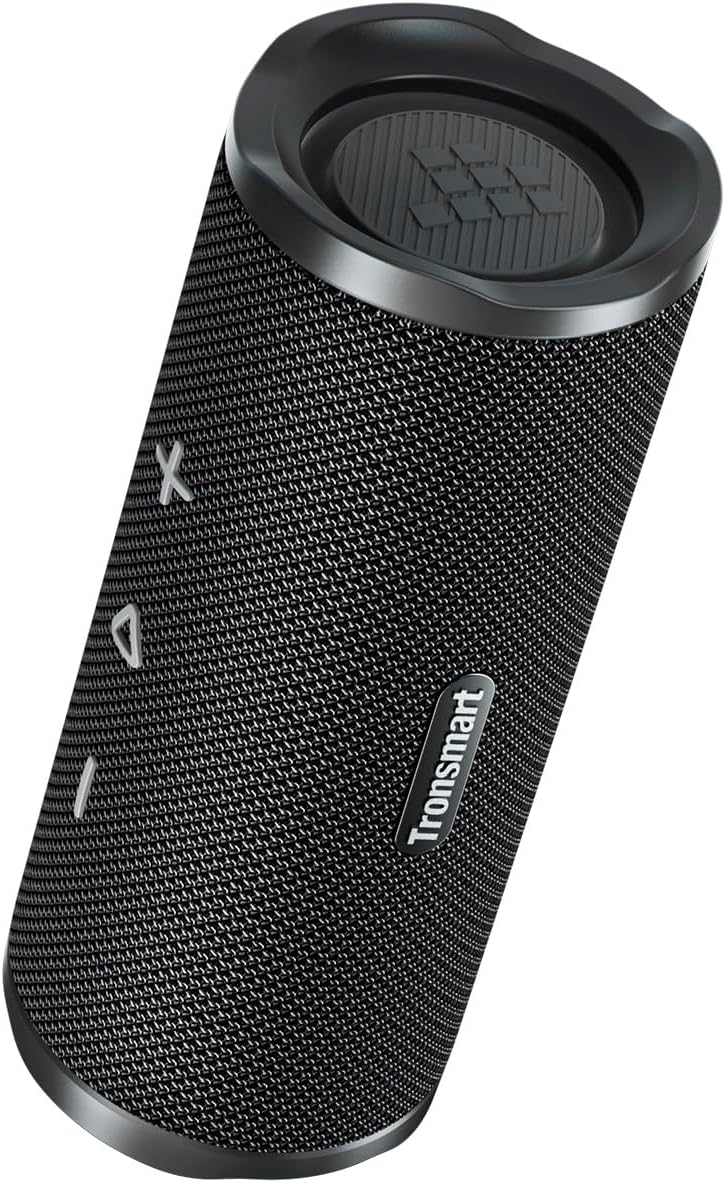
Figura 1: Frontal view of the Tronsmart Mirtune C3 speaker, showcasing its mesh grille and control buttons.

Figura 2: lateral view of the Tronsmart Mirtune C3 speaker, highlighting its portable strap for easy carrying.
Configuració
Carregant l'altaveu
Before first use, fully charge the speaker using the provided USB-C cable. The charging indicator light will show charging status.
Encès/Apagat
- Per engegar, premeu i manteniu premut el botó d'engegada durant 2 segons.
- Per apagar-lo, premeu i manteniu premut el botó d'engegada durant 2 segons.
Emparellament Bluetooth
Follow these steps to pair your Tronsmart Mirtune C3 speaker with a Bluetooth-enabled device:
- Assegureu-vos que l'altaveu estigui encès i en mode d'emparellament (l'indicador Bluetooth parpellejarà).
- On your device, enable Bluetooth and search for "Tronsmart Mirtune C3".
- Select "Tronsmart Mirtune C3" from the list to connect. A voice prompt will confirm successful pairing.
Video 1: Demonstrates how to power on the speaker and connect it via Bluetooth to a mobile device.
Instruccions de funcionament
Reproducció de música
- Reproduir/pausa: Premeu el botó Reproduir/Pausa una vegada per reproduir o posar en pausa la música.
- Pujar el volum: Press the '+' button once to increase volume.
- Baixar el volum: Press the '-' button once to decrease volume.
- Pista següent: Premeu i manteniu premut el botó '+' durant 2 segons per saltar a la pista següent.
- Pista anterior: Press and hold the '-' button for 2 seconds to skip to the previous track.
Video 2: Illustrates how to control music playback, including play/pause, volume adjustment, and track skipping using the speaker's buttons.
Assistent de veu
Double-press the Play/Pause button to activate your device's voice assistant (e.g., Siri, Google Assistant).
Trucades telefòniques
- Respondre/Finalitzar la trucada: Premeu el botó Reproduir/Pausa una vegada.
- Rebutja la trucada: Manteniu premut el botó Reproduir/Pausa durant 2 segons.
- Switch Audio: During a call, press the Bluetooth button once to switch audio between the speaker and your phone.
Video 3: Demonstrates how to manage phone calls (answer, end, reject) and switch audio output between the speaker and phone.
SoundPulse™ Technology & EQ Modes
The Mirtune C3 features SoundPulse™ technology for enhanced audio. You can switch between different EQ modes or customize them via the Tronsmart App.
- Switch EQ Mode (Speaker): Press the 'SoundPulse' button once to cycle through available EQ modes.
- Customize EQ (App): Download the Tronsmart App. Connect your speaker via the app. You can then adjust the equalizer settings or select preset modes like Default, SoundPulse, Deep Bass, Classical, Rock, or Custom.
Video 4: Shows how to switch EQ modes directly on the speaker and how to customize EQ settings using the Tronsmart app.
Vinculació True Wireless Stereo (TWS).
Pair two Mirtune C3 speakers for an immersive stereo sound experience.
- Assegureu-vos que els dos altaveus estiguin encès.
- On both speakers, press and hold the Bluetooth button for 3 seconds to enter TWS pairing mode. You will hear a prompt.
- Once successfully paired, the Bluetooth indicator on one speaker will flash, and the other will be solid.
- Connect your device to one of the speakers via Bluetooth. Both speakers will now play in stereo.
- To exit TWS mode, press the Bluetooth button on either speaker once.
Video 5: Guides users through the process of entering and exiting True Wireless Stereo (TWS) pairing mode with two Mirtune C3 speakers.
Manteniment
- Neteja: Netegeu l'altaveu amb un suau, damp tela. No utilitzeu productes químics aggressivs ni netejadors abrasius.
- Resistència a l'aigua: The speaker is IPX7 waterproof, meaning it can be submerged in water up to 1 meter for 30 minutes. Ensure the charging port cover is securely closed before exposure to water. Do not expose to saltwater or other chemicals.
- Emmagatzematge: Guardeu l'altaveu en un lloc fresc i sec, allunyat de temperatures extremes i de la llum solar directa.

Figure 3: The Tronsmart Mirtune C3 speaker demonstrating its IPX7 waterproof capability with water splashing on it.
Resolució de problemes
| Problema | Solució |
|---|---|
| L'altaveu no s'encén. | Assegureu-vos que l'altaveu estigui carregat. Connecteu-lo a una font d'alimentació i torneu-ho a provar. |
| No es pot emparellar amb el dispositiu. |
|
| Sense so o amb un volum baix. |
|
| L'altaveu no respon. | Reinicieu l'altaveu prement i mantenint premut el botó Bluetooth durant 8 segons. |
Especificacions
| Característica | Detall |
|---|---|
| Número de model | Mirtune C3 |
| Marca | Tronsmart |
| Potència de sortida dels altaveus | 24 watts |
| Resposta de freqüència | 20 kHz |
| Tecnologia de connectivitat | Bluetooth 5.3 |
| Mode de sortida d'àudio | estèreo |
| Classificació impermeable | IPX7 |
| Dimensions del producte | 21 x 8 x 21 cm |
| Pes | 640 g |
| Bateria | 1 bateria de 9V (inclosa) |
| País d'origen | Xina |
Garantia i Suport
Tronsmart products are designed and manufactured to the highest standards. For warranty information, technical support, or customer service inquiries, please refer to the warranty card included in your package or visit the official Tronsmart weblloc web. Conserveu el comprovant de compra per a reclamacions de garantia.


