1. Introducció i finalview
This manual provides detailed instructions for the FOXWELL T2000 Pro TPMS Relearn Tool and the FOXWELL NT630 Plus OBD2 Scanner. This powerful bundle offers comprehensive diagnostic and maintenance capabilities for your vehicle's Tire Pressure Monitoring System (TPMS), Anti-lock Braking System (ABS), Supplemental Restraint System (SRS/Airbag), and full OBD-II functions.
The T2000 Pro is designed for efficient TPMS sensor activation, relearn procedures, and diagnostics, ensuring proper tire pressure monitoring. The NT630 Plus extends diagnostic capabilities to critical ABS and SRS systems, including advanced functions like ABS auto bleed and various reset services, providing a complete and precise vehicle diagnosis.

Figure 1.1: FOXWELL T2000 Pro and NT630 Plus devices.
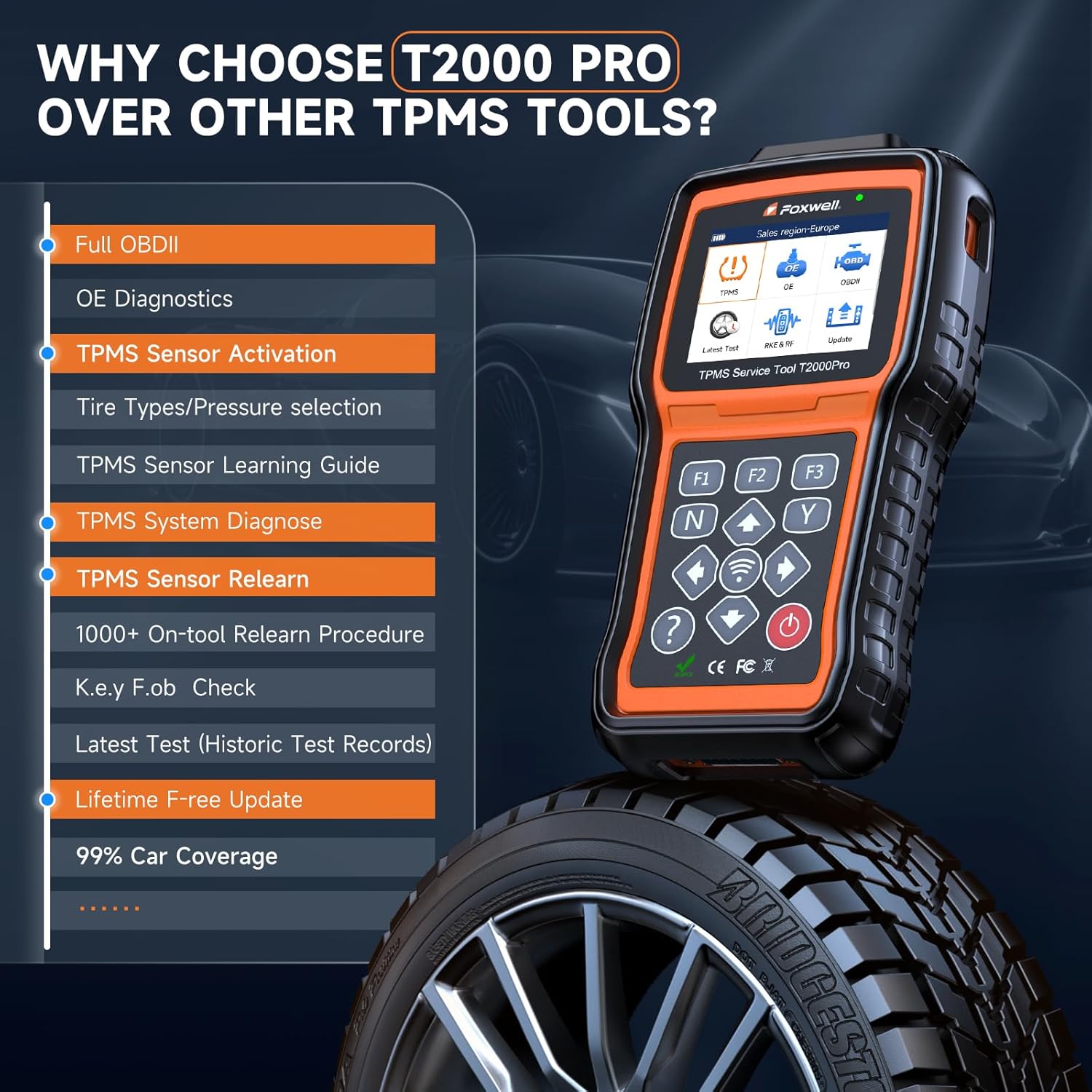
Figure 1.2: Key features of the T2000 Pro TPMS tool.
2. Configuració
2.1 Desembalatge i inspecció inicial
Carefully unpack all components from the packaging. Verify that all items listed in the product's packing list are present and undamaged. If any items are missing or damaged, contact customer support immediately.
2.2 Engegar el dispositiu
The devices are typically powered via the vehicle's OBD-II port. Connect the diagnostic cable to the device and then to the vehicle's 16-pin OBD-II port, usually located under the dashboard on the driver's side. The device will power on automatically once connected.
2.3 Actualitzacions de programari
It is recommended to regularly update the device software to ensure optimal performance and compatibility with the latest vehicle models and diagnostic protocols. Refer to the FOXWELL official website for detailed instructions on downloading and installing software updates. Both devices offer lifetime free updates.
3. Instruccions de funcionament
3.1 TPMS Functions (T2000 Pro)
3.1.1 TPMS Sensor Activation
The T2000 Pro can activate 315MHz and 433MHz TPMS sensors. This process is necessary to wake up new or sleeping sensors before relearning. Follow the on-screen prompts to trigger the sensor. The tool will display sensor ID, frequency, position, tire pressure, tire temperature, and battery power.
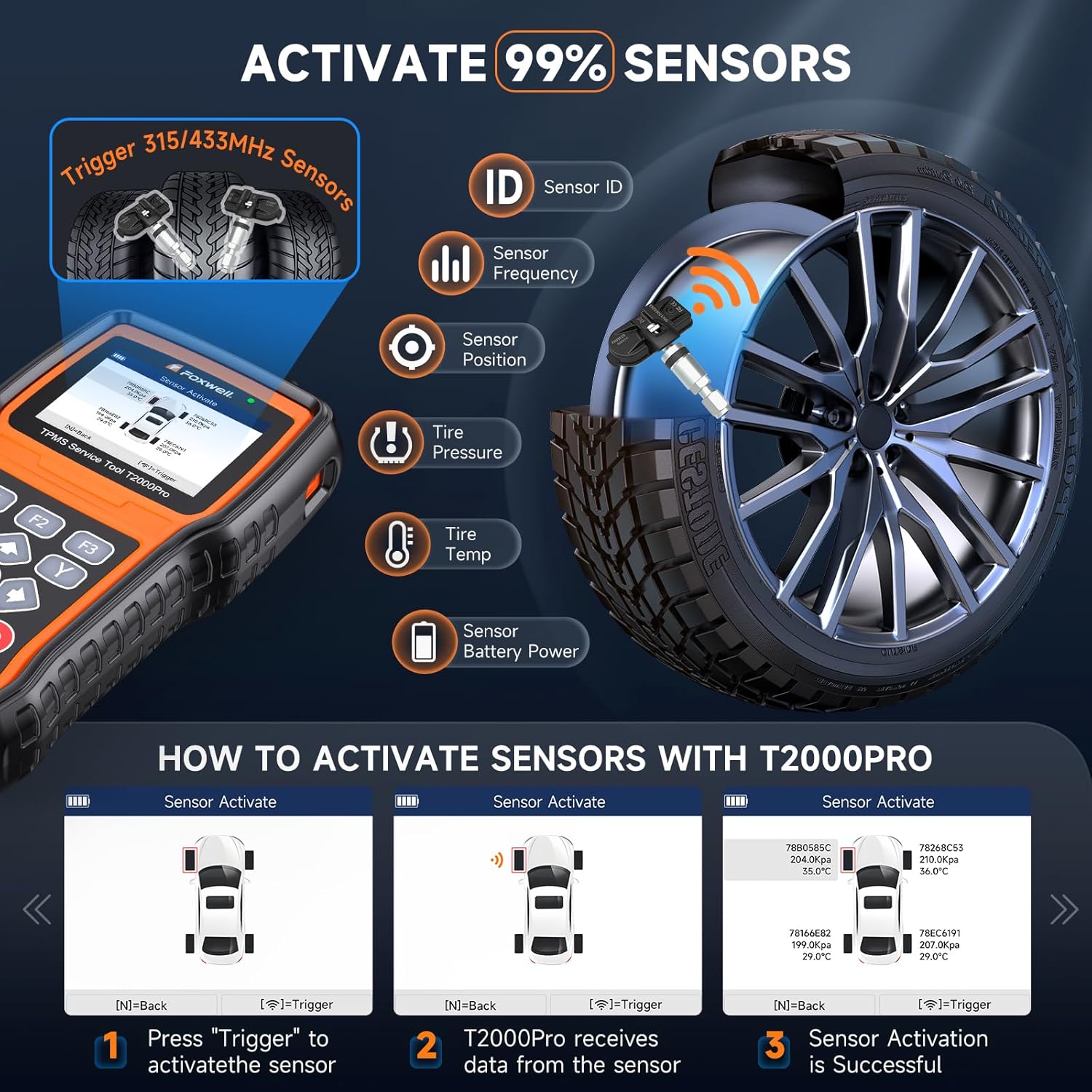
Figure 3.1: Activating TPMS sensors using the T2000 Pro.
3.1.2 TPMS Sensor Relearn
After replacing a TPMS sensor or rotating tires, the vehicle's ECU needs to learn the new sensor IDs. The T2000 Pro supports multiple relearn methods:
- Reaprenentatge estacionari: Requires the vehicle to be in a specific mode (e.g., parking brake engaged).
- OBD Relearn: Directly writes sensor IDs to the vehicle's ECU via the OBD-II port.
- Automatic Relearn: The vehicle learns new sensor IDs by driving under specific conditions.
- Clone Sensor: Copies existing sensor IDs to new programmable sensors.
The appropriate relearn method varies by vehicle make and model. Consult your vehicle's service manual or the T2000 Pro's on-screen instructions for the correct procedure.

Figure 3.2: Various TPMS sensor relearn methods.
3.1.3 Complete TPMS Diagnostics
The T2000 Pro allows for comprehensive monitoring of your tires. It can read sensor data within 30 seconds, read and erase TPMS Diagnostic Trouble Codes (DTCs), provide on-screen DTC descriptions, check ID matching, and turn off the TPMS warning light.

Figure 3.3: TPMS diagnostic capabilities of the T2000 Pro.
3.2 Diagnostic Functions (NT630 Plus)
The NT630 Plus provides in-depth diagnostics for three core systems: ABS, SRS, and OBD-II.

Figure 3.4: The three main diagnostic systems supported.
3.2.1 ABS System Diagnostics
The NT630 Plus offers comprehensive coverage of ABS data, including FR/FL wheel speed, ABS static test, ABS system calibration, and ABS initialization. It supports reading and clearing codes, real-time data display, and active tests for the ABS system. The tool also features bidirectional control for precise testing and locating faulty parts.
3.2.2 SRS/Airbag System Diagnostics
Diagnose the Supplemental Restraint System (SRS) to ensure airbag functionality. The NT630 Plus can read and clear SRS fault codes, view live data, and perform active tests to diagnose issues such as SRS faults location and damaged clock spring checks.
3.2.3 Full OBD-II Functions
Access standard OBD-II functions for engine and emission-related diagnostics. This includes reading and clearing generic and manufacturer-specific DTCs, viewing live data streams, I/M readiness status, freeze frame data, and O2 sensor tests. The tool also supports Auto VIN for quick vehicle identification.

Figure 3.5: Detailed diagnostic functions for ABS and SRS/Airbag systems.
3.3 Special Functions (NT630 Plus)
3.3.1 Professional ABS Auto Bleed
The NT630 Plus assists in resolving soft brake pedal issues by monitoring the ABS for air and performing automatic bleeding procedures. This function helps restore firm and precise braking. Note that some vehicles may only support manual bleeding, making this feature unavailable.

Figure 3.6: The process and benefits of ABS Auto Bleed.
3.3.2 funcions de reinici en calent
The NT630 Plus supports several hot reset functions:
- Calibració SAS: Calibratge del sensor d'angle de direcció.
- Oil/Service Light Reset: Reinicia la llum de servei d'oli després d'un canvi d'oli.
- Restabliment de l'EPB: Electronic Parking Brake reset, necessary when replacing brake pads.
Coverage for these functions may vary depending on the specific car conditions and model.

Figura 3.7: Mésview of hot reset functions.
4. Manteniment
4.1 Neteja del dispositiu
Regularly clean the device's screen and casing amb un suau, damp drap. Eviteu utilitzar productes de neteja abrasius o dissolvents que puguin danyar el plàstic o la pantalla.
4.2 Emmagatzematge
Store the device in a cool, dry place away from direct sunlight and extreme temperatures. Keep it in its original case or a protective pouch to prevent physical damage.
4.3 Actualitzacions de programari
As mentioned in the setup section, ensure your device's software is always up-to-date. This ensures compatibility with the latest vehicle models and access to new features or bug fixes. Visit the FOXWELL official website for update instructions.
5. Solució De Problemes
5.1 El dispositiu no s'encén
- Ensure the diagnostic cable is securely connected to both the device and the vehicle's OBD-II port.
- Verify the vehicle's ignition is in the ON position (engine off or running, as required by the specific diagnostic function).
- Check the vehicle's fuse for the OBD-II port.
5.2 Communication Errors
- Confirm the vehicle's make, model, and year are correctly selected in the device's menu.
- Ensure the vehicle's battery has sufficient voltage.
- Try connecting the device to a different compatible vehicle to rule out a device issue.
5.3 Inaccurate Readings or Failed Functions
- Assegureu-vos que el programari del dispositiu estigui actualitzat.
- Verify that the specific function is supported for your vehicle model. Refer to the device's vehicle coverage list.
- Follow all on-screen instructions precisely for diagnostic or service functions.
6. Especificacions
| Marca | FOXWELL |
| Números de model | T2000 Pro, NT630 Plus |
| ASIN | B0DQ15RDB2 |
| Data de primera disponibilitat | 10 de desembre de 2024 |
| TPMS Sensor Coverage | Activates 99% of 315MHz and 433MHz sensors |
| Diagnostic Systems | ABS, SRS/Airbag, OBD-II |
| Actualitzacions de programari | Actualització gratuïta de per vida |
7. Garantia i Suport
For detailed warranty information, please refer to the official FOXWELL website or the warranty card included with your product. Typically, FOXWELL products come with a limited warranty covering manufacturing defects.
For technical support, software updates, or any inquiries regarding your FOXWELL T2000 Pro or NT630 Plus, please visit the official FOXWELL weblloc web o contacteu directament amb el seu servei d'atenció al client. També podeu visitar el FOXWELL Store on Amazon per obtenir més informació sobre el producte i recursos d'assistència.


