1. Introducció
The WAVLINK UG6902H is a versatile USB 3.0 and USB-C to Dual HDMI Adapter designed to expand your display capabilities. It allows you to connect two external monitors to your computer, supporting resolutions up to 4K at 60Hz on each display simultaneously. This adapter is ideal for enhancing productivity in various professional and personal computing environments, enabling efficient multitasking, data analysis, and video conferencing.
This device utilizes DisplayLink technology, which requires a driver installation for proper functionality. It is compatible with a wide range of operating systems, including Windows, macOS (M1/M2/M3 and Intel), ChromeOS, Android, and HarmonyOS. Please note that it is not compatible with Linux, Unix, iPad OS, or iOS.

Image: The WAVLINK UG6902H adapter connected to a laptop, extending the display across two external 4K monitors, showcasing its dual display capability.
2. Contingut del paquet
Si us plau, verifiqueu que tots els elements siguin presents al vostre paquet:
- 1x WAVLINK USB A/C to HDMI Dual Display Adapter (cable length: 120mm/4.7in)
- 1x CD-Shaped Card for Driver Download Links
- 1x Guia d’inici ràpid
3. Instruccions de configuració
3.1 Instal·lació del controlador
The WAVLINK UG6902H adapter requires driver installation to function correctly. It is not a plug-and-play device. Follow these steps to install the necessary drivers:
- Access the official DisplayLink weblloc: displaylink.com.
- Navigate to the 'Downloads' or 'Drivers' section.
- Find and download the driver corresponding to your operating system (Windows, macOS, ChromeOS, Android, HarmonyOS).
- Executeu l'instal·lador descarregat i seguiu les instruccions que apareixen a la pantalla per completar la instal·lació.
- Reinicieu l'ordinador si se us demana.
Note for Mac users: After driver installation, it may be necessary to grant permission to the DisplayLink Manager to record your screen in your system settings for the adapter to function properly.

Image: A visual guide illustrating the three steps for DisplayLink driver installation: accessing the website, downloading the driver, and installing it.
3.2 Connexió de l'adaptador
Once the drivers are installed, connect the adapter to your devices:
- Connect the integrated USB-A or USB-C cable from the WAVLINK UG6902H adapter to an available USB 3.0 or USB-C port on your host computer (laptop, desktop, etc.).
- Connect your primary external monitor to one of the HDMI ports on the adapter using an HDMI cable.
- Connect your secondary external monitor to the second HDMI port on the adapter using another HDMI cable.
- Ensure both monitors are powered on and set to the correct HDMI input source.

Image: The WAVLINK UG6902H adapter shown with its USB-A and USB-C connectors, and two HDMI output ports, ready for connection to a host device and dual monitors.
4. Modes de funcionament
The adapter supports various display modes to suit your needs:
4.1 Mode mirall
In Mirror Mode, the content displayed on your primary computer screen is duplicated onto both external monitors. This is useful for presentations or sharing content with an audience.

Image: A laptop connected to two external monitors, all displaying the same content in Mirror Mode. Android devices support mirror mode only with resolution up to 1080P.
4.2 Mode d'ampliació
Extend Mode allows you to expand your desktop workspace across multiple screens. Each monitor displays different content, providing a larger virtual desktop for enhanced productivity. This mode is supported on Windows and macOS.
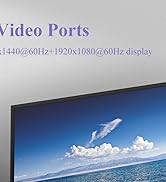
Image: A laptop connected to two external monitors, with the laptop screen and the two external monitors each displaying different content in Extend Mode.
4.3 Rotation and Clamshell Modes
For Windows and macOS 12.x or later, the adapter supports display rotation, allowing you to orient your monitors vertically or horizontally. Clamshell mode is also supported, enabling you to use external monitors with your laptop lid closed (requires external power for the laptop).
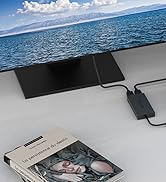
Image: Two monitors demonstrating rotation mode (vertical display) and clamshell mode (laptop lid closed, external monitors active).
5. Compatibilitat del sistema
The WAVLINK UG6902H adapter offers broad compatibility with various operating systems:
- Windows: 7/8/8.1/10/11
- macOS: 10.14 - 13.x or later (including Apple Mac M1/M2/M3)
- ChromeOS
- Android
- HarmonyOS
- Ubuntu
No compatible amb:
- Linux (other than Ubuntu)
- Unix
- iPad OS
- iOS

Image: A visual chart detailing the compatibility and incompatibility of the WAVLINK UG6902H adapter with different operating systems, including Windows, macOS, ChromeOS, Android, HarmonyOS, Ubuntu, and explicitly listing Linux, Unix, iPad OS, and iOS as incompatible.
6. Especificacions tècniques
| Característica | Especificació |
|---|---|
| Número de model | UG6902H |
| Dimensions del producte (L x A x A) | 6.3 x 3.94 x 0.98 polzades (160 x 100 x 25 mm) |
| Pes de l'article | 4.2 unces (119 grams) |
| Tipus de connector | USB tipus C, USB 3.0 |
| Sortida de vídeo | 2x HDMI (up to 4096x2160@60Hz each) |
| Interfície d'amfitrió | USB 3.1 / USB-C (compatible with Thunderbolt 3/4, USB 4) |
| Color | Negre |
| Fabricant | WAVLINK |
| Dispositius compatibles | Monitor, PC, Projector |
7. Solució De Problemes
If you encounter issues with your WAVLINK UG6902H adapter, please refer to the following common solutions:
- No Display on External Monitors:
- Ensure the DisplayLink driver is correctly installed. Visit displaylink.com per descarregar l'última versió.
- Verify that the HDMI cables are securely connected to both the adapter and the monitors.
- Check that your monitors are powered on and set to the correct HDMI input source.
- Restart your computer after driver installation or if the issue persists.
- For macOS, ensure DisplayLink Manager has screen recording permissions in System Settings > Privacy & Security > Screen Recording.
- Resolució o freqüència d'actualització incorrecta:
- Update your graphics card drivers on your host computer.
- Adjust display settings in your operating system (e.g., Windows Display Settings, macOS System Settings > Displays) to select the desired resolution and refresh rate.
- Ensure your monitors support the desired 4K@60Hz resolution.
- Intermittent Connection or Flickering:
- Try using different HDMI cables, as faulty cables can cause issues.
- Ensure the adapter is connected directly to a USB 3.0 or USB-C port on your computer, avoiding unpowered USB hubs if possible.
- Minimitzar les interferències d'altres dispositius electrònics.
- Adaptador no reconegut:
- Prova de connectar l'adaptador a un port USB diferent de l'ordinador.
- Assegureu-vos que els ports USB de l'ordinador funcionin correctament.
- Reinstall the DisplayLink driver.
If these steps do not resolve your issue, please contact WAVLINK customer support.
Video: An official product video demonstrating the setup and functionality of the WAVLINK USB-C to Dual HDMI Adapter, showcasing its ability to connect two 4K@60Hz monitors for extended or mirrored displays.
8. Manteniment
To ensure the longevity and optimal performance of your WAVLINK UG6902H adapter, follow these maintenance guidelines:
- Neteja: Feu servir un drap suau i sec per netejar l'adaptador. Eviteu netejadors líquids o materials abrasius.
- Emmagatzematge: Guardeu l'adaptador en un lloc fresc i sec, allunyat de la llum solar directa i de temperatures extremes quan no l'utilitzeu.
- Manipulació: Handle the adapter gently. Avoid dropping it or subjecting it to strong impacts. Do not pull on the cables forcefully.
- Ventilació: Ensure the adapter's ventilation holes are not obstructed to prevent overheating. The device features lateral ventilation holes for heat dissipation.

Imatge: Primer pla view of the WAVLINK UG6902H adapter, showing its lateral ventilation holes for heat dissipation, anti-skid pads on the bottom, and a blue LED indicator for operational status.
9. Garantia i Suport
WAVLINK provides technical support and warranty services for its products. For any questions or assistance, please contact our support team:
- Suport telefònic: +1 8889730883 (UTC-5) Mon - Fri 9AM - 6PM
- Suport per correu electrònic: Contact@wavlink.com
- Alternatively, you can contact us via Amazon.
We aim to provide solutions within 24 hours and offer life-long technical support.

Image: A graphic displaying WAVLINK's commitment to customer support, including technical support, customer services, and data safety, along with phone and email contact details.