Introducció
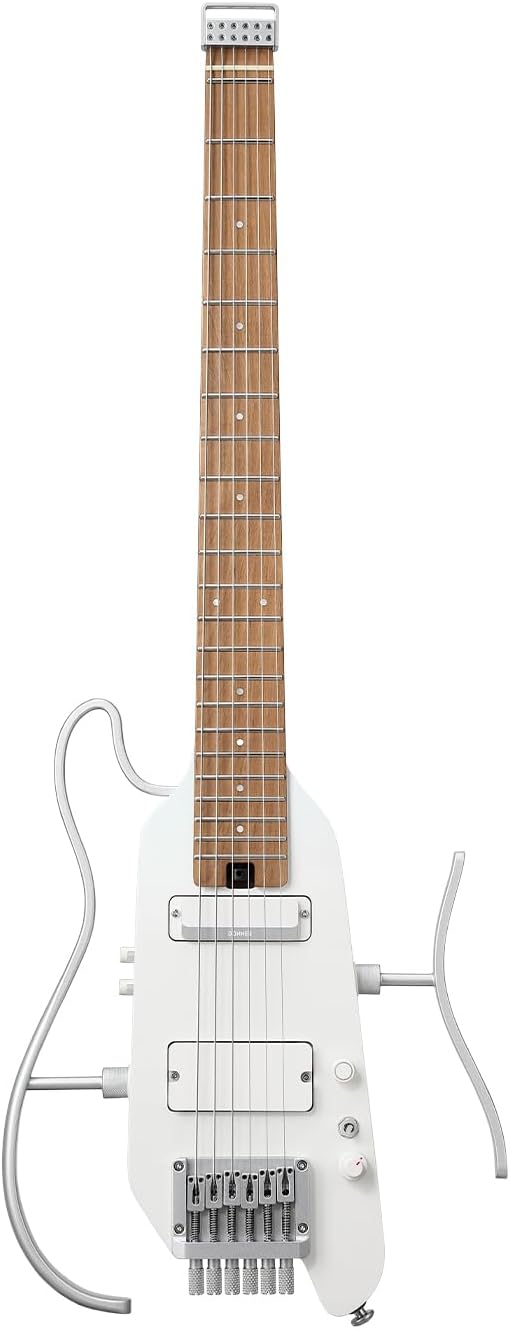
The Donner HUSH X PRO is a smart travel electric guitar kit designed for versatility and portability. It features an advanced DXP system with multiple tone simulations, effects, and amp models, allowing for diverse soundscapes. With its ultra-lightweight, headless design and long battery life, it's ideal for musicians on the go. This manual provides essential information for setting up, operating, maintaining, and troubleshooting your HUSH X PRO guitar.
Oficial acabatview video of the Donner HUSH X PRO Smart Electric Guitar, highlighting its key features and portability.
Configuració
Desembalatge i inspecció inicial
Your Donner HUSH X PRO kit comes with everything you need to start playing. Carefully unpack all components and inspect them for any damage. The kit typically includes the guitar, a gig bag, headphones, charging cable, 1/4” cable, guitar strap, and necessary tools.
The main components of the Donner HUSH X PRO Electric Guitar Kit, including the guitar, gig bag, and various accessories.
Attaching Side Frames
The HUSH X PRO features detachable side frames for enhanced playability and comfort. To attach them, align the posts of the frames with the corresponding holes on the guitar body and push them firmly into place until they click and are secure. Ensure the stand is fully inserted prior to use or it may slip out.
Demonstration of how to install the side frames on the Donner Hush X Pro guitar for comfortable playing.
Ajust de truss rod
The truss rod controls the neck relief of your guitar. If you experience fret buzz or high action, you may need to adjust it. Use the provided small hexagonal wrench. The truss rod adjustment point is located at the base of the neck, above the first pickup. Insert the wrench and turn it in small increments (1/8 to 1/4 turn at a time). Turn clockwise to reduce relief (flatten the neck) and counter-clockwise to increase relief (add bow). Allow time for the neck to settle after each adjustment. The neck is designed to be very stable, so frequent adjustments should not be necessary.

Detallada view of the guitar's neck, highlighting the truss rod adjustment area for optimal playability.
Càrrega i potència
The HUSH X PRO has a built-in rechargeable battery. Use the included USB-C cable to charge the product. The red light indicator will remain solid during charging and turn green when fully charged. If the battery level is below 5%, the red light will flash, and the guitar will auto-power off. For power on/off, long press the power knob. The light indicator will show white for 100%-20% battery, red for 20%-10% (flashing at 80 BPM), and red for below 5% (flashing).
Demonstration of the main components and controls, including the power knob and charging indicator.
Operating the Donner HUSH X PRO
Main Controls Overview
The HUSH X PRO features intuitive controls for its advanced DXP system. The main controls include the power knob (long press for on/off), pickup switch (three-position toggle), tone knob (upper knob for guitar's tone), and volume knob (lower knob for master volume output). When the system is not turned on, the HUSH X PRO can connect to an amplifier and be played like a normal electric guitar without the need for battery power.
Acabatview of the main components and controls of the Donner HUSH X PRO guitar.
DXP Effect System Panel
The DXP system panel provides access to the guitar's smart features. It includes a display screen, BLT (Bluetooth) button, TAP/TUNER button, Menu knob, and Value knob. The Menu knob selects and activates specific modules in the effect chain or switches to DSP Bypass mode. The Value knob button allows you to select highlighted items and switch screens (short press) or adjust preset volume/save settings (long press).
Detailed explanation of the DXP Effect System Panel and its various controls.
Tone Module
Switch the Menu knob to the TONE module. Use the Value knob to select the guitar tone simulation (Tone Sim), adjust the Noise Gate (NR), adjust the 5-band EQ (125/400/800/1.6k/4k), and adjust the volume (Vol). You can also select the pickup position corresponding to the guitar model (Based) and adjust the blend of the guitar tone simulation (MIX).
Guide to using the Tone Module for guitar tone simulation, noise gate, and EQ adjustments.
Mòdul FX
Switch the Menu knob to the FX module. Use the Value knob to select the FX type (Chorus, Flanger, Tremolo, Wah, Phaser) and adjust parameters such as blend (Mix), effect depth (DP), effect rate (Rate), volume (Vol), Q value, and feedback (F.b.).
Instructions for selecting and adjusting various effects within the FX Module.
Mòdul d'accionament
Switch the Menu knob to the DRV (Drive) module. Use the Value knob to select the Drive type (TS-9, OD-Y, Blues, Fuzz, Dirt) and adjust parameters such as gain (Gain), tone brightness (Tone), and volume (Vol).
How to use the Drive Module to select different drive types and adjust their parameters.
Amp (CAB) Module
Switch the Menu knob to the AMP/CAB module, which includes both the AMP and CAB modules. Use the Value knob to select the AMP type (IR) and adjust parameters such as gain (Gain), volume (Vol), low frequency (Low), mid frequency (Mid), high frequency (High), tone brightness (Tone), and other effect parameters. Use the Value knob to select the cabinet (CAB) type.
Instructions for navigating and adjusting settings within the Amp (CAB) Module.
DLY Module
Switch the Menu knob to the DLY (Delay) module. Use the Value knob to select the Delay type (Tape, Analog, LoFi, Rev, Digital Delay Stereo) and adjust the mix (Mix), delay time (Time), and feedback amount (F.b).
Guide to using the DLY Module for various delay effects and parameter adjustments.
REV Module
Switch the Menu knob to the REV (Reverb) module. Use the Value knob to select the desired Reverb type (Room, Hall, Plate, Spring, N-Star), adjust the mix (Mix), and control the reverb decay time (Fade).
Instructions for selecting and adjusting reverb types and decay time in the REV Module.
Gestió de presets
The HUSH X PRO allows you to save and recall your customized tone settings. To save a preset, long press the VALUE key to enter the SAVE interface, then rotate the VALUE knob to adjust the preset volume. Press the VALUE key again and rotate the VALUE knob to select the preset save location. Finally, press the VALUE key to save the preset.
Detailed steps on how to save and manage your custom presets on the guitar.
Built-in Tuner and TAP BPM
The guitar features a built-in tuner and TAP BPM function. To access the tuner, long press the TAP/TUNER button. Once tuning is complete, press the button again to exit. For TAP BPM, short press the TAP/TUNER button briefly to enter the TAP BPM Adjustment interface. Continuous tapping sets the preset speed, or you can use the VALUE knob to adjust it.
Explanation of how to use the built-in tuner and set the TAP BPM.
Opcions de connectivitat
The HUSH X PRO offers multiple connection options for diverse scenarios:
- Monitorització d'auriculars: Use the 1/8" output jack for private practice.
- Amp Connexió: Connect directly to an amplifier o poder amp via the 1/4" output jack.
- OTG Mobile Connection: Use a data cable to connect the guitar's USB-C port to your phone's data port for recording. Note: Lightning interface on Apple devices is not supported at this stage. Some Android phones may require third-party camera apps or enabling OTG function in settings.
- Entrada Bluetooth: Pair your phone or other device via Bluetooth for BGM accompaniment. Press the BLT button to turn on the LED indicator. If the LED is flashing, open Bluetooth settings on your phone and select HUSH-X PRO. When the LED is solid, the device is connected. Long press the BLT button to disconnect.
- Interfície d'àudio integrada: The guitar can function as an audio interface.

Visual representation of the multiple ways to connect your HUSH X PRO.
Demonstration of OTG connection for recording and live streaming.
Steps to establish a Bluetooth connection with your HUSH X PRO.
Connexió de programari
Visita donnermusic.com/support/downloads to download the software and experience the full functions and latest firmware of HUSH X PRO. Install the software onto your computer as instructed, using a USB Type-C cable to connect your guitar. You may edit/import IR files using the software after successful installation.
Guide to connecting your HUSH X PRO to computer software for advanced features.
Pràctica silenciosa
One of the key features of the HUSH X PRO is its ability for silent practice. By plugging headphones into the 1/8" output jack, you can hear your amplified guitar tone and effects without disturbing others. This is ideal for late-night practice sessions or when traveling.

Enjoy high-fidelity tone in silence with the HUSH X PRO's headphone output.
Manteniment
Neteja
Regularly wipe down your guitar with a soft, dry cloth to remove dust and fingerprints. A polishing cloth is included in your kit for this purpose. Avoid using harsh chemicals or abrasive materials that could damage the finish.
Reinicialització del dispositiu
If the device crashes or experiences abnormal operation failures (e.g., interface does not respond), you can use the small hexagonal wrench (already equipped under the bridge) to insert into the reset hole next to the headphone jack. Gently press to power off and reboot the HUSH X PRO.
Demonstration of how to use the reset hole to reboot the device in case of a freeze.
Restabliment de fàbrica
To restore the guitar to its factory settings, long press the VALUE key in the SAVE interface to enter the Factory Reset interface. Then, select OK to confirm and restore the factory settings.
Steps to perform a factory reset on your Donner HUSH X PRO guitar.
Resolució de problemes
| Problema | Possible causa/solució |
|---|---|
| Apareix l'indicador de bateria baixa | Charge promptly using the included USB-C cable. |
| Interface does not respond / Device freezes | Use the small hexagonal wrench to press the reset hole next to the headphone jack to reboot. |
| Distortion or noise occurs with output devices/earphones | This may be due to impedance mismatch. Try replacing with compatible equipment. |
| Stand slips out during use | Ensure the stand is fully inserted prior to use. |
| Sound cuts off / Lack of sustain (Noise Gate issue) | The factory Noise Gate (NR) setting may be too high. Reduce the NR value in the TONE settings for the preset (e.g., to 38-45). |
| Pickup switch feels "janky" or not solid | While some users report this, it typically does not affect functionality. If it impacts playability, contact support. |
| Pickup height is not adjustable | The screws on the pickups primarily hold them in place, not adjust height. This is a design characteristic. |
Especificacions
| Característica | Detall |
|---|---|
| Número de model | HUSH-X PRO |
| Pes de l'article | 9.28 lliures |
| Dimensions del paquet | 36.5 x 7.5 x 5.5 polzades |
| País d'origen | Xina |
| Tipus de bateria | Necessites 1 piles de polímer de liti (incloses) |
| Material posterior | Caoba |
| Material del cos | Caoba |
| Nom del color | Metallic White |
| Material del diapasó | Fusta d'auró |
| Configuració de la pastilla de la guitarra | H-S (Humbucker-Single Coil) |
| Material de corda | Rounded Stainless Steel |
| Material superior | Caoba |
| Tipus de material del coll | Caoba |
| Nombre de cadenes | 6 |
| Sistema de pont de guitarra | Exclusive Molded High Stability Bridge |
| Orientació de la mà | D'acord |
Garantia i Suport
Donner provides a warranty for its products. For detailed warranty information, product registration, and technical support, please visit the official Donner weblloc web. També hi podeu trobar recursos addicionals i preguntes freqüents.
Official Donner Weblloc: https://s.donnermusic.com/donnerplay


