Introducció
The hohem HRT-04 Detachable Remote Control is a wireless accessory designed to enhance the functionality of your iSteady X3 or iSteady V3 gimbal stabilizer. This remote provides convenient, remote operation of your smartphone gimbal, allowing for precise control of gimbal movements and camera functions from a distance. Its detachable design ensures versatility, enabling use both attached to the gimbal or as a standalone unit.
The compact and portable design makes it easy to carry, fitting into pockets or small bags. It is equipped with a long-lasting battery for extended filming sessions.
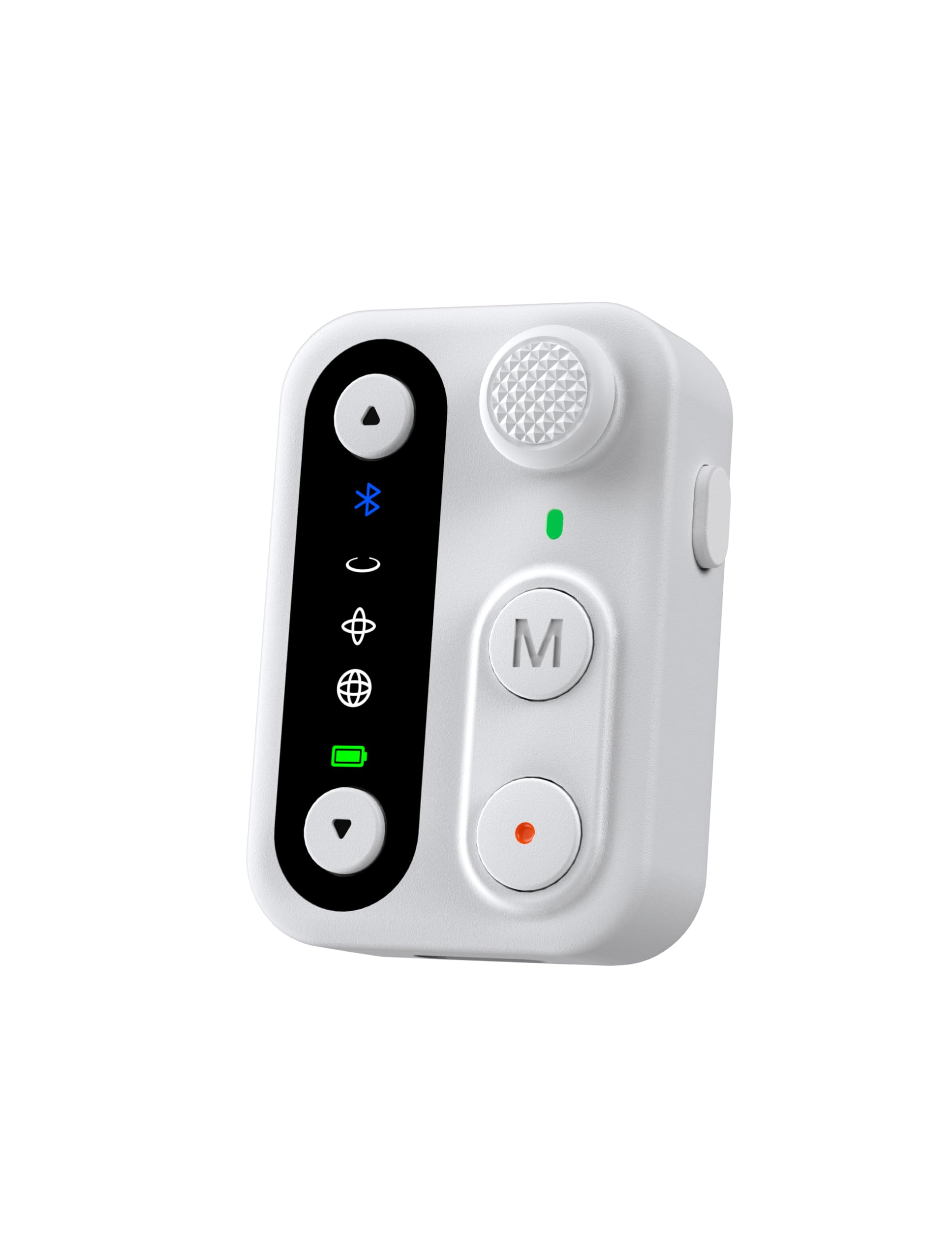
Image: The hohem HRT-04 Detachable Remote Control in white.
Producte acabatview
The HRT-04 remote control features several buttons and indicators for intuitive operation. Familiarize yourself with the layout before use.

Image: Labeled diagram of the HRT-04 remote control showing its components.
- Palanca de control: Controls gimbal pan and tilt movements.
- Zoom In/Out Buttons: Adjusts the camera's zoom level.
- Botó de funció: Performs various functions depending on the gimbal mode.
- Botó de mode (M): Cycles through different gimbal operating modes.
- Botó de l'obturador: Initiates photo capture or video recording.
- Indicador de mode de treball: Displays the current operating mode and connection status.
- Port de càrrega USB-C: Per carregar el comandament a distància.
Configuració
1. Charging the Remote Control
Before initial use, ensure the remote control is fully charged. The remote can be charged in two ways:
- Càrrega magnètica: Attach the remote control to the designated magnetic charging area on your iSteady X3 or V3 gimbal grip. It will automatically begin charging.
- Càrrega USB-C: Connect a USB-C cable to the remote control's USB-C charging port and plug the other end into a power source.

Image: Illustration of magnetic charging by attaching to the gimbal and direct USB-C charging.
2. Pairing with Gimbal
The HRT-04 remote control is designed for seamless wireless connection with the hohem iSteady X3 and iSteady V3 gimbals. Typically, the remote will automatically pair when attached to the gimbal or when powered on near a compatible gimbal that is also powered on. If manual pairing is required:
- Ensure both the remote control and your iSteady X3/V3 gimbal are powered on.
- Refer to your specific iSteady X3/V3 gimbal manual for detailed Bluetooth pairing instructions, as the process may vary slightly.
- Once successfully paired, the Bluetooth indicator on the remote control will illuminate steadily.
Instruccions de funcionament
The HRT-04 remote control allows for versatile operation of your iSteady X3/V3 gimbal from a distance of up to 10 meters (32.8 feet), providing enhanced stability for smooth footage.

Image: A user operating the gimbal remotely with the detachable control.
Funcions bàsiques:
- Gimbal Movement: Utilitza el Joystick to control the pan (left/right) and tilt (up/down) axes of the gimbal.
- Control del zoom: Premeu el botó Apropa (up arrow) or Allunya el zoom (down arrow) buttons to adjust the camera's focal length.
- Captura de foto/vídeo: Premeu el botó Botó de l'obturador once to take a photo or start/stop video recording.
- Canvi de mode: Premeu el botó Botó de mode (M) to cycle through the gimbal's various operating modes (e.g., Pan Follow, Pan & Tilt Follow, All Lock, POV). Refer to your gimbal's manual for specific mode descriptions.
- Botó de funció: The function of this button may vary based on the current gimbal mode or app settings. Consult your gimbal's manual or the hohem app for details.
Manteniment
Proper maintenance ensures the longevity and optimal performance of your HRT-04 remote control.
- Neteja: Feu servir un drap suau i sec per netejar el comandament a distància. Eviteu utilitzar productes químics agressius o materials abrasius.
- Emmagatzematge: Guardeu el comandament a distància en un lloc fresc i sec, lluny de la llum solar directa i de temperatures extremes.
- Cura de la bateria: To maintain battery health, avoid fully discharging the remote control frequently. Charge it regularly, even if not in use for extended periods.
- Evitar l'impacte: Protect the remote control from drops and impacts, which can damage internal components.
Resolució de problemes
If you encounter issues with your HRT-04 remote control, refer to the following common solutions:
| Problema | Causa possible | Solució |
|---|---|---|
| Remote does not power on. | Bateria baixa o esgotada. | Charge the remote control using either the magnetic connection to the gimbal or a USB-C cable. |
| Remote does not connect/pair with gimbal. | Gimbal is off, out of range, or not in pairing mode. Remote is not compatible with the specific gimbal model. | Ensure the gimbal is powered on and within 10 meters of the remote. Verify that your gimbal is an iSteady X3 or iSteady V3. (Note: This remote is not compatible with models like the iSteady Pro4). Restart both the remote and the gimbal. |
| Els controls no responen. | Connection issue, low battery, or gimbal is in an incompatible mode. | Check battery level. Re-establish connection by restarting both devices. Ensure the gimbal is in a mode that allows remote control input. |
| Zoom function not working. | Camera app does not support remote zoom, or connection issue. | Ensure you are using the hohem app or a camera app that supports remote zoom control via Bluetooth. Check connection status. |
Especificacions
Key technical specifications for the hohem HRT-04 Detachable Remote Control:
- Model: HRT-04
- Color: Blanc
- Dispositius compatibles: hohem iSteady X3, hohem iSteady V3 gimbals
- Pes de l'article: 1.76 unces (0.05 quilograms)
- Dimensions del paquet: 4.13 x 2.05 x 1.73 polzades
- Bateries: 1 bateria de 9 V (inclosa)
- Fabricant: Hohem Technology Co., LTD.
- ASIN: B0DQY2R2R7
- GTIN (Número d'identificació comercial global): 06971071554072


