1. Introducció
The SEVENPARK T01 Hidden Camera Detector is a versatile device designed to enhance your privacy and security. It combines multiple detection functions, including hidden camera detection, GPS tracker detection, and RF wireless signal scanning. This manual provides detailed instructions for the proper use, setup, and maintenance of your device.
The detector features 5 adjustable sensitivity levels, allowing for precise identification of various hidden devices across different environments. Its portable design makes it suitable for use in offices, hotels, cars, and other locations where privacy is a concern.

Image: SEVENPARK Hidden Camera Detector protecting privacy and security, highlighting its features such as 6.5GHz range, 5 levels of adjustment, 3 modes of detection, 30 hours battery life, Type-C rechargeable, and portable design.
2. Contingut del paquet
Si us plau, comproveu el paquet per veure si hi ha els elements següents:
- 1 x SEVENPARK T01 Hidden Camera Detector
- 1 x Cable de càrrega (USB tipus C)
- 1 x Manual d'usuari
3. Producte acabatview
Familiaritzeu-vos amb els components i els controls del dispositiu:
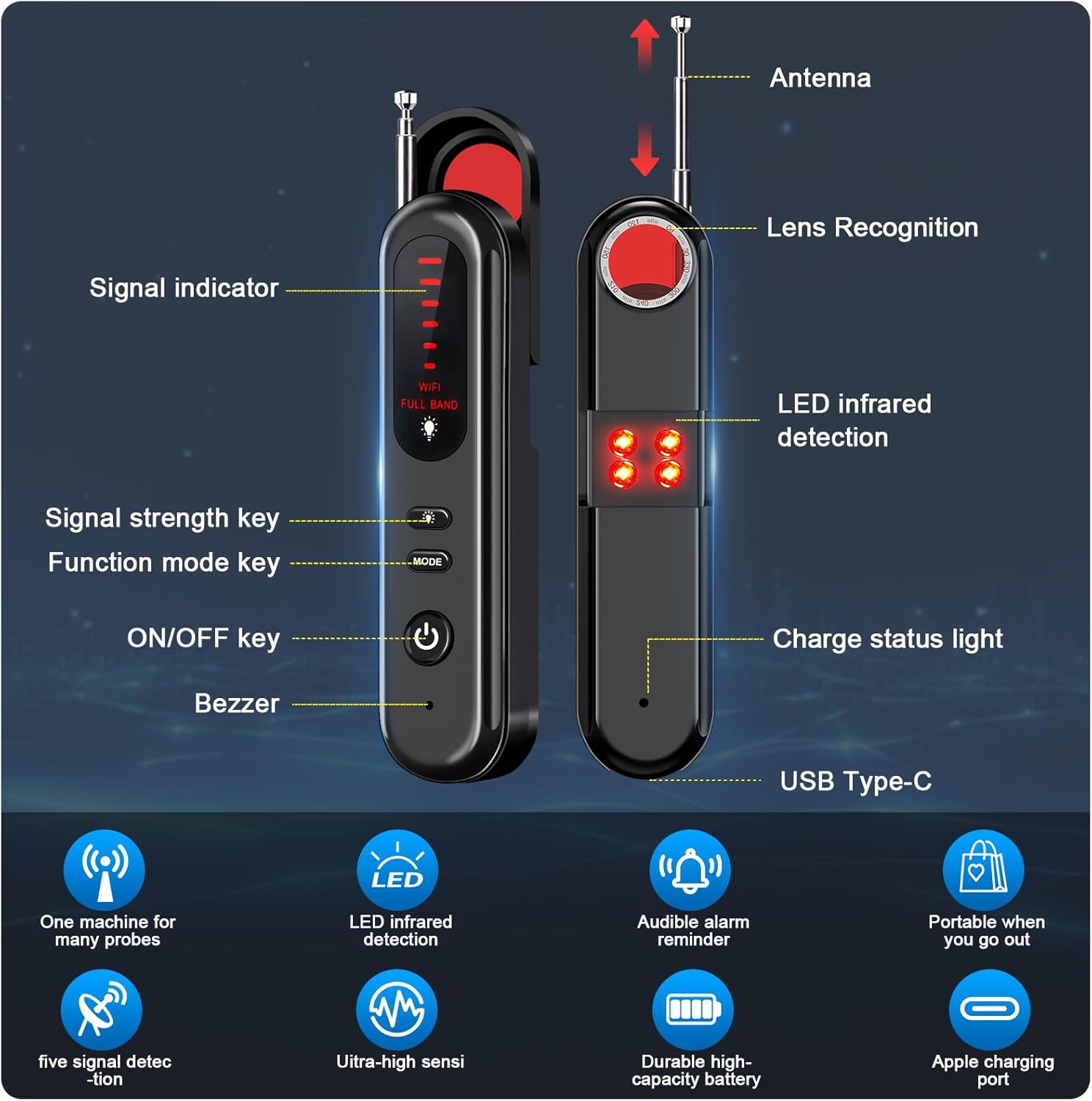
Image: Detailed diagram of the SEVENPARK Hidden Camera Detector, illustrating its various components including the antenna, lens recognition window, signal indicator LEDs, LED infrared detection lights, signal strength key, function mode key, ON/OFF key, buzzer, charge status light, and USB Type-C charging port.
- Antena: S'estén per a la detecció de senyals de radiofreqüència.
- Lens Recognition Window: Used for visual detection of hidden camera lenses.
- Indicador de senyal: LED lights that illuminate to indicate signal strength.
- LED Infrared Detection: Red LEDs used to illuminate hidden camera lenses for visual detection.
- Signal Strength Key: Adjusts the sensitivity of RF detection.
- Function Mode Key (MODE): Switches between different detection modes.
- Tecla ON/OFF: Encén o apaga el dispositiu.
- Zumbador: Emits an audible alert when a signal is detected.
- Llum d'estat de càrrega: Indica l'estat de càrrega.
- Port USB tipus C: Per carregar el dispositiu.
4. Configuració
4.1 Càrrega del dispositiu
- Connect the provided USB Type-C charging cable to the device's charging port.
- Connect the other end of the cable to a standard USB power adapter (not included) or a computer's USB port.
- The charge status light will indicate charging. Once fully charged, the light will change or turn off.
A full charge typically provides up to 30 hours of battery life, depending on usage.
4.2 Engegada/apagada
- Per encendre, premeu i manteniu premut Tecla ON / OFF until the indicator lights illuminate.
- Per apagar-lo, manteniu premut el botó Tecla ON / OFF again until the lights turn off.
5. Instruccions de funcionament
5.1 Selecció del mode
Premeu el botó Function Mode Key (MODE) to cycle through the available detection modes:
- RF Signal Detection Mode: Detects wireless signals from hidden cameras, GPS trackers, and other bugging devices.
- Hidden Camera Lens Detection Mode: Uses LED infrared lights to visually locate hidden camera lenses.
5.2 RF Signal Detection (Wireless/GPS Tracker Detection)
- Extend the antenna for optimal signal reception.
- Select the RF Signal Detection Mode using the MODE clau.
- Adjust the sensitivity using the Signal Strength Key. Start with a lower sensitivity and gradually increase it to narrow down the detection area.
- Slowly scan the area you wish to inspect. The signal indicator LEDs will light up, and the buzzer will sound with increasing frequency as you approach a hidden wireless device.
- When the signal strength is high, reduce sensitivity to pinpoint the exact location of the device.

Image: SEVENPARK Hidden Camera Detector scanning over a wide range, illustrating its capability to detect various hidden devices such as hidden cameras, GPS trackers, infrared cameras, wireless cameras, and anti-spy devices.
5.3 Hidden Camera Lens Detection
- Select the Hidden Camera Lens Detection Mode using the MODE key. The red LED infrared detection lights will activate.
- Mira a través del Lens Recognition Window al dispositiu.
- Slowly scan the area, paying close attention to objects like smoke detectors, air vents, books, lamps, and other common hiding spots.
- If a hidden camera lens is present, it will appear as a bright red dot or reflection when viewed through the window.

Image: SEVENPARK Hidden Camera Detector illustrating its ability to detect various types of cameras, including infrared, wireless, spy, discreet, and wired cameras, by scanning the environment.
5.4 Ajust de sensibilitat
The device features 5 levels of sensitivity. Use the Signal Strength Key to adjust the detection range. Higher sensitivity allows for detection of weaker signals from further distances, while lower sensitivity helps pinpoint the exact location of a strong signal.
5.5 Escenaris d'aplicació
The SEVENPARK T01 is suitable for various environments:
- Hotels and Rental Properties: Check for hidden cameras in bedrooms, bathrooms, and common areas.
- Offices and Meeting Rooms: Detect unauthorized listening devices or cameras.
- Vehicles: Scan for GPS trackers or hidden recording devices.
- Dressing Rooms and Public Restrooms: Ensure privacy by checking for hidden cameras.

Image: SEVENPARK Hidden Camera Detector demonstrating its use in various locations such as travel hotels, meeting rooms, inside a car, and dressing rooms to detect bugging devices.
6. Manteniment
- Neteja: Feu servir un drap suau i sec per netejar el dispositiu. No utilitzeu productes de neteja abrasius ni dissolvents.
- Emmagatzematge: Guardeu el dispositiu en un lloc fresc i sec, allunyat de la llum solar directa i de temperatures extremes.
- Cura de la bateria: Per allargar la durada de la bateria, carregueu el dispositiu regularment, fins i tot si no l'utilitzeu amb freqüència. Eviteu descarregar completament la bateria durant períodes prolongats.
7. Solució De Problemes
| Problema | Causa possible | Solució |
|---|---|---|
| El dispositiu no s'encén. | Bateria baixa. | Carregueu el dispositiu amb el cable USB tipus C proporcionat. |
| No s'ha detectat cap senyal. | Sensitivity too low; no active signals nearby. | Increase sensitivity. Ensure the antenna is extended. Scan the area thoroughly. |
| False alarms/constant signal. | Sensitivity too high; interference from legitimate devices (Wi-Fi, cell phones). | Decrease sensitivity. Move away from known signal sources. |
| Cannot visually find camera lens. | Lens is very small or well-hidden; improper scanning technique. | Ensure LED infrared detection is active. Scan slowly and methodically, checking all surfaces and objects. |
8. Especificacions
| Característica | Detall |
|---|---|
| Nom del model | T01 |
| Dimensions (L x A x A) | 5.09 x 3.13 x 0.95 polzades |
| Pes de l'article | 0.282 unces (8 grams) |
| Material | Plàstic |
| Font d'alimentació | Funciona amb bateria (1 bateria de polímer de liti inclosa) |
| Tecnologia de connectivitat | Wireless (Wi-Fi, Cellular protocols) |
| Nivells de sensibilitat | 5 nivells ajustables |
| Tipus de controlador | Pulsador |
| Tipus de muntatge | Portàtil |
| Usos recomanats | Indoor/Outdoor Hidden Camera Detection |
9. Garantia i Suport
SEVENPARK products are designed for reliability and performance. For warranty information, technical support, or any questions regarding your T01 Hidden Camera Detector, please refer to the contact information provided with your purchase or visit the official SEVENPARK weblloc.


