Introducció
Welcome to your JLab Go Lux ANC Wireless Headphones. This manual provides detailed instructions to help you get the most out of your new headphones, covering setup, operation, maintenance, and troubleshooting.
Què hi ha a la caixa
- JLab Go Lux ANC Wireless Headphones
- Cable de càrrega USB-C

Image: JLab Go Lux ANC Headphones and included USB-C charging cable.
Producte acabatview
Familiarize yourself with the key components and controls of your JLab Go Lux ANC Wireless Headphones.

Imatge: Primer pla view of the right earcup, highlighting the power button, volume controls, and ANC/Be Aware mode button.
Característiques principals:
- Cancel·lació activa de soroll híbrida (ANC): Reduces external distractions by up to 30 dB.
- Mode d'atenció: Et permet escoltar el teu entorn mentre escoltes àudio.
- Cloud Foam Comfort: Ergonomically shaped Form-Fit Earcups with 1-inch Cloud Foam cushions and adjustable hinges for extended comfort.
- JLab App Customization: Personalize ANC/Be Aware settings, touch controls, and sound preferences.
- Trucades clares: Equipped with noise-canceling microphones for clear communication.
- Bluetooth multipunt: Connecteu-vos a dos dispositius simultàniament.
- Mode de compartició sense fil: Share audio wirelessly between two Lux headphones.
- Google Fast Pair i Microsoft Swift Pair: Effortless pairing with Android and Windows devices.
- Google Find My Device: Localitza els auriculars si els has perdut.
- Disseny plegable: Rotating earcups for compact storage and portability.
Configuració
1. Càrrega inicial
Before first use, fully charge your headphones using the provided USB-C cable. The LED indicator will show charging status.
2. Encendre/apagar
- Encès: Manteniu premut el botó d'engegada fins que s'il·lumini l'indicador LED.
- Apagar: Manteniu premut el botó d'engegada fins que l'indicador LED s'apagui.
3. Emparellament Bluetooth
- Turn on your JLab Go Lux ANC headphones.
- The headphones will automatically enter pairing mode (LED will flash blue/red).
- On your device (smartphone, laptop, etc.), open Bluetooth settings and select "JLab Go Lux ANC" from the list of available devices.
- Un cop connectat, el LED es tornarà blau fix.
Google Fast Pair i Microsoft Swift Pair: For supported Android and Windows 10/11 devices, simply turn on your headphones near the device, and a pop-up notification will prompt you to connect with a single click.
4. Personalització de l'aplicació JLab
Download the JLab App from the App Store or Google Play Store to unlock full customization options for your headphones.
- Customize ANC/Be Aware settings.
- Ajusta els controls tàctils.
- Fine-tune sound with the equalizer (JLab Signature, Balance, Bass Boost presets available).
- Enable Safe Hearing with volume limits.
- Rebre actualitzacions de programari.

Image: The JLab App interface on a smartphone, demonstrating sound and noise control customization options.
Instruccions de funcionament
1. Active Noise Cancelling (ANC) & Be Aware Mode
Toggle between ANC, Be Aware, and ANC Off modes using the dedicated button on the earcup.
- ANC híbrid: Eliminates external distractions for an immersive audio experience.
- Mode d'atenció: Permet que els sons ambientals passin, mantenint-te conscient del teu entorn.

Image: A person wearing the headphones, demonstrating the use of ANC or Be Aware mode in a public environment.
2. Funcions de crida
The built-in noise-canceling microphones ensure clear calls.
- Respondre/Finalitzar la trucada: Premeu una sola vegada el botó multifunció.
- Rebutja la trucada: Premeu i manteniu premut el botó multifunció.
- Activa l'Assistent de veu: Premeu dues vegades el botó multifunció.

Image: A person engaged in a phone call while wearing JLab Go Lux ANC headphones, emphasizing the clear call feature.
3. Reproducció de música
- Reproduir/pausa: Premeu una sola vegada el botó multifunció.
- Pujar el volum: Premeu breument el botó '+'.
- Baixar el volum: Premeu breument el botó '-'.
- Pista següent: Premeu llargament el botó '+'.
- Pista anterior: Premeu llargament el botó '-'.
4. Bluetooth multipunt
Connect your headphones to two devices simultaneously. For example, connect to your laptop for work calls and your phone for music. The headphones will intelligently switch between devices.
5. Wireless Share Mode
Share your audio with another pair of JLab Lux headphones. Refer to the JLab App or JLab support for detailed instructions on activating Wireless Share Mode.
6. Google Find My Device
If you misplace your headphones, use the Google Find My Device feature to locate them. Ensure this feature is enabled and configured on your connected Android device.

Image: A person using the Google Find My Device app on a smartphone to locate their JLab headphones.
Confort i Fit
The JLab Go Lux ANC headphones are designed for comfort during extended use.
- Form-Fit Earcups: Ergonomically shaped to the natural outline of the ear.
- Cloud Foam Cushions: 1-inch thick cushions provide plush comfort.
- Frontisses ajustables: Customize the fit for various head sizes and shapes.

Image: A person wearing JLab Go Lux ANC headphones, showcasing the comfortable Cloud Foam earcups.
Càrrega i durada de la bateria
Your JLab Go Lux ANC headphones offer extended battery life.
- Durada de la bateria: Up to 70+ hours of playtime (40+ hours with ANC on).
- Càrrega: Use the included USB-C cable to charge. A full charge typically takes a few hours.
- Indicador LED: The LED light on the earcup indicates charging status and battery level.
Manteniment
- Clean headphones with a soft, damp tela. Eviteu els productes químics durs.
- Emmagatzemar en un lloc fresc i sec quan no s'utilitzi.
- No exposar a temperatures o humitat extremes.
- The headphones are not water resistant. Avoid contact with liquids.
- The foldable design with rotating earcups allows for compact storage.
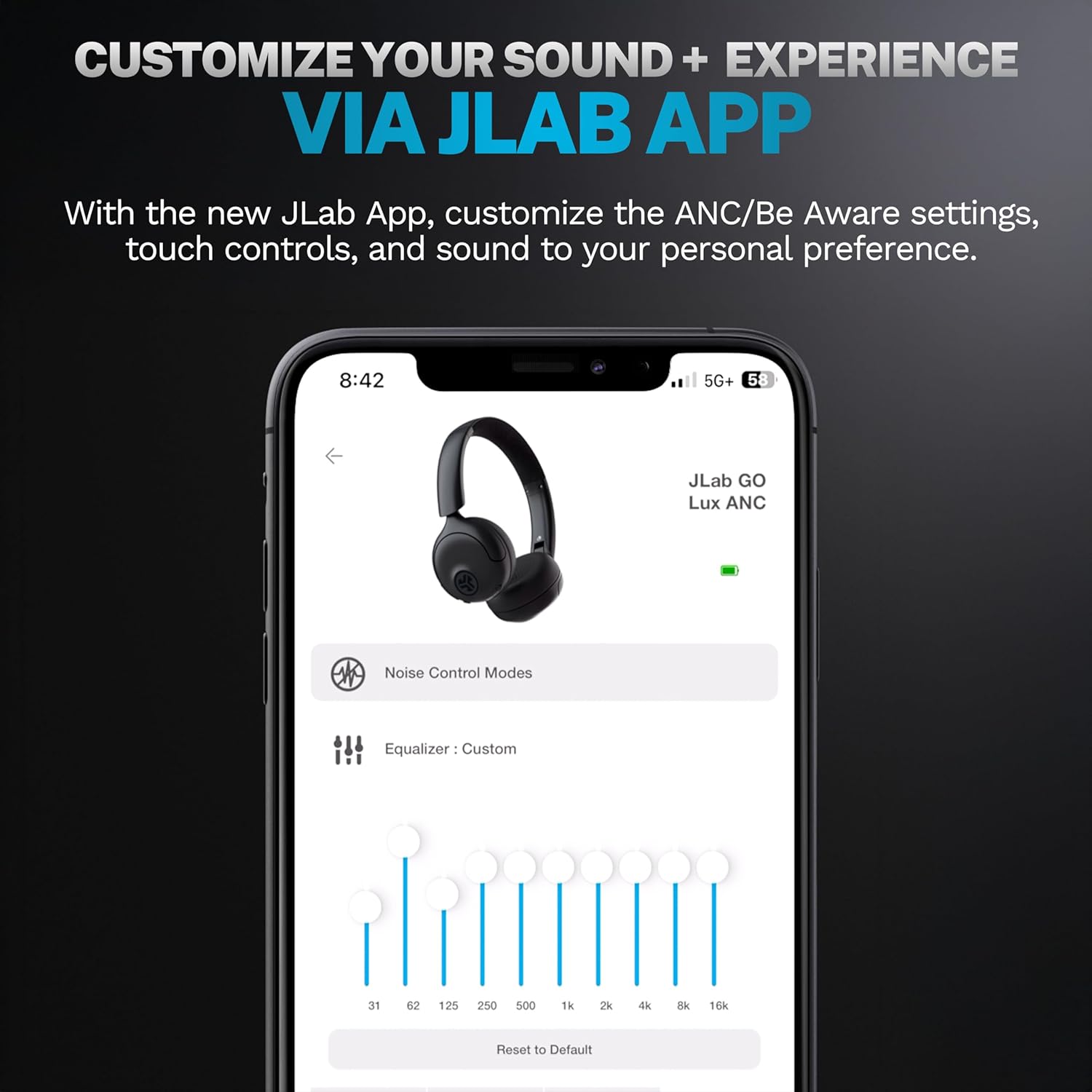
Image: JLab Go Lux ANC headphones in their folded position, demonstrating portability.
Resolució de problemes
| Problema | Solució |
|---|---|
| Els auriculars no s'encenen | Ensure headphones are charged. Press and hold the power button for 3-5 seconds. |
| No es pot emparellar amb el dispositiu | Make sure Bluetooth is enabled on your device. Ensure headphones are in pairing mode (flashing blue/red LED). Forget the device in your Bluetooth settings and re-pair. |
| Sense so ni volum baix | Check volume levels on both headphones and your connected device. Ensure headphones are properly connected. |
| L'ANC no funciona eficaçment | Assegureu-vos que el mode ANC estigui activat. Ajusteu els auriculars per garantir un bon segellat al voltant de les orelles. |
| Problemes de qualitat de trucada | Ensure microphones are not obstructed. Check your device's connection and signal strength. |
Especificacions
| Característica | Detall |
|---|---|
| Nom del model | HBGOLUXANCMVE20WEB |
| Tecnologia de connectivitat | Sense fil (Bluetooth) |
| Versió Bluetooth | 5.0 |
| Forma de l'auricular | A l'orella |
| Funcions de control de soroll | Hybrid Active Noise Canceling, Be Aware Mode |
| Tipus de controlador d'àudio | Controlador dinàmic (40 mm) |
| Resposta de freqüència | 20 Hz - 20 kHz |
| Sensibilitat | 104 dB |
| Durada de la bateria | Up to 70+ hours (40+ hours with ANC) |
| Mètode de control | Tàctil, control d'aplicacions |
| Pes de l'article | 10.6 unces (0.3 quilograms) |
| Dimensions del producte | 2.95 x 6.1 x 7.48 polzades |
| Nivell de resistència a l'aigua | No resistent a l'aigua |
Garantia i Suport
Your JLab Go Lux ANC Wireless Headphones come with a JLab 2 Year Warranty.
For detailed warranty information, product support, or to contact customer service, please visit the official JLab weblloc web o consulteu la targeta de garantia inclosa amb el producte.
També podeu visitar el Botiga JLab a Amazon for more information and accessories.


