1. Introducció
The TONGVEO 20X Optical Zoom NDI AI Auto Tracking PTZ Camera (Model: NV620A-NDI-US) is a versatile live streaming camera designed for professional video production in various environments such as churches, conference rooms, events, and weddings. It features advanced AI auto-tracking, 20X optical zoom, and multiple output options including HDMI, SDI, USB 3.0, and IP streaming with NDI technology for ultra-low latency and high-quality video.

Figure 1: TONGVEO 20X Optical Zoom NDI AI Auto Tracking PTZ Camera.
2. Què hi ha a la caixa
Verifiqueu que tots els elements que s'enumeren a continuació s'inclouen al vostre paquet:
- 1 x càmera PTZ
- 1 control remot IR
- 1 x 9.8ft USB 3.0 Cable
- 1 x adaptador d'alimentació DC 12V/2A
- 1 x Wall Bracket with Screws
- 1 x Manual d'usuari

Vídeo 1: Desempaquetatge i més enllàview of the TONGVEO PTZ Camera, showing included accessories.
3. Producte acabatview
3.1 Característiques clau
- Seguiment automàtic per IA: Three modes available: Presenter Tracking, Zone Tracking, and Hybrid Tracking for intelligent subject tracking.
- Zoom òptic de 20X: High-quality optical zoom lens for capturing details from a distance.
- Sortides versàtils: HDMI, SDI, USB 3.0, and IP streaming (NDI) for broad compatibility.
- NDI Technology: Ultra-low latency 1080P 60fps video for professional broadcasting, NDI license included.
- Alimentació per Ethernet (PoE): Simplifica la instal·lació i redueix el desordre de cables.
- Web Interfície: Integrat web interface for easy configuration and control.
- Opcions de control: Supports Visca over IP, OBS plugins, and dedicated physical controllers.
- Disseny durador: Compact build with smooth preset switching and fast auto-focus.

Figura 2: Mésview of the TONGVEO PTZ Camera's main features including 20X Optical Zoom, Audio Line in/out, PoE, 1080P 60FPS, AI Humanoid Auto-Tracking, 2D&3D Digital Noise Reduction, 4 Video Outputs, IP/NDI Live streaming, and 65° FOV.
3.2 Camera Components and Interfaces
The camera features a robust set of input and output ports for various professional setups.

Figure 3: Detailed diagram of the PTZ Camera's rear interface, showing Audio Line In/Out, LAN (PoE), HDMI, 3G-SDI, USB 3.0, RS485/232, and power input.
- LINE IN/LINE OUT: 3.5mm audio input/output for external audio devices.
- Xarxa LAN (RJ45): Ethernet port for IP control, NDI streaming, and Power over Ethernet (PoE).
- HDMI: High-definition video output for display monitors.
- 3G-SDI: Professional video output for long-distance transmission.
- USB 3.0: Connects to a computer for video output and control.
- RS485/RS232: Control ports for external PTZ controllers.
- CC 12V/2A: Power input for the camera.
4. Configuració
4.1 Engegada i connexió inicials
- Desembaleu la càmera i els accessoris.
- Traieu la tapa de la lent.
- Connect the DC 12V/2A power adapter to the camera's power input and plug it into a power outlet.
- Flip the power switch on the rear of the camera to the 'ON' position. The camera will perform an initial self-test, moving its head to various positions before settling.
- Connect the USB 3.0 cable from the camera to your computer for direct video feed, or connect an HDMI/SDI cable to a monitor/switcher.
- For network control and NDI streaming, connect an Ethernet cable from the camera's LAN port to your network switch.
Video 2: Demonstrates the physical setup and connection of the TONGVEO PTZ Camera, including power, USB, and HDMI connections.
4.2 Opcions de muntatge
The camera can be placed on a table, mounted to a wall, or ceiling using the provided wall bracket and screws. Ensure the mounting surface is stable and can support the camera's weight.
5. Instruccions de funcionament
5.1 Funcions de control remot
The included IR remote control allows for comprehensive camera operation:
- Botó d'encesa: Encén/apaga la càmera.
- Restabliment PTZ: Returns the camera to its initial home position.
- Selecció de càmera: Selects which camera to control (up to 4 cameras).
- Botons predefinits (0-9): Saves and recalls up to 9 preset positions.
- Coixinet direccional: Controls pan and tilt movements.
- Botons de zoom: Adjusts optical zoom (slow/fast).
- Botons d'enfocament: Auto, Manual (Near/Far).
- AI Key: Activates AI auto-tracking modes.
- Botó de menú: Accesses the On-Screen Display (OSD) menu for advanced settings.

Figure 4: Layout of the remote control with descriptions of key functions for camera operation.
5.2 Seguiment automàtic d'IA
The camera features advanced AI auto-tracking with three distinct modes:
- Seguiment del presentador: Ideal for single subjects, keeping the speaker in frame as they move.
- Zone Tracking: Defines specific areas for tracking, useful for classrooms or stages.
- Hybrid Tracking: Combines elements of presenter and zone tracking for flexible scenarios.
Activate AI tracking using the dedicated AI button on the remote or through the web interfície.

Figure 5: The camera demonstrating AI Humanoid Tracking, keeping a person in frame as they move.

Video 3: A demonstration of the TONGVEO PTZ Camera's AI auto-tracking capabilities in a classroom setting.
5.3 NDI Streaming Setup
To utilize NDI streaming, follow these steps:
- Connect the PTZ camera to your local network (LAN) via an Ethernet cable.
- Accedir a la càmera web interface (see Section 5.4) and enable NDI mode in the network settings.
- Use NDI Tools (e.g., NDI Studio Monitor) on your computer to discover and select the camera's NDI name.
- Integrate the NDI feed into your preferred streaming software (e.g., OBS, vMix).
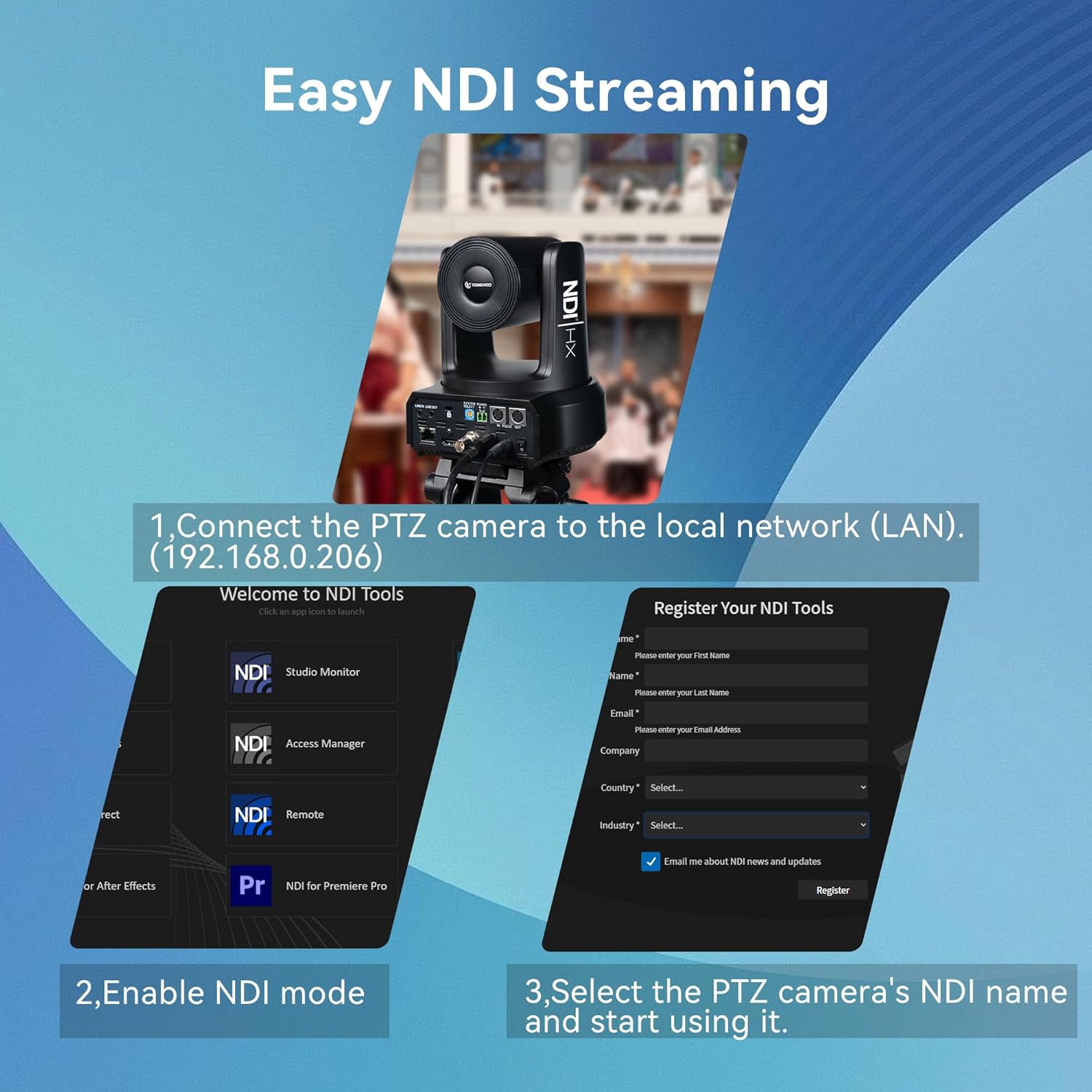
Figure 6: Visual guide for setting up NDI streaming, showing network connection and NDI Tools interface.
5.4 Web Configuració de la interfície
The camera features a built-in web interface for comprehensive control and configuration:
- Connect the camera to your network and obtain its IP address (usually found on a sticker at the bottom of the camera or via NDI Tools).
- Obre a web navegador i introduïu l'adreça IP de la càmera.
- Log in using the default credentials (typically admin/admin, refer to the manual for specifics).
- Des del web interface, you can adjust image settings (exposure, color, display), PTZ controls, communication setup, tracking modes, and network settings.

Video 4: A detailed walkthrough of the TONGVEO PTZ Camera's web interface, demonstrating various settings and controls.
6. Manteniment
6.1 Neteja
- Feu servir un drap suau i sec per netejar el cos de la càmera.
- For the lens, use a lens cleaning cloth and specialized lens cleaning solution.
- Eviteu utilitzar productes químics o materials abrasius.
6.2 actualitzacions de microprogramari
Regular firmware updates are released to improve performance and add new features. Check the TONGVEO official weblloc web per obtenir el firmware més recent i instruccions sobre com actualitzar la càmera.
7. Solució De Problemes
- Sense energia: Ensure the power adapter is securely connected and the power switch is on. If using PoE, verify the Ethernet cable is properly connected to a PoE-enabled switch or injector.
- Sense sortida de vídeo: Check all cable connections (HDMI, SDI, USB, Ethernet). Verify the correct input source is selected on your display or switcher.
- Problemes de seguiment automàtic: Ensure the AI tracking mode is correctly selected (Presenter, Zone, Hybrid) via the remote or web interface. Ensure the subject is clearly visible and not obscured.
- Problemes de qualitat de la imatge: Adjust lighting conditions. Use the web interface to fine-tune exposure, color, and image settings. Ensure the lens is clean.
- El control remot no respon: Check battery levels in the remote. Ensure there are no obstructions between the remote and the camera's IR receiver.
8. Especificacions
| Característica | Detall |
|---|---|
| Marca | TONGVEO |
| Número de model | NV620A-NDI-US |
| Sensor | 1/2.8" CMOS, 2.07MP |
| Zoom òptic | 20X |
| Video Resolution (Main Stream) | 1920x1080p a 60 fps |
| Sortides de vídeo | USB 3.0, HDMI, SDI, RJ45 (IP/NDI) |
| Rotació horitzontal | 350° (±175°) |
| Rotació vertical | 180° (±90°) |
| Font d'alimentació | DC 12V/2A or PoE (802.3af) |
| Consum d'energia | 18W |
| Dimensions del producte | 7 x 7 x 6.6 polzades |
| Pes de l'article | 5.5 lliures |
9. Garantia i assistència
TONGVEO is committed to providing high-quality products and customer satisfaction. For warranty information, technical support, or service inquiries, please refer to the contact details provided in the product packaging or visit the official TONGVEO weblloc.
Regular firmware updates and dedicated customer support ensure a hassle-free experience with your TONGVEO PTZ camera.


