1. Introducció
This manual provides detailed instructions for the installation, operation, and maintenance of your Montech AX 120 ARGB Fans. These 120mm fans are designed to provide efficient cooling and customizable lighting for your computer system. Please read this manual thoroughly before installation to ensure proper function and safety.
2. Informació de seguretat
- Always disconnect power from your computer before installing or handling internal components.
- Handle fans by their frames, avoiding contact with the blades.
- Assegureu-vos d'una connexió a terra adequada per evitar danys per descàrrega electrostàtica (ESD).
- Mantingueu les peces petites i els materials d'embalatge fora de l'abast dels nens.
- No intenteu modificar el ventilador ni els seus cables. Les modificacions no autoritzades poden anul·lar la garantia i plantejar riscos per a la seguretat.
3. Contingut del paquet
Verifiqueu que tots els elements siguin presents al vostre paquet:
- Montech AX 120 ARGB Fan (x4)
- Cargols de muntatge (x16)
- Fan Hub (if included in your specific pack)

Figure 3.1: Montech AX 120 ARGB Fan (Pack of 4)
4. Configuració i instal·lació
Follow these steps to install your Montech AX 120 ARGB Fans:
- Prepareu el vostre sistema: Apagueu l'ordinador i desconnecteu-lo de la presa de corrent. Obriu la carcassa de l'ordinador.
- Identify Fan Mounting Locations: Determine where you want to install the fans (e.g., front, top, rear, bottom of the case).
- Muntar els ventiladors: Position each fan in the desired location. The AX series fans are designed to blow air from the RGB-lit side towards the non-RGB side. Consider this for optimal airflow (e.g., intake or exhaust). Secure each fan using four mounting screws. The integrated anti-vibration pads help reduce noise from resonance.

Figura 4.1: Frontal view of the Montech AX 120 ARGB Fan

Figura 4.2: Esquena view of the Montech AX 120 ARGB Fan, indicating airflow direction from front to back.
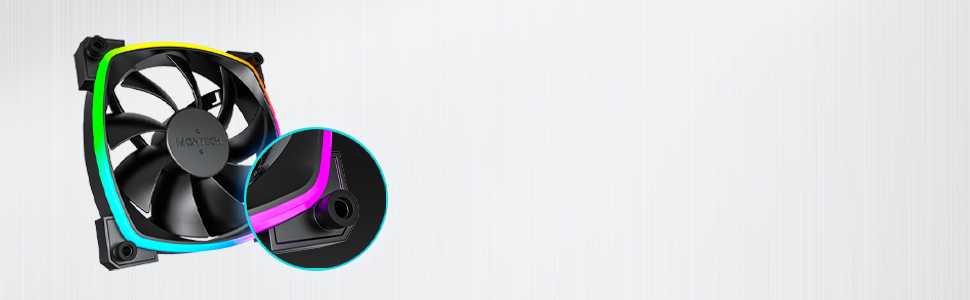
Figure 4.3: Integrated anti-vibration pads for reduced noise.
- Connect Power and ARGB Cables: Each fan has two cables: a 4-pin PWM cable for fan speed control and a 3-pin ARGB cable for lighting control.
- Connect the 4-pin PWM cable to an available 4-pin fan header on your motherboard or to a fan hub.
- Connect the 3-pin ARGB cable to an available 5V 3-pin ARGB header on your motherboard or to a compatible ARGB controller/hub. Nota: No connecteu a un connector RGB de 12V, ja que això danyarà els LED.
- Gestió de cables: Route cables neatly to avoid interference with other components and to improve airflow.
- Tanqueu la carcassa i engegueu-la: Once all connections are secure, close your computer case, reconnect power, and power on your system.
5. Instruccions de funcionament
The Montech AX 120 ARGB Fans offer both speed and lighting control:
5.1 Control de velocitat del ventilador (PWM)
The 4-pin PWM connection allows for precise fan speed control based on system temperature. The fan speed can be adjusted from 600 RPM to 1600 RPM.
- BIOS/UEFI: Access your motherboard's BIOS/UEFI settings to configure fan curves. This allows the fan speed to automatically adjust based on CPU or system temperatures.
- Programari: Use your motherboard's fan control software (e.g., ASUS Fan Xpert, MSI Dragon Center, Gigabyte SIV) to create custom fan profiles within your operating system.

Figure 5.1: PWM fan speed adjustment from 600 RPM to 1600 RPM.
5.2 Control d'il·luminació ARGB
The Addressable RGB (ARGB) lighting can be synchronized and customized through your motherboard's software or a dedicated ARGB controller.
- Programari de la placa base: If connected to a 5V 3-pin ARGB header, use your motherboard's RGB software (e.g., ASUS Aura Sync, MSI Mystic Light Sync, Gigabyte RGB Fusion, ASRock Polychrome Sync) to control lighting effects, colors, and synchronization with other ARGB components.
- Controlador ARGB: If using a standalone ARGB controller, refer to the controller's manual for specific instructions on changing lighting modes.
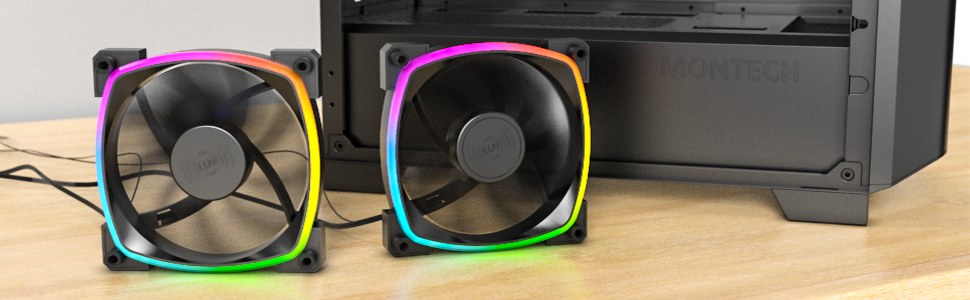
Figure 5.2: Customizable hexagonal ARGB lighting.
6. Manteniment
Un manteniment regular garanteix un rendiment òptim i una llarga vida útil dels ventiladors:
- Neteja: Netegeu periòdicament la pols de les aspes del ventilador i del marc amb aire comprimit o un raspall suau. Assegureu-vos que l'ordinador estigui apagat i desendollat abans de netejar-lo.
- Inspecció: Check cables for any signs of wear or damage. Ensure mounting screws are secure.
- Longevitat del rodament: The fans feature an HDB (Hydro Dynamic Bearing) designed for high-end durability and a lifespan of 40,000 hours. No user maintenance is required for the bearing.
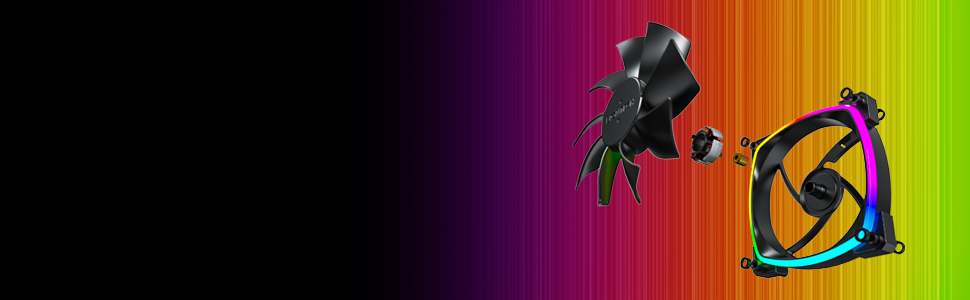
Figure 6.1: Hydro Dynamic Bearing (HDB) for extended lifespan.
7. Solució De Problemes
Si teniu problemes, consulteu la guia de resolució de problemes següent:
| Problema | Causa possible | Solució |
|---|---|---|
| El ventilador no gira | Loose 4-pin PWM cable connection Insufficient power from motherboard header Fan curve set too low in BIOS/software | Ensure 4-pin PWM cable is securely connected. Try connecting to a different fan header. Adjust fan curve settings in BIOS/software to ensure fans spin at low temperatures. |
| La il·luminació ARGB no funciona | Loose 3-pin ARGB cable connection Connected to incorrect 12V RGB header ARGB software not configured or running | Ensure 3-pin ARGB cable is securely connected to a 5V ARGB header. Verify connection is to a 5V 3-pin ARGB header, not a 12V 4-pin RGB header. Install and configure your motherboard's ARGB software or check your ARGB controller settings. |
| Soroll excessiu | Alta velocitat del ventilador Vibracions Obstrucció | Adjust fan speed in BIOS/software to a lower RPM. Ensure all mounting screws are tight. The fans have anti-vibration pads to minimize this. Check for any cables or objects interfering with fan blades. |
8. Especificacions
Key technical specifications for the Montech AX 120 ARGB Fan:
- Model: AX120 PWM BLACK
- Dimensions del ventilador: 120 mm x 120 mm x 25 mm (4.72 x 4.72 x 0.98 polzades)
- Tipus de rodament: Rodament hidrodinàmic (HDB)
- Velocitat de rotació: 600 - 1600 RPM (controlades per PWM)
- Nivell de soroll: Menys de 27.9 dB(A)
- Connector d'alimentació: PWM de 4 pins
- Connector ARGB: ARGB de 3 pins i 5 V
- Voltage: 12V DC (Fan), 5V DC (LED)
- Wattage: 2 watts
- Material: Metall, plàstic, cautxú
- Vida útil: 40,000 hores
9. Garantia i Suport
Montech products are manufactured to the highest quality standards. For warranty information, technical support, or customer service inquiries, please visit the official Montech weblloc web o poseu-vos en contacte amb el vostre distribuïdor local. Conserveu el comprovant de compra per a reclamacions de garantia.


