1. Introducció
This manual provides essential information for the proper use and maintenance of your ALLDOCUBE iPlay60 Lite 11-inch Android 15 Tablet. Please read it thoroughly before operating the device to ensure optimal performance and longevity. Keep this manual for future reference.
2. Producte acabatview
2.1 Contingut del paquet
Verifiqueu que tots els elements siguin presents al paquet:
- ALLDOCUBE iPlay60 Lite Tablet
- Cable USB-Type C
- Pin de la targeta SIM
- Adaptador d'alimentació (5 V/2 A)
- Manual d'usuari

Image: Contents of the ALLDOCUBE iPlay60 Lite tablet package, including the tablet, USB-C cable, SIM ejector tool, power adapter, and user manual.
2.2 Disseny del dispositiu
Familiaritzeu-vos amb els components físics de la vostra tauleta:
- Càmera frontal: Per a videotrucades i selfies.
- Càmeres posteriors: Càmera principal per a fotos i vídeos.
- Interruptor d'alimentació: To turn the device on/off or lock/unlock the screen.
- Botons de volum: Per ajustar el volum de l'àudio.
- Port de càrrega (tipus C): Per carregar el dispositiu i transferir dades.
- Ponent: Per a la sortida d'àudio.
- TF/SIM Card Slot: For inserting microSD and SIM cards.

Image: Diagram illustrating the physical layout of the ALLDOCUBE iPlay60 Lite tablet, highlighting the front camera, rear cameras, power switch, volume buttons, charging port, speaker, and TF/SIM card slot.
3. Configuració
3.1 Inserció de targetes SIM i MicroSD
- Locate the TF/SIM card slot on the side of the tablet.
- Insert the provided SIM card pin into the small hole next to the slot to eject the tray.
- Place your Nano-SIM card(s) and/or microSD card into the designated slots on the tray. Note that SIM2 shares a slot with the microSD card.
- Torneu a inserir la safata a la tauleta amb cura.

Imatge: Primer pla view of the SIM and microSD card tray, demonstrating how to insert the cards into the ALLDOCUBE iPlay60 Lite tablet.
3.2 Initial Power On and Android Setup
- Press and hold the Power button until the ALLDOCUBE logo appears.
- Follow the on-screen prompts to complete the initial Android 15 setup, including language selection, Wi-Fi connection, Google account login, and security settings.
- Ensure your tablet is sufficiently charged before starting the setup process.
4. Instruccions de funcionament
4.1 Display Features and Media Playback
The 11-inch in-cell display with 1280x800 resolution is suitable for video viewing, reading, and gaming. It supports Widevine L1 DRM, allowing for high-definition 1080P playback on streaming services like Netflix, Hulu, Prime Video, and Disney+ without quality loss.

Image: The 11-inch display of the ALLDOCUBE iPlay60 Lite, highlighting its 1280x800 resolution, in-cell technology, 10-point touch, 350 cd/m² brightness, and Widevine L1 support for streaming services.
Adjust display settings for comfort:
- Mode de protecció ocular: Reduces blue light to prevent eye strain.
- Mode nocturn: Darkens the interface for comfortable viewamb poca llum.
- Mode de lectura: Optimizes the display for reading text.
- Ajust de temperatura de color: Customize the screen's color balance.

Image: Screenshots demonstrating various display modes available on the ALLDOCUBE iPlay60 Lite, including eye protection, night mode, reading mode, and color temperature adjustment.
4.2 Rendiment i emmagatzematge
The tablet is equipped with a T606 octa-core processor and Arm Mali G57 GPU, providing smooth multitasking and efficient power usage. It features 12GB RAM (4GB physical + 8GB virtual) and 128GB ROM, expandable up to 512GB with a microSD card, offering ampespai per a aplicacions, fotos i vídeos.
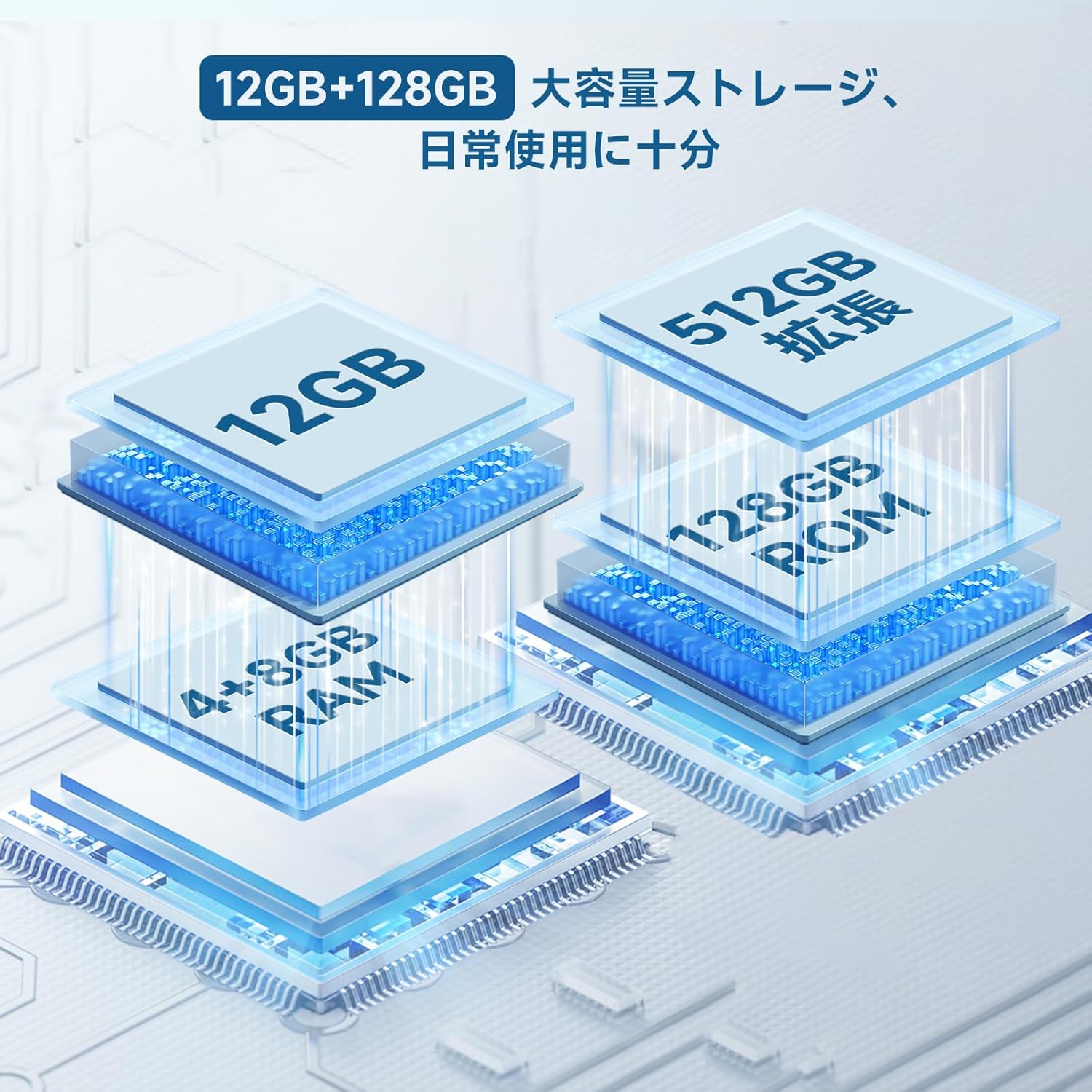
Image: Diagram illustrating the 12GB RAM (4GB + 8GB virtual) and 128GB ROM storage, expandable to 512GB, of the ALLDOCUBE iPlay60 Lite tablet.

Image: Graphic detailing the Unisoc T606 octa-core CPU and Arm Mali G57 GPU, highlighting its AnTuTu score of 290,000 points.
4.3 Connectivitat
The iPlay60 Lite supports various connectivity options:
- 4G LTE: Dual SIM support for stable and high-speed mobile data and VoLTE calls.
- Wi-Fi de doble banda: Supports 2.4GHz and 5GHz for stable and fast internet connections.
- Bluetooth 5.0: For seamless connection with wireless accessories and file transferència.
- GPS: Integrated GPS (GPS/Beidou/Galileo/Glonass) for navigation.
Image: Visual representation of the ALLDOCUBE iPlay60 Lite's connectivity, including 4G LTE dual SIM, 2.4GHz/5GHz Wi-Fi, Bluetooth 5.0, and GPS, with examples of use cases like video calls, TV casting, and navigation.
4.4 Durada de la bateria
The 8000mAh battery provides extended usage times:
- Up to 10 hours of continuous video playback.
- Fins a 32 hores de reproducció de música.
- Fins a 16 hores de web navegació.

Image: Graphic illustrating the 8000mAh battery capacity and estimated usage times for video playback (10 hours), music playback (32 hours), and reading/web browsing (16 hours).
4.5 Característiques d'Android 15
The tablet runs on Android 15, offering enhanced features for privacy, security, and data protection. It provides more control over app data usage and security functions, along with increased customization options.
- Protecció de privadesa: Enhanced controls over app permissions and data access.
- Controls parentals: Manage screen time and app usage for children.
- Pantalla dividida: Perform multiple tasks simultaneously by dividing the screen.
- 3-Finger Screenshot: Quickly capture screenshots with a simple gesture.

Image: Screenshots showcasing key features of Android 15 on the ALLDOCUBE iPlay60 Lite, including privacy settings, parental controls, split-screen functionality, and the 3-finger screenshot gesture.
5. Manteniment
- Neteja: Feu servir un drap suau i sense borrissol per netejar la pantalla i la carcassa. Eviteu productes de neteja o dissolvents abrasius.
- Emmagatzematge: Guardeu la tauleta en un lloc fresc i sec, allunyat de la llum solar directa i de temperatures extremes.
- Cura de la bateria: To prolong battery life, avoid fully discharging the battery frequently. Charge the device using the provided charger or a compatible 5V/2A or PD18W charger.
- Actualitzacions de programari: Comproveu i instal·leu regularment si hi ha actualitzacions del sistema per garantir un rendiment i una seguretat òptims.
6. Solució De Problemes
6.1 Data Transfer Warning
Nota important: If you purchased your tablet on or after April 20th, it comes with Android 15. Transferring data directly from another tablet to this device may cause errors. It is recommended to set up the new tablet as a fresh device and manually transfer data or use cloud services to avoid potential issues.
6.2 Problemes comuns
- El dispositiu no s'encén: Assegureu-vos que la bateria estigui carregada. Connecteu el carregador i espereu uns minuts abans d'intentar tornar-lo a engegar.
- La pantalla no respon: Try restarting the device by holding the power button. If unresponsive, force restart by holding the power button for an extended period (usually 10-15 seconds).
- Problemes de connectivitat Wi-Fi/4G: Check if Wi-Fi is enabled and connected to the correct network. For 4G, ensure SIM cards are properly inserted and your plan is active. Try restarting the tablet and your router/modem.
- Les aplicacions es bloquegen: Clear the cache of the problematic app or reinstall it. Ensure the tablet's software is up to date.
7. Especificacions
| Característica | Especificació |
|---|---|
| Marca | ALLDOCUBE |
| Nom del model | iPlay 60 Lite |
| Sistema operatiu | Android 15 |
| Mida de la pantalla | 11 polzades |
| Resolució de visualització | 1280 x 800 píxels |
| Marca de la CPU | MediaTek (T606 Octa-core) |
| Tipus de targeta gràfica | Integrated (Arm Mali G57) |
| RAM | 12 GB (4 GB + 8 GB virtual) |
| Capacitat d'emmagatzematge de memòria | 128 GB (ampliable fins a 512 GB amb microSD) |
| Connectivitat | Wi-Fi (802.11ac, 2.4/5GHz), Bluetooth 5.0, GPS (GPS/Beidou/Galileo/Glonass), 4G LTE |
| Capacitat de la bateria | 8000 mAh (3.8 V, 30.4 Wh) |
| Càmera posterior | 13MP (Autofocus) |
| Càmera frontal | 5MP |
| Pes del producte | 940 g (Package weight, device weight approx. 306g) |
8. Garantia i Suport
For warranty information and technical support, please refer to the official ALLDOCUBE website or contact their customer service directly. Details are typically provided with your purchase documentation or on the manufacturer's support pages.


