1. Introducció
This manual provides detailed instructions for the installation, operation, and maintenance of your ASRock B860M Live Mixer WiFi motherboard. Designed for content creators, this motherboard offers robust connectivity and reliable performance for demanding tasks. Please read this manual thoroughly before proceeding with installation or operation.

Figura 1: Frontal view of the ASRock B860M Live Mixer WiFi motherboard. This image highlights the CPU socket, RAM slots, and various heatsinks.
2. Característiques clau
The ASRock B860M Live Mixer WiFi motherboard is equipped with advanced features to support high-performance computing and content creation:
- Power Phase Design: Features a 10+1+1+1+1 power phase design with Dr.MOS for VCore+GT+SA, ensuring stable power delivery to the CPU.
- Suport de memòria DDR5: Supports 4 x DDR5 DIMMs in dual channel configuration, with speeds up to 8666+ (OC) MHz.
- Graphics Output: Multiple display options including 1 HDMI, 1 DisplayPort, and 1 Thunderbolt 4 Type-C port.
- Qualitat d'àudio: Integrated Realtek ALC1220 7.1 CH HD Audio Codec with Nahimic Audio for immersive sound.
- Enhanced Capacitors: Utilizes exclusive 20K Capacitors with 1000uF capacitance for improved durability and stability.
- Connectivitat d'alta velocitat: Includes WiFi 6E and 2.5G LAN for fast and reliable network connections.
Vídeo 1: Acabatview of ASRock Intel B860 Series Motherboards. This video highlights key features and design aspects of the B860 motherboard series, including power delivery and connectivity options.
3. Configuració i instal·lació
Segueix aquests passos per instal·lar correctament la placa base i els components.
3.1 Desembalatge i inspecció
Carefully remove the motherboard and all accessories from the packaging. Inspect for any visible damage.
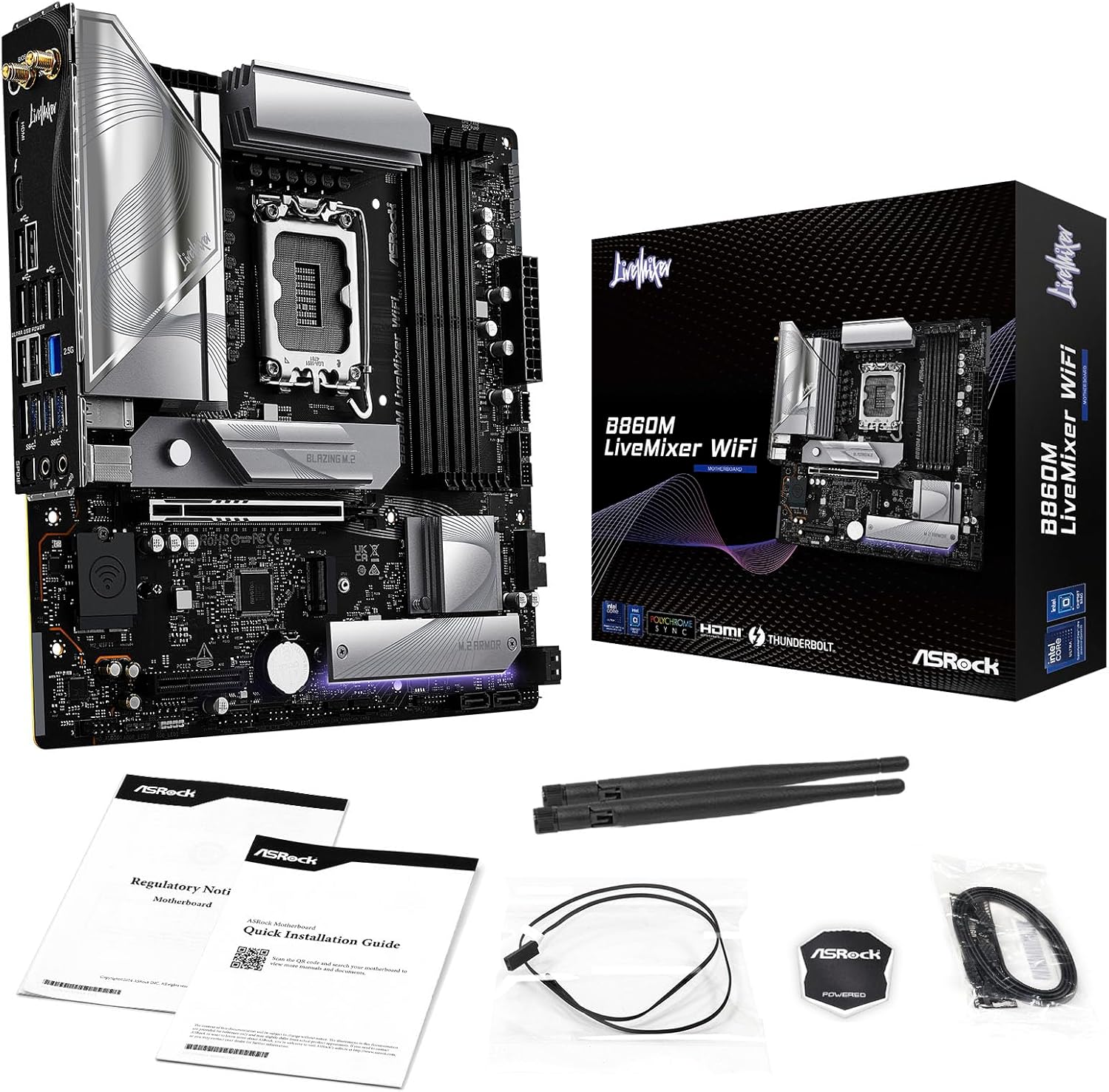
Figure 2: Contents of the ASRock B860M Live Mixer WiFi motherboard package. This image displays the motherboard, documentation, Wi-Fi antennas, and other accessories included.
3.2 CPU Installation (LGA1851)
- Localitza el sòcol de la CPU LGA1851 a la placa base.
- Obriu la palanca del sòcol de la CPU i retireu la coberta protectora.
- Align your Intel Core Ultra processor with the socket, ensuring the notches on the CPU match the keys on the socket. Gently place the CPU into the socket without forcing it.
- Tanqueu la palanca del sòcol de la CPU per fixar el processador.
3.3 Memory (DDR5) Installation
- Localitzeu les quatre ranures DIMM DDR5.
- Obriu els clips dels dos extrems de la ranura DIMM.
- Alineeu el mòdul de memòria amb la ranura, assegurant-vos que l'osca del mòdul coincideixi amb la clau de la ranura.
- Premeu fermament els dos extrems del mòdul de memòria fins que els clips encaixin al seu lloc.
3.4 Storage Installation (M.2 and SATA)
The motherboard supports multiple M.2 slots and SATA3 6.0 Gb/s ports.
- SSD M.2: Locate the M.2 slots (e.g., Blazing M.2, M.2 Armor). Insert the M.2 SSD into the slot at an angle, then push it down and secure it with the provided screw or tool-less mechanism.
- Unitats SATA: Connect SATA data cables from your storage drives (HDDs/SSDs) to the SATA3 6.0 Gb/s ports on the motherboard. Connect power cables from your power supply to the drives.

Figura 3: Angle view of the ASRock B860M Live Mixer WiFi motherboard, highlighting the M.2 slots and their heatsinks for high-speed storage.
3.5 Expansion Cards (PCIe 5.0)
Insert your graphics card or other PCIe expansion cards into the appropriate PCIe 5.0 slot. Ensure it is seated firmly and secured with a screw to your chassis.
3.6 Connexions d'alimentació
Connecteu el connector d'alimentació ATX de 24 pins i el connector d'alimentació de la CPU de 8 pins (o 4+4 pins) de la font d'alimentació als ports corresponents de la placa base.
3.7 Rear I/O Connections
Connect your peripherals to the rear I/O panel. This includes USB devices, display cables (HDMI, DisplayPort, Thunderbolt 4 Type-C), Ethernet cable, and audio devices.

Figura 4: Detallada view of the rear I/O panel on the ASRock B860M Live Mixer WiFi motherboard, showing various USB ports, display outputs, Ethernet, and audio jacks.
Video 2: Demonstrates the ultimate connectivity features for creators on ASRock motherboards, including Thunderbolt and high-speed networking.
4. Instruccions de funcionament
After successful installation, power on your system. The motherboard will perform a Power-On Self-Test (POST). You can access the BIOS/UEFI setup utility by pressing the Suprimeix or F2 key during POST.
4.1 Configuració de la BIOS/UEFI
The BIOS/UEFI interface allows you to configure system settings, including boot order, memory profiles (XMP), fan speeds, and overclocking options. Refer to the on-screen instructions within the BIOS for navigation and adjustments.
4.2 BIOS Update Procedure
Updating your BIOS can improve system stability, compatibility, and performance. ASRock provides tools like USB BIOS Flashback and Instant Flash for this purpose.
Video 3: A detailed tutorial on how to update the motherboard BIOS using ASRock's USB BIOS Flashback and Instant Flash methods. This is crucial for maintaining system compatibility and performance.
For detailed steps on using USB BIOS Flashback or Instant Flash, please refer to the video tutorial above or the dedicated section in the full user manual available on the ASRock support weblloc.
5. Manteniment
Un manteniment regular garanteix la longevitat i el rendiment òptim de la placa base.
- Eliminació de pols: Netegeu periòdicament la pols de l'interior de la carcassa del vostre PC, especialment dels dissipadors de calor i els ventiladors, amb aire comprimit.
- Actualitzacions de la BIOS: Keep your BIOS updated to the latest version to ensure compatibility with new hardware and software, and to benefit from performance improvements and bug fixes.
- Actualitzacions de controladors: Install the latest drivers for your motherboard chipset, audio, network, and other components from the ASRock weblloc.
- Gestió de cables: Ensure proper cable management to maintain good airflow within the case, preventing overheating.
6. Solució De Problemes
Si teniu problemes, tingueu en compte els passos habituals següents per resoldre'ls:
- Sense energia: Check all power connections (24-pin ATX, 8-pin CPU, GPU power). Ensure your power supply is switched on.
- Sense pantalla: Verify that your monitor is connected to the correct graphics output port (motherboard or discrete GPU). Reseat your graphics card and RAM modules.
- Inestabilitat/Avaries del sistema: Check RAM seating and try running with one stick of RAM at a time. Ensure CPU cooler is properly installed. Update BIOS and drivers.
- Problemes d'arrencada: Check boot order in BIOS/UEFI. Ensure your storage drive is detected.
- Perifèric no detectat: Try different USB ports. Install necessary drivers for the peripheral.
For more advanced troubleshooting, consult the full user manual or ASRock's online support resources.
7. Especificacions
| Característica | Detall |
|---|---|
| Marca | ASRock |
| Nom del model | B860M LIVEMIXER WIFI |
| Socket de CPU | LGA 1851 |
| Processadors compatibles | Intel Core Ultra |
| Tipus de xipset | Intel B860 |
| Tecnologia de memòria RAM | DDR5 |
| Velocitat de rellotge de memòria | 8666 MHz (OC) |
| Capacitat d'emmagatzematge de memòria | Fins a 256 GB |
| Graphics Output Options | 1 HDMI, 1 DisplayPort, 1 Thunderbolt 4 Type-C |
| Còdec d'àudio | Realtek ALC1220 7.1 CH HD Audio Codec, Nahimic Audio |
| LAN | LAN de 2.5 G |
| Connectivitat sense fil | WiFi 6E |
| Power Phase | 10+1+1+1+1 Power Phase, Dr.MOS for VCore+GT+SA |
| Condensadors | Exclusive 20K Cap with 1000uF Capacitance |
| Factor de forma | Micro ATX |
| Dimensions del paquet | 11.73 x 10.51 x 2.4 polzades |
| Pes de l'article | 3.25 lliures |
8. Garantia i Suport
For warranty information, technical support, and driver downloads, please visit the official ASRock weblloc:
You can also find additional support and FAQs on the ASRock store page: ASRock America Store
Protection plans are available for purchase separately to extend coverage for your product.


