SUPVAN G15M

Manual d'usuari de la mini màquina d'etiquetes portàtil SUPVAN G15M

Brand: SUPVAN | Model: G15M Mini

1. Introducció

This manual provides detailed instructions for the safe and efficient operation of your SUPVAN G15M Mini Portable Label Maker Machine. Please read this manual thoroughly before using the device and keep it for future reference.

Característiques principals:

  • Multi-Type Label Compatibility: Supports heat-shrink tubes, continuous labels, fixed-size labels, and cable labels.
  • Rechargeable & Portable: Built-in 1200 mAh rechargeable battery, lightweight and compact design.
  • Minimal Margin Printing: Prints labels with just a 5 mm margin, reducing material waste.
  • Thermal Transfer Technology: Ensures 10 years of durability with UV, heat, and water resistance.
  • Fully Customizable Labels: Personalize with 9 font sizes, 6 font styles, 5 frames, and over 400 icons.

2. Contingut del paquet

Verifiqueu que tots els elements siguin presents al paquet:

ItemQuantitat
G15M Mini Label Maker1
White Label Paper (0.47 in x 24.6 ft)1
Cable USB-Type C1
Manual d'usuari1
SUPVAN G15M Mini Label Maker, label tape, USB-C cable, and user manual
Figure 1: Package Contents. The image displays the SUPVAN G15M Mini Label Maker, a roll of white label tape, a USB Type-C charging cable, and the user manual.

3. Configuració

3.1 Càrrega del dispositiu

The label maker features a built-in 1200 mAh rechargeable battery. Connect the provided USB Type-C cable to the charging port on the device and to a compatible USB power source. A full charge can provide up to 3 months of use.

SUPVAN G15M Mini Label Maker connected to a charging cable, highlighting its 1200 mAh battery capacity.
Figure 2: Charging the G15M Mini Label Maker. The image shows the label maker connected to a charging cable, emphasizing its rechargeable battery.

3.2 Instal·lació de la cinta adhesiva

Open the label compartment cover. Insert the label tape cartridge, ensuring the tape feeds correctly through the printer slot. Close the cover securely.

Video 1: EazeID LM1600 Label Maker. This video demonstrates the process of installing label tape into a similar label maker, which can be used as a reference for the SUPVAN G15M Mini.

3.3 Connecting to the Mobile App (Optional)

The label maker supports Bluetooth connectivity for enhanced customization via a mobile application. Download the official SUPVAN app from your device's app store. Follow the in-app instructions to pair your label maker.

Video 2: Brother Label Maker - Honest Review. This video shows a user connecting a label maker to a mobile app, illustrating the general process for app-controlled label makers.

4. Instruccions de funcionament

4.1 Creació bàsica d'etiquetes

Use the QWERTY keyboard to type your desired text. The LCD display will show your input. Utilize the navigation keys to move the cursor and the function keys to access various settings.

Video 3: LP5120M Thermal Transfer Label Maker Machine. This video demonstrates the basic operation of a SUPVAN label maker, including typing and printing labels.

4.2 Personalització d'etiquetes

The G15M Mini offers extensive customization options:

  • Mides de lletra: Choose from 9 different font sizes.
  • Estils de lletra: Seleccioneu entre 6 estils de lletra.
  • Marcs: Apply one of 5 available frames.
  • Icones: Access over 400 icons to enhance your labels.
  • Multi-color Labels: Print labels with up to 4 lines of text.
  • Codis de barres i codis QR: Generate various barcode and QR code types.
Image showing various customization options including barcodes, QR codes, frames, and over 400 icons available for the SUPVAN G15M Mini Label Maker.
Figure 3: Customization Options. This image illustrates the wide range of elements available for personalizing labels, including barcodes, QR codes, frames, and numerous icons.
Image showing support for 17 languages, 400+ symbols, 9 barcodes & QR codes, and 4-line text support.
Figure 4: Advanced Customization. This image highlights the label maker's support for 17 languages, over 400 symbols, 9 types of barcodes and QR codes, and the ability to print up to 4 lines of text.

4.3 Printing and Cutting Labels

After customizing your label, press the print button. The label will be dispensed. Use the manual cutter on the side of the device to cleanly cut the label. The G15M Mini prints with a minimal 5mm margin, reducing waste.

Image comparing minimal margin printing of SUPVAN G15M Mini (less than 1/4 inch) with other label makers (around 1/2 inch), showing reduced waste.
Figure 5: Minimal Margin Printing. This image demonstrates the G15M Mini's ability to print with a minimal 5mm margin, significantly reducing label tape waste compared to other devices.

4.4 Tipus d'etiquetes i aplicacions

The SUPVAN G15M Mini supports various label types for diverse applications:

  • Heat Shrink Labels: Ideal for cable identification.
  • Fixed Size Labels: Perfect for organizing small parts or files.
  • Wrap Around Labels: Useful for cables and wires.
  • Etiquetes contínues: For custom length labels.
  • Marcatge Tags: For general identification.
Image displaying 10 different label types including heat shrink, fixed size, wrap around, cable, tamper evident, marking tag, laboratory cryogenic, continuous, and circle labels.
Figure 6: Diverse Label Applications. This image showcases the versatility of the G15M Mini, illustrating various label types such as heat shrink, fixed size, wrap around, and cable labels, suitable for different organizational needs.
Image showing various uses of the label maker for indoor and outdoor organization, including plant labels, electrical panel labels, tool organization, and network cable identification.
Figure 7: Indoor and Outdoor Use. Examples of labels used for plants, electrical panels, tools, and network cables, demonstrating the label maker's suitability for both indoor and outdoor environments.

5. Manteniment

5.1 Neteja del dispositiu

Regularly clean the print head and the interior of the label compartment with a soft, dry cloth to ensure optimal printing quality. Avoid using harsh chemicals or abrasive materials.

5.2 Durabilitat de l'etiqueta

The thermal transfer technology ensures labels are durable for up to 10 years, with resistance to UV, heat, and water, making them suitable for both indoor and outdoor use.
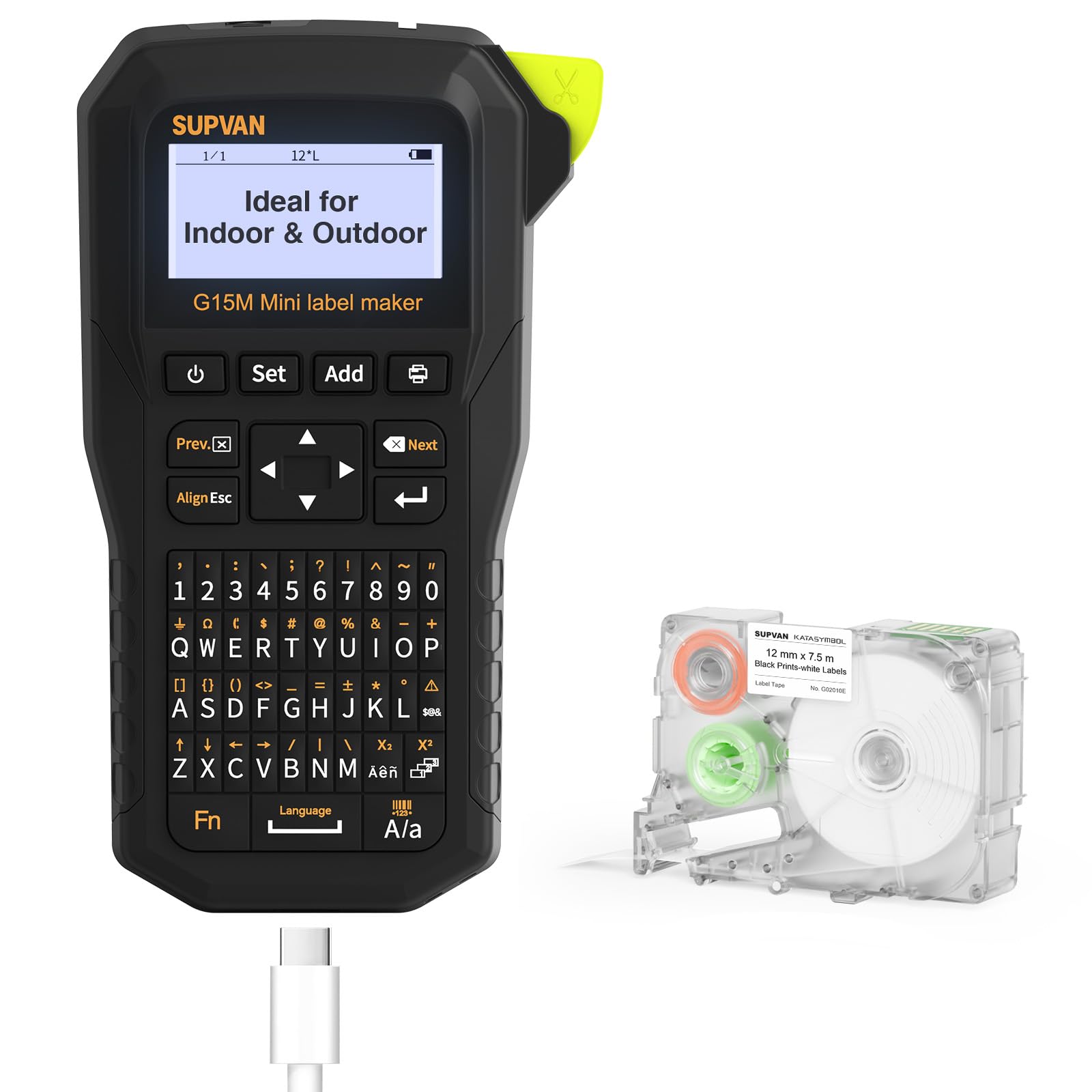
Image comparing the durability of SUPVAN G15M Mini labels (10 years fade-resistant) with other label makers (1 year fade-resistant), showing a label on an exhaust fan.
Figure 8: 10-Year Fade-Resistant Labels. This image highlights the superior durability of SUPVAN G15M Mini labels, which remain clear and legible for up to 10 years due to thermal transfer technology, unlike direct thermal labels that fade quickly.
Image showing labels are water-resistant, oil-proof, UV resistant, scratch-proof, heat-resistant, and leave no residue.
Figure 9: Label Resistance Features. This image illustrates the robust qualities of the labels, including water-resistance, oil-proof, UV resistance, scratch-proof, heat-resistance, and the ability to be removed without leaving residue.

6. Solució De Problemes

6.1 Problemes comuns

  • Mala qualitat d'impressió: Ensure the print head is clean and the label tape is correctly installed. Check battery level.
  • El dispositiu no respon: Recharge the battery. If the issue persists, try resetting the device (refer to the full user manual for reset instructions).
  • Etiquetes que no alimenten: Verify the label tape is properly seated and not jammed.
  • Problemes de connectivitat: Ensure Bluetooth is enabled on your mobile device and the label maker is within range. Restart both devices if necessary.

7. Especificacions

CaracterísticaDetall
MarcaSUPVAN
ModelG15M Mini
Tecnologia d'impressióTransferència tèrmica
Resolució d'impressió màxima203 ppp
ConnectivitatUSB Type-C, Bluetooth
Bateria1200 mAh Rechargeable (included)
Dimensions17 x 4.3 x 8.5 cm
Pes400 g
Tipus de visualitzacióLCD
Característiques especialsHeat Shrink Tube, Minimal Margin, Wide Label Compatibility

8. Garantia i Suport

For warranty information, technical support, or to purchase additional accessories and label tapes, please visit the official SUPVAN store or contact customer service.

Official SUPVAN Store: SUPVAN on Amazon

Documents relacionats - G15M

Preview Manual d'usuari i guia de la impressora d'etiquetes mini SUPVAN G15M
Manual d'usuari complet per a la impressora d'etiquetes mini SUPVAN G15M, que cobreix les característiques, la instal·lació, el funcionament, la resolució de problemes, la seguretat i les especificacions. Inclou contingut en anglès i alemany.
Preview Etiquetadora SUPVAN E10: Guia de l'usuari i especificacions
Guia completa de l'etiquetadora SUPVAN E10, que cobreix la configuració, l'ús de l'aplicació, la impressió, la resolució de problemes, la seguretat, les especificacions i els tipus d'etiquetes disponibles.
Preview Manual d'usuari de la impressora d'etiquetes SUPVAN Katasymbol T50M Pro
Manual d'usuari complet per a la impressora d'etiquetes Bluetooth SUPVAN Katasymbol T50M Pro, que cobreix informació sobre configuració, funcionament, característiques, manteniment, resolució de problemes i seguretat.
Preview Etiquetadora SUPVAN E10: Guia de l'usuari i especificacions
Una guia completa de l'etiquetadora Bluetooth SUPVAN E10, que cobreix la configuració, l'ús, la integració d'aplicacions, la resolució de problemes i la informació de seguretat.
Preview Manual d'usuari de la impressora de tubs SUPVAN TP70E/TP76E
Manual d'usuari complet per a les impressores de tubs SUPVAN TP70E i TP76E, que cobreix les característiques, les especificacions, la instal·lació, el funcionament, la connectivitat a l'ordinador i la resolució de problemes per a una impressió eficient de tubs i etiquetes.
Preview Manual d'usuari i especificacions de la màquina d'etiquetes Bluetooth SUPVAN KATASYMBOL E16
Guia completa de l'etiquetadora Bluetooth SUPVAN KATASYMBOL E16, que cobreix la configuració, la connexió a l'aplicació, la impressió, la resolució de problemes, la informació de seguretat i les especificacions del producte.