1. Introducció
This manual provides essential information for the safe and effective use of your Ortur LU2-10A 10000mW Laser Module. Please read these instructions carefully before installation and operation. This laser module is designed for high-precision engraving and cutting with Ortur Laser Engravers.
2. Contingut del paquet
Verifiqueu que tots els components que s'enumeren a continuació siguin presents al vostre paquet:

Imatge: Detallada view of all components included in the Ortur LU2-10A Laser Module package, such as the laser module, laser shield, air assist, various screws, cables, and tools.
- LU2-10A Laser Module
- Laser Shield
- Assistència aèria
- Bloc de suport
- Control lliscant
- OUC2.0
- Small Coupling
- Adaptador d'alimentació 24V 2A
- Dedicated LaserWire
- Pipe Air
- Connector de canonada
- Normal Adapter Cable
- Laser Backboard
- M3x5mm Screws*6 (Used for Slider)
- Thumb Screws*2
- M3x8mm Screws*4 (Used for OLM2S2)
- M3x12mm Screws*4 (Used for OLM2)
- Brida de cable * 10
- M3 Gasket*1
- Clau anglesa
- Lent
- Regulador de flux d'aire
- OLM2/S2 OUC Exclusive Adapter Cable
3. Configuració i instal·lació
This section guides you through the assembly and installation of the LU2-10A Laser Module onto your Ortur Laser Engraver. Ensure the engraver is powered off and disconnected from the power source before beginning installation.
3.1. Vídeo tutorial d'instal·lació
Video: A detailed installation tutorial for the Ortur Laser Master 2 Pro S2 LU2-10A, demonstrating step-by-step assembly and connection procedures.
3.2. Laser Module Installation Steps
- Attach the laser module to the engraver's carriage.
- Secure the laser module using the provided thumbscrews.
- Insert the 5-pin terminal of the dedicated laser line into the laser module's port.
- Connect the other end of the laser line to the appropriate port on the engraver's control board.
- Install the laser shield onto the laser module to ensure eye protection during operation.
- Connect the air assist hose to the air intake port on the laser module and to an external air pump (not included).

Image: The Ortur LU2-10A Laser Module actively cutting a piece of wood, demonstrating its operational capability.
4. Instruccions de funcionament
The Ortur LU2-10A Laser Module offers powerful and precise capabilities for various materials.
4.1. Característiques clau
- Àmplia compatibilitat: Compatible with Ortur Laser Master 2, Ortur Laser Master 2 S2, Ortur Laser Master 2Pro S2, and Ortur Laser Master 3 Laser Engravers.
- Versatilitat del material: Engrave and cut acrylic, metal, wood, stainless steel, glass, ceramics, leather, food, paper, fabric, and more.
- Sortida potent: True 10000mW laser output for effective cutting and engraving.
- Alta precisió: Compressed spot size of 0.05mm x 0.1mm for detailed work.
- Alta eficiència: Lightweight design (235g) allows for engraving speeds up to 15000mm/min.
- Refrigeració amb doble ventilador: Optimized cooling system ensures stable long-term operation without overheating.
- Funcionament estable: 24V electrical system and high-quality cables support 24 hours of uninterrupted, consistent engraving.
4.2. Capacitats de gravat i tall
The LU2-10A module is capable of cutting various materials with significant thickness:
- Up to 30mm acrylic.
- Up to 20mm wood.

Image: An internal diagram illustrating how two 5.5W laser beams are combined using light combing lenses to achieve a true 10W output with a precise 0.05 x 0.1mm compressed spot.

Image: The Ortur LU2-10A Laser Module highlighting its air intake for cooling and its lightweight design (only 235g), contributing to high engraving speeds.

Imatge: Una imatge transparent view of the Ortur LU2-10A Laser Module, showing the internal arrangement of two 5.5W lasers combining to form a single 10W output beam.

Image: The Ortur LU2-10A Laser Module featuring its built-in air assist system, with an example showing a cleaner cut (labeled "Ours") compared to a cut without air assist (labeled "Other").
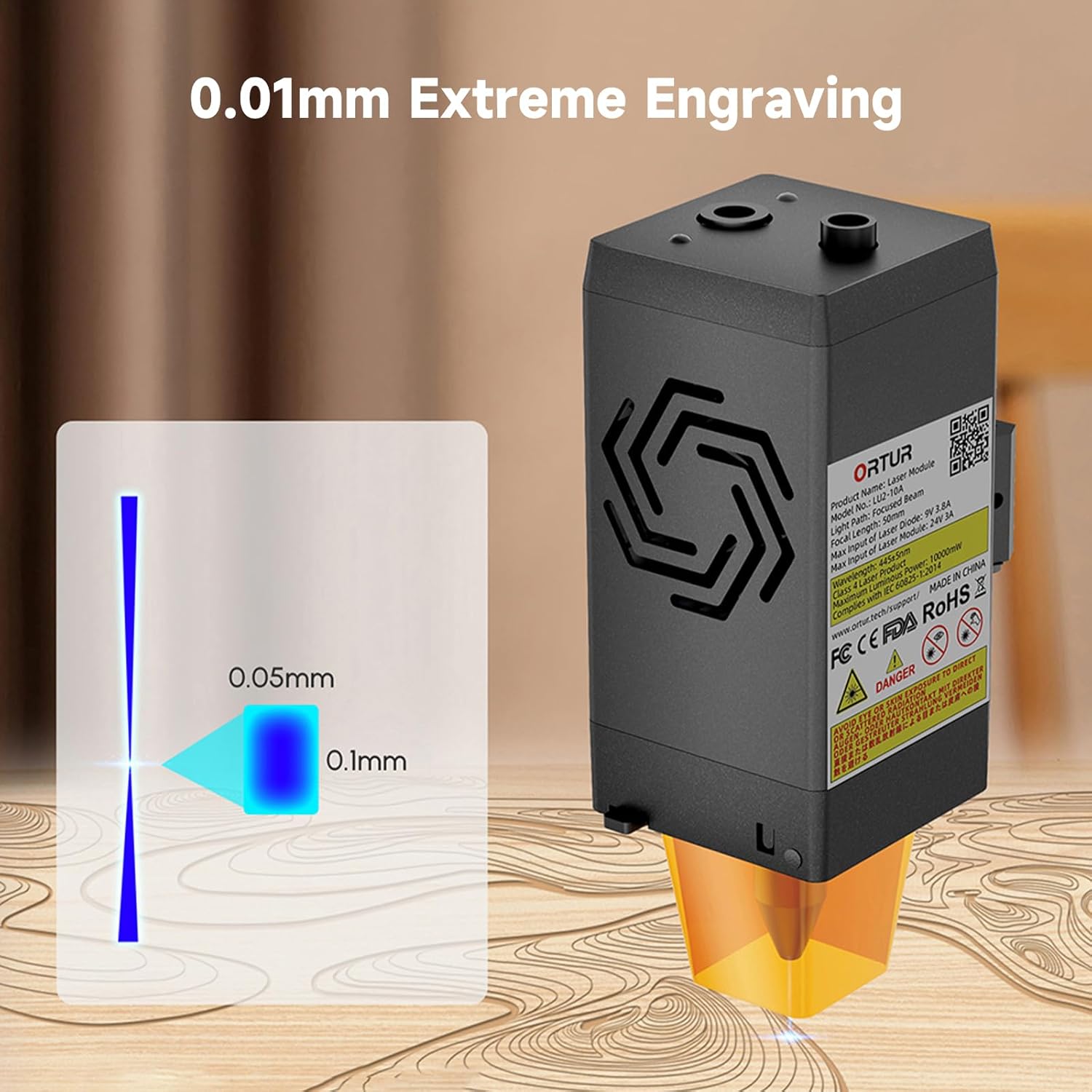
Image: A visual representation of the laser's compressed spot, showing its dimensions of 0.05mm x 0.1mm, which enables extreme precision in engraving.
5. Manteniment
Regular maintenance ensures optimal performance and extends the lifespan of your laser module.
- Neteja de lents: Periodically clean the laser lens with a soft, lint-free cloth and appropriate lens cleaning solution to prevent residue buildup that can affect laser performance.
- Broquet d'assistència d'aire: Ensure the air assist nozzle is clear of debris to maintain effective airflow during cutting and engraving.
- Ventiladors de refrigeració: Check the dual cooling fans for dust accumulation and clean them gently to ensure proper heat dissipation.
- Inspecció del cable: Regularly inspect all cables for any signs of wear, damage, or loose connections.
6. Solució De Problemes
This section addresses common issues you might encounter with your Ortur LU2-10A Laser Module.
| Problema | Causa possible | Solució |
|---|---|---|
| El làser no dispara o la sortida és feble. |
|
|
| Inconsistent engraving/cutting results. |
|
|
| Air assist not functioning. |
|
|
7. Especificacions
| Característica | Detall |
|---|---|
| Dimensions del producte | 4.72 x 1.97 x 1.73 polzades |
| Número de model de l'article | Ortur-LaserMaster2-ProS2 (LU2-10A variant) |
| Pes de l'article | 1.54 lliures |
| Potència de sortida làser | 10000 mW (10 W) |
| Mida del punt comprimit | 0.05 mm x 0.1 mm |
| Velocitat de gravat | Fins a 15000 mm/min |
| Sistema de refrigeració | Dual Fan Cooling |
| Sistema elèctric | 24 V |
| Compatibilitat | Ortur Laser Master 2, 2 S2, 2Pro S2, 3 |
8. Garantia i Suport
For warranty information, technical support, or further assistance, please refer to the official Ortur weblloc web o contacteu directament amb el seu servei d'atenció al client. Conserveu el rebut de compra com a comprovant de compra.
Official Ortur Weblloc: www.ortur.net


