1. Introducció
The CrossBeats Clip M02 is a versatile wireless microphone system designed for high-quality audio recording. It is suitable for various applications including video recording, vlogging, podcasting, and live streaming. This manual provides detailed instructions to help you set up, operate, and maintain your Clip M02 microphone system.

Figure 1: CrossBeats Clip M02 Wireless Microphone system including two transmitters, a receiver, and charging case.
2. Què hi ha a la caixa
Si us plau, comproveu el contingut del paquet per assegurar-vos que hi hagi tots els elements:
- 2 Wireless Microphone Transmitters
- 1 Receiver (Type-C or Lightning, depending on variant)
- 1 Estoig de càrrega
- 1 Cable de càrrega
- 1 Manual d'usuari (aquest document)
3. Característiques del producte
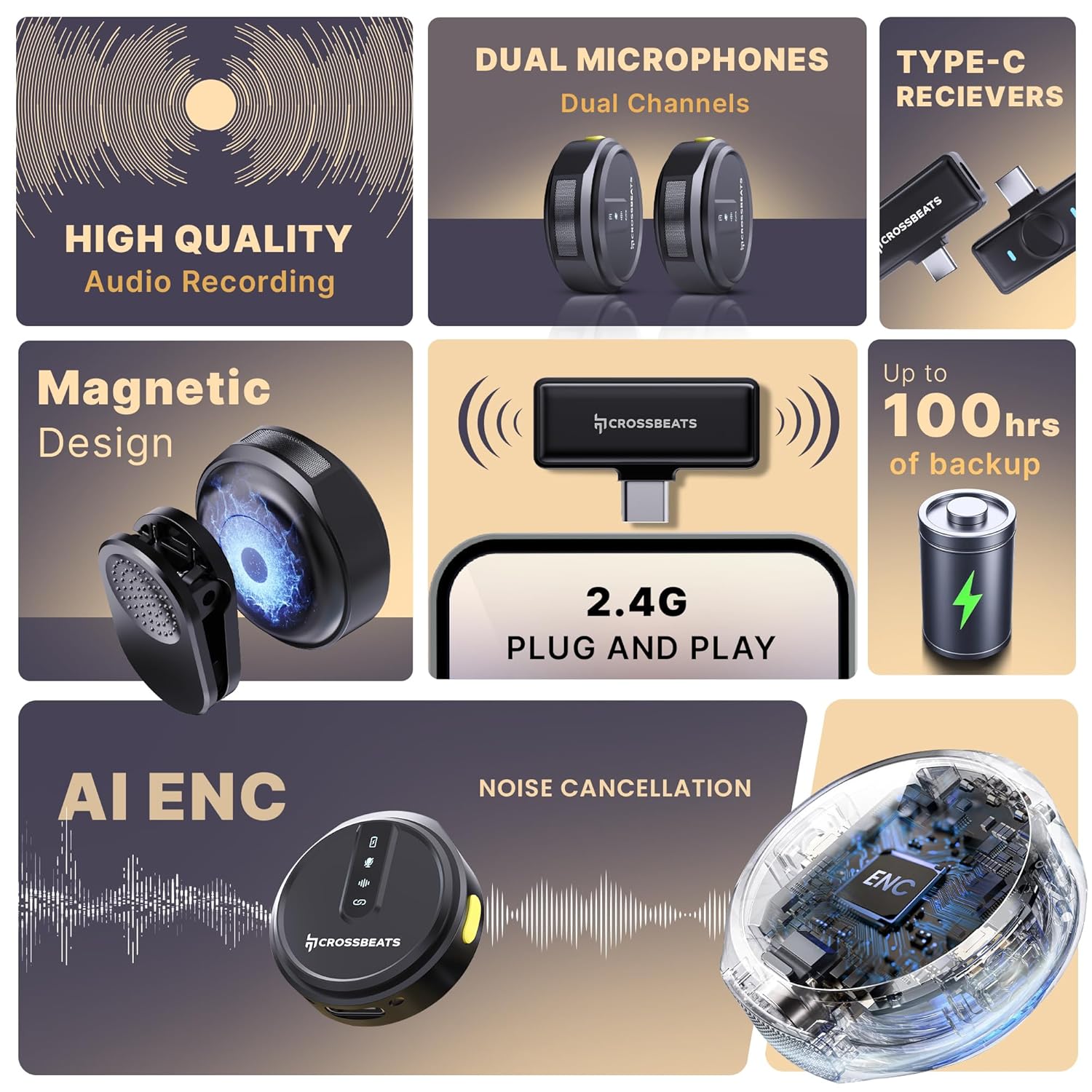
Figure 2: Key features of the CrossBeats Clip M02, highlighting high-quality audio, dual microphones, Type-C receivers, magnetic design, 2.4G plug and play, AI ENC noise cancellation, and up to 100 hours of backup.
- High-Quality Audio Recording: Features ProVocalTM filtration technology, capturing sound at 24-bit depth and a 128dB maximum sound pressure level for clear content.
- 360° Omnidirectional Microphone: Captures surround audio at a sampling rate of 48kHz/24-bit depth. Optimized antenna and noise cancelling design enable stable coverage up to 70 feet indoors or outdoors.
- Plug & Play Wireless Microphone: Offers a Line of Sight (LOS) transmission range of up to 120 meters, making it suitable for various recording scenarios.
- Dual Receivers with AI ENC: Equipped with dual microphones and receivers for seamless dual-channel recording. AI-powered Environmental Noise Cancellation (ENC) with SNR levels below 80dB ensures clear recording by eliminating background noise.
- Llarga vida útil de la bateria: Provides up to 80+ hours of battery life with the charging case, which includes an indicator for quick recharges. Independent Type-C port charging option is also available.
- Disseny lleuger: Each microphone weighs approximately 9 grams, ensuring comfortable wear.
- Multi-App Recording Support: Compatible with various platforms for podcasts, interviews, i creació de continguts.
- iOS & Android Compatibility: Supports both iOS (Lightning connector) and Android (Type-C connector) devices.

Figure 3: Dual receivers with AI Environmental Noise Cancellation for clear audio.

Figure 4: The CrossBeats Clip M02 system indicating up to 100 hours of recording time.

Figure 5: The lightweight design of the microphone.

Figure 6: Multi-app recording support for the microphone.

Figure 7: Compatibility with Android and iOS devices.
4. Guia de configuració
4.1 Càrrega dels dispositius
- Place the microphone transmitters into the charging case.
- Connecteu la funda de càrrega a una font d'alimentació mitjançant el cable USB-C proporcionat.
- The charging indicator on the case will show the charging status. Ensure both transmitters are fully charged before first use.
4.2 Connecting the Receiver to Your Device
- Identify the correct receiver for your device (Type-C for Android/some cameras, Lightning for iOS).
- Plug the receiver directly into the charging port of your smartphone, tablet, or compatible camera.
- L'indicador lluminós del receptor s'il·luminarà, indicant que està encès i llest per a l'emparellament.
4.3 Emparellament dels micròfons
- Ensure the microphone transmitters are charged and powered on.
- The transmitters will automatically attempt to pair with the receiver when both are active.
- A successful connection is indicated by a solid blue light on both the transmitter(s) and the receiver. If the light is blinking, pairing is in progress or has failed.
5. Instruccions de funcionament
5.1 Encès/Apagat
- To power on the microphone transmitter, press and hold the power button for a few seconds until the indicator light illuminates.
- Per apagar-lo, premeu i manteniu premut el botó d'engegada de nou fins que l'indicador lluminós s'apagui.
5.2 Enregistrament d'àudio
- Once the microphone(s) and receiver are successfully paired, open your preferred recording application (e.g., camera app, voice recorder, social media app) on your connected device.
- The audio input will automatically switch to the Clip M02 microphone.
- Start recording within your application.
5.3 Toggling Noise Cancellation (ENC)
- The Clip M02 features Environmental Noise Cancellation (ENC) to reduce background noise.
- To toggle ENC on or off, press the dedicated ENC button on the microphone transmitter once.
- The indicator light will change to confirm the ENC status (refer to product specific light indicators for details).

Figure 8: Microphone with ENC toggle button.
6. Manteniment
- Neteja: Use a soft, dry cloth to clean the microphone transmitters, receiver, and charging case. Avoid using liquids or abrasive cleaners.
- Emmagatzematge: Store the device in a cool, dry place, away from direct sunlight and extreme temperatures. Always store the transmitters in the charging case when not in use.
- Cura de la bateria: Per allargar la durada de la bateria, eviteu descarregar completament el dispositiu amb freqüència. Carregueu el dispositiu regularment, fins i tot si no l'utilitzeu durant períodes prolongats.
7. Solució De Problemes
If you encounter issues with your CrossBeats Clip M02, please refer to the following common solutions:
- Microphone not connecting/no signal:
- Ensure both the transmitter(s) and receiver are fully charged.
- Verify the receiver is securely plugged into your device's port.
- Power cycle both the transmitter(s) and the receiver.
- Check if the indicator lights on both devices are solid blue, indicating a successful connection.
- Try connecting the receiver to a different compatible device to rule out device-specific issues.
- Poor audio quality/excessive background noise:
- Ensure the microphone is positioned correctly, close to the sound source.
- Activate the Environmental Noise Cancellation (ENC) feature by pressing the ENC button on the transmitter.
- Reduce the distance between the transmitter and receiver, and ensure there are no major obstructions.
- Avoid using the microphone in extremely noisy environments if possible.
- La bateria no es carrega:
- Verify the charging cable is securely connected to both the charging case and the power adapter.
- Ensure the power adapter is functional and the power outlet is active.
- Clean the charging contacts on both the transmitters and the charging case.
- Try using a different USB-C charging cable or power adapter.
8. Especificacions
| Característica | Detall |
|---|---|
| Model | Clip M02 |
| Factor de forma del micròfon | Lavalier |
| Patró polar | Omnidireccional |
| Tecnologia de connectivitat | Sense fil |
| Tipus de connector | USB Type-C (and Lightning for iOS variant) |
| Sensibilitat d'àudio | 38 decibels |
| Ràtio senyal / soroll | 75 dB |
| Resposta de freqüència | 20 kHz |
| Impedància | 3 ohms |
| Pes de l'article | 90 grams (paquet total) |
| Dimensions del producte | 6 x 8.2 x 3 centímetres |
| Font d'alimentació | Funciona amb bateria |
| Característiques especials | Indicador lluminós de bateria, clip, funció de silenci, reducció de soroll |
| Dispositius compatibles | Camera, Gaming Consoles, Laptop, Tablet, Voice Recorder, Smartphone |
9. Garantia i Suport
The CrossBeats Clip M02 Wireless Microphone comes with a 12 mesos de garantia des de la data de compra, cobrint defectes de fabricació.
For technical support, warranty claims, or any inquiries, please contact CrossBeats customer service:
- Telèfon: +91 8050056565
- Correu electrònic: support@crossbeats.com
- Adreça del fabricant: CrossBeats, SELLBRITE DIGITAL LLP, Ground Floor Brigade Towers 135 Brigade Road Bangalore India - 560025
Si us plau, conserveu el comprovant de compra per validar la garantia.


