1. Introducció
Thank you for choosing the SwanScout 703A Wireless Charging Station. This device is designed to provide a convenient and efficient charging solution for your compatible iPhone, Apple Watch, and AirPods. Its foldable and portable design makes it ideal for both home and travel use. Please read this manual thoroughly to ensure proper setup and operation.

Image 1: The SwanScout 703A Wireless Charging Station in use, simultaneously charging an iPhone, Apple Watch, and AirPods.
2. Contingut del paquet
- 1 x SwanScout 703A Wireless Charging Station
- 1 x cable de càrrega USB-C
- 1 x Manual d'usuari
Nota: A 20W PD (Power Delivery) adapter is required for fast charging and is NOT included in the package.
3. Característiques del producte
- Càrrega sense fil 3 en 1: Simultaneously charges compatible iPhone, Apple Watch, and AirPods.
- Disseny plegable i portàtil: Easy to carry for travel or storage.
- Adjustable Digital Clock: Features a dimmable clock display for convenience without disturbing sleep.
- Start/Stop Charging Button: Allows control over phone charging, also functions as a phone stand when charging is paused.
- Càrrega compatible amb estoigs: Supports phone cases up to 5mm (0.19 inches) thick.
4. Configuració
- Desembalar: Traieu amb cura tots els components de l'embalatge.
- Connectar l'alimentació: Insert the provided USB-C charging cable into the charging port on the back of the SwanScout 703A. Connect the other end of the cable to a 20W PD power adapter (not included) and plug it into a wall outlet.
- Encès: The digital clock display will illuminate, indicating the device is powered on and ready for use.

Image 2: Connecting the SwanScout 703A to a power adapter for operation.
Video 1: A demonstration of the SwanScout 703A charging station's features and how to use it with an iPhone, Apple Watch, and AirPods.
5. Instruccions de funcionament
5.1 Dispositius de càrrega
- Per a iPhone: Place your compatible iPhone vertically on the main charging pad. Ensure the phone is centered for optimal charging. Phone cases should be less than 5mm (0.19 inches) thick for effective wireless charging.
- Per a Apple Watch: Place your Apple Watch on the magnetic charging module located at the top. The watch will automatically align and begin charging.
- Per a AirPods: Place your AirPods (with wireless charging case) on the base charging area.

Image 3: Illustration of fast charging capabilities for various Apple Watch models.

Image 4: The charging area is designed to accommodate phones with raised camera modules, ensuring stable charging.

Image 5: The SwanScout 703A is suitable for various environments, including nightstands and office desks.
5.2 Adjustable Digital Clock
The integrated digital clock features adjustable brightness to suit your preference, especially in low-light environments.
- Ajusta la brillantor: Press the 'Brightness Touch Button' (represented by a sun icon) on the front of the station to cycle through brightness levels (100%, 50%, 20%, OFF).
- Establir hora: Long press the 'Time Setting' button for 3 seconds to enter hour setting mode. Short press to adjust the hour. Short press again to switch to minute setting. Long press for 3 seconds to exit setting mode.
- 12/24H System Switch: Short press the '12/24H' button once to switch between 12-hour and 24-hour display formats.

Image 6: The dimmable clock feature provides convenience without disrupting sleep.

Imatge 7: Detallada view of the clock adjustment buttons and display.
5.3 Start/Stop Charging Button
The SwanScout 703A includes a button to control phone charging. When your phone is fully charged, press the button to stop charging. This transforms the station into a phone stand. Press it again to resume charging.

Image 8: The dedicated button for starting or stopping phone charging.
6. Compatibilitat
The SwanScout 703A is compatible with a wide range of devices. Please refer to the following for specific models:
6.1 Compatible Phones
- iPhone: Air, 17 Pro Max/Pro/17, 16 Pro Max/Pro/Plus/16, 15 Pro Max/Pro/Plus/15, 14 Pro Max/Pro/Plus/14, 13 Pro Max/Pro/13, 12 Pro Max/Pro/12, 11 Pro Max/Pro/11, SE, XS MAX, X, XR, 8/8 Plus. (Note: Not for iPhone 12 mini/13 mini)
- Samsung: S25/S24/S23/S22/S21/S20/S10 Series (including Ultra/FE models), Note 20/10/9, Z Flip 6/5/4/3/2, Z Fold 6/5/4/3/2.
- Google Pixel: 9 Pro/8/7 (including Pro/XL models), 8a, 7a, 6 Pro/6, 5, 4 (XL), 3 (XL).
- And other Qi-enabled phones.

Image 9: Detailed compatibility list for various smartphone models.
6.2 Compatible Apple Watch Models
- Càrrega ràpida de 5 W: Apple Watch Ultra 3, Ultra 2, Ultra, SE 3, Series 11, Series 10, Series 9, Series 8, Series 7.
- Càrrega de 2.5 W: Apple Watch SE (2nd generation), SE (1st generation), Series 6, Series 5, Series 4, Series 3, Series 2, Series 1.

Image 10: Compatibility and charging speeds for Apple Watch models.
6.3 Compatible Wireless Earbuds
- AirPods: Pro 3, 4 (with Active Noise Cancellation), Pro 2, 3rd generation, 2, 1, Pro.
- Galaxy Buds: 3 Pro, 3, 2 Pro, 2, Buds+, Pro, Live.
- Google Pixel Buds: Pro, 2.
- And all other wireless earbuds with a wireless charging case.

Image 11: Compatibility list for various wireless earbud models.
6.4 Phone Case Considerations
For optimal wireless charging, ensure your phone case is less than 5mm (0.19 inches) thick. Remove any magnetic pads, metal cases, credit cards, or metal rings from your phone case before charging, as these can interfere with the wireless charging function.

Image 12: Guidelines for phone case compatibility with the wireless charger.
7. Manteniment
- Neteja: Disconnect the power before cleaning. Use a soft, dry cloth to wipe the surface of the charging station. Do not use abrasive cleaners or immerse the device in water.
- Emmagatzematge: When not in use, store the charging station in a cool, dry place, away from direct sunlight and extreme temperatures. Its foldable design allows for compact storage.
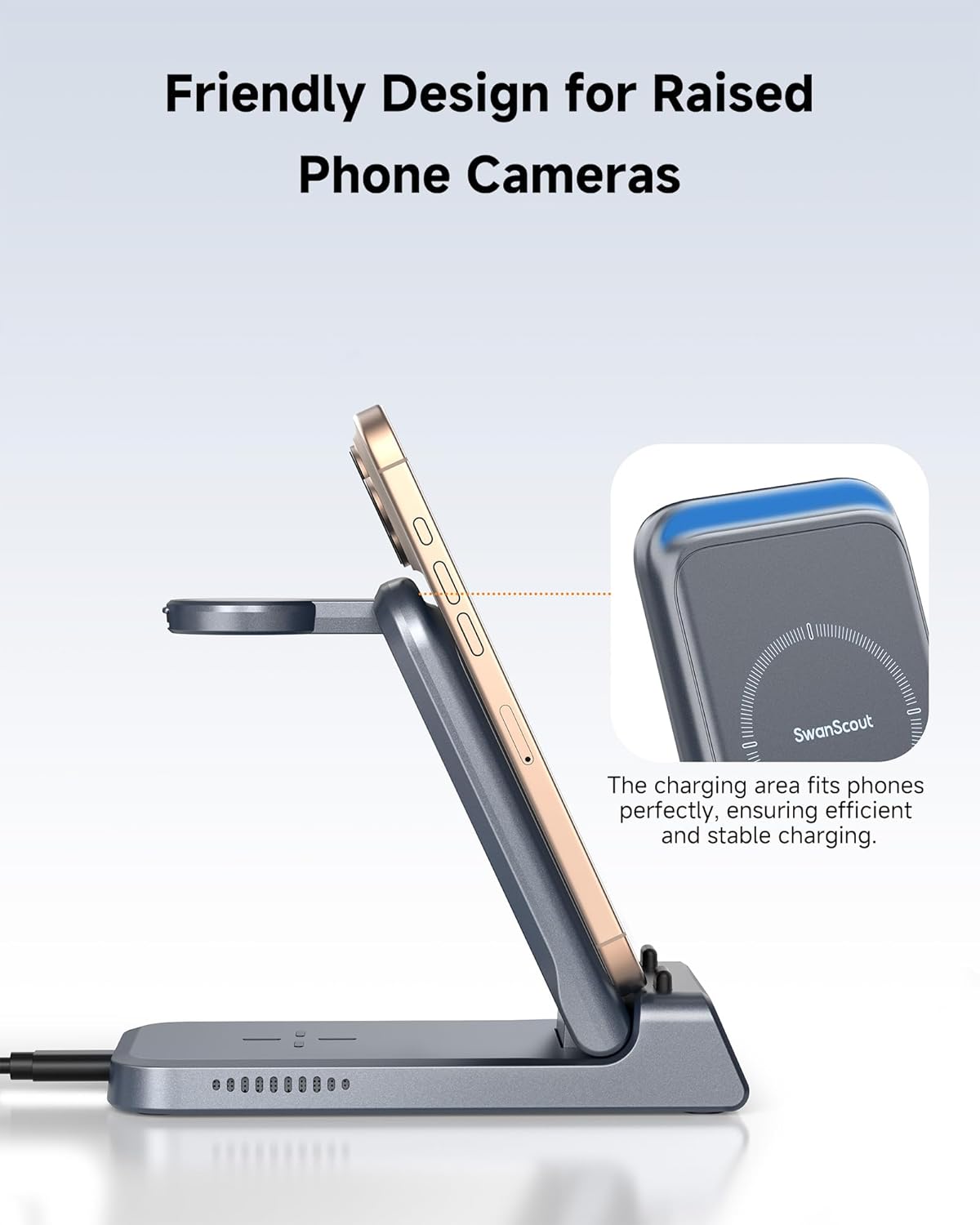
Image 13: The foldable design makes the charging station easy to store and transport.
8. Solució De Problemes
- El dispositiu no es carrega:
- Ensure the charging station is properly connected to a 20W PD power adapter and a working power outlet.
- Verify that your device is wirelessly charging compatible and correctly placed on the charging area.
- Check for any foreign objects or thick cases (over 5mm) that might be obstructing the charging connection.
- Try restarting the charging station by unplugging and re-plugging it.
- Càrrega lenta:
- Confirm you are using a 20W PD power adapter. Lower wattagEls adaptadors electrònics poden provocar velocitats de càrrega més lentes.
- Ensure your device is properly aligned on the charging pad.
- Clock display not working or incorrect:
- Check if the charging station is powered on.
- Refer to section 5.2 for instructions on setting the time.
9. Especificacions
| Característica | Detall |
|---|---|
| Número de model | S10011 |
| Dimensions del paquet | 6.18 x 3.5 x 3.43 polzades |
| Pes de l'article | 8.7 unces |
| Tipus de connector | USB tipus C |
| Entrada Voltage | 9 Volts |
| Ampedat | 2 Amps |
| Ports USB totals | 1 |
| Característiques especials | Fast Charging, Lightweight Design, Multi Device Charging, Portable for Travel, Wireless Charging |
| Color | Technology Gray |
10. Informació de seguretat
- No desmunteu, modifiqueu ni repareu el dispositiu vosaltres mateixos.
- Mantingueu el dispositiu allunyat de l'aigua, la humitat i les altes temperatures.
- Eviteu deixar caure o sotmetre el dispositiu a forts impactes.
- Use only the provided charging cable and a compatible power adapter (20W PD recommended).
- Mantenir fora de l'abast dels nens.
11. Garantia i Suport
SwanScout is committed to providing high-quality products and customer satisfaction. If you encounter any issues or have questions regarding your SwanScout 703A Wireless Charging Station, please contact our customer service team. Refer to the contact information provided in your product packaging or visit the official SwanScout weblloc de suport.
Si us plau, conserveu el comprovant de compra per a qualsevol reclamació de garantia.


