1. Producte acabatview
This manual provides detailed instructions for the installation, operation, and maintenance of your TMEZON A2 Video Doorbell Camera. This device is designed to integrate seamlessly with the TMEZON MZ-IP-V728TW-kit monitor and 1080P video intercom system, enhancing your home security and communication capabilities.
1.1 Característiques clau
- 1080p Video Capture Resolution for clear imaging.
- Two-Way Audio Communication for interactive conversations.
- Suitable for Outdoor Usage.
- Wi-Fi Connectivity for smartphone integration and remote access.
- Compatibility with TMEZON MZ-IP-V728TW-kit monitors and 1080P video intercom systems.
- Supports connection of up to 6 monitors, 2 doorbells, and 2 CCTV cameras within the system.
- Enables dual-way communication between the doorbell camera and indoor monitors, and between multiple indoor monitors.
- Allows call forwarding between all connected monitors.
- Provides the ability to open and unlock doors from any indoor monitor.
1.2 Contingut del paquet
- 1 x TMEZON A2 Doorbell Camera
- Maquinari de muntatge (cargols, ancoratges)
- Manual d'usuari
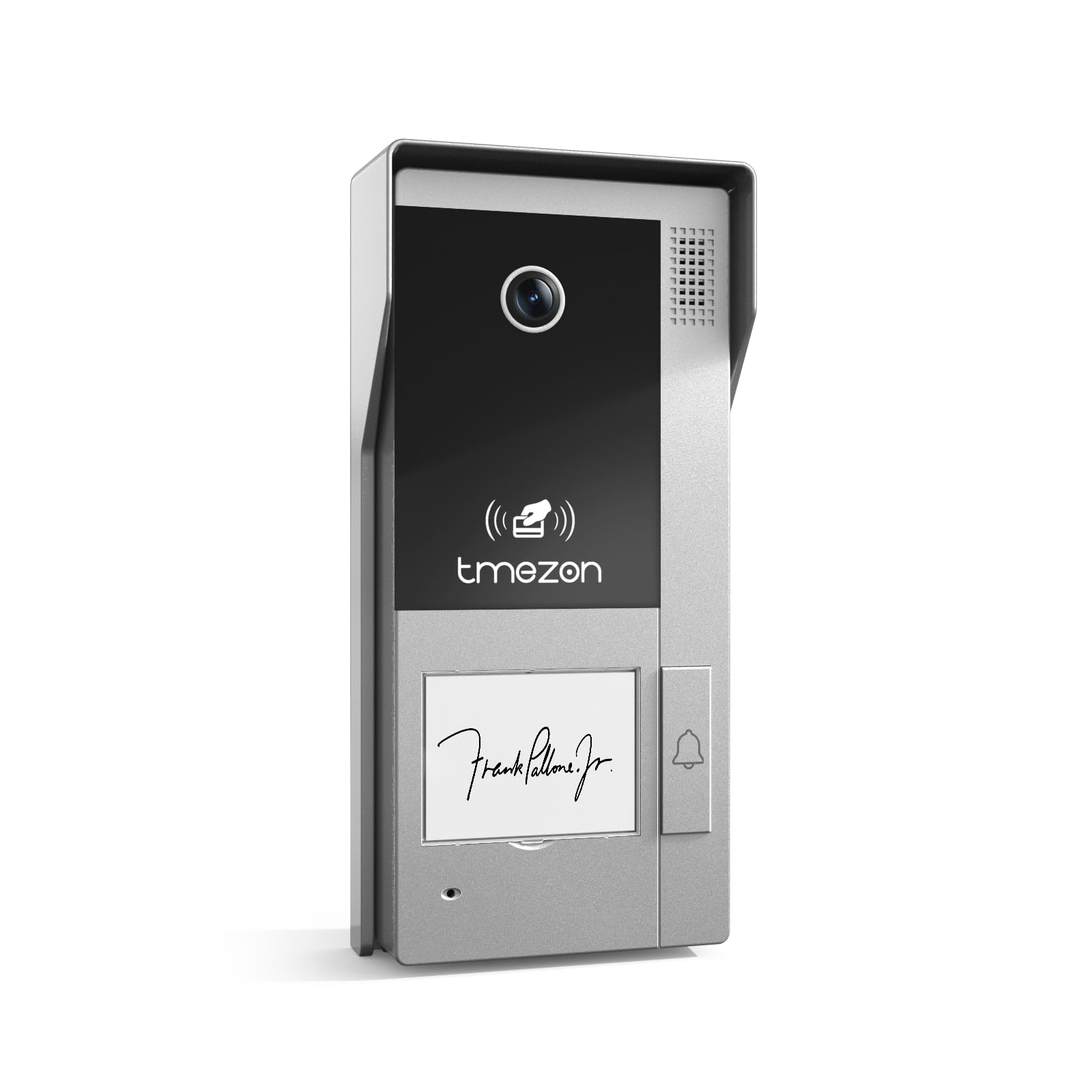
Image: TMEZON A2 Video Doorbell Camera, showing the camera lens, speaker grille, TMEZON logo, and doorbell button.
2. Informació important de seguretat
Llegiu atentament totes les instruccions de seguretat abans de la instal·lació i el funcionament. Si no seguiu aquestes instruccions, podeu patir descàrregues elèctriques, incendis o danys al producte.
- Desconnecteu l'alimentació abans de la instal·lació o el servei.
- Ensure all wiring is performed by a qualified electrician if you are unsure.
- Do not expose the device to extreme temperatures, humidity, or direct water immersion.
- Feu servir només les fonts d'alimentació i els accessoris especificats.
- Mantenir fora de l'abast dels nens.
3. Guia de configuració i instal·lació
3.1 Abans de començar
Ensure you have the necessary tools: screwdriver, drill, wire strippers, and the TMEZON MZ-IP-V728TW-kit monitor. Verify the installation location is suitable for outdoor use and provides a clear view de la zona desitjada.
3.2 Mounting the Doorbell Camera
- Choose a suitable mounting height, typically 48-60 inches (120-150 cm) from the ground, ensuring the camera has an optimal viewangle de ing.
- Use the provided mounting template (if applicable) to mark drill holes on the wall.
- Perforeu forats i inseriu ancoratges de paret si cal.
- Fixeu el suport de muntatge a la paret amb cargols.
- Attach the doorbell camera to the mounting bracket.
3.3 Instruccions de cablejat
The TMEZON A2 Doorbell Camera uses a corded electric power source and wired connectivity for the intercom system.
- Connexió d'alimentació: Connect the power wires from your existing doorbell wiring or a dedicated power supply (refer to your system's power requirements) to the designated terminals on the doorbell camera. Ensure correct polarity.
- Intercom System Connection: Connect the data/signal wires from the doorbell camera to the corresponding input terminals on your TMEZON MZ-IP-V728TW-kit monitor. Consult the wiring diagram provided with your complete intercom system kit for specific connections.
- Door Lock Integration (Optional): If connecting to an electronic door lock, wire the lock control wires from the doorbell camera to the lock mechanism. Test functionality before final assembly.
3.4 System Integration and Initial Configuration
After physical installation and wiring, power on your TMEZON MZ-IP-V728TW-kit monitor and the doorbell camera.
- Monitor Pairing: Follow the instructions in your MZ-IP-V728TW-kit monitor manual to pair the A2 doorbell camera with the indoor monitor.
- Configuració Wi-Fi: Access the monitor's settings to configure Wi-Fi connectivity for the system. This enables smartphone control and remote access.
- Aplicació per a telèfon intel·ligent: Download the TMEZON smartphone application (compatible with Android devices) and follow the in-app instructions to add your doorbell camera and monitor system.
- Expansió del sistema: The system supports connecting up to 6 indoor monitors, 2 doorbell cameras, and 2 CCTV cameras. Refer to your main system manual for adding additional devices.
4. Instruccions de funcionament
4.1 Basic Doorbell Function
When a visitor presses the doorbell button, the indoor monitor(s) will ring, and a live video feed from the A2 camera will display. To answer, press the "Answer" button on the monitor.
4.2 Comunicació d'àudio bidireccional
Once a call is answered, you can speak to the visitor at the door, and they can respond through the doorbell camera's built-in microphone and speaker.
4.3 Remote Access via Smartphone
With the TMEZON app connected, you will receive notifications on your smartphone when the doorbell is pressed. You can view the live feed, communicate with visitors, and unlock the door remotely.
4.4 Intercom System Features
- Monitor-to-Camera Communication: Initiate a call from an indoor monitor to view the doorbell camera feed and communicate with someone at the door.
- Monitor-to-Monitor Communication: If multiple indoor monitors are installed, you can make internal calls between them.
- Desviació de trucades: Calls from the doorbell can be forwarded to other indoor monitors or even to your smartphone if configured.
- Door Unlock Function: From any connected indoor monitor or the smartphone app, you can remotely unlock an integrated electronic door lock.
5. Manteniment
5.1 Neteja
Regularly wipe the camera lens and surrounding area with a soft, damp drap per eliminar la pols i la brutícia. No utilitzeu productes químics agressius ni netejadors abrasius.
5.2 actualitzacions de microprogramari
Check the TMEZON website or your smartphone app periodically for firmware updates. Keeping your device updated ensures optimal performance and security.
5.3 Comprovació del sistema
Periodically test the doorbell, video, and audio functions to ensure proper operation.
6. Solució De Problemes
6.1 No Video Feed on Monitor
- Check power connections to both the doorbell camera and the indoor monitor.
- Verifiqueu que totes les connexions de cablejat siguin segures i correctes segons el diagrama de cablejat.
- Ensure the doorbell camera is properly paired with the monitor.
6.2 No Audio / Poor Audio Quality
- Check microphone and speaker settings on the indoor monitor.
- Ensure there are no obstructions blocking the microphone or speaker on the doorbell camera.
- Verify network connection stability if audio issues occur during remote access.
6.3 Doorbell Not Ringing
- Confirm the doorbell button is functioning correctly.
- Check wiring from the doorbell button to the system.
- Ensure the monitor's ringtone volume is not muted.
6.4 Cannot Connect via Wi-Fi / Smartphone App
- Ensure your home Wi-Fi network is active and the signal strength at the doorbell location is adequate.
- Re-enter Wi-Fi credentials on the monitor.
- Restart your router, monitor, and doorbell camera.
- Ensure the smartphone app is updated to the latest version.
6.5 Door Unlock Function Not Working
- Verify the electronic door lock is correctly wired to the doorbell camera and receiving power.
- Check the lock control settings on the indoor monitor.
- Ensure the lock mechanism itself is functional.
7. Especificacions del producte
| Característica | Detall |
|---|---|
| Marca | TMEZON |
| Nom del model | A2 |
| Ús interior/exterior | A l'aire lliure |
| Dispositius compatibles | Smartphone |
| Font d'alimentació | Elèctric amb cable |
| Protocol de connectivitat | Wi-Fi |
| Tipus de controlador | Android |
| Tipus de muntatge | Muntatge del timbre |
| Resolució de captura de vídeo | 1080p |
| Nombre d'articles | 1 (Doorbell camera) |
| Components inclosos | Càmera de timbre |
| Tecnologia de comunicació sense fils | Wi-Fi |
| Mides de l'article L x W x H | 4 x 2 x 3 polzades |
| Format de captura de vídeo | MOV |
| Recompte d'unitats | 1.0 recompte |
| Dimensions del producte | 4 x 2 x 3 polzades |
| ASIN | B0DS499SND |
| Data de primera disponibilitat | 3 de gener de 2025 |
| Fabricant | TMEZON |
| Usos recomanats per al producte | Seguretat exterior |
| Tecnologia de connectivitat | Amb cable |
| Característica especial | Àudio de 2 vies |
8. Garantia i Suport
For warranty information and technical support, please refer to the official TMEZON website or contact TMEZON customer service directly. Keep your purchase receipt for warranty claims.
Online Support: Visit the TMEZON official weblloc per a preguntes freqüents, guies de resolució de problemes i informació de contacte.


