1. Introducció
This manual provides detailed instructions for the installation, operation, and maintenance of your SINOTIMER DC/AC 24V Digital Programmable Timer Switch, Model 24VDC. This device is designed for precise, programmable control of electrical circuits, offering up to 28 ON/OFF events per day across a 7-day cycle. Please read this manual thoroughly before use to ensure proper function and safety.

Image 1.1: The SINOTIMER 7 Day Digital Programmable Timer Switch.
2. Informació de seguretat
- Risc elèctric: Installation and wiring should only be performed by qualified personnel. Ensure power is disconnected before any installation or maintenance.
- Voltage Compatibilitat: This device operates on DC/AC 24V. Connecting to an incorrect voltage supply may damage the unit and pose a safety risk.
- Capacitat de càrrega: Do not exceed the maximum load rating of 10A at 250VAC (2000 watts). For higher loads, use an external contactor or relay.
- Medi ambient: Install the timer in a dry, protected environment. While the unit has some dustproof features, direct exposure to water or extreme temperatures should be avoided.
- Bateria: The internal battery is for memory backup only. Do not attempt to charge or replace it unless specified in the maintenance section.
3. Contingut del paquet
Verifiqueu que tots els elements siguin presents al paquet:
- 1x SINOTIMER Digital Programmable Timer Switch (Model: 24VDC)
- 1 x suport de muntatge
- 1x Funda antipols
- 1x CR2032 Battery (pre-installed or separate)
- 1x Disassembly Tool (small screwdriver)
- 2x cargols de muntatge
- 5x Spade Connecting Wires
- 1x Manual d'usuari (aquest document)
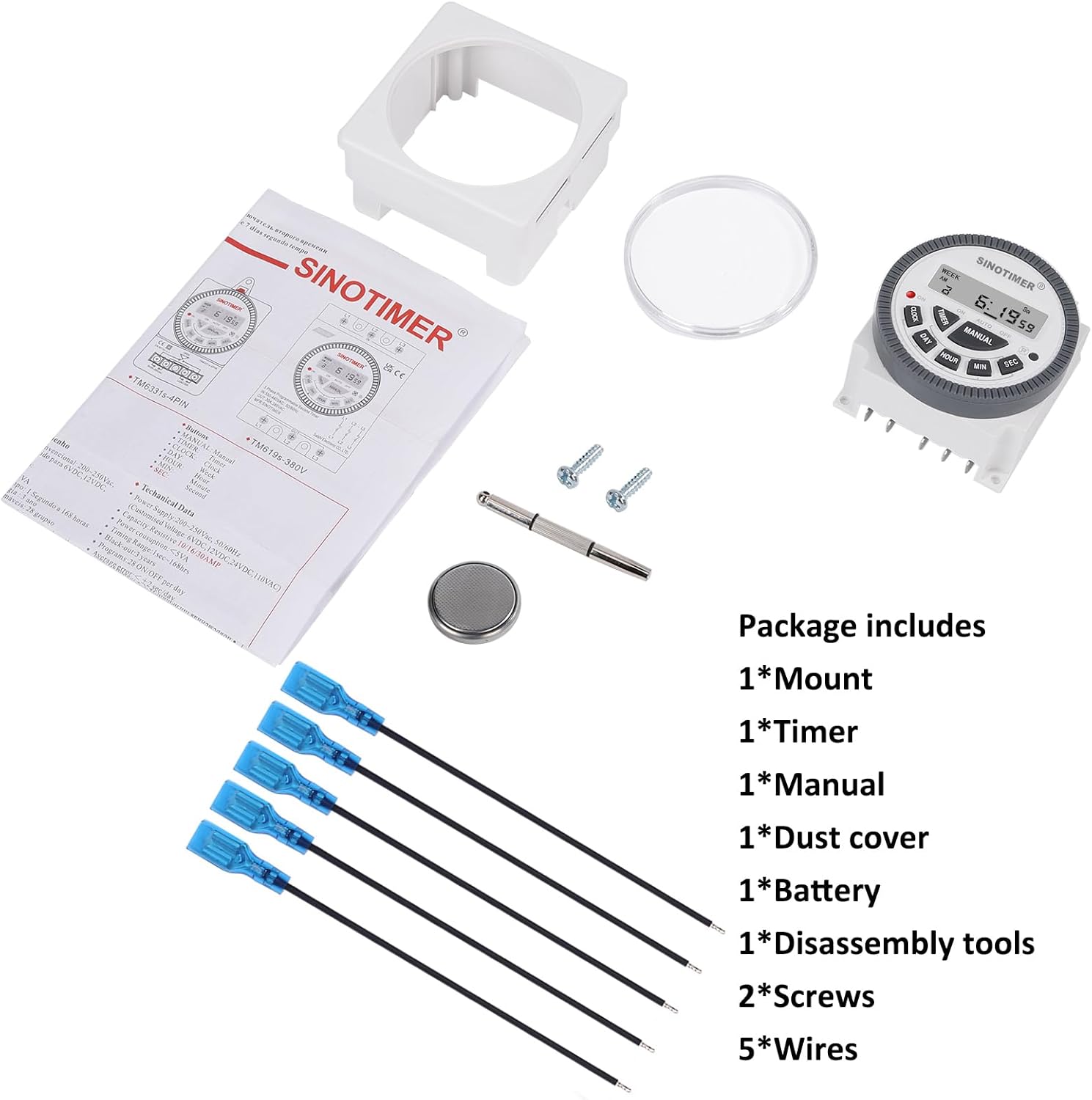
Image 3.1: Visual representation of the package contents, including the timer, mount, manual, dust cover, battery, disassembly tool, screws, and wires.
4. Producte acabatview & Característiques
The SINOTIMER DC/AC 24V Digital Programmable Timer Switch is a versatile device designed for automating various electrical applications. Its compact design and digital display ensure ease of use and integration into control panels.
Característiques principals:
- Programabilitat de 7 dies: Allows for up to 28 ON/OFF events per day, with flexible programming blocks for daily, weekly, or custom schedules.
- Pantalla digital: Clear LCD for time, day, and program status.
- Bateria interna de reserva: Retains program settings during power outages.
- SPDT Output: Single Pole Double Throw relay output (1 Normally Open + 1 Normally Closed contact).
- Alta capacitat de càrrega: Rated for up to 10A at 250VAC, 2000 watts.
- Format 12/24 hores: User-selectable time display format.
- Disseny a prova de pols: Enhanced durability for various environments.

Imatge 4.1: acabatview of the timer's key features, including its robust design and advanced functionality.
5. Especificacions
| Característica | Especificació |
|---|---|
| Model | 24VDC (TM-619) |
| Entrada Voltage | DC/AC 24V |
| Tipus de sortida | SPDT (1NO+1NC) |
| Corrent de càrrega màxima | 10A @ 250VAC, 2000W |
| Esdeveniments programables | Fins a 28 encesos/apagats per dia |
| Format horari | Seleccionable de 12 hores / 24 hores |
| Còpia de seguretat de la bateria | Internal CR2032 (for program memory) |
| Dimensions (P x A x A) | 1.77" x 2.83" x 2.83" (45 mm x 72 mm x 72 mm) |
| Pes | 5.3 unces (aprox. 150 g) |
| Material | Metall, plàstic |

Image 5.1: Dimensional drawing and terminal layout of the timer switch.
6. Instal·lació i cablejat
ADVERTIMENT: Disconnect all power before installation to prevent electric shock or equipment damage.
6.1 Muntatge
- Select a suitable location for mounting, ensuring it is protected from moisture and excessive heat.
- Attach the mounting bracket to a flat surface using the provided screws.
- Slide the timer switch into the mounting bracket until it clicks securely into place.
- Optionally, install the clear dust cover over the timer face for added protection.
6.2 Instruccions de cablejat
The timer switch features 5 spade connecting terminals. Refer to the wiring diagram below and the labels on the back of the unit for correct connections.
- Terminals 1 i 2: Power Input (DC/AC 24V). Connect your 24V power supply here.
- Terminal 3: Common (COM) for the relay output.
- Terminal 4: Normally Open (NO) contact for the relay output. The circuit connected here will be ON when the timer is active.
- Terminal 5: Normally Closed (NC) contact for the relay output. The circuit connected here will be OFF when the timer is active.

Image 6.1: Simplified wiring diagram for the timer switch.

Imatge 6.2: Ex.ample of spade connectors attached to the timer terminals.
7. Instruccions de funcionament
After successful installation and power connection, the timer display should illuminate. If not, ensure power is supplied correctly and the internal battery is properly seated.
7.1 Configuració inicial (primer ús)
- Restablir: Press the 'R' (Reset) button with a pointed object (e.g., the provided disassembly tool) to clear all previous settings. The display will show '0:00'.
- Estableix l'hora actual:
- Premeu el botó RELOJ botó.
- Premeu DIA to select the current day of the week (Mo, Tu, We, Th, Fr, Sa, Su).
- Premeu HORA per configurar l'hora actual.
- Premeu MIN per configurar el minut actual.
- Premeu SEC to set the current second (optional, for precise synchronization).
- To switch between 12-hour (AM/PM) and 24-hour format, press RELOJ i DIA simultàniament.
7.2 Programació d'esdeveniments ON/OFF
The timer supports up to 28 ON/OFF programs. Each program consists of an ON time and an OFF time.
- Premeu el botó TEMPORIZADOR button. The display will show '1 ON'. This is the first ON program.
- Premeu DIA to select the day(s) for this program. You can choose a single day, weekdays, weekends, or various combinations. Keep pressing DIA per anar ciclant entre les opcions.
- Premeu HORA per configurar l'hora d'encesa desitjada.
- Premeu MIN per ajustar el minut d'encesa desitjat.
- Premeu TEMPORIZADOR again. The display will show '1 OFF'. This is the first OFF program.
- Repeat steps 2-4 to set the desired OFF day(s), hour, and minute for this program.
- Continueu prement TEMPORIZADOR to cycle through '2 ON', '2 OFF', up to '28 ON', '28 OFF', setting each program as needed.
- Després de configurar tots els programes desitjats, premeu el botó RELOJ button to return to the current time display. The programs are now saved.
7.3 Anulació manual
El MANUAL button allows you to override the programmed schedule temporarily or permanently.
- Premeu MANUAL to cycle through the following modes:
- ACTIVITAT: Output is continuously ON, ignoring programs.
- AUTO ON: Output is currently ON, following programs.
- APAGAT AUTOMÀTIC: Output is currently OFF, following programs.
- DESACTIVAT: Output is continuously OFF, ignoring programs.
- Seleccioneu AUTO ON or AUTO DESACTIVAT to resume programmed operation.
8. Manteniment
8.1 Neteja
Netegeu la unitat amb un drap suau i sec. No utilitzeu productes de neteja abrasius ni dissolvents.
8.2 Substitució de la bateria
The internal CR2032 battery provides backup for program memory. If the display becomes dim or programs are lost during power outagés possible que calgui substituir la bateria.
- ADVERTIMENT: Disconnect main power to the timer before replacing the battery.
- Localitzeu el compartiment de la bateria a la part posterior de la unitat.
- Obriu amb cura la tapa del compartiment.
- Remove the old CR2032 battery and insert a new one, ensuring correct polarity (+ side up).
- Tanqueu la tapa del compartiment de la bateria.
- After replacement, perform an initial setup (Section 7.1) to reset and set the current time.

Image 8.1: Location of the replaceable CR2032 battery.
9. Solució De Problemes
| Problema | Causa possible | Solució |
|---|---|---|
| La pantalla està en blanc o tènue | No power supply; Incorrect wiring; Dead internal battery. | Check 24V power input (Terminals 1 & 2). Verify wiring. Replace CR2032 battery. |
| Programs are not running | Timer is in Manual ON/OFF mode; Incorrect program settings; Incorrect current time. | Premeu MANUAL until 'AUTO ON' or 'AUTO OFF' is displayed. Review program settings (Section 7.2). Set current time correctly (Section 7.1). |
| Output does not switch ON/OFF | Incorrect output wiring; Load exceeds capacity; Faulty relay. | Verify output wiring (Terminals 3, 4, 5) to your load. Ensure load does not exceed 10A/2000W. If issues persist, contact support. |
| El temps és inexacte | Internal clock drift; Battery low. | Reset and set time again. Consider replacing the internal battery if drift is significant. |
10. Garantia i assistència
For warranty information and technical support, please refer to the documentation provided with your purchase or contact SINOTIMER customer service through the retailer where the product was purchased. Please have your product model (24VDC) and purchase date available when contacting support.
Recursos en línia: For additional information, FAQs, or to view other SINOTIMER products, visit the official SINOTIMER store or weblloc.


