Introducció
The Kingstar Smart Ring is a compact and lightweight wearable device designed to help you monitor and manage your health and fitness data directly from your fingertip. It seamlessly integrates with a dedicated mobile application to provide real-time insights into your sleep, activity, and various health metrics. This manual provides essential information for setting up, operating, maintaining, and troubleshooting your smart ring.
Configuració
1. Què s'inclou
Abans de començar, assegureu-vos que tots els components estiguin presents al paquet:
- Kingstar Smart Ring
- Caixa de càrrega magnètica
- Cable de càrrega USB
- Japanese User Manual
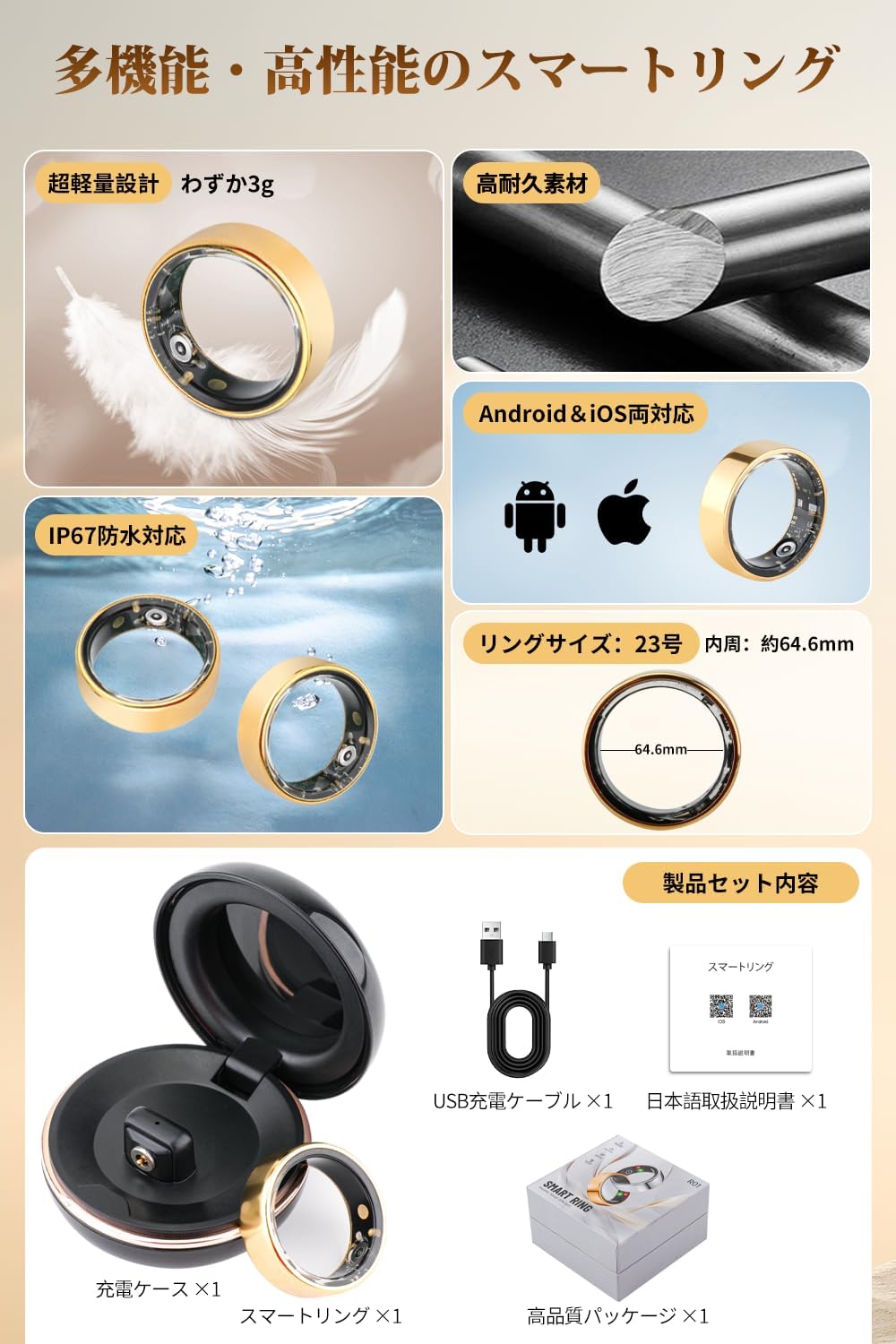
Image: The Kingstar Smart Ring, its magnetic charging case, USB charging cable, and the included user manual.
2. Càrrega inicial
For optimal performance, fully charge your smart ring before first use. Place the ring into the magnetic charging case, ensuring proper alignment. Connect the USB charging cable to the case and a power source (e.g., computer USB port or wall adapter). A full charge takes approximately 1.5 hours and provides up to 7 days of battery life.

Image: The Kingstar Smart Ring placed inside its magnetic charging case, connected via USB for charging.
3. Descàrrega i emparellament de l'aplicació
Download the dedicated Kingstar Smart Ring application from your device's app store (compatible with Android and iPhone). Follow the in-app instructions to create an account and pair your smart ring via Bluetooth. Ensure Bluetooth is enabled on your smartphone during the pairing process.
4. Talla
The Kingstar Smart Ring is available in four sizes to ensure a comfortable and accurate fit:
- Size #9 (Circumference 59.6mm)
- Size #10 (Circumference 62.4mm)
- Size #11 (Circumference 64.9mm)
- Size #12 (Circumference 67.5mm)
Choose the size that fits snugly but comfortably on your finger for accurate data collection.

Imatge: Una imatge detallada view of the Kingstar Smart Ring and its compact magnetic charging case.
Instruccions de funcionament
1. Ús general
Wear the Kingstar Smart Ring on your finger throughout the day and night to automatically record health and activity data. The ring is designed to be ultra-lightweight (approx. 3g) for maximum comfort, making it easy to forget you're wearing it.
2. Monitorització de la salut
The smart ring continuously monitors various health metrics, which are then synchronized with the dedicated app for detailed analysis:
- Seguiment del son: Records deep sleep, light sleep, REM sleep, and awake times. The app provides a graphical representation of your sleep cycles and offers insights for improvement.
- Monitorització de la freqüència cardíaca: Registra la freqüència cardíaca durant el dia i durant l'exercici.
- Saturació d'oxigen en sang: Measures blood oxygen levels to provide a comprehensive view de la teva salut.

Image: A user wearing the Kingstar Smart Ring, with a smartphone displaying the companion app's health data interface, including activity and fitness assessment.

Image: The sleep tracking screen within the app, showing detailed sleep patterns, sleep duration, and heart rate variability during sleep.

Image: The app's real-time health management interface, showing current heart rate and blood oxygen saturation, as well as a log of historical heart rate readings.
3. Seguiment d'activitat
The smart ring supports 8 different exercise modes to track your workouts and daily activity:
- Córrer
- Ciclisme
- Ioga
- Escalada
- Golf
- I més...
In each mode, the ring records specific data such as heart rate, calories burned, and exercise routes (when GPS is enabled via the connected smartphone). It also functions as a pedometer, tracking your daily steps. All activity data is visualized in the app, allowing you to track your progress daily, weekly, and monthly.

Image: The app's activity tracking section, displaying icons for various sports modes and a circular graph showing daily steps, activity distance, and calorie consumption.
Manteniment
1. Neteja
To maintain the accuracy and longevity of your smart ring, regularly clean it with a soft, dry cloth. Avoid using abrasive materials or harsh chemicals.
2. Resistència a l'aigua
The Kingstar Smart Ring features an IP67 waterproof rating, meaning it is resistant to splashes, rain, and brief immersion in water. You can wear it during handwashing or in light rain without concern. However, it is not recommended for swimming, showering, or prolonged water activities.
Resolució de problemes
1. Ring Not Connecting to App
- Assegureu-vos que el Bluetooth estigui habilitat al vostre telèfon intel·ligent.
- Make sure the ring is charged.
- Restart both the ring (by placing it in the charging case and removing it) and the app.
- Try unpairing and re-pairing the device in the app's settings.
2. Inaccurate Data Readings
- Ensure the ring is worn snugly on your finger, not too loose or too tight.
- Clean the sensors on the inside of the ring to remove any dirt or debris.
- Assegureu-vos que l'aplicació estigui actualitzada a la darrera versió.
3. Durada curta de la bateria
- Ensure the ring is fully charged (1.5 hours).
- Eviteu les temperatures extremes, que poden afectar el rendiment de la bateria.
- Si el problema persisteix, poseu-vos en contacte amb el servei d'atenció al client.
Especificacions
| Marca | Kingstar |
| Número de model | R01-GD |
| Connectivitat | Bluetooth |
| Durada de la bateria | Up to 7 days (1.5 hours charging time) |
| Classificació impermeable | IP67 |
| Ring Weight | Aprox. 3 g |
| Dimensions del paquet | 7.6 x 7.6 x 4.2 cm; 90 g |
| Mides disponibles | #9 (59.6mm), #10 (62.4mm), #11 (64.9mm), #12 (67.5mm) |
Garantia i Suport
For detailed warranty information and customer support, please refer to the included Japanese user manual. If you encounter any issues not covered in this manual, please contact Kingstar customer service through the contact information provided in the manual or on the official product weblloc.


