1. Introducció
This manual provides detailed instructions for the installation, operation, and maintenance of your 70mai Magnetic CPL (Circular Polarizing Lens) Filter, designed specifically for the 70mai 4K Omni X800 Dash Cam. The CPL filter is engineered to enhance video clarity by reducing glare and reflections, ensuring optimal recording quality in various lighting conditions.

Image 1.1: The 70mai Magnetic CPL Filter, a circular lens accessory designed to attach to the dash cam.
2. Configuració i instal·lació
The 70mai Magnetic CPL Filter features a snap-on design for quick and secure attachment to your 4K Omni X800 Dash Cam. The magnetic system ensures precise alignment without the need for tools.
2.1 Magnetic Precision Alignment
The integrated magnetic system facilitates perfect lens alignment in approximately 2 seconds. Strong neodymium magnets are designed to withstand vibrations up to 2G, preventing misalignment even on uneven road surfaces.
2.2 Passos d'instal·lació
Follow these steps for tool-free installation:
- Traieu la pel·lícula protectora: Carefully peel off any protective film from the CPL filter.
- Install Clip onto Lens Axis: Position the CPL filter's clip onto the lens housing of your 70mai 4K Omni X800 Dash Cam.
- Magnetic Snap for Secure Fit: Allow the magnetic mechanism to snap the filter securely into place. The filter can be removed in approximately 3 seconds when needed.

Image 2.1: Visual guide demonstrating the three-step installation process for the CPL filter onto the dash cam lens.
3. Operation and Benefits
The CPL filter optimizes your dash cam's recording capabilities by addressing common visual challenges encountered during driving.
3.1 Glare-Free Forensic Clarity
The multi-layer polarizing film effectively eliminates reflections from the windshield. This feature is crucial for capturing clear details such as license plates and road signs, especially in challenging backlit conditions like sunrise or sunset. Enhanced clarity is vital for insurance claims and accident evidence.

Image 3.1: A side-by-side comparison illustrating how the CPL filter significantly reduces glare on a car's rear window, revealing clearer details.
3.2 Elimination of Interior Reflections
Advanced polarizing technology minimizes reflections from the dashboard and windshield interior. This ensures that crucial details of the road ahead are captured without visual distractions caused by internal reflections.
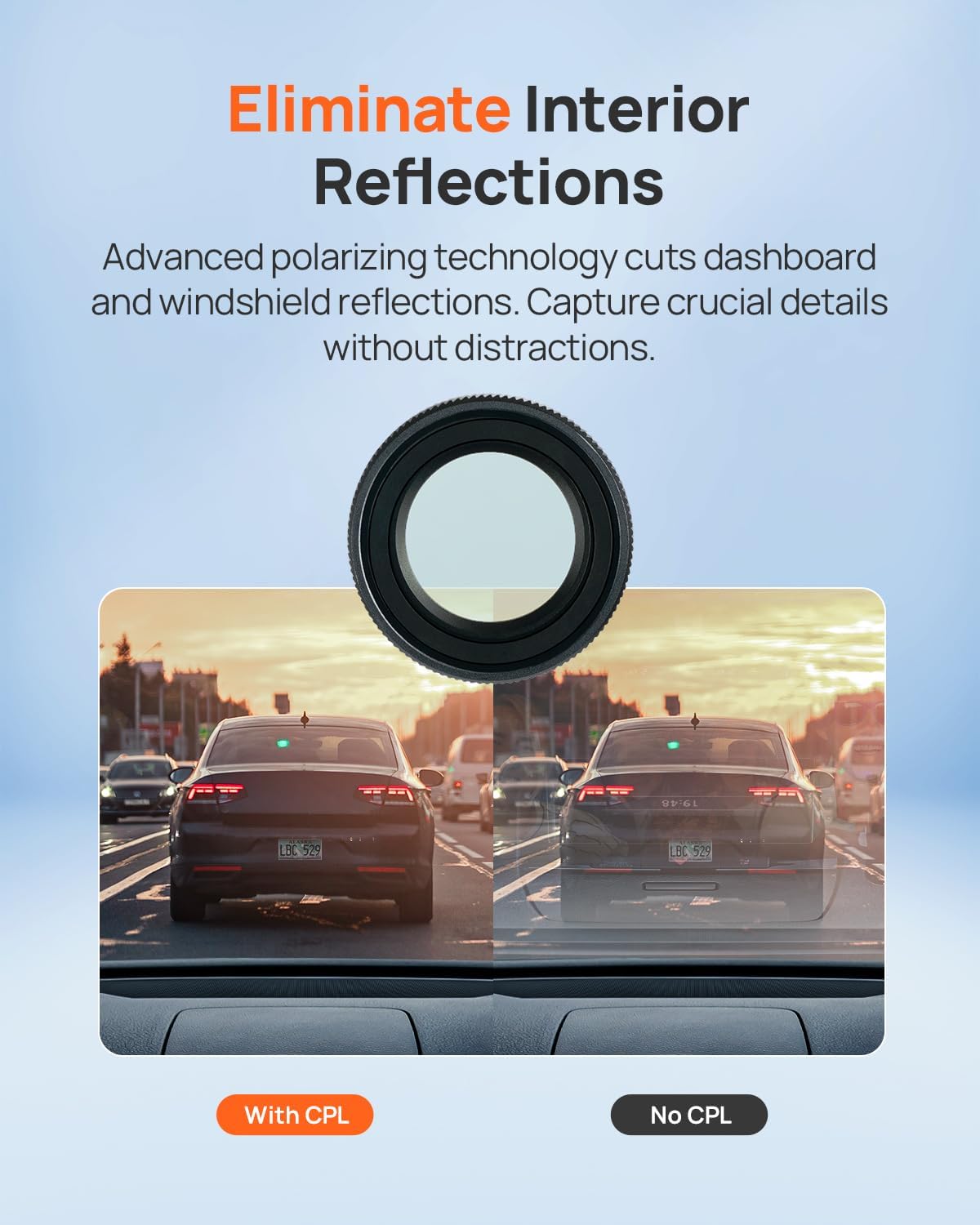
Image 3.2: A visual demonstration showing the reduction of dashboard and windshield reflections in dash cam footage when the CPL filter is used.
3.3 True-Color Enhancement
The optical glass construction of the filter maintains the native 4K resolution of your dash cam while simultaneously boosting color accuracy. It also contributes to reducing asphalt glare, which can improve visibility during night driving.

Imatge 3.3: A view through the CPL filter, illustrating improved color tone, better detail, and reduced light reflection in a driving scene.
3.4 Filter Adjustment
The CPL filter can be rotated to fine-tune the polarizing effect. For optimal results, adjust the filter while viewing the dash cam's live feed on its screen or via the connected mobile application to achieve the desired level of glare reduction and clarity.
4. Manteniment
Proper care ensures the longevity and performance of your CPL filter.
4.1 Scratch-Resistant Armor
The filter features a 9H hardness coating, providing resistance against scratches from daily handling and cleaning. It has been tested to withstand over 500 attachment cycles without magnet degradation and operates reliably in extreme temperatures ranging from -40°F to 200°F.

Image 4.1: A visual representation of the CPL filter's scratch-resistant surface, shown with a utility knife blade against it.
4.2 Dust-Proof & Easy-Clean Surface
A hydrophobic nano-coating repels dust and water droplets, simplifying cleaning. A single wipe is typically sufficient to restore crystal clarity. The filter's optical performance is maintained through over 500 cleaning cycles.

Image 4.2: Two images demonstrating the CPL filter's easy-clean properties: one showing water droplets beading on the surface, and another showing dust being easily wiped away.
4.3 Superior Quality Craftsmanship
The filter is constructed with multiple layers, including a superhard water-resistant thin film and an antireflection film, all crafted from optical glass to ensure superior image quality and durability.

Image 4.3: A diagram illustrating how light interacts with the multi-layered CPL filter, showing the reduction of light reflection and the path of filtered light.
5. Solució De Problemes
5.1 Rainbow Effect with Tinted Windshields
Some users with tinted windshields may observe a 'rainbow effect' or unusual patterns when using the CPL filter. This phenomenon is due to the interaction between the polarizing film of the CPL filter and the existing tint on the windshield. If this occurs, consider removing the filter or testing it in a vehicle without windshield tint to determine if the tint is the cause.
5.2 General Clarity Issues
- Ensure the filter is clean and free from dust, smudges, or water droplets. Refer to the Maintenance section for cleaning instructions.
- Verify that the filter is properly aligned and securely attached to the dash cam lens.
- Rotate the filter while observing the dash cam's live view to find the optimal polarization angle for your current lighting conditions.
6. Especificacions
| Dimensions del producte | 2.73 x 0.54 x 3.2 polzades |
| Pes de l'article | 0.634 unces |
| Material | Vidre òptic |
| Descripció del recobriment | Recobriment de duresa 9H |
| Tipus d'efecte de filtre de foto | Polaritzador |
| Nivell de resistència a l'aigua | Impermeable |
| Nombre de peces | 1 |
7. Garantia i Suport
70mai is committed to providing reliable products and customer service.
7.1 Informació de la garantia
- Garantia del producte: This product comes with an 18-month warranty from the date of purchase.
- Política de devolució: A 30-day return policy is available for this product.
7.2 Atenció al client
Per a qualsevol consulta o assistència, poseu-vos en contacte amb el nostre equip d'atenció al client:
- Correu electrònic: ajuda@70mai.com
- Telèfon: 1-877-746-6088 (Monday - Friday, 9 AM - 6 PM PST)
- Disponibilitat: Hi ha atenció al client disponible les 24 hores.


