1. Introducció
Thank you for choosing the Hiwill HiElite A41 4.1 Dolby Atmos Soundbar. This manual provides essential information for setting up, operating, and maintaining your new audio system. Please read it thoroughly before use to ensure optimal performance and safety.
The HiElite A41 system is designed to deliver a powerful and immersive audio experience, featuring Dolby Atmos technology, a wired subwoofer, and two wired front surround speakers for a dynamic 4.1 channel sound configuration.

Image 1.1: The Hiwill HiElite A41 4.1 Dolby Atmos Soundbar system, including the main soundbar unit, wired subwoofer, and two wired front surround speakers, positioned in front of a television.
2. Informació de seguretat
- Llegiu atentament totes les instruccions abans d'utilitzar el dispositiu.
- Conserveu aquest manual com a referència futura.
- No exposeu la barra de so a la pluja, la humitat ni a temperatures extremes.
- Assegureu-vos una ventilació adequada al voltant de la unitat per evitar el sobreescalfament.
- No obstruïu cap obertura de ventilació.
- Utilitzeu només accessoris/accessoris especificats pel fabricant.
- Desendolleu l'aparell durant les tempestes amb llamps o quan no s'utilitzi durant llargs períodes.
- Demaneu tot el servei a personal de servei qualificat.
- Aquest producte no és impermeable. Evitar el contacte amb líquids.
3. Contingut del paquet
Si us plau, comproveu que tots els articles estiguin inclosos al vostre paquet:
- Soundbar Unit
- Subwoofer amb cable
- 2 Wired Front Surround Speakers
- Adaptador d'alimentació
- Cable estèreo de 3.5 mm
- ARC Cable (HDMI)
- Cable òptic
- Control remot
- 2 piles AAA (per al comandament a distància)
- Kit de muntatge a la paret
- Manual d'usuari (aquest document)
4. Producte acabatview
4.1 Característiques clau
- 4.1 Channel Dolby Atmos Sound: Experience immersive, multi-dimensional audio with precise sound localization.
- Potència màxima de 300 W: Delivers powerful and clear audio for movies, music, and games.
- High-Tech Alloy Speakers: Features aluminum-magnesium alloy diaphragms for deeper bass, clearer treble, and precise vocals.
- HXS-Processing ClearVoice: Enhances dialogue clarity and refines sound for an immersive listening experience.
- 5.25-inch Wired Subwoofer: Provides robust, wall-shaking bass.
- 2 Wired Front Surround Speakers: Expandeix els sonstage for a more enveloping audio environment.
- Adjustable Bass and Treble: Customize your audio preferences.
- Múltiples opcions de connectivitat: HDMI ARC, Optical, 3.5mm Stereo, and Bluetooth.
4.2 Components
The HiElite A41 system consists of a main soundbar, a wired subwoofer, and two wired front surround speakers.

Image 4.1: Illustration of the 4.1 channel Dolby Atmos sound system, demonstrating how sound is projected from the soundbar, subwoofer, and two front surround speakers to create an immersive audio field.
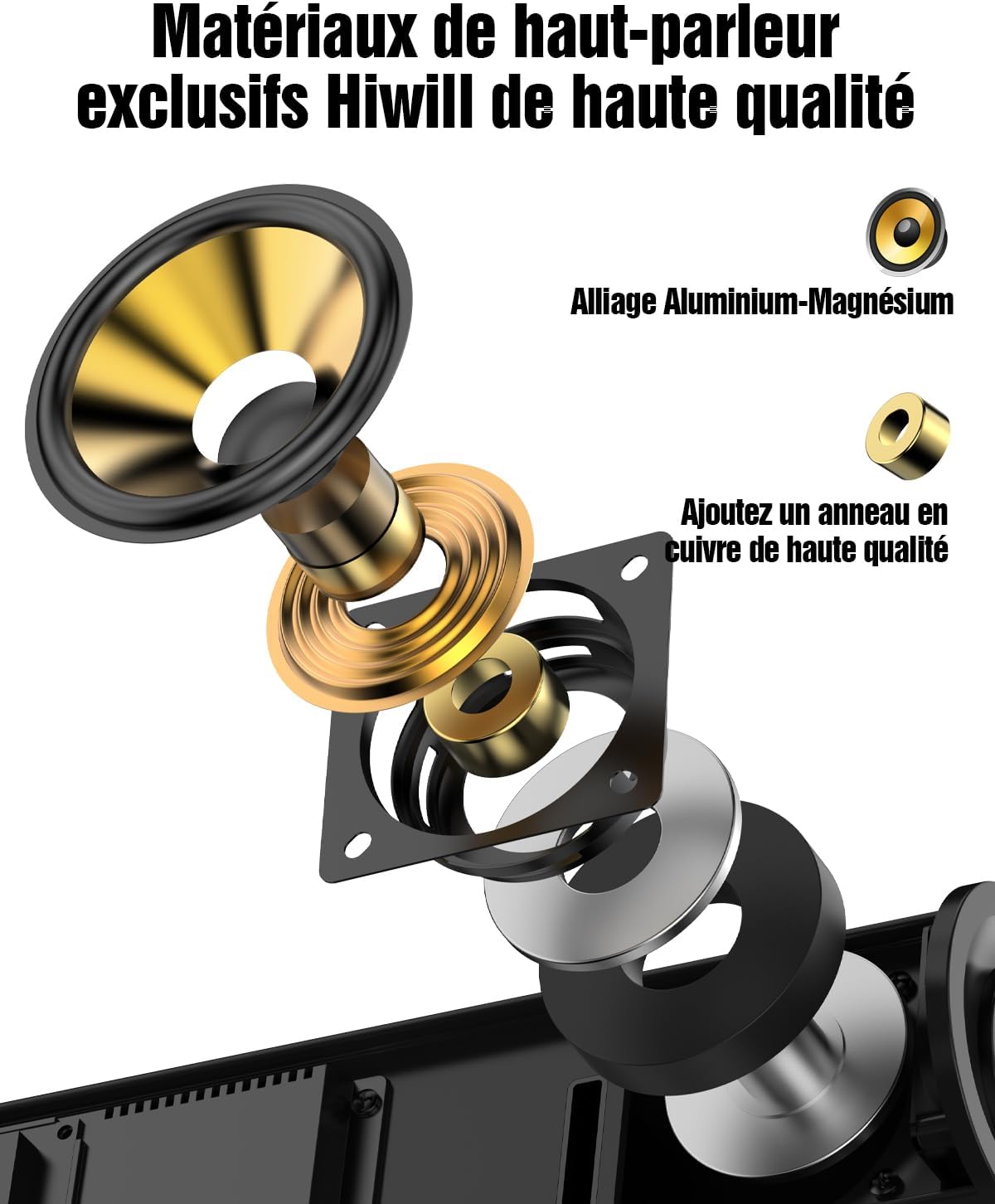
Image 4.2: An exploded diagram showcasing the internal components of a Hiwill speaker, highlighting the aluminum-magnesium alloy diaphragm and a high-quality copper ring for enhanced audio performance.

Imatge 4.3: Un intern view of the 5.25-inch wired subwoofer, illustrating its powerful driver and design optimized for deep bass reproduction.

Image 4.4: A visual representation of the Digital Signal Processor (DSP) chip, emphasizing its role in achieving a frequency response of 45Hz-20KHz, 99% high fidelity, and less than 1% Total Harmonic Distortion (THD).
5. Configuració
5.1 Col·locació
- Barra de so: Place the soundbar centrally below your TV. Ensure it is on a stable, flat surface or mounted securely to the wall.
- subwoofer: Position the wired subwoofer on the floor, preferably near the soundbar or in a corner for enhanced bass.
- Altaveus envoltants frontals: Connect the two wired front surround speakers to the main soundbar unit. These speakers are designed to be placed on either side of your TV, or mounted on the wall, to expand the front soundstage.

Image 5.1: The two wired front surround speakers are shown mounted on the wall, flanking a television, to create a wider and more immersive sound experience.
5.2 Connexions
- Potència: Connect the power adapter to the soundbar and then plug it into a wall outlet.
- Subwoofer & Surround Speakers: Connect the wired subwoofer and the two wired front surround speakers to their respective ports on the soundbar.
- TV Connection (Recommended - HDMI ARC): Connect one end of the HDMI ARC cable to the HDMI ARC port on your TV and the other end to the HDMI ARC port on the soundbar. This allows for high-quality audio transmission and TV remote control integration.
- TV Connection (Alternative - Optical): If your TV does not have an HDMI ARC port, connect the optical cable from your TV's optical output to the OPTICAL input on the soundbar.
- Other Devices (3.5mm AUX): For connecting devices with a 3.5mm audio output, use the provided 3.5mm stereo cable.
6. Instruccions de funcionament
6.1 Encès/Apagat
Press the Power button on the remote control or the soundbar to turn the unit on or off.
6.2 Selecció d'entrada
Press the 'Input' button on the remote control to cycle through available input sources: HDMI ARC, Optical, AUX, and Bluetooth.
6.3 Control de volum
Use the 'VOL+' and 'VOL-' buttons on the remote control or the soundbar to adjust the master volume.
6.4 Modes de so
The soundbar offers optimized sound profiles for different content types:
- NEWS Mode: Enhances vocal clarity for news broadcasts and dialogue-heavy content.
- MOVIE Mode: Provides a dynamic and immersive soundstage for films.
- MUSIC Mode: Optimizes audio for a balanced and rich musical experience.
Press the corresponding button (NEWS, MOVIE, MUSIC) on the remote control to select a sound mode.
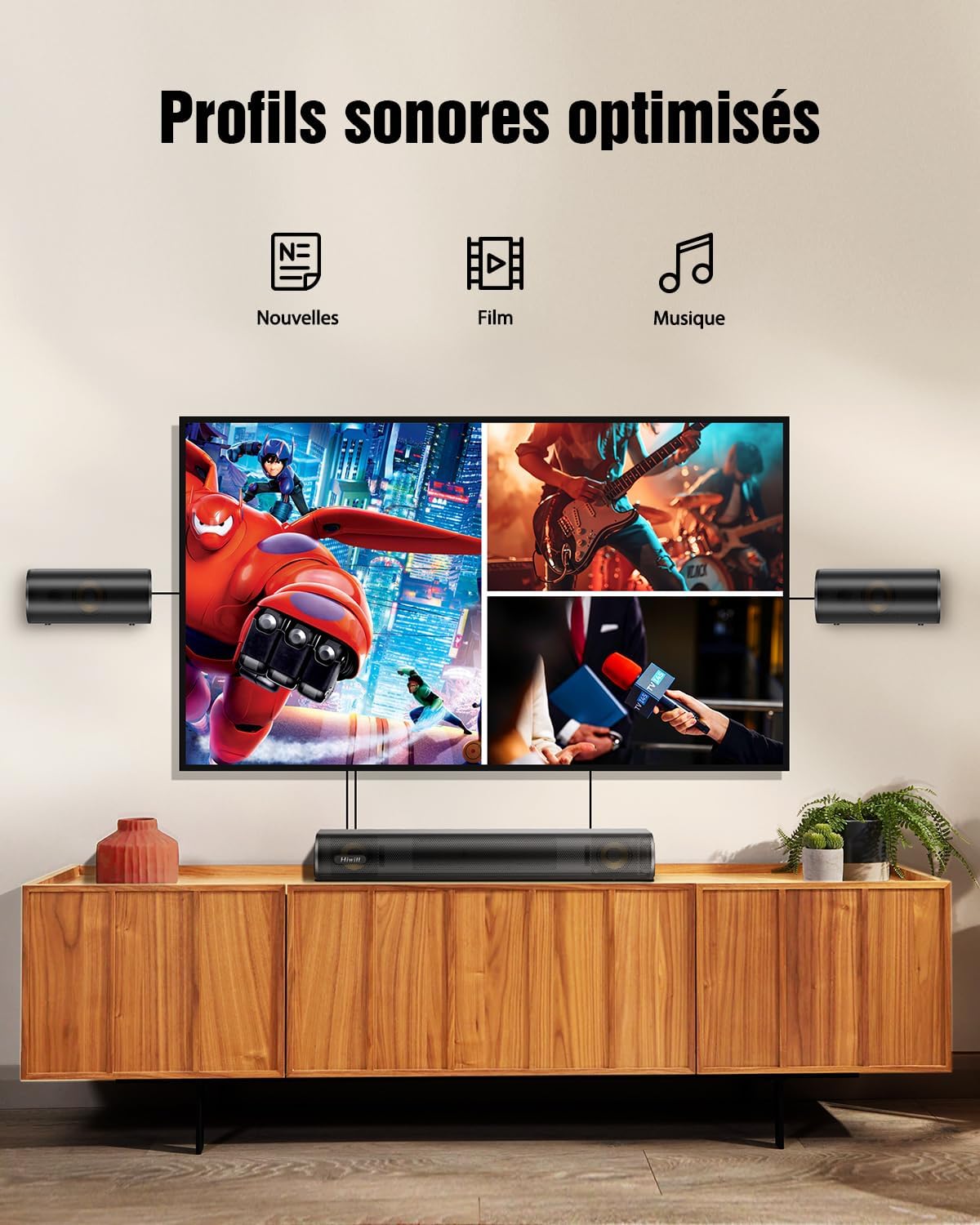
Image 6.1: Visual representation of the three optimized sound profiles: News, Movie, and Music, each tailored for specific audio content.
6.5 Adjusting Bass and Treble
Use the 'BASS+' / 'BASS-' and 'TRE+' / 'TRE-' buttons on the remote control to fine-tune the bass and treble levels according to your preference. The adjustable range is typically from -6 to +6.

Image 6.2: The remote control for the soundbar, highlighting the buttons for adjusting bass and treble levels, allowing users to personalize their audio experience.
6.6 Vinculació Bluetooth
- Press the 'Bluetooth' button on the remote control to switch to Bluetooth mode. The LED indicator on the soundbar will flash.
- On your mobile device, enable Bluetooth and search for 'HiElite A41'.
- Select 'HiElite A41' to pair. Once connected, the LED indicator will stop flashing and remain solid.
7. Actualització del firmware
Hiwill periodically releases firmware updates to improve performance and add new features. It is recommended to keep your soundbar's firmware up to date.
- Expanded surround soundstage
- Clearer dialogues & deeper bass
- Funció de memòria intel·ligent
- Reduced default volume
- Automatic LED turn-off (30s)
- Softened screen brightness
Please contact Hiwill customer support or visit the official Hiwill website to obtain the latest firmware and detailed update instructions.

Image 7.1: A graphic illustrating the benefits of a firmware upgrade, including an expanded surround soundstage, clearer dialogues, deeper bass, intelligent memory function, reduced default volume, automatic LED turn-off, and softened screen brightness.
8. Manteniment
- Neteja: Use a soft, dry cloth to clean the surface of the soundbar, subwoofer, and surround speakers. Do not use liquid cleaners or abrasive materials.
- Ventilació: Ensure that the ventilation openings are not blocked by dust or debris.
- Emmagatzematge: Si guardeu la unitat durant un període prolongat, desendolleu-la de la presa de corrent i guardeu-la en un lloc fresc i sec.
9. Solució De Problemes
| Problema | Causa possible | Solució |
|---|---|---|
| Sense poder | Cable d'alimentació no connectat; Presa de corrent no activa | Assegureu-vos que el cable d'alimentació estigui ben connectat; proveu una altra presa de corrent |
| Sense so | Font d'entrada incorrecta; Volum massa baix; Cables no connectats correctament | Select the correct input source; Increase volume; Check all audio cables (HDMI ARC, Optical, AUX) |
| S'ha produït un error en l'aparellament de Bluetooth | La barra de so no està en mode d'emparellament; Dispositiu massa lluny; Interferència | Ensure soundbar is in Bluetooth pairing mode; Move device closer; Turn off other Bluetooth devices |
| El comandament a distància no funciona | Piles esgotades; Obstrucció entre el comandament a distància i la barra de so | Replace AAA batteries; Remove any obstructions; Ensure remote is pointed at the soundbar's sensor |
| So distorsionat | Volume too high; Poor audio source quality; Incorrect cable connection | Reduce volume; Try a different audio source; Re-check cable connections |
10. Especificacions
| Característica | Detall |
|---|---|
| Nom del model | HiElite A41 |
| Marca | Hiwill |
| Tipus d'altaveu | Barra de so |
| Configuració del canal de so envoltant | 4.1 |
| Mode de sortida d'àudio | Dolby Atmos, 3D Spatial Audio |
| Potència màxima de sortida de l'altaveu | 300 watts |
| Resposta de freqüència | 45Hz-20KHz |
| Tecnologia de connectivitat | Cablejat, Bluetooth |
| Tecnologia de comunicació sense fils | Bluetooth |
| Mètode de control | Control remot |
| Dispositius compatibles | Ordinador personal, Televisió |
| Usos recomanats | For game console, For music player, For computer, For television |
| Dimensions del producte (L x A x A) | 41.6 x 11.3 x 6 cm |
| Pes de l'article | 5 quilos |
| Font d'alimentació | Cable elèctric |
| Característiques especials | Dolby Atmos enabled, Aluminum-Magnesium alloy diaphragms, 2 front surround speakers, HarmonicX sound processing, Adjustable bass and treble |
| És impermeable | No |
| País d'origen | Xina |
11. Garantia i Suport
11.1 Garantia del fabricant
The Hiwill HiElite A41 Soundbar comes with a Garantia del fabricant de 2 anysAquesta garantia cobreix els defectes de materials i de fabricació en condicions d'ús normal. Si us plau, conserveu el comprovant de compra per a reclamacions de garantia.
11.2 Atenció al client
For technical assistance, troubleshooting, or warranty inquiries, please contact Hiwill Customer Support:
- Weblloc: Visit the official Hiwill weblloc web amb recursos de suport, preguntes freqüents i informació de contacte.
- Correu electrònic: Refer to your product packaging or the Hiwill weblloc web per a l'adreça de correu electrònic d'atenció al client.
When contacting support, please have your product model (HiElite A41) and purchase details ready.


