Introducció
This instruction manual provides comprehensive guidance for the installation, operation, and maintenance of your Ergotron LX Pro Premium Vertical Stacking Dual Monitor Arm. Please read this manual thoroughly before assembly and use to ensure proper function and safety. This product is designed to enhance your workspace ergonomics by providing flexible positioning for two monitors.
Informació de seguretat
- Ensure that the total weight of your monitors, including any accessories, does not exceed 22 lbs (10 kg) per arm.
- Verify that your desk surface is stable and capable of supporting the combined weight of the monitor arm and monitors.
- No estrenyeu massa els cargols durant el muntatge, ja que això podria danyar els components.
- Keep children and pets away from the product during installation and adjustment.
- Si falta alguna peça o està danyada, no procediu amb el muntatge. Poseu-vos en contacte amb el servei d'atenció al client immediatament.
Contingut del paquet
Desembaleu la caixa amb cura i assegureu-vos que hi hagi tots els components:
- Two Monitor Arms
- Two Arm Extensions
- Two Monitor Pivots (VESA plates)
- Two-piece Desk Clamp
- Base gran
- 12-inch Pole
- Two Pole Collars
- Attachment Hardware (screws, washers, Allen wrenches)

Image: All components included in the Ergotron LX Pro Premium Vertical Stacking Dual Monitor Arm package.
Configuració
1. Desk Compatibility
The included two-piece desk clamp is designed for secure attachment to various desk types. It supports desk thicknesses ranging from 0.4 inches (1 cm) to 2.4 inches (6 cm). Ensure your desk meets these specifications for stable mounting. A grommet mount is available as a separate accessory (part number 98-729-292) if preferred.

Image: Diagram illustrating the compatible desk thickness range for the clamp muntar.
2. Monitor Compatibility
This monitor arm is compatible with two screens up to 24 inches diagonal, each weighing between 4 to 22 pounds (1.8 to 10 kg). It supports VESA mounting patterns of 75x75mm and 100x100mm. Ensure your monitors meet these criteria.

Image: Diagram detailing screen size, weight capacity, depth, and VESA compatibility.
3. Passos d'instal·lació
- Adjunta el clauer de l'escriptoriamp: Secure the two-piece desk clamp to your desk edge. Tighten the clamp firmly using the provided hardware.
- Install Pole: Insert the 12-inch pole into the desk clamp base and secure it.
- Attach Arms: Slide the two monitor arms onto the pole. Position them as desired for vertical stacking.
- Mount Monitors: Attach the VESA plates to the back of your monitors. Then, slide the monitors onto the ends of the arms. Ensure they click securely into place.
- Ajustar la tensió: Refer to the 'Operating Instructions' section for adjusting arm tension to match your monitor weight.
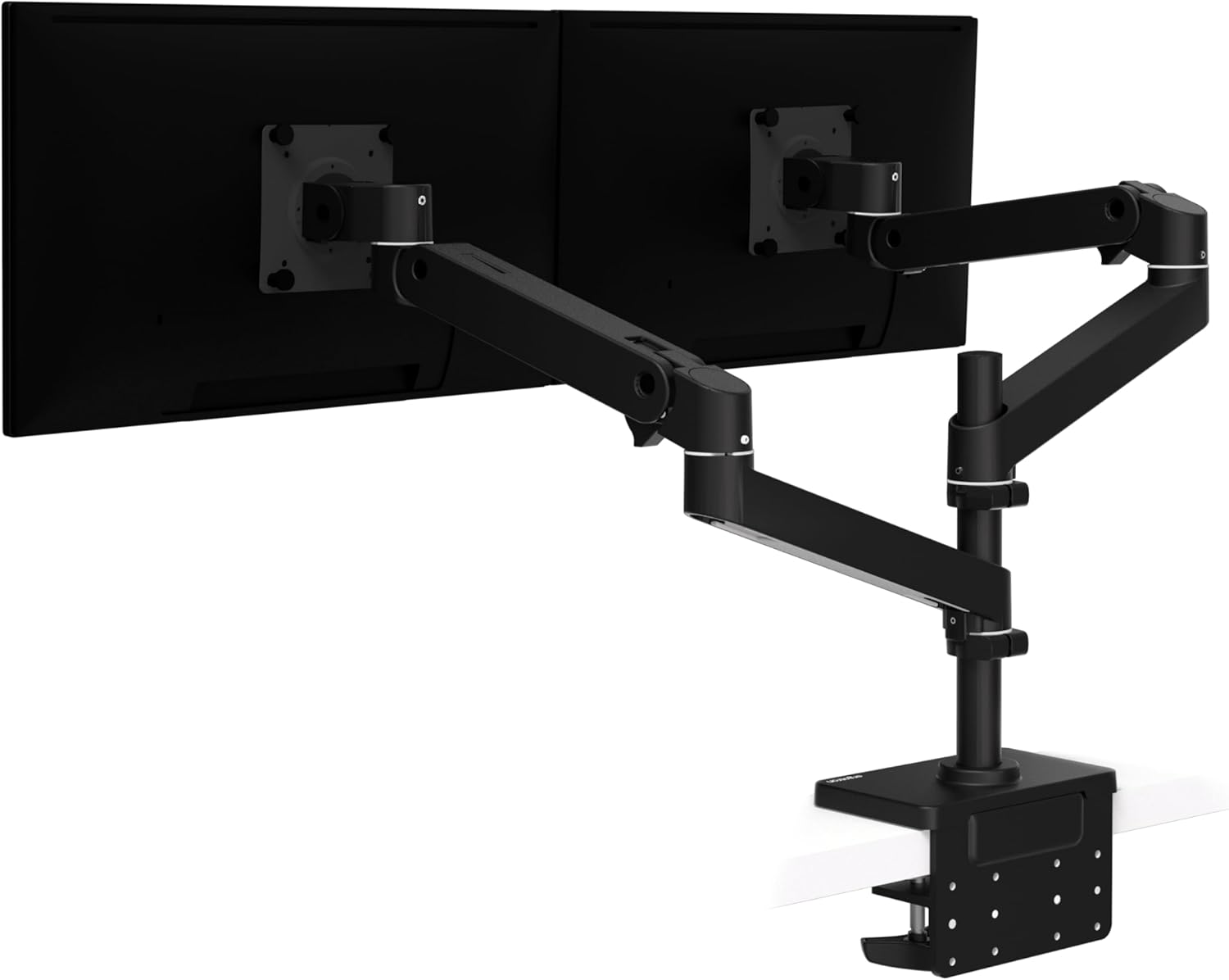
Image: The Ergotron LX Pro Premium Dual Monitor Arm with two monitors mounted in a side-by-side configuration.
Instruccions de funcionament
1. Ajust de la posició del monitor
The LX Pro arm offers extensive adjustability to achieve optimal ergonomic positioning:
- Ajust d'alçada: Monitors can be raised up to 20 inches (51 cm) above the worksurface, with 13 inches (33 cm) of vertical lift available through the arm.
- Extensió: The arm extends up to 22 inches (56 cm) from the pole, allowing you to pull monitors closer or push them further away.
- Inclinació: Adjust the monitor tilt from +70 degrees to -15 degrees for comfortable viewangles d'ajust.
- Rotació: Monitors can rotate 360 degrees for portrait or landscape orientation. The arm itself can rotate 360 degrees at the base, with an optional 180-degree rotation stop to protect walls or cubicles.

Image: Diagram showing the 22-inch (56 cm) extension range of the monitor arm.

Image: The dual monitor arm configured for vertical stacking of two displays.

Image: Diagrams illustrating the 360-degree rotation, 180-degree rotation stop, and tilt range of the monitor arm.
2. Ajust de la tensió
The arm features a tension indicator for precise adjustment. Use the provided Allen wrench to set the tension. Rotate clockwise for heavier displays and counter-clockwise for lighter displays. Adjust until the monitor holds its position freely without drifting up or down.

Image: Close-up of the tension indicator, showing clockwise adjustment for heavier displays and counter-clockwise for lighter displays.
3. Gestió de cables
Utilize the integrated cable management system to route and conceal monitor cables. This helps maintain a tidy workspace and prevents cable snags. Open the cable covers on the underside of the arms, place your cables inside, and close the covers securely.

Image: Illustration of the monitor arm's improved cable management system, routing cords for a clean setup.
Manteniment
- Neteja: Wipe the monitor arm surfaces with a soft, damp drap. Eviteu productes de neteja o dissolvents abrasius.
- Comprovacions periòdiques: Reviseu periòdicament tots els cargols i connexions per assegurar-vos que estiguin ben ajustats i segurs. Torneu a apretar-los si cal.
- Ajust de tensió: If monitors begin to sag or become difficult to move, re-adjust the arm tension as described in the 'Operating Instructions' section.
Resolució de problemes
- Monitor Sags or Drifts: The arm tension is likely too low for the monitor's weight. Increase the tension by rotating the adjustment screw clockwise.
- Monitor is Difficult to Move: The arm tension may be too high. Decrease the tension by rotating the adjustment screw counter-clockwise.
- Arm Feels Loose: Check all connection points, especially the desk clamp and the pole attachment. Ensure all screws are securely tightened.
- Monitors no anivellats: Minor adjustments can be made at the VESA plate connection to ensure monitors are perfectly aligned.
Especificacions
| Número de model | 45-690-292 |
| Marca | Ergotron |
| Monitor Capacity | Two monitors, 4 to 22 lbs (1.8 to 10 kg) each |
| Compatibilitat amb la mida de la pantalla | Up to 24 inches diagonal per monitor |
| Compatibilitat VESA | 75x75mm, 100x100mm |
| Escriptori Clamp Gruix | De 0.4 a 2.4 polzades (de 1 a 6 cm) |
| Ascensor Vertical | 13 polzades (33 cm) |
| Extensió del braç | Fins a 22 polzades (56 cm) |
| Interval d'inclinació | +70° a -15° |
| Rotació | 360° at base, 360° at monitor pivot (with optional 180° stop) |
| Dimensions del producte | 23.11 x 18.62 x 6.93 polzades (envasat) |
| Pes de l'article | 15.97 lliures |
| Material | Metall |
| Color | Negre mat |
Garantia i Suport
Ergotron products are built to last and are backed by extensive quality testing. This product comes with a 10 any de garantia, garantint la fiabilitat i el rendiment a llarg termini.
For technical support, warranty claims, or assistance with any aspect of your Ergotron LX Pro Premium Vertical Stacking Dual Monitor Arm, please visit the official Ergotron website or contact their customer service department. Contact information can typically be found on the product packaging or the Ergotron weblloc.


