1. Introducció
This manual provides detailed instructions for the safe and proper installation, operation, and maintenance of your BONTEC Dual Arm Gas Spring Monitor Desk Mount. Please read this manual thoroughly before installation and retain it for future reference. This monitor mount is designed to enhance your workspace ergonomics and efficiency by providing adjustable positioning for two monitors.

Imatge 1.1: acabatview of the BONTEC Dual Arm Gas Spring Monitor Desk Mount with two monitors.
2. Informació de seguretat
ADVERTIMENT: Si no llegiu i no seguiu totes les instruccions, podeu patir lesions personals o danys al producte. Guardeu aquest manual en un lloc segur per a futures consultes.
- Ensure your desk can support the combined weight of the mount and your monitors.
- No supereu la capacitat màxima de pes de 19.8 lliures (9 kg) per braç.
- This mount is compatible with monitors between 15 and 32 inches.
- Utilitzeu-lo només amb monitors compatibles amb VESA (75x75 mm o 100x100 mm).
- Always use two people for monitor installation to prevent injury or damage.
- Estrenyeu tots els cargols fermament, però no els estrenyeu massa.
- Mantingueu les peces petites allunyades dels nens.
3. Contingut del paquet
Verifiqueu que tots els components siguin presents i no estiguin danyats abans de començar la instal·lació. Si falta alguna peça o està danyada, poseu-vos en contacte amb el servei d'atenció al client.
- Monitor Arms (2)
- Escriptori Clamp Base
- Components de la base del grommet
- Plaques VESA (2)
- Kit de ferramenta (cargols, volanderes, claus Allen)
- Manual d'instruccions
4. Configuració i instal·lació
The BONTEC monitor mount offers two installation options: C-Clamp or Grommet Mounting.
4.1. Trieu el mètode de muntatge

Image 4.1: C-Clamp and Grommet mounting options with compatible desk thickness ranges.
C-Clamp Muntatge: Suitable for desk thicknesses from 0.39 inches to 3.15 inches (10mm to 80mm). This method does not require drilling.
Muntatge d'oelles: Suitable for desk thicknesses from 0.39 inches to 3.15 inches (10mm to 80mm) with a pre-existing hole diameter of 0.4 inches to 2.4 inches (10mm to 60mm). This method provides a more permanent installation.
4.2. Install the Desk Base
Per C-Clamp Muntatge:
- Enganxeu el C-clamp to the main pole using the provided screws.
- Col·loca el clamp a la vora del teu escriptori.
- Apretar el C-clamp knob until the base is securely fastened to the desk. Ensure it is stable and does not wobble.
For Grommet Mounting:
- Desmunteu el C-clamp components from the main pole.
- Insert the grommet bolt through the desk hole and secure it from underneath with the provided plate and nut.
- Attach the main pole to the grommet bolt and tighten securely.
4.3. Attach the Monitor Arms
- Slide the monitor arms onto the main pole. Adjust their height as desired and secure them with the locking collar.
- Attach the VESA plates to the back of your monitors using the appropriate screws from the hardware kit. Ensure the screws are tightened firmly.
- Carefully slide the monitors (with VESA plates attached) onto the monitor arms. Secure them with the provided locking mechanism.

Image 4.2: Detail of VESA plate attachment to the monitor arm using screws and an Allen wrench.
4.4. Ajusteu la tensió de la molla de gas
The gas spring tension may need adjustment to properly support your monitor's weight. If the monitor sags or rises too easily, adjust the tension screw located on the arm joint.
- Use the provided Allen key to turn the tension screw.
- Turn clockwise to increase tension (for heavier monitors).
- Turn counter-clockwise to decrease tension (for lighter monitors).
- Adjust gradually until the monitor stays in position when released.

Imatge 4.3: Interna view of the gas spring mechanism, responsible for smooth adjustments.
5. Instruccions de funcionament
Once installed, your BONTEC monitor mount allows for flexible positioning to optimize your viewexperiència.
5.1. Ajust de la posició del monitor

Image 5.1: Full motion capabilities including tilt, swivel, and rotation for optimal viewing.
- Ajust d'alçada: Gently push or pull the monitor up or down to the desired height. The gas spring will hold it in place.
- Inclinació: Tilt the monitor screen up or down by up to ±90° to reduce glare and find your preferred angle.
- Girar: Swivel the monitor left or right by up to ±90° to share your screen or adjust viewdirecció.
- Rotació: Rotate the monitor 360° to switch between landscape and portrait modes.

Imatge 5.2: Ex.ample of monitors configured in both landscape and portrait orientations.
5.2. Gestió de cables
Utilize the integrated cable management system to keep your workspace tidy.
- Open the cable clips located on the underside of the monitor arms.
- Route your monitor cables (power, video, etc.) through these clips.
- Close the clips to secure the cables. This helps prevent clutter and protects cables from damage.
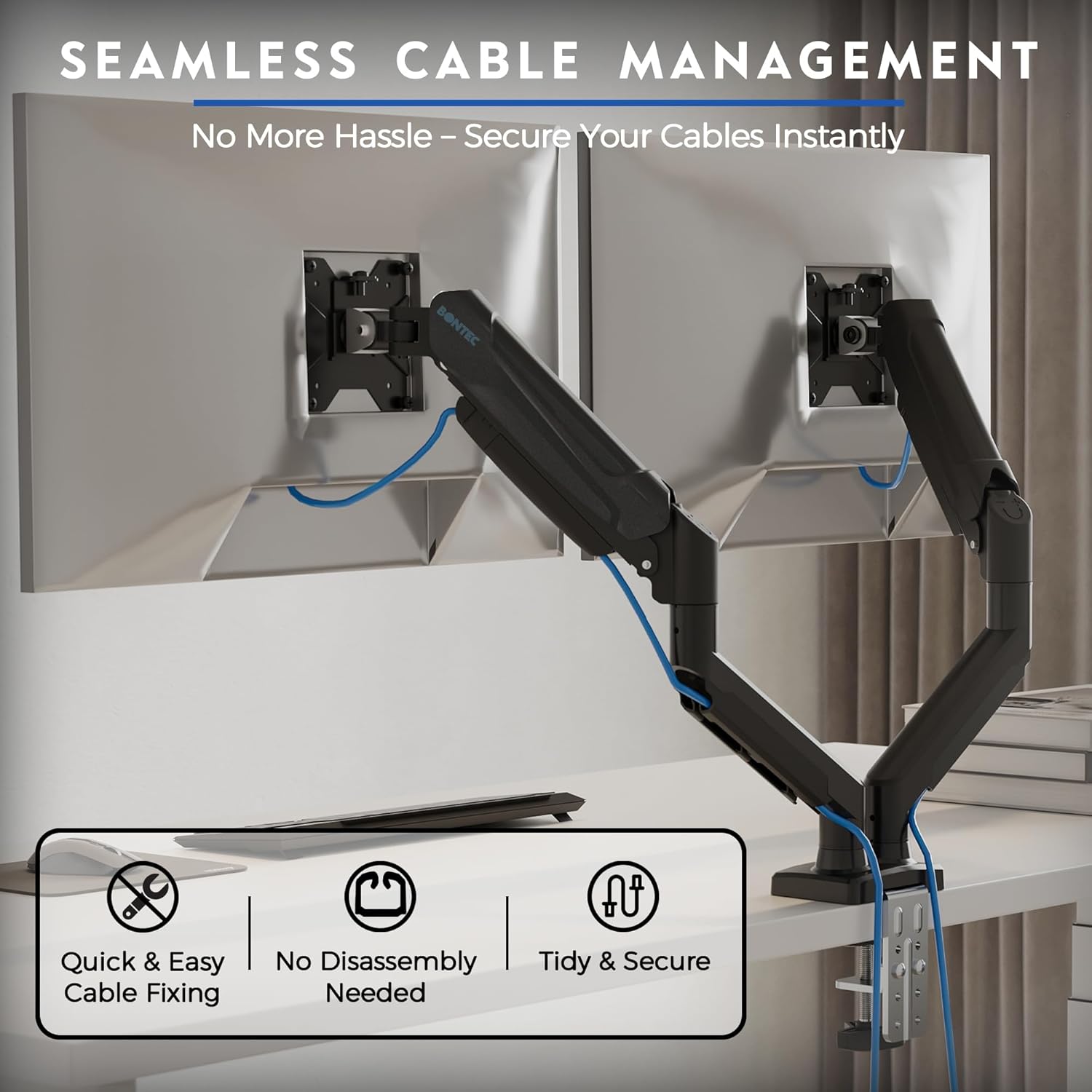
Image 5.3: Cables neatly routed through the integrated cable management system.
6. Manteniment
Un manteniment regular garanteix la longevitat i el rendiment òptim del suport del monitor.
- Neteja: Netegeu la muntura amb un drap suauamp drap. Eviteu productes de neteja o dissolvents abrasius.
- Comprovar l'estanquitat: Reviseu periòdicament tots els cargols i connexions per assegurar-vos que romanen ajustats. Torneu a apretar-los si cal, però no els apreteu massa.
- Molla de gas: The gas spring is designed for long-term use (30,000 cycles tested) and generally requires no specific maintenance. If adjustment becomes difficult, re-evaluate the tension setting.
7. Solució De Problemes
If you encounter issues with your monitor mount, refer to the following common problems and solutions:
| Problema | Causa possible | Solució |
|---|---|---|
| El monitor s'enfonsa o no es manté a l'alçada desitjada. | La tensió de la molla de gas és massa baixa per al pes del monitor. | Increase gas spring tension by turning the adjustment screw clockwise with the Allen key. |
| El monitor és difícil de moure amunt o avall. | La tensió de la molla de gas és massa alta per al pes del monitor. | Decrease gas spring tension by turning the adjustment screw counter-clockwise with the Allen key. |
| El muntatge és inestable o trontolla. | Escriptori clamp/grommet base is not securely tightened. | Assegureu-vos que el C-clamp or grommet base is fully tightened to the desk. Check all arm connections. |
| El monitor no es pot inclinar ni girar. | Tilt/rotation screws are overtightened or too loose. | Adjust the tilt/rotation screws on the VESA plate or arm joint. Do not overtighten. |
8. Especificacions
- Model: GDM7502-v02-FBA
- Monitor Size Compatibility: 15-32 polzades
- Capacitat de pes: 6.6-19.8 lbs (3-9 kg) per arm
- Compatibilitat VESA: 75x75mm, 100x100mm
- Rang inclinat: ±90°
- Interval de rotació: ±90°
- Rotació: 360°
- Opcions de muntatge: C-Clamp, Ullera
- Gruix de l'escriptori (C-Cl)amp/Grommet): 0.39" - 3.15" (10 mm - 80 mm)
- Grommet Hole Diameter: 0.4" - 2.4" (10 mm - 60 mm)
- Material: Alumini, metall
- Gas Spring Durability: 30,000 cicles provats


