1. Producte acabatview
The Anlapus Wireless Camera System provides comprehensive indoor surveillance solutions with advanced features for home monitoring. This system includes two distinct camera models: the C528 Dual Lens Camera and the C518 Pan/Tilt Camera. Both models offer high-definition video, two-way audio, and remote access via the Anlapus Smart app, ensuring you stay connected to your home and loved ones.
Característiques clau
- C528 Dual-Lens Design: Features one fixed lens and one rotatable lens for wider coverage and detailed monitoring (2MP + 2MP resolution).
- C518 1080p HD Resolution: Provides clear and sharp 1080p video for live streaming and recording.
- Visió nocturna per infrarojos: Both models offer up to 10 meters (33 feet) of clear night vision in low-light conditions.
- 360° Pan/Tilt View (C518): The C518 camera offers full panoramic surveillance with no blind spots.
- Auto-Tracking & Motion Detection: Intelligent features that detect movement, send alerts, and automatically follow moving subjects.
- Two-Way Talk & Gesture Calling: Communicate with family or pets, and initiate video calls with a simple "OK" gesture.
- Emmagatzematge flexible: Supports local storage via micro SD card (up to 256GB, not included).
- Connectivitat Wi-Fi: C528 supports 2.4GHz Wi-Fi; C518 supports both 2.4GHz and 5GHz Wi-Fi for stable connection.

Imatge 1.1: acabatview of Anlapus camera key features including Pan & Tilt, Auto Tracking, Two-Way Audio, One-Click Call, Motion Detection, Night Vision, SD Card Storage, and 2.4GHz/5GHz WiFi.
2. Contingut del paquet
Please check the package contents upon opening. If any items are missing or damaged, contact Anlapus customer support.
- Anlapus C528 Dual Lens Camera (Quantity as per purchase)
- Anlapus C518 Pan/Tilt Camera (Quantity as per purchase)
- Power Adapters (one for each camera)
- Cargols i ancoratges de muntatge
- Manual d'usuari (aquest document)

Image 2.1: A set of Anlapus C528 (top two) and C518 (bottom two) cameras, illustrating the different models included in the system.
3. Informació de seguretat
Si us plau, llegiu i seguiu aquestes pautes de seguretat per garantir un funcionament correcte i evitar danys al dispositiu o lesions.
- Feu servir només l'adaptador de corrent original que s'inclou amb la càmera.
- Do not expose the camera to water or moisture. This product is designed for indoor use only.
- Eviteu col·locar la càmera sota la llum solar directa o a prop de fonts de calor.
- No intenteu desmuntar ni modificar la càmera. Això anul·larà la garantia.
- Mantingueu la càmera i els seus accessoris fora de l'abast dels nens i les mascotes.
- Ensure the camera is installed on a stable surface or securely mounted to prevent falling.
4. Guia de configuració
4.1. Download the Anlapus Smart App
Cerca "Anlapus Smart" in the Apple App Store (for iOS devices) or Google Play Store (for Android devices) and download the application. Register an account if you are a new user.
4.2. Enceneu la càmera
Connect the power adapter to the camera's power port and plug it into a wall outlet. The camera will power on and initiate its startup sequence. Wait for the indicator light to flash, indicating it's ready for pairing.
4.3. Connecteu-vos a Wi-Fi
- Open the Anlapus Smart app and tap the "+" icon to add a new device.
- Select your camera model (C528 or C518) from the list.
- Seguiu les instruccions a la pantalla per connectar la càmera a la vostra xarxa Wi-Fi.
- For C528: Ensure your Wi-Fi network is 2.4GHz. The C528 is ONLY compatible with 2.4GHz Wi-Fi.
- For C518: This camera supports both 2.4GHz and 5GHz Wi-Fi networks.
- The app will generate a QR code. Position the camera lens to scan this QR code from your phone screen. You will hear a confirmation sound once the scan is successful.
- Wait for the camera to connect to the network. Once connected, the indicator light will turn solid, and the camera will appear in your app's device list.
4.4. Col·locació i muntatge de la càmera
Trieu una ubicació que ofereixi el que vulgueu viewing angle and is within range of your Wi-Fi signal. The cameras can be placed on a flat surface or mounted to a wall or ceiling using the provided screws and anchors.
- For C528 (Dual Lens): Consider its dual-lens capability to cover a wider area.
- For C518 (Pan/Tilt): Place it where its 360° rotation can be fully utilized for panoramic surveillance.

Image 4.1: The Anlapus C518 camera demonstrating its 360-degree pan and tilt capability, allowing it to monitor an entire room.
5. Funcionament de la càmera
5.1. En directe View i Control
From the Anlapus Smart app, tap on the camera's name to access its live view. Tu pots:
- Pan/Tilt (C518): Use the directional controls on the screen to rotate the camera horizontally (pan) and vertically (tilt) for a 360° view.
- Doble lent View (C528): Switch between the fixed and rotatable lenses to monitor different areas simultaneously or focus on specific details.
- Zoom: Pinch to zoom in on the live feed for a closer look.

Image 5.1: The Anlapus C528 dual-lens camera showing how its two lenses provide wider coverage, monitoring both a child playing and a cat on a scratching post.
5.2. Two-Way Talk and Gesture Calling
Both cameras support two-way audio communication.
- Xerrada bidireccional: Tap the microphone icon in the app to speak through the camera's speaker. Release the icon to listen.
- Trucada amb un sol toc: Press the call button on the camera (if available) to initiate a call to your linked app.
- Gesture Call: Make an "OK" gesture in front of the camera lens to initiate a video call directly through the app. The app will display the other person's image for face-to-face interaction.

Image 5.2: Demonstrates the "One Touch Call" feature where a finger presses a button on the camera, and the "Gesture Call" feature where an "OK" hand gesture initiates a call.

Image 5.3: Illustrates the two-way audio feature, showing a child speaking through the camera and an adult responding via their phone.
5.3. Motion Detection and Auto-Tracking
The cameras are equipped with intelligent motion detection and auto-tracking capabilities.
- Detecció de moviment: Quan es detecta moviment dins del camp de la càmera view, you will receive instant push notifications on your Anlapus Smart app. You can customize detection sensitivity and set specific detection areas in the app settings.
- Seguiment automàtic: The camera (C518) can automatically lock onto and follow moving people, ensuring that critical moments are continuously captured.
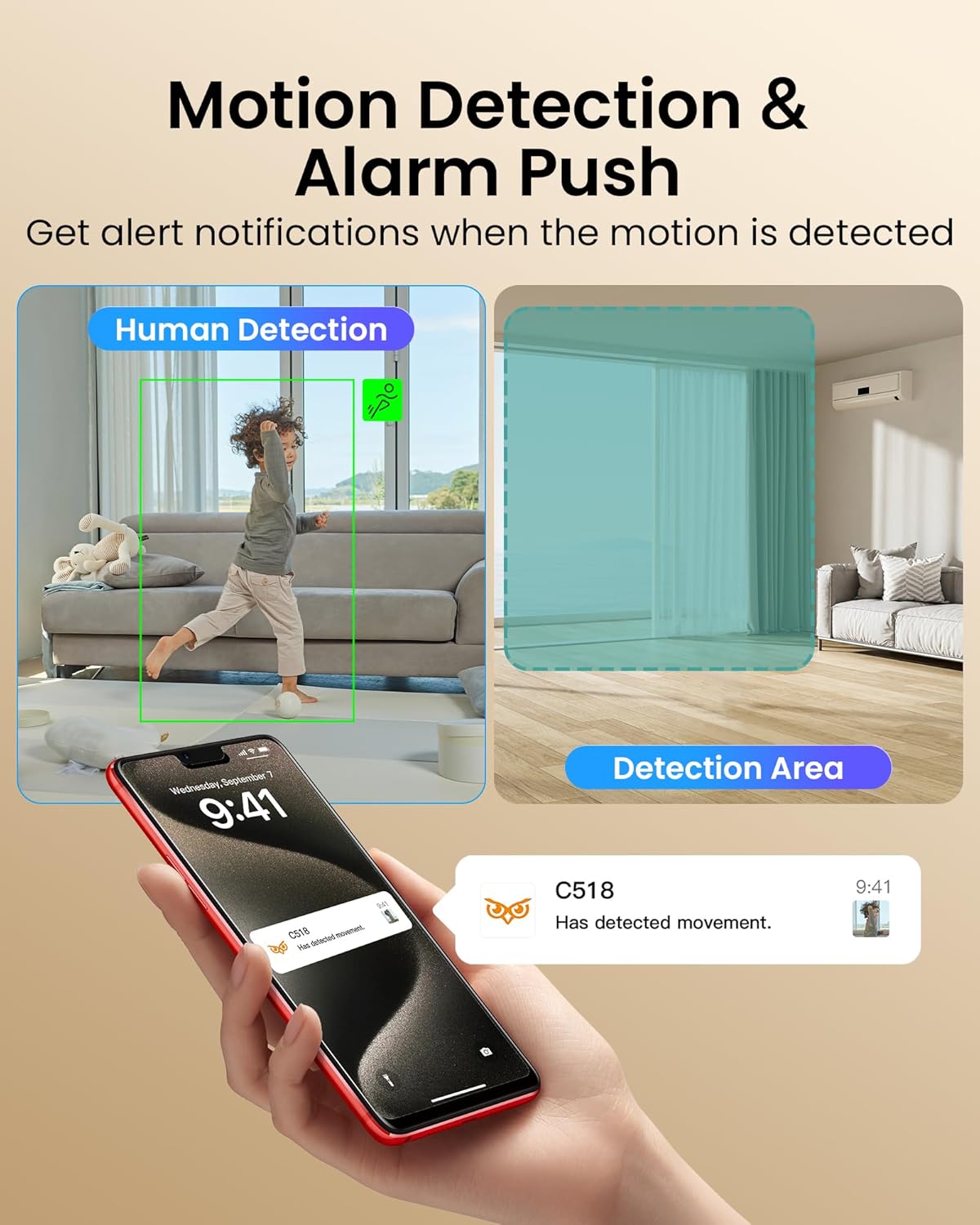
Image 5.4: Shows the motion detection feature, highlighting human detection and a customizable detection area, with a phone displaying an alert notification.

Image 5.5: Illustrates the smart auto-tracking function, showing the camera following a moving child across the room.
5.4. Visió nocturna
Both cameras are equipped with infrared night vision for clear monitoring in low-light or complete darkness.
- The cameras automatically switch to night vision mode when ambient light is insufficient.
- Infrared LEDs provide illumination for up to 10 meters (33 feet).

Image 5.6: Comparison of color night vision and IR night vision, showing a dog sleeping in the dark, with the color image on the left and the black and white IR image on the right.
5.5. Gravació i reproducció
The cameras support local video storage via a micro SD card (not included).
- Insert a micro SD card (up to 256GB) into the designated slot on the camera.
- Configure recording settings (e.g., continuous recording, motion-triggered recording) in the Anlapus Smart app.
- Accés gravat footage through the playback feature in the app, allowing you to review esdeveniments passats.
6. Manteniment
- Neteja: Feu servir un drap suau i sec per netejar la lent i el cos de la càmera. No utilitzeu netejadors líquids ni aerosols.
- Actualitzacions de firmware: Regularly check for firmware updates through the Anlapus Smart app. Keeping your camera's firmware updated ensures optimal performance and access to new features.
- Gestió de la targeta SD: Periodically check the status of your SD card in the app. Format the SD card if necessary to maintain recording efficiency.
7. Solució De Problemes
| Problema | Causa possible | Solució |
|---|---|---|
| La càmera no es connecta a la Wi-Fi. | Incorrect Wi-Fi password; Camera too far from router; Incorrect Wi-Fi band (C528 only 2.4GHz). |
|
| No hi ha cap canal de vídeo a l'aplicació. | Camera offline; Poor network connection; App issue. |
|
| Motion detection alerts not received. | Notifications disabled; Incorrect detection settings; Network issues. |
|
| L'àudio bidireccional no funciona. | Microphone/speaker muted; App permissions; Network latency. |
|
8. Especificacions
| Característica | C528 Dual Lens Camera | C518 Pan/Tilt Camera |
|---|---|---|
| Resolució | 4MP (2MP + 2MP) | 1080p HD (2MP) |
| Tipus de lent | Dual Lens (1 Fixed, 1 Rotatable) | Single Lens (Pan/Tilt) |
| Interval de panoràmica/inclinació | N/A (Rotatable lens only) | 360° Horizontal, Vertical Tilt |
| Visió nocturna | 10m (33ft) Infrared | 10m (33ft) Infrared |
| Connectivitat Wi-Fi | Només a 2.4 GHz | 2.4GHz / 5GHz Dual Band |
| Emmagatzematge | Targeta Micro SD (fins a 256 GB, no inclosa) | Targeta Micro SD (fins a 256 GB, no inclosa) |
| Àudio | Xerrada bidireccional | Xerrada bidireccional |
| Característiques | Motion Detection, Gesture Call | Motion Detection, Auto-Tracking, One-Touch Call, Gesture Call |
9. Garantia i Suport
Anlapus products come with a standard manufacturer's warranty. For detailed warranty information, please refer to the warranty card included in your product packaging or visit the official Anlapus weblloc.
If you encounter any issues or have questions regarding your Anlapus camera system, please contact our customer support team:
- Correu electrònic: Refer to your product packaging or the Anlapus weblloc web per obtenir l'adreça electrònica d'assistència més actualitzada.
- Weblloc: Visit the Anlapus official weblloc web per a preguntes freqüents, guies de resolució de problemes i formularis de contacte.
Please have your model number (C528 or C518) and purchase information ready when contacting support.


