1. Introducció
This manual provides essential information for the installation, operation, and maintenance of your ENERMAX Revolution III 650W ATX 3.1 Power Supply. Please read this manual thoroughly before installation and keep it for future reference.
1.1 Informació de seguretat
- Desconnecteu sempre l'alimentació de la presa de corrent altern abans de la instal·lació o el manteniment.
- No obriu la font d'alimentació. Alt voltatgetages are present inside, and it contains no user-serviceable parts.
- Assegureu-vos una correcta connexió a terra per evitar riscos elèctrics.
- Instal·leu la font d'alimentació en una zona ben ventilada.
- Feu servir només els cables modulars que s'inclouen amb aquesta font d'alimentació. L'ús de cables incompatibles pot fer malbé la unitat o els components connectats.
- Aquest producte està dissenyat per al seu ús en sistemes informàtics personals. No l'utilitzeu per a cap altre propòsit.
1.2 Contingut del paquet
- ENERMAX Revolution III 650W Power Supply
- Modular Cable Set (including 12V-2x6 cable for PCIe 5.1)
- Cable d'alimentació CA
- Cargols de muntatge
- Cable Combs (16 pieces for 650W model)
- Manual d'usuari

Image 1.1: The ENERMAX Revolution III 650W power supply, showcasing its compact design and fan grille.
2. Configuració i instal·lació
Follow these steps to properly install your ENERMAX Revolution III 650W power supply into your computer system.
2.1 Comprovacions prèvies a la instal·lació
- Assegureu-vos que la caixa de l'ordinador sigui compatible amb les fonts d'alimentació de format ATX.
- Verify that your motherboard and other components are compatible with the power requirements of a 650W power supply.
- Unpack the power supply and all modular cables.
2.2 Instal·lació física
- Mount the power supply into the designated bay in your computer case using the provided screws. Ensure the fan is oriented correctly for optimal airflow (typically facing downwards if there's a bottom vent, or upwards if not).
- Connect the necessary modular cables to the power supply unit. The Revolution III is fully modular, allowing you to connect only the cables you need. Refer to the labels on the power supply for correct port identification.
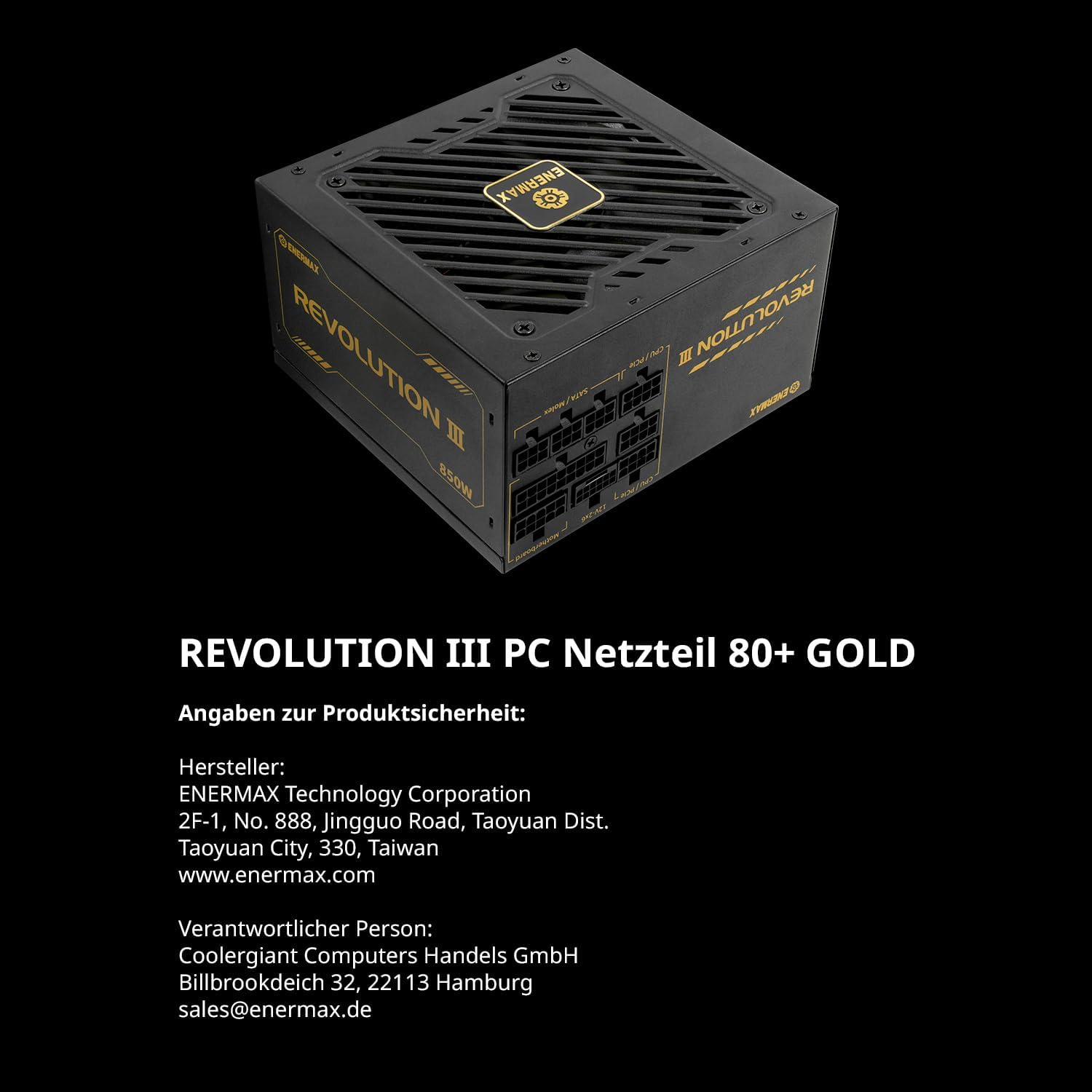
Imatge 2.1: posterior view of the power supply showing the clearly labeled modular cable ports for motherboard, CPU/PCIe, and SATA/Molex connections.
2.3 Connexions de cable
Connect the modular cables from the power supply to your system components:
- Placa base: Connecteu el cable ATX de 24 pins a la placa base.
- CPU: Connect the 4+4-pin or 8-pin EPS/CPU cable to your motherboard's CPU power connector.
- Targeta gràfica (GPU): For modern GPUs, use the dedicated 12V-2x6 cable (PCIe 5.1) for high-power graphics cards. For other GPUs, use the 6+2-pin PCIe cables. The Revolution III supports PCIe 5.1, providing a 450W 12V-2x6 cable for demanding GPUs.
- Dispositius d'emmagatzematge: Connecteu els cables d'alimentació SATA a SSD, HDD i unitats òptiques.
- Perifèrics: Connect Molex cables for any other peripherals requiring power.

Image 2.2: The power supply highlighting the native PCIe 5.1 12V-2x6 connector, designed for high-performance graphics cards.
2.4 Gestió de cables
Utilize the included cable combs to organize the premium mesh-sleeved cables for a clean and efficient build. Proper cable management improves airflow and aesthetics within your PC case.

Image 2.3: Modular cables with mesh sleeving and cable combs, demonstrating organized cable routing.
3. Instruccions de funcionament
Once all connections are secure, you can power on your system.
3.1 Encès
- Ensure the power switch on the back of the power supply is in the 'OFF' (0) position.
- Connecteu el cable d'alimentació de CA a la font d'alimentació i després a una presa de corrent.
- Flip the power switch on the power supply to the 'ON' (I) position.
- Premeu el botó d'engegada de la caixa de l'ordinador per iniciar el sistema.
3.2 Funcionament del ventilador
The Revolution III 650W features a whisper-quiet 120mm FDB (Fluid Dynamic Bearing) fan. This fan is designed for silent operation under typical loads and will adjust its speed based on the power supply's temperature to maintain optimal cooling and noise levels.
3.3 Eficiència
This power supply is 80 PLUS Gold certified, indicating an efficiency of over 90% at standard load conditions. This means less energy is wasted as heat, contributing to lower operating temperatures and reduced energy consumption.
4. Manteniment
Un manteniment regular ajuda a garantir la longevitat i el rendiment òptim de la vostra font d'alimentació.
4.1 Neteja
- Periodically clean the exterior of the power supply and its fan grille to prevent dust buildup.
- Use compressed air to gently remove dust from the fan and internal components (without opening the unit).
- Ensure the power supply is disconnected from the AC outlet before cleaning.
4.2 Condicions ambientals
Operate the power supply within recommended temperature and humidity ranges. Avoid exposing the unit to extreme temperatures or moisture.
5. Solució De Problemes
Si teniu problemes amb la font d'alimentació, consulteu els passos habituals següents per a la resolució de problemes:
- Sense energia:
- Comproveu si el cable d'alimentació de CA està connectat correctament tant a la font d'alimentació com a la presa de corrent.
- Assegureu-vos que l'interruptor d'alimentació de la part posterior de la font d'alimentació estigui en la posició 'ON' (I).
- Verify that the 24-pin ATX and CPU power cables are correctly seated in the motherboard.
- Proveu la presa de corrent amb un altre dispositiu per confirmar que tingui corrent.
- Inestabilitat/Avaries del sistema:
- Ensure all modular cables are fully inserted into both the power supply and the components.
- Verify that your system's power requirements do not exceed the 650W capacity of the power supply.
- The Revolution III features a 6-way protection circuit (OVP, UVP, OPP, SCP, OCP, OTP) to safeguard against various electrical issues. If the system is unstable, these protections might be activating due to an underlying component issue or excessive load.
- Soroll del ventilador:
- While designed for quiet operation, ensure the power supply fan grille is not obstructed.
- Clean any dust buildup from the fan.
If problems persist after following these steps, please contact ENERMAX customer support.
6. Especificacions
| Característica | Descripció |
|---|---|
| Nom del model | REVOLUCIÓ III |
| Número de model de l'article | ERV650G-AHG-MAC |
| Potència de sortidatage | 650 watts |
| Factor de forma | ATX |
| Certificació d'eficiència | 80 PLUS Gold (over 90% efficiency at standard load) |
| Estàndard ATX | ATX 3.1 |
| Connector PCIe | Native PCIe 5.1 (12V-2x6 cable) |
| Condensadors | 105°C Japanese Capacitors |
| Mètode de refrigeració | Air (120mm FDB fan) |
| Dimensions del producte (L x A x A) | 5.51 x 5.91 x 3.39 polzades (140 x 150 x 86 mm) |
| Pes de l'article | 3.41 lliures (1.55 quilograms) |
| Circuit de protecció | 6-way (OVP, UVP, OPP, SCP, OCP, OTP) |
7. Garantia i Suport
ENERMAX products are manufactured under strict quality control standards. For warranty information and technical support, please refer to the official ENERMAX weblloc web o poseu-vos en contacte amb el vostre distribuïdor local.
7.1 Informació del fabricant
Fabricant: Corporació Tecnològica ENERMAX
2F-1, No. 888, Jingguo Road, Taoyuan Dist.
Taoyuan City, 330, Taiwan
www.enermax.com
Responsible Person (Germany):
Coolergiant Computers Handels GmbH
Billbrookdeich 32, 22113 Hamburg
sales@enermax.de

Image 7.1: Manufacturer and responsible party contact details, as well as 80 PLUS Gold certification information.


