Introducció
This manual provides essential information for the setup, operation, maintenance, and troubleshooting of your Onn 22 inch 1080P 100 Hz FHD LED Monitor. Please read this guide thoroughly before using the product to ensure optimal performance and safety.
The Onn 22 inch FHD LED Monitor is designed for a variety of applications, offering a vivid 1920x1080 resolution, a 100Hz refresh rate, and a 6.5ms response time for efficient performance. Its slim profile and T-shaped base are ideal for saving desk space.
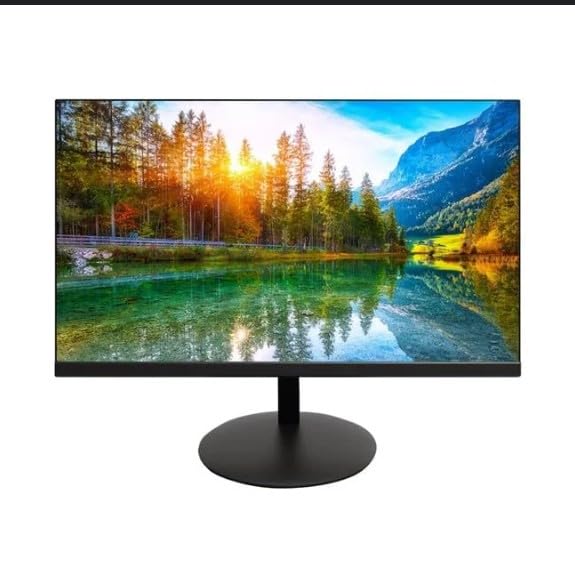
The image shows the Onn 22 inch FHD LED Monitor, highlighting its 100Hz refresh rate and 1080p resolution. The monitor features a slim design and a T-shaped base.
Instruccions de configuració
- Desembalatge: Carefully remove the monitor and all accessories from the packaging. Ensure all components are present: monitor, T-shaped base, HDMI cable, and power adapter.
- Muntatge de l'estand: Attach the T-shaped base to the monitor. The design is screw-less for easy assembly. Ensure it is securely fastened.
- Connexió a un dispositiu:
The monitor supports both HDMI and VGA inputs. Connect the provided HDMI cable from your computer's HDMI output to the HDMI IN port on the monitor. Alternatively, use a VGA cable for VGA input.

This image displays the rear panel of the Onn monitor, illustrating the available input ports: HDMI IN, VGA IN, and the DC 12V power input. These ports are essential for connecting the monitor to a computer or other devices.
- Connexió d'alimentació: Connect the power adapter to the DC 12V input port on the monitor, then plug the adapter into a power outlet.
- Ajust del monitor: The monitor is capable of swivel, tilt, rotation, and height adjustment. Adjust the screen to your preferred viewangle d'ajust per a una comoditat ergonòmica.
- Configuració del monitor dual: This monitor is suitable for a fully functioning dual monitor setup. Connect a second monitor using the appropriate cables and configure your operating system's display settings.
Instruccions de funcionament
- Encès/apagat: Press the power button, usually located on the bottom or back of the monitor, to turn it on or off.
- Selecció d'entrada: If the monitor does not automatically detect the input source, use the On-Screen Display (OSD) menu buttons to manually select between HDMI and VGA inputs.
- Navegació del menú OSD: Use the physical buttons on the monitor (typically on the back or bottom edge) to navigate the OSD menu. This allows you to adjust settings such as brightness, contrast, color temperature, and input source.
- Resolució i freqüència d'actualització: The monitor supports a native resolution of 1920x1080 at a 100Hz refresh rate. Ensure your computer's display settings are configured to these specifications for the best visual experience.
- Sincronització adaptativa: The monitor features Adaptive Sync for gaming, which helps to reduce screen tearing and stuttering. Ensure this feature is enabled in your graphics card settings if supported.
Manteniment
- Neteja de la pantalla: Netegeu suaument la pantalla amb un drap suau i sense borrissol. Per a marques difícils, netegeu suaument.ampen the cloth with water or a non-abrasive, monitor-specific cleaning solution. Avoid spraying liquids directly onto the screen.
- Neteja de la Casing: Feu servir un drap suau i sec per netejar el monitor casing. Do not use strong detergents or solvents, as they may damage the finish.
- Ventilació: Assegureu-vos que les obertures de ventilació del monitor no estiguin bloquejades per evitar el sobreescalfament.
- Emmagatzematge: Quan no l'utilitzeu durant períodes prolongats, guardeu el monitor en un lloc fresc i sec, allunyat de la llum solar directa i de temperatures extremes.
Resolució de problemes
- Sense energia:
- Comproveu si el cable d'alimentació està ben connectat tant al monitor com a la presa de corrent.
- Comproveu que la presa de corrent funcioni correctament.
- Sense senyal:
- Ensure the video cable (HDMI or VGA) is firmly connected to both the monitor and the computer.
- Seleccioneu la font d'entrada correcta mitjançant el menú OSD del monitor.
- Comproveu si l'ordinador està encès i no està en mode de repòs.
- Flickering Screen or Poor Image Quality:
- Comproveu si el cable de vídeo està danyat o connexions soltes.
- Adjust the resolution and refresh rate settings on your computer to match the monitor's specifications (1920x1080, 100Hz).
- Restableix la configuració del monitor als valors predeterminats de fàbrica mitjançant el menú OSD.
- Botons que no responen:
- Unplug the monitor from the power outlet, wait for 30 seconds, and then plug it back in.
If problems persist, please refer to the support information provided in the "Support and Warranty" section.
Especificacions
| Marca | Onn |
| Número de model | 100140681 |
| Nom del model | OTTO |
| Mida de la pantalla | 21.5 polzades |
| Tipus de visualització | LED, LCD |
| Resolució | 1920 x 1080 (FHD 1080p) |
| Freqüència d'actualització | 100 Hz |
| Temps de resposta | 6.5 mil·lisegons |
| Interfície del maquinari | HDMI, VGA |
| Característiques especials | Ajust d'alçada |
| Viewangle ing | 160 graus |
| Relació d'aspecte | 16:9 |
| Dimensions del producte | 49.2 x 20 x 37.2 cm; 3.24 kg |
Suport i garantia
For technical support, product inquiries, or warranty information, please visit the official Onn support weblloc o poseu-vos en contacte amb el seu servei d'atenció al client.
- Suport oficial Weblloc: onnsupport.ca
- Garantia: Specific warranty details may vary by region and purchase date. Please refer to the documentation included with your product or visit the support weblloc web per obtenir la informació més actualitzada sobre la garantia.


