1. Introducció
This manual provides instructions for the safe and efficient operation of your Srliya N01 Electric Turbine Blower. This device is designed for powerful dust cleaning and inflation tasks, featuring an 80000RPM brushless motor and stepless speed regulation. Please read this manual thoroughly before using the product and retain it for future reference.
2. Instruccions de seguretat
Per garantir un funcionament segur i evitar danys, si us plau, seguiu les següents pautes de seguretat:
- Keep the device away from water and moisture. Do not operate with wet hands.
- Do not point the blower directly at people or animals.
- Avoid blocking the air intake or outlet during operation.
- Use only the provided charging cable and a compatible DC 5V USB adapter for charging.
- No intenteu desmuntar ni modificar el dispositiu. Encarregueu tot el manteniment a personal qualificat.
- Guardeu el dispositiu en un lloc fresc i sec, fora de l'abast dels nens.
- No utilitzeu el dispositiu a prop de líquids o gasos inflamables.
- Assegureu-vos que la bateria estigui completament carregada abans del primer ús per obtenir un rendiment òptim.
3. Producte acabatview i Components
Familiarize yourself with the components included with your Srliya N01 Electric Turbine Blower.

Figura 3.1: Main unit of the Srliya N01 Electric Turbine Blower with a nozzle attached.
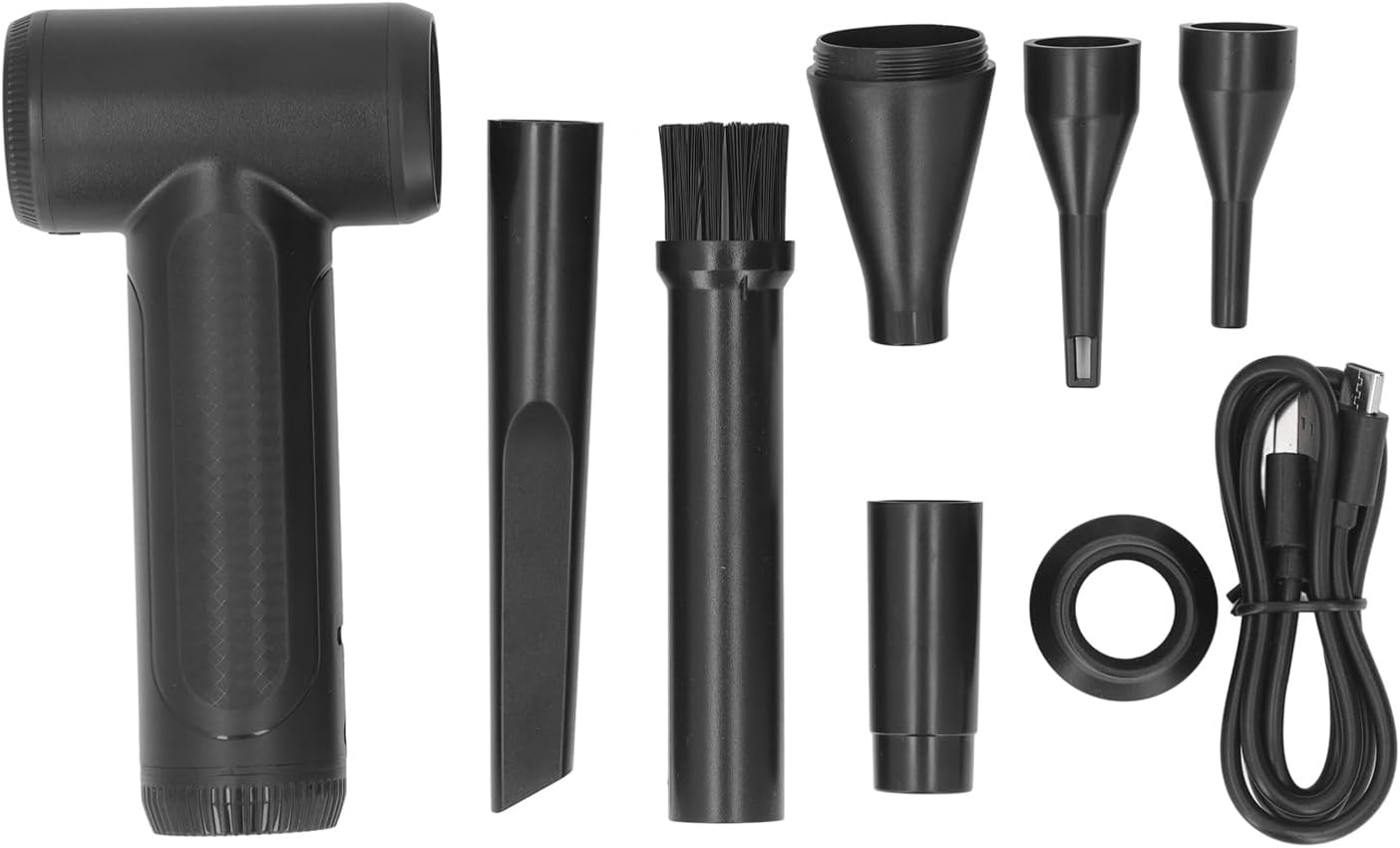
Figura 3.2: Complete package contents including the blower, charging cable, adapter, five nozzles, and a nozzle brush.
Llista d'embalatge:
- 1 x Electric Turbine Blower (Main Unit)
- 1 cable de càrrega (USB)
- 1 x Adapter (Note: This refers to a specific type of connector, not a wall charger. A wall charger is not included.)
- 5 x Various Nozzles
- 1 x Nozzle Brush
Note: A USB wall charger is not included. The device can be charged with any standard DC 5V USB charger.
4. Configuració
4.1 Càrrega del dispositiu
- Connect the provided charging cable to the charging port on the blower.
- Connect the other end of the charging cable to a DC 5V USB power source (e.g., a computer USB port, a USB wall adapter, or a power bank).
- The charging indicator light will illuminate (specific behavior may vary by model, refer to device for exact indication).
- Allow the device to charge fully before first use. A full charge ensures optimal performance and battery longevity.
4.2 Fixació de broquets
- Select the appropriate nozzle for your cleaning or inflation task. The kit includes various nozzles for different applications.
- Align the chosen nozzle with the air outlet of the blower.
- Gently push and twist the nozzle until it is securely attached. Ensure it is firmly in place to prevent detachment during operation.

Figura 4.1: A nozzle securely attached to the blower's air outlet.
5. Instruccions de funcionament
5.1 Engegada/Apagada i Control de Velocitat
- To power on the device, locate the power button (usually on the handle or body) and press it. The blower will start at a low speed.
- The device features stepless speed regulation. To adjust the airflow speed, use the designated speed control mechanism (e.g., a dial or a pressure-sensitive trigger). Increase or decrease the speed as needed for your task, up to 80000RPM.
- To power off the device, press the power button again.
5.2 Aplicacions
The Srliya N01 Electric Turbine Blower is versatile and can be used for various tasks:
- Neteja de pols: Effectively remove dust from electronic devices such as computer cases, keyboards, cameras, and other intricate components.
- Automotive Cleaning: Clean dust and debris from car interiors, vents, and hard-to-reach areas.
- Neteja de la llar: Useful for cleaning fans, window blinds, and other household items.
- Inflació: Certain nozzles are designed for inflating items like swimming rings and air cushions. Ensure the correct nozzle is used for inflation tasks.

Figura 5.1: Air intake grille, ensure it remains unobstructed during operation.
6. Manteniment
6.1 Neteja del bufador
- Ensure the device is powered off and disconnected from the charging cable before cleaning.
- Wipe the exterior of the blower with a soft, dry cloth. Do not use abrasive cleaners or solvents.
- Use the provided nozzle brush to clean any dust or debris from the nozzles and the air intake grille.
- Periodically check the air intake for obstructions and remove them carefully to maintain optimal airflow.
6.2 Cura de la bateria
- Per allargar la durada de la bateria, eviteu descarregar-la completament amb freqüència.
- If storing the device for an extended period, charge it to approximately 50% and recharge every few months.
7. Solució De Problemes
If you encounter issues with your Srliya N01 Electric Turbine Blower, refer to the following common problems and solutions:
- El dispositiu no s'encén:
- Ensure the battery is charged. Connect the device to a power source and allow it to charge.
- Verifiqueu que el botó d'engegada estigui premut correctament.
- Flux d'aire feble:
- Check if the battery is low. Recharge the device.
- Inspect the air intake and outlet for any obstructions and clear them.
- Ensure the nozzle is securely attached and not blocked.
- Device stops unexpectedly:
- The battery may be depleted. Recharge the device.
- The device may have overheated. Allow it to cool down before resuming operation.
Si el problema persisteix després d'intentar aquestes solucions, poseu-vos en contacte amb l'atenció al client.
8. Especificacions
| Tipus d'element | Electric Turbine Blower |
| Model | N01 |
| Material | PC, ABS |
| Velocitat | 80000 RPM |
| Motor | 3 Phase Brushless DC High Speed Motor |
| Control de velocitat | Regulació de velocitat continua |
| Vol. De càrregatage | DC 5V |
| Font d'alimentació | 1 x 1100mAh Lithium Ion Battery (Built-in) |
| Dimensions del paquet | 6.69 x 4.33 x 1.57 polzades |
| Pes de l'article | 11.5 unces |
9. Garantia i Suport
Specific warranty details for the Srliya N01 Electric Turbine Blower are not provided within this manual. For warranty information, please refer to the product listing on the retailer's weblloc web o contacteu directament amb el venedor.
Extended protection plans may be available for purchase separately through the retailer. Please check the product page for details on 2-Year or 3-Year Protection Plans.
For technical support, troubleshooting assistance beyond this manual, or inquiries regarding parts and service, please contact Srliya customer service through the platform where you purchased the product.


