Introducció
Thank you for choosing the ILIFE V20 Robot Vacuum Cleaner and Mop. This manual provides essential information for the safe operation, maintenance, and troubleshooting of your device. Please read it thoroughly before use and retain it for future reference.
The ILIFE V20 is designed to provide efficient cleaning for various floor types, combining powerful vacuuming with effective mopping. Its advanced navigation system and smart control features ensure a convenient and thorough cleaning experience.
Instruccions de seguretat
- Read all instructions before operating the robot.
- No permeteu que els nens facin servir el robot. Superviseu els nens i les mascotes mentre el robot estigui en funcionament.
- Use only the original power adapter and charging dock provided by ILIFE.
- Assegureu-vos que el robot estigui apagat i desendollat abans de netejar-lo o fer-ne el manteniment.
- Mantingueu els cabells, la roba solta, els dits i totes les parts del cos lluny de les obertures i les parts mòbils.
- Do not operate the robot in areas with open flames or fragile objects.
- Avoid using the robot to pick up large debris, liquids, or burning/smoking materials.
- No submergiu el robot ni els seus components electrònics a l'aigua.
- Només per a ús interior.
Contingut del paquet
Verifiqueu que tots els elements siguin presents al paquet:
- ILIFE V20 Robot Vacuum Cleaner and Mop
- Base de càrrega
- Adaptador d'alimentació
- Comandament a distància (amb piles)
- Raspalls laterals (2 parells)
- Filtre d'alta eficiència
- Eina de neteja
- Dipòsit d'aigua
- Draps de fregona (2)
- Manual d'usuari
Producte acabatview

Figura 1: ILIFE V20 Robot Vacuum Cleaner and Mop, showing the main unit, remote control, and a smartphone displaying the control app interface. This image illustrates the complete product package and control options.

Figura 2: The ILIFE V20 highlighting its 2-in-1 vacuum and mop functionality, with indicators for a 300ml dustbin and a 250ml water tank. This image demonstrates the dual cleaning capabilities and capacities.
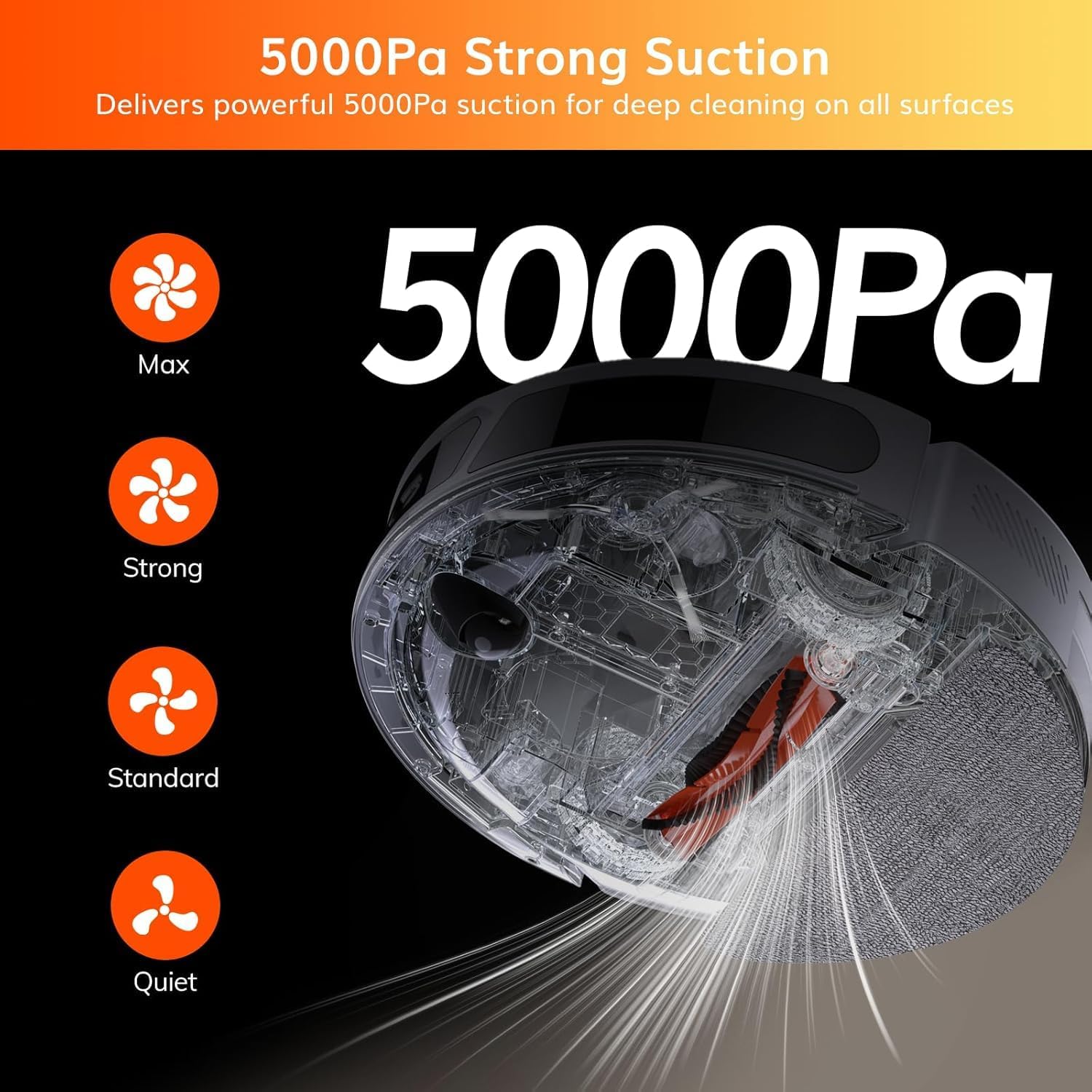
Figura 3: Diagram illustrating the 5000Pa suction power of the ILIFE V20, with options for Max, Strong, Standard, and Quiet modes. This image emphasizes the powerful cleaning performance.
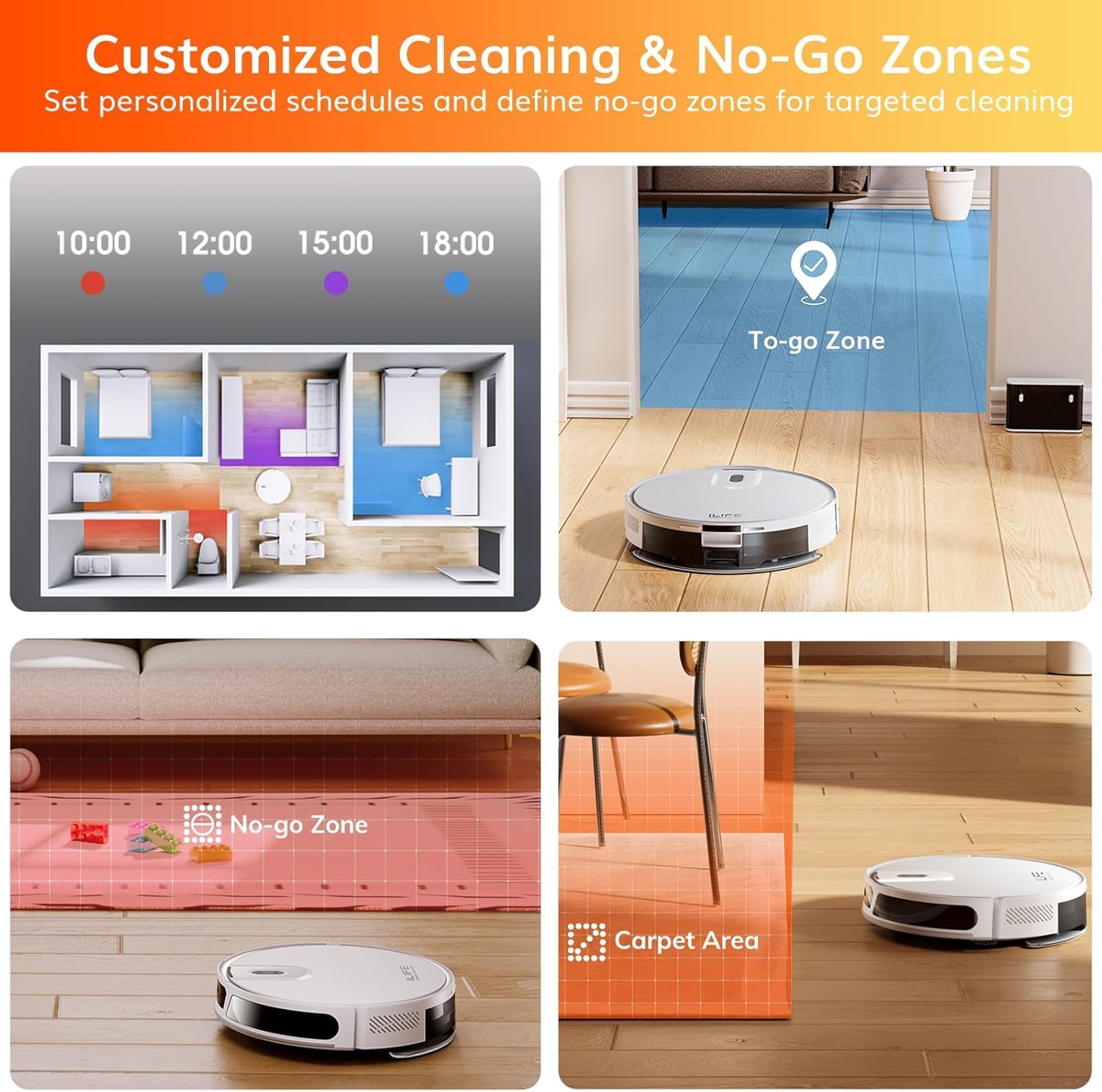
Figura 4: The ILIFE V20 robot vacuum cleaning under a piece of furniture, demonstrating its low-profile design (83mm height) for accessing hard-to-reach areas. This image highlights the robot's ability to clean beneath obstacles.
Configuració
1. Col·locació de la base de càrrega
Place the charging dock against a wall in an open, uncluttered area. Ensure there is at least 1 meter (3 feet) of clear space on both sides and 2 meters (6 feet) in front of the dock. Plug the power adapter into the dock and a wall outlet.
2. Instal·leu els raspalls laterals
Press the side brushes onto the square posts at the bottom of the robot until they click into place. Ensure they are securely attached.
3. Càrrec inicial
Place the robot onto the charging dock, ensuring the charging contacts on the robot align with those on the dock. The robot will begin charging automatically. For first-time use, charge the robot fully (approximately 4-5 hours) before operation.
4. Connexió a l'aplicació (opcional però recomanada)
- Download the "ILIFEHOME" app from your smartphone's app store.
- Registreu un compte i inicieu sessió.
- Follow the in-app instructions to connect your ILIFE V20 to your home Wi-Fi network (2.4GHz only).
- Once connected, you can control the robot, schedule cleanings, and view cleaning maps from your phone.

Figura 5: The ILIFE V20 demonstrating its smart control capabilities via the ILIFEHOME app, remote control, and voice assistants like Amazon Alexa and Google Assistant. This image highlights the various methods for controlling the robot.
Instruccions de funcionament
Modes de neteja
The ILIFE V20 offers versatile cleaning modes to suit different needs:
- Neteja automàtica: The robot automatically plans its cleaning path using SoF laser navigation. Press the power button on the robot or select "Auto" in the app/remote.
- Neteja de punts: For concentrated cleaning of a specific dirty area. Place the robot in the center of the area and select "Spot" in the app/remote.
- Neteja de vores: The robot cleans along walls and furniture edges. Select "Edge" in the app/remote.
- Neteja programada: Set specific times for the robot to clean automatically via the ILIFEHOME app or remote control.
Aspirar
Ensure the dustbin is properly installed. The robot will automatically adjust suction power on carpets (up to 5000Pa) for optimal cleaning.

Figura 6: The ILIFE V20 robot vacuum demonstrating its auto-boost feature, where it automatically increases suction power when detecting a carpeted surface for enhanced cleaning. This image shows the robot transitioning from hard floor to carpet.
Fregar
Per utilitzar la funció de fregar:
- Ompliu el dipòsit d'aigua amb aigua neta. No utilitzeu solucions de neteja que puguin obstruir el broquet.
- Attach a clean mop cloth to the water tank.
- Slide the filled water tank into the robot until it clicks into place.
- Select the desired cleaning mode. The robot will vacuum and mop simultaneously.
- Remove the water tank and empty any remaining water after each mopping session to prevent odors and mildew.
Nota: Avoid using the mopping function on carpets. Use the app to set "No-Go Zones" for carpeted areas if using the mop.
Multi-Floor Mapping and No-Go Zones
The ILIFE V20 can store up to 5 maps, making it suitable for multi-level homes. Use the ILIFEHOME app to:
- Create and save maps for different floors.
- Define "No-Go Zones" to restrict the robot from entering specific areas.
- Set "No-Mop Zones" to prevent mopping on carpets or other sensitive surfaces.
- Target specific rooms or zones for cleaning.

Figura 7: An illustration of the ILIFE V20's customized cleaning features, including scheduled cleaning times, "To-go Zones," and "No-go Zones" for specific areas like under furniture or carpeted regions. This image demonstrates the robot's intelligent mapping and zone control.

Figura 8: The ILIFE V20 utilizing Smart Mapping SoF Enhanced Navigation to create precise and efficient cleaning routes, shown with a mapped floor plan. This image highlights the robot's advanced navigation system.
Manteniment
Regular maintenance ensures optimal performance and extends the lifespan of your ILIFE V20. Always turn off the robot and unplug it from the charging dock before performing any maintenance.
1. Emptying the Dustbin (After each use)
- Premeu el botó d'alliberament del contenidor de pols i traieu-lo.
- Obriu la tapa de la paperera i buideu-ne el contingut en una paperera.
- Clean the filter with the provided cleaning tool or a small brush. Do not wash the filter with water.
- Reinstall the filter and close the dustbin cover. Insert the dustbin back into the robot.
2. Cleaning the Water Tank and Mop Cloth (After each mopping use)
- Traieu el dipòsit d'aigua del robot.
- Buidar l'aigua que quedi del dipòsit.
- Detach the mop cloth and rinse it thoroughly with water. Allow it to air dry completely.
- Clean the water tank and allow it to air dry before reattaching the mop cloth and storing.
3. Cleaning Side Brushes (Weekly or as needed)
Remove the side brushes by gently pulling them upwards. Remove any hair or debris wrapped around them. Reinstall them, ensuring they click into place.
4. Cleaning Main Brush (Weekly or as needed)
Open the main brush cover. Lift out the main brush. Use the cleaning tool to remove hair and debris from the brush and its bearings. Reinstall the main brush and close the cover.
5. Cleaning Sensors and Charging Contacts (Monthly or as needed)
Wipe the anti-drop sensors, wall sensors, and charging contacts on both the robot and the charging dock with a clean, dry cloth. This ensures proper navigation and charging.
Resolució de problemes
| Problema | Causa possible | Solució |
|---|---|---|
| El robot no s'encén. | Bateria baixa; interruptor apagat. | Charge the robot fully; Ensure the main power switch is ON. |
| El robot no pot trobar la base de càrrega. | Dock is obstructed; Dock is unplugged; Robot too far from dock. | Clear obstructions around the dock; Ensure dock is plugged in; Manually place robot near the dock. |
| El rendiment de neteja és deficient. | Cubell de les escombraries ple; filtre obstruït; raspalls enredats. | Buidar el contenidor de pols; netejar/substituir el filtre; netejar els raspalls principal i laterals. |
| El robot es queda encallat sovint. | Cables/small objects on floor; Dark surfaces mistaken for cliffs. | Clear floor of obstacles; Use "No-Go Zones" for problematic areas. |
| La funció de fregar no funciona. | Water tank empty; Mop cloth dry; Water outlet clogged. | Fill water tank; Wet mop cloth before use; Clean water tank and mop cloth. |
| Problemes de connexió de l'aplicació. | Contrasenya Wi-Fi incorrecta; xarxa Wi-Fi de 5 GHz; robot massa lluny del router. | Verify password; Ensure 2.4GHz Wi-Fi; Move robot closer to router or reset Wi-Fi. |
Especificacions
| Característica | Detall |
|---|---|
| Model | V20 |
| Potència d'aspiració | Fins a 5000Pa |
| Tipus de navegació | SoF Laser Navigation (Lidar) |
| Durada de la bateria | Fins a 140 minuts |
| Capacitat de la paperera | 300 ml |
| Capacitat del dipòsit d'aigua | 250 ml |
| Connectivitat | 2.4GHz Wi-Fi, Remote Control, Voice Control (Alexa/Google Assistant) |
| Característiques especials | Anti-Collision, Low Noise, Multi-Floor Mapping (up to 5 maps), No-Go Zone, Auto-Boost on Carpets |
| Dimensions | 45.6 x 35.4 x 14 cm (Package); 83mm height (Robot) |
| Pes | 3.3 kg |
Garantia i Suport
ILIFE products come with a standard manufacturer's warranty. For specific warranty details, please refer to the warranty card included in your product packaging or visit the official ILIFE weblloc.
For technical support, troubleshooting assistance, or replacement parts, please contact ILIFE Customer Service:
- Weblloc: www.iliferobot.com
- Correu electrònic: Refer to your warranty card for regional support email.
- Telèfon: Refer to your warranty card for regional support phone number.
Please have your model number (V20) and purchase information ready when contacting support.


