Introducció
This manual provides comprehensive instructions for the setup, operation, and maintenance of your MONTECH Heritage PRO mATX Gaming Chassis. Designed with a unique blend of leather and metal, this compact case offers robust support for high-performance components while maintaining a portable and stylish form factor.
Les característiques clau inclouen:
- Portable suitcase-style leather handle for convenient mobility.
- Elegant leather and metal fusion with a timeless aesthetic design.
- Supports high-performance components including RTX 40 Series GPUs, ATX PSU, and 360mm AIO liquid cooling.
- Includes 4 x 120mm fans for optimal airflow.
- Additional headphone hanger for added convenience.
Producte acabatview
Familiarize yourself with the various components and features of your Heritage PRO chassis.

Figura 1: En general view of the MONTECH Heritage PRO chassis, showcasing its unique leather handle and compact design.

Figura 2: Front I/O panel featuring power button, reset button, headset audio jack, USB-A 5Gb/s ports, and a Type-C 20Gb/s port.
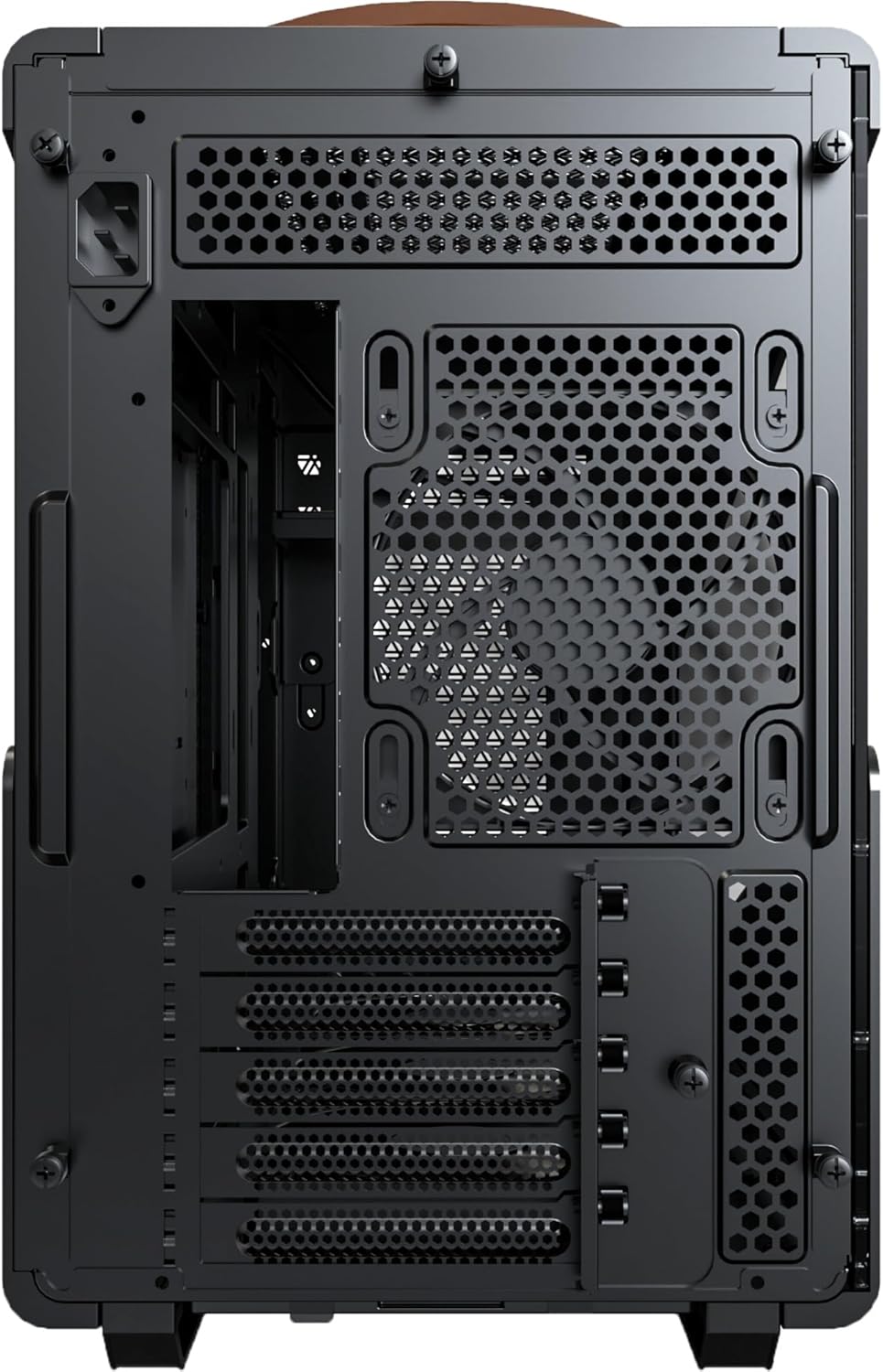
Figura 3: Rear panel layout, including motherboard I/O cutout, expansion slots, and power supply mounting area.

Figura 4: The durable leather handle is engineered to support up to 40KG, facilitating easy transport of your system.
Guia de configuració
Follow these steps to assemble your computer components within the Heritage PRO chassis.
1. Preparació del xassís
Before installation, ensure the chassis is placed on a stable, flat surface. Remove the side panels by unscrewing the thumb screws at the rear of the case and gently sliding them off.
2. Instal·lació de la placa base
Els Heritage PRO supports Micro-ATX and Mini-ITX motherboards. Align your motherboard with the standoffs inside the chassis. Secure the motherboard using the provided screws. Ensure the I/O shield is properly seated in the rear opening.
3. Instal·lació de la font d'alimentació (PSU)
This chassis supports ATX PSUs. Install your power supply into the designated bottom mount area. Secure it with screws from the rear of the chassis. Route the necessary power cables through the cable management cutouts.
4. Instal·lació de la unitat de processament gràfic (GPU)
Els Heritage PRO can accommodate GPUs up to 400mm in length, supporting RTX 40 Series GPUs. Remove the necessary PCIe slot covers at the rear. Insert your GPU into the PCIe slot on the motherboard and secure it with screws.
5. Instal·lació del sistema de refrigeració
The chassis includes 4 x 120mm fans for optimal airflow. Additional cooling options include support for a 360mm AIO liquid cooler. Install fans and radiators in their respective mounting positions (front, top, rear, or bottom) as per your cooling configuration.

Figura 5: Internal layout showing component compatibility: Micro-ATX/Mini-ITX motherboards, 160mm ATX PSU, 400mm GPU, and 360mm AIO support.
6. Instal·lació de la unitat d'emmagatzematge
Install your 2.5-inch SSDs or 3.5-inch HDDs into the designated drive bays. Secure them with the appropriate screws.
7. Gestió de cables
Aprofita els retalls de cables i els punts d'amarratge que hi ha darrere de la safata de la placa base per gestionar els cables. Això millora la circulació del flux i l'estètica.
8. Reassembling the Chassis
Once all components are installed and cables are managed, carefully reattach the side panels and secure them with the thumb screws.
Instruccions de funcionament
After successful assembly, connect your peripherals and power cable to the system. Press the power button on the front I/O panel to turn on your computer. The system status indicator will illuminate.
To power off, initiate a shutdown from your operating system. For a forced shutdown, press and hold the power button for several seconds.
Manteniment
Regular maintenance helps ensure optimal performance and longevity of your chassis.
- Filtres de pols: Els Heritage PRO features magnetic dust filters. Regularly remove and clean these filters to prevent dust buildup and maintain optimal airflow. Gently brush or rinse them with water (ensure they are completely dry before reinstallation).
- Neteja exterior: Wipe the exterior surfaces, including the leather and metal parts, with a soft, dry cloth. For stubborn marks on metal, a slightly damp es pot fer servir un drap i assecar-lo immediatament. Eviteu productes químics agressius o netejadors abrasius.
- Neteja interior: Periodically use compressed air to clear dust from internal components and fans. Ensure the system is powered off and unplugged before performing internal cleaning.
Resolució de problemes
Aquesta secció tracta problemes comuns que podeu trobar.
| Problema | Causa possible | Solució |
|---|---|---|
| El sistema no s'encén. | Cables d'alimentació solts, font d'alimentació defectuosa, connexions incorrectes al panell frontal. |
|
| Els ventiladors no giren. | Loose fan connections, fan controller issues, faulty fans. |
|
| Sobreescalfament de components. | Poor airflow, dust buildup, incorrect fan orientation. |
|
Especificacions
Detailed technical specifications for the MONTECH Heritage PRO mATX Gaming Chassis.
| Característica | Detall |
|---|---|
| Marca | Montech |
| Nom del model | HeritagePro-B |
| Tipus de cas | Torre mitja |
| Compatibilitat amb la placa base | Micro ATX, Mini ITX |
| Material | Leather, Metal |
| Color | Brown (for this specific model) |
| Pes de l'article | 13.23 lliures (6.0 kg) |
| Dimensions del producte (LxWxH) | 18.9 x 9.25 x 14.49 polzades (48.0 x 23.5 x 36.8 cm) |
| Tipus de muntatge de la font d'alimentació | Muntatge inferior |
| Mètode de refrigeració | Aigua, Aire |
| Ventiladors preinstal·lats | 4 x 120mm fans |
| Longitud màxima de la GPU | 400 mm |
| Longitud màxima de la PSU | 160mm (ATX PSU) |
| Suport del radiador AIO | Fins a 360 mm |
| Ports d'E / S frontals | Power Button, Reset Button, Headset Audio Jack (1), USB-A 5Gb/s (2), Type-C 20Gb/s (1) |
Garantia i Suport
For detailed warranty information and technical support, please refer to the official Montech weblloc web o contacteu directament amb el servei d'atenció al client. Conserveu el comprovant de compra per a reclamacions de garantia.
Official Montech Weblloc: www.montechpc.com


