Introducció
The Portronics Iron Beats III is a powerful 200W party speaker designed to deliver an immersive audio experience. It features a wireless UHF karaoke microphone, Bluetooth V5.3 connectivity, versatile input options, dynamic RGB LED lights, and an extended battery life. This manual provides essential information for setting up, operating, and maintaining your speaker.
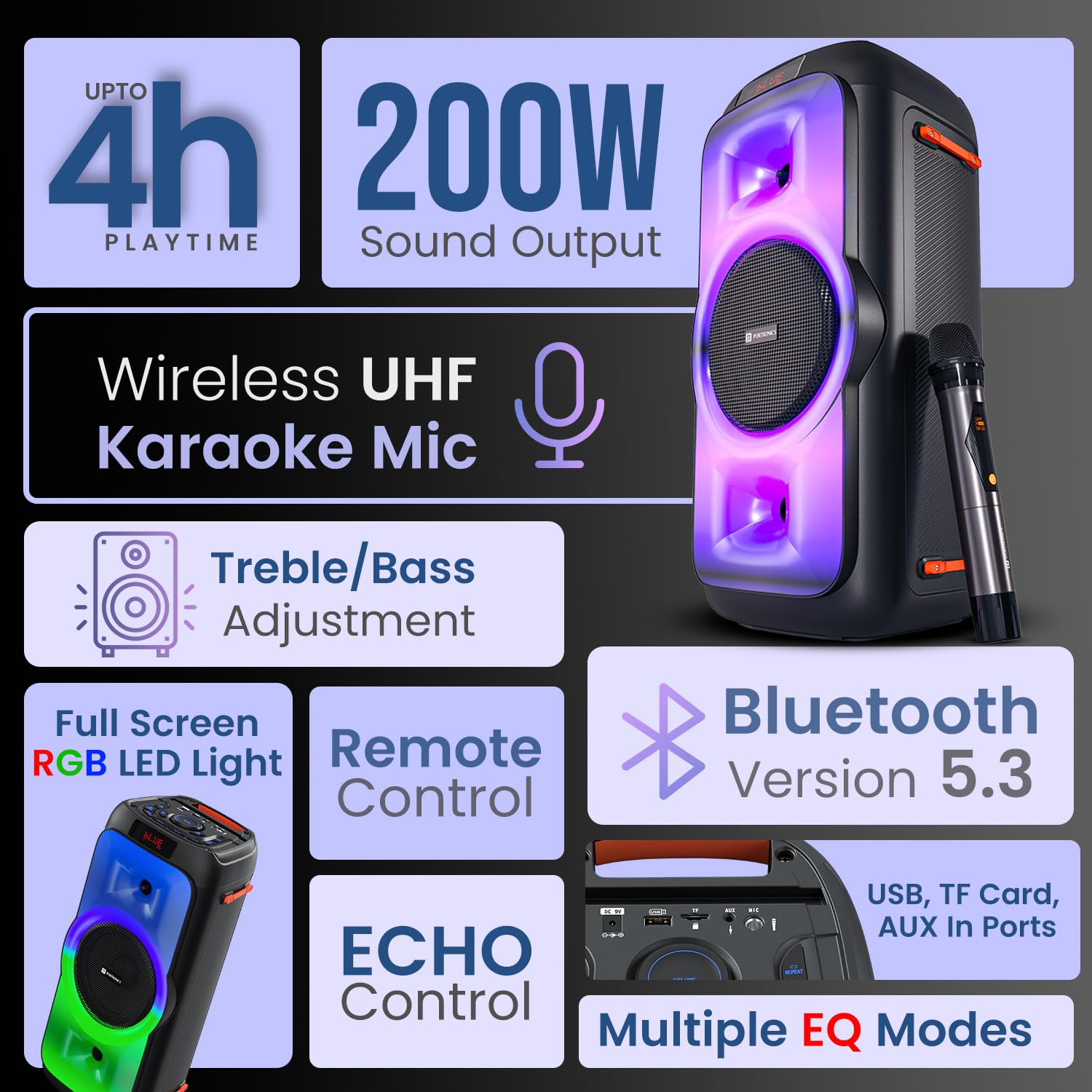
Acabatview of the Portronics Iron Beats III speaker, showcasing its main features including sound output, connectivity, and lighting.
Configuració
Desembalatge i càrrega inicial
- Carefully remove all components from the packaging: Speaker, Power Adapter, Wireless Karaoke Mic, Remote Control, and Documentation.
- Before first use, fully charge the speaker using the provided power adapter. Connect the adapter to the DC 9V input port on the speaker and plug it into a power outlet. The charging indicator will show the charging status.
Encès/Apagat
- Per encendre, premeu i manteniu premut PODER botó del tauler de control.
- Per apagar-lo, manteniu premut el botó PODER botó de nou.
Instruccions de funcionament
Connectivitat Bluetooth (V5.3)
- Turn on the speaker. It will automatically enter Bluetooth pairing mode, indicated by a flashing 'BLUE' on the LED display.
- Al dispositiu mòbil, activeu el Bluetooth i cerqueu els dispositius disponibles.
- Select "Portronics Iron Beats III" from the list. Once connected, the speaker will emit a confirmation sound, and 'BLUE' will stop flashing.

The speaker features Bluetooth 5.3 for stable wireless connections and includes a convenient mobile holder space.
Reproducció de targetes USB/TF
- Insert a USB drive or TF card into the respective port on the speaker.
- L'altaveu detectarà automàticament el dispositiu d'emmagatzematge i començarà a reproduir àudio files.
- Utilitza el MODE button to switch between input sources if needed.
Entrada AUX
- Connect an external audio device (e.g., MP3 player, laptop) to the AUX IN port using a 3.5mm audio cable (not included).
- Premeu el botó MODE botó per seleccionar l'entrada AUX.
Ràdio FM
- Premeu el botó MODE botó per canviar al mode de ràdio FM.
- Premeu el botó ESCANEAR button (often combined with Play/Pause) to automatically scan and save available FM stations.
- Utilitza el CH- / CH+ botons per navegar per les estacions desades.
Micròfon karaoke sense fils
- Ensure the wireless microphone is charged and powered on.
- El micròfon s'aparellarà automàticament amb l'altaveu.
- Adjust the microphone volume using the dedicated MIC VOL control on the speaker.
- Ajusteu l'efecte d'eco amb el botó ECO control.

The included wireless UHF karaoke microphone allows for clear vocal performance.
Sound Adjustment (Bass/Treble/EQ)
- Utilitzeu el dedicat BASS i AGUTS controls on the speaker to fine-tune the audio output.
- Premeu el botó EQ button to cycle through multiple equalizer modes (e.g., Pop, Rock, Jazz, Classic) to match your music genre.

Adjust bass and treble levels for a customized sound experience.
Control de llums LED
- Premeu el botó LED button on the control panel or remote to cycle through different RGB lighting modes or to turn the lights off.

The full-screen RGB LED lights enhance the party atmosphere.
Ús del control remot
- The included remote control allows for convenient adjustment of volume, track selection, mode switching, EQ settings, and LED light control from a distance.

The control panel and remote offer comprehensive control over the speaker's functions.
Manteniment
Neteja
- Wipe the speaker's exterior with a soft, dry cloth. Do not use abrasive cleaners or solvents.
- Eviteu que entri humitat a cap obertura.
Emmagatzematge
- Guardeu l'altaveu en un lloc fresc i sec, allunyat de la llum solar directa i de temperatures extremes.
- Si l'emmagatzemeu durant un període prolongat, carregueu la bateria periòdicament per mantenir-ne l'estat.
Cura de la bateria
- To prolong battery life, avoid fully discharging the speaker frequently.
- Charge the speaker using only the provided power adapter.
Resolució de problemes
| Problema | Possible solució |
|---|---|
| Sense poder | Ensure the speaker is charged. Connect the power adapter and check if the charging indicator lights up. Press and hold the power button. |
| Sense so | Check the volume level on both the speaker and your connected device. Ensure the correct input mode (Bluetooth, AUX, USB, TF, FM) is selected. |
| L'aparellament de Bluetooth falla | Ensure the speaker is in pairing mode. Disable and re-enable Bluetooth on your device. Move your device closer to the speaker. Forget the device from your phone's Bluetooth list and try pairing again. |
| El micròfon no funciona | Ensure the microphone is powered on and charged. Check the MIC VOL control on the speaker. |
| El comandament a distància no funciona | Ensure there are no obstructions between the remote and the speaker. Replace the remote control battery (CR5 type). |
Especificacions
- Número de model: POR-2343
- Potència de sortida: 200 watts
- Connectivitat: Bluetooth V5.3
- Entrades d'àudio: USB, TF Card, AUX, FM Radio
- Micròfon: Wireless UHF Karaoke Mic
- Tipus de bateria: Polímer de liti
- Temps de joc: Up to 4 Hours (at moderate volume)
- Tipus de muntatge: Terra de peu
- Material: Plàstic ABS
- Dimensions del producte (LxWxH): 55.1 x 29.7 x 29 cm
- Pes de l'article: 4.85 kg
- Components inclosos: Speaker, Power Adapter, Karaoke Mic, Remote Control, Documentation
Garantia i Suport
For warranty information, technical support, or service inquiries, please contact Portronics customer support:
- Correu electrònic: help@portronics.com
- Telèfon: +91 9555-245-245
Please refer to the documentation included in the box for specific warranty terms and conditions.


