1. Introducció
Thank you for choosing the Insoma WiFi Water Timer. This smart device is designed to simplify your garden watering, offering convenient control via the Smart Life APP, voice commands through Alexa and Google Assistant, and flexible scheduling options. With its 2 independent watering zones and rain delay function, you can ensure your plants receive optimal hydration while conserving water.
2. Informació de seguretat
- The water timer has an IP55 waterproof rating, making it suitable for outdoor use. However, avoid submerging the device in water.
- Requires 4x AA batteries (not included). Ensure correct polarity when inserting.
- Interval de temperatura de funcionament: de 40.1 °F a 113 °F (4.5 °C a 45 °C).
- Working pressure: 7.25 psi to 116 psi.
- Disconnect and store the timer indoors during freezing temperatures to prevent damage.
- Ensure all hose connections are tight to prevent leaks.
3. Contingut del paquet
Si us plau, verifiqueu que tots els elements siguin presents al paquet:
- Insoma WiFi Water Timer (Model SGW02MB-BL-T)
- Hub WiFi
- Cable USB
- Adaptador d'alimentació
- Cinta de tefló
- Extra Washers
- Manual d'usuari
4. Configuració
4.1. Install Batteries in Water Timer
Open the battery compartment on the back of the water timer. Insert 4 new AA batteries, ensuring correct polarity. Close the compartment securely to maintain its waterproof seal.
4.2. Connect Water Timer to Faucet
Screw the brass inlet of the water timer onto your outdoor faucet. Hand-tighten firmly. If leaks occur, unscrew, wrap the faucet threads with the provided Teflon tape, and re-tighten.
4.3. Connect Hoses to Outlets
Attach your garden hoses or drip irrigation lines to the two independent outlets (labeled L and R) at the bottom of the water timer. Ensure these connections are also tight.
4.4. Install and Power On WiFi Hub
Plug the WiFi Hub into a standard electrical outlet indoors, ensuring it is within range of your home's 2.4GHz WiFi network. Connect the USB cable to the hub and the power adapter, then plug the adapter into the wall. The hub must remain powered for remote control functionality.
4.5. Instal·lació i emparellament de l'aplicació
- Descarrega't el Vida intel·ligent app from your device's app store (iOS or Android).
- Registra't o inicia la sessió al teu compte de Smart Life.
- Emparellar el concentrador WiFi: In the app, tap '+' to add a device. Select 'Socket (Wi-Fi)' or search for 'Irrigation Hub'. Follow the in-app instructions to put the hub into pairing mode (usually by long-pressing a button until a light blinks). Enter your 2.4GHz WiFi network password.
- Pair the Water Timer: Once the hub is connected, select the hub in the app and choose 'Manage added devices'. Find and click on 'Water valve controller'. Follow the instructions to put the water timer into pairing mode (long-press both buttons on the timer for 5 seconds until the light flashes). The app will discover and add the timer.

Image: Insoma WiFi Water Timer connected to an outdoor faucet, with a smartphone displaying the Smart Life app interface for remote control. A WiFi hub is shown wirelessly connecting to the timer.
Video: A step-by-step guide on how to connect the water timer to the Alexa app via the Tuya app on an Android device, demonstrating the pairing process and voice control setup.
5. Instruccions de funcionament
5.1. Control manual
The water timer features two physical buttons (one for each zone) for immediate manual watering. Pressing a button will activate the corresponding zone. Pressing it again will turn it off. This allows for quick watering without interrupting preset schedules.
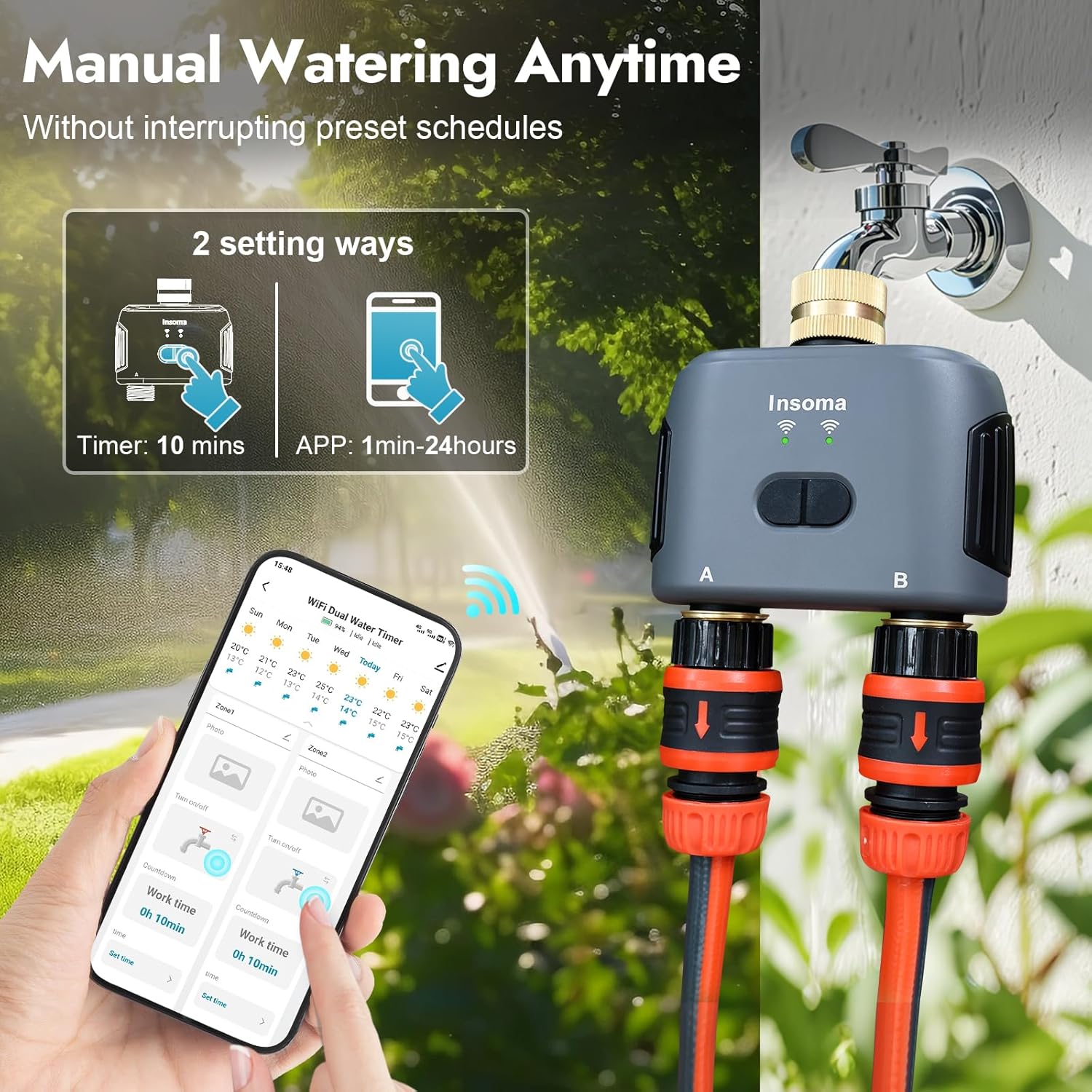
Image: The Insoma WiFi Water Timer is shown connected to a faucet, with an illustration highlighting two setting ways: manual control via the timer's buttons and app control for flexible duration settings.
5.2. Control d'aplicacions
The Smart Life app provides comprehensive control over your water timer:
- Mode de reg temporitzat: Set a specific start time, irrigation duration (1 minute to 24 hours), and choose a weekly cycle (e.g., Mon, Wed, Fri) or specific days (odd/even days, every few days). Each of the 2 zones can have up to 10 programs.
- Mode de reg cíclic: Define an irrigation duration, an interval time between cycles, and overall start and end times. The timer will automatically cycle watering within these parameters.
- Retard per la pluja: Pause your programmed watering schedule for 1 to 7 days. The schedule will automatically resume after the delay period.
- Control de veu: Integrate with Alexa or Google Assistant to turn watering on/off using simple voice commands (e.g., "Alexa, open the Smart Dual Water Timer").
- Watering History: View detailed records of past watering events, including duration, for each zone within the app.
- Sistema de reg ampliat: Expand your smart irrigation system by connecting up to 32 WiFi water timers to a single WiFi hub.

Image: A man relaxing on a couch, using voice commands with a smart speaker (Alexa) to control the Insoma WiFi Water Timer, which is shown connected to a sprinkler system in a garden.

Image: The Insoma WiFi Water Timer is shown connected to a faucet during rainfall, with an overlay illustrating the rain delay function that can pause watering for 1 to 7 days. The device has an IP55 rating.

Image: A smartphone screen displays the Smart Life app interface, detailing two watering schedule types: Timed Watering Mode (customizable start time, duration, and frequency) and Cyclical Watering Mode (with irrigation duration, interval time, and start/end times).
6. Manteniment
- Substitució de la bateria: Replace all 4 AA batteries when the low battery indicator appears in the app or on the device. Ensure the waterproof seal is properly seated when closing the battery compartment.
- Neteja del filtre d'entrada: Periodically check the filter screen in the brass inlet for debris. Remove and rinse it under running water to maintain optimal water flow.
- Hivernització: Before the first frost, disconnect the water timer from the faucet and hoses. Remove the batteries and store the device indoors in a dry, frost-free location to prevent damage from freezing water.
7. Solució De Problemes
- Sense flux d'aigua:
- Assegureu-vos que l'aixeta exterior estigui completament oberta.
- Comproveu els nivells de la bateria i substituïu-la si és baixa.
- Verify the watering schedule in the app is active and not paused by rain delay.
- Test manual watering using the device buttons.
- Fuites a les connexions:
- Assegureu-vos que totes les connexions (aixeta al temporitzador, temporitzador a les mànegues) estiguin ben fixades.
- Check for damaged or missing rubber washers; use the provided spares if necessary.
- Apply Teflon tape to threaded connections if leaks persist.
- Problemes de connectivitat de l'aplicació:
- Confirm your home WiFi network is 2.4GHz.
- Ensure the WiFi Hub is powered on and connected to your network.
- Check that the water timer is within Bluetooth range of the WiFi Hub.
- Verify the correct WiFi password was entered during hub setup.
- El control per veu no respon:
- Ensure the Smart Life app is correctly linked to your Alexa or Google Assistant account.
- Check the device name in the Alexa/Google Home app and use that exact name in your commands.
- Verify your smart speaker is online and connected to the internet.
8. Especificacions
| Marca | Insoma |
| Número de model | SGW02MB-BL-T |
| Color | Negre |
| Material | Brass Inlet |
| Dimensions del producte | 5.94 "P x 5" W x 2.36" H |
| Pes de l'article | 14.4 unces |
| Nombre de configuracions | 20 (10 programs per outlet) |
| ASIN | B0DT15HZC2 |
| Data de primera disponibilitat | 14 de gener de 2025 |
9. Garantia i Suport
Per obtenir informació sobre la garantia, consulteu la fitxa oficial del fabricant website or contact Insoma customer support directly. Extended protection plans (3-Year and 4-Year) may be available for purchase separately. Please check product listings or contact your retailer for details on these plans.


