1. Introducció
This manual provides essential information for the installation, operation, maintenance, and troubleshooting of your ENERMAX Revolution III 850W Fully Modular PC Power Supply. Please read this manual thoroughly before installation and retain it for future reference.

Figure 1: ENERMAX Revolution III 850W Power Supply
2. Característiques clau
- Conformitat amb ATX 3.1: Adheres to the latest Intel ATX 3.1 specifications, ensuring compatibility with current and future components. The 850W model includes a native 600W 12V-2x6 connector for reliable power delivery to high-end GPUs.
- Alta eficiència: 80 PLUS Gold certified, achieving up to 93% efficiency at 50% load. This reduces energy consumption and heat generation, contributing to more efficient system performance.
- Superior Performance for High-End GPUs: Accommodates up to 200% power excursion, allowing stable operation with demanding graphics cards.
- Silent Operation and Durability: Features 100% industrial-grade Japanese capacitors for high-end performance and longevity. The built-in 120mm Fluid Dynamic Bearing (FDB) fan provides ultra-quiet operation, even under heavy loads.
- Optimized Safety: Includes multiple protection circuitries: Over Current Protection (OCP), Over Voltage Protection (OVP), sota voltage Protection (UVP), Over Power Protection (OPP), Short Circuit Protection (SCP), and Over Temperature Protection (OTP). Certified for use at altitudes up to 5000m.
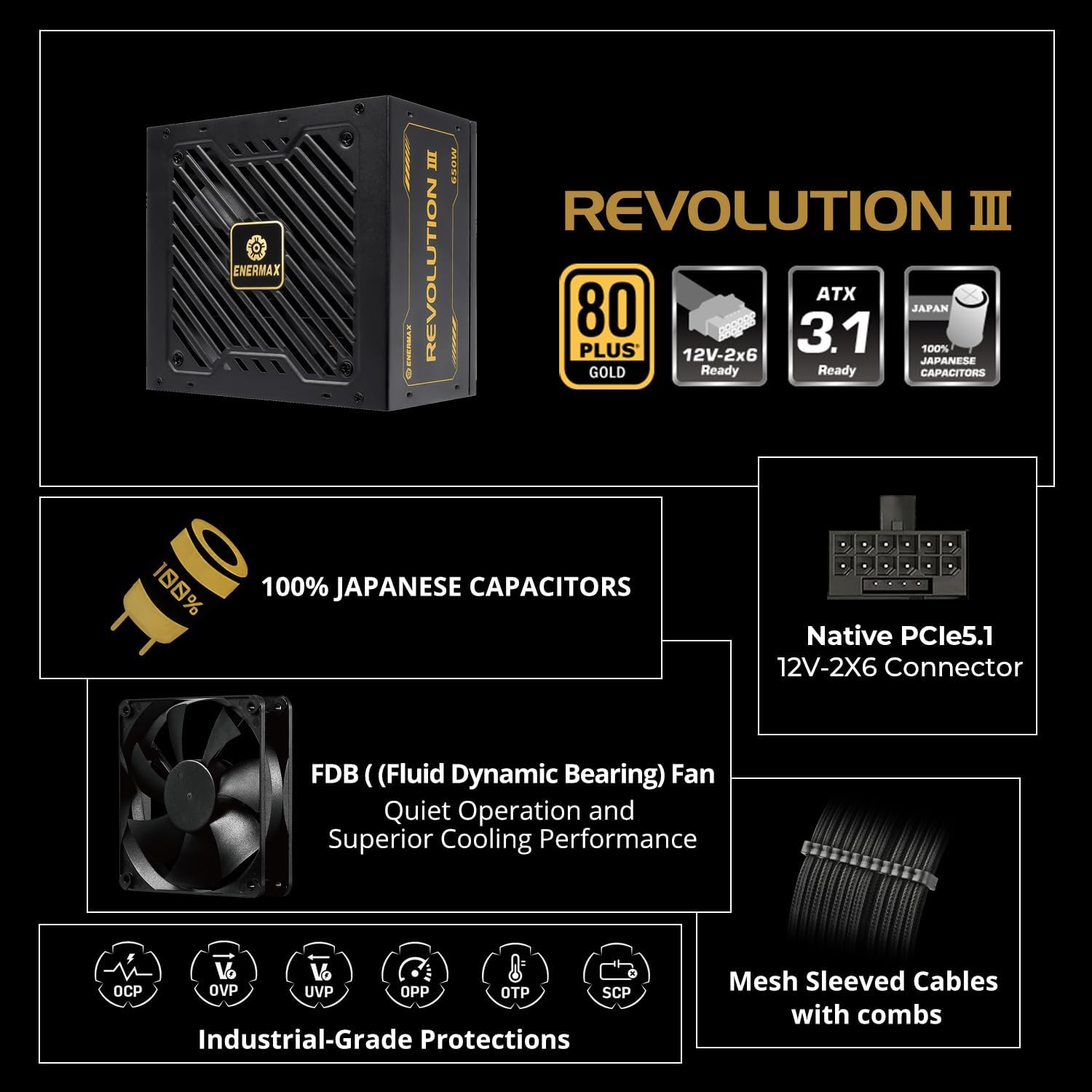
Figura 2: Mésview de les característiques clau

Figure 3: ATX 3.1 Ready with 12V-2x6 Connector
Video 1: Enermax Revolution III ATX 3.1 Power Supply Overview. This video highlights the ATX 3.1 compliance and key features of the power supply.
3. Configuració i instal·lació
3.1 Precaucions de seguretat
- Ensure your system is completely powered off and unplugged from the wall outlet before installation.
- Discharge any static electricity by touching a grounded metal object before handling components.
- No obriu la font d'alimentació. Alt voltatgetagsón presents a dins.
3.2 Passos d'instal·lació
- Muntar la font d'alimentació: Secure the ENERMAX Revolution III 850W PSU into the designated power supply bay of your PC case using the provided screws.
- Connecteu l'alimentació de la placa base: Connect the 24-pin ATX motherboard cable to the corresponding port on your motherboard and the PSU.
- Connecteu l'alimentació de la CPU: Connect the 8-pin (4+4 pin) CPU power cable(s) to your motherboard and the PSU.
- Connecteu l'alimentació de la GPU: For graphics cards requiring a 12V-2x6 connector, use the native 600W cable. For other GPUs, use the appropriate PCIe (6+2 pin) cables. Ensure all connections are secure.
- Connecteu els perifèrics: Connect SATA power cables to your storage drives (HDDs, SSDs) and Molex cables to any other peripherals as needed.
- Gestió de cables: Utilize the fully modular design and mesh-sleeved cables to organize your cables for optimal airflow and a clean build.
- Encès: Once all connections are secure, connect the AC power cord to the PSU and a wall outlet. Flip the power switch on the PSU to the 'On' position.

Figure 4: Modular Connector Layout

Figure 5: Premium Mesh-Sleeved Cables
4. Instruccions de funcionament
After successful installation, your ENERMAX Revolution III 850W Power Supply is ready for operation. The unit is designed for continuous, stable power delivery.
- Encès/apagat: Use the main power switch located on the rear of the PSU to turn the unit on or off. Always ensure the system is properly shut down via the operating system before switching off the PSU.
- Funcionament del ventilador: The 120mm FDB fan operates intelligently, adjusting its speed based on the power supply's temperature and load. This ensures optimal cooling while maintaining quiet operation.
5. Manteniment
To ensure the longevity and optimal performance of your power supply, periodic maintenance is recommended.
- Neteja: Regularly clean the fan grill and ventilation openings of the power supply to prevent dust buildup. Use compressed air or a soft brush. Ensure the system is powered off and unplugged before cleaning.
- Inspecció del cable: Periodically check all modular cable connections to ensure they are seated firmly.
- Medi ambient: Operate the power supply in a well-ventilated area, away from excessive heat, humidity, or dust.
6. Solució De Problemes
Si teniu problemes amb la font d'alimentació, consulteu els passos habituals següents per a la resolució de problemes:
- Sense energia:
- Comproveu si el cable d'alimentació de CA està connectat correctament tant a la font d'alimentació com a la presa de corrent.
- Ensure the main power switch on the PSU is in the 'On' position.
- Verifiqueu que la presa de corrent funciona connectant-hi un altre dispositiu.
- Inestabilitat del sistema/aturades aleatòries:
- Ensure all modular cables are correctly and firmly seated in both the PSU and the components.
- Confirm that your system's power requirements do not exceed the 850W capacity of the PSU.
- The PSU's built-in protection circuitries (OCP, OVP, UVP, OPP, SCP, OTP) may trigger a shutdown to protect components if an anomaly is detected. If this occurs, identify and resolve the underlying issue (e.g., short circuit, excessive load).
- Soroll excessiu del ventilador:
- Clean the fan and ventilation areas to remove any dust buildup.
- Ensure the PSU is operating within its normal temperature range. High temperatures can cause the fan to spin faster.
Si els problemes persisteixen després de seguir aquests passos, poseu-vos en contacte amb l'atenció al client.
7. Especificacions
| Característica | Detall |
|---|---|
| Nom del model | REVOLUTION III 850 |
| Número de model de l'article | EP-RV3-850G-FR |
| Marca | Enermax |
| Wattage | 850 watts |
| Factor de forma | ATX |
| Disseny de fonts d'alimentació | Completament Modular |
| Certificació d'eficiència | 80 PLUS Or |
| Mètode de refrigeració | Aire (ventilador FDB de 120 mm) |
| Dimensions del producte | 5.51 x 5.91 x 3.39 polzades |
| Pes de l'article | 5.1 lliures |
| Dispositius compatibles | Escriptori |
| Tipus de connector | ATX, PCI Express (Native 12V-2x6) |
| Condensadors | 100% Japanese Industrial-Grade |
| Protection Circuitries | OCP, OVP, UVP, OPP, SCP, OTP |
8. Garantia i Suport
8.1 Informació de la garantia
The ENERMAX Revolution III 850W Power Supply comes with a 10 any de garantia des de la data de compra. Aquesta garantia cobreix els defectes de materials i de fabricació en condicions d'ús normal. Conserveu el comprovant de compra per a reclamacions de garantia.
8.2 Atenció al client
For technical assistance, warranty claims, or any questions regarding your ENERMAX product, please visit the official Enermax website or contact their customer support department. Refer to the product packaging or Enermax's official weblloc web per obtenir la informació de contacte més actualitzada.


