1. Introducció
This manual provides essential information for the safe and effective operation of your Srliya UT33D Digital Multimeter. Please read this manual thoroughly before using the device to ensure proper function and to prevent potential hazards.
The Srliya UT33D is a portable digital multimeter designed for measuring DC voltage, vol. ACtage, DC current, and resistance. It features a large screen for clear readings and is suitable for various electrical testing applications.
2. Informació de seguretat
WARNING: To avoid possible electric shock or personal injury, and to avoid possible damage to the multimeter or to the equipment under test, follow these instructions:
- Always ensure the test leads are properly connected and the function switch is set to the correct range before making any measurements.
- No apliqueu més del volum nominaltage, as marked on the multimeter, between the terminals or between any terminal and earth ground.
- Tingueu precaució quan treballeu amb voltagper sobre de 30 V CA RMS, 42 V pic o 60 V CC. Aquest volumtagsuposen un risc de xoc.
- Do not use the multimeter if it is damaged or if the test leads are damaged. Inspect the multimeter and test leads before each use.
- Do not operate the multimeter around explosive gas, vapor, or dust.
- Always disconnect the test leads from the circuit before changing the function or range.
- Substituïu la bateria tan bon punt aparegui l'indicador de bateria baixa per garantir lectures precises.
3. Contingut del paquet
Verify that all items listed below are present and in good condition:
- 1 x Srliya UT33D Digital Multimeter
- 1 x Manual d'usuari (aquest document)
- 1 x Pair of Testing Pens (Test Leads)
Note: A 9V battery (6F22) is required for operation and is not included in the package.

Image: The Srliya UT33D Digital Multimeter shown with its included red and black test leads, ready for use.
4. Producte acabatview
The Srliya UT33D Digital Multimeter features a robust design with a large LCD display for easy reading. Its intuitive rotary switch allows for quick selection of measurement functions.
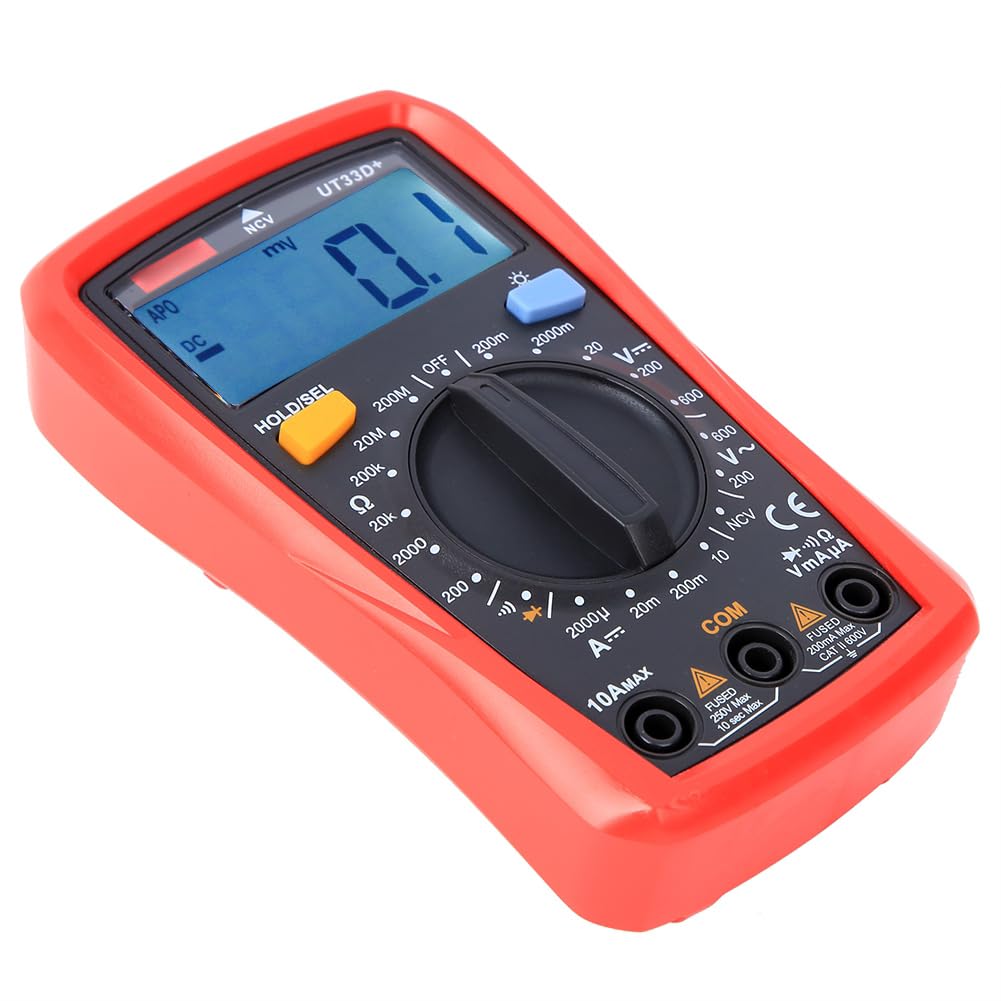
Imatge: Un front clar view of the Srliya UT33D Digital Multimeter, highlighting its large digital display, central rotary function switch, and input terminals.
Característiques principals:
- Pantalla LCD gran: Provides clear and intuitive readings.
- Interruptor de funció rotatiu: Simple and smooth operation for selecting measurement modes.
- Funció de retenció de dades: Freezes the displayed reading for convenience.
- Il·luminació de fons: Millora la visibilitat en entorns amb poca llum.
- Vol. Sense contactetagDetecció de e (NCV): Per detectar AC voltagi sense contacte directe.
- Protecció de sobrecàrrega: Enhances safety and durability.
5. Configuració
5.1 Instal·lació de la bateria
The Srliya UT33D Multimeter requires one 9V battery (6F22) for operation. Ensure the multimeter is turned OFF before installing or replacing the battery.
- Localitzeu la tapa del compartiment de la bateria a la part posterior del multímetre.
- Use a screwdriver (not included) to loosen the screw securing the battery cover.
- Traieu la tapa de la bateria.
- Connect a new 9V battery to the battery clips, observing the correct polarity (+ and -).
- Col·loqueu la bateria al compartiment.
- Substituïu la tapa de la bateria i fixeu-la amb el cargol.

Image: The rear of the Srliya UT33D Digital Multimeter, showing the battery compartment cover, which needs to be opened for battery installation.
5.2 Connexió dels cables de prova
Always connect the test leads correctly to ensure accurate and safe measurements.
- Inseriu el negre cable de prova a la COM Presa d'entrada (comuna).
- Per a la majoria de volumstage, resistance, and small current measurements (mA/µA), insert the vermell cable de prova a la VΩmAµA presa d'entrada.
- For large current measurements (up to 10A), insert the vermell cable de prova a la 10A MÀX presa d'entrada.

Imatge: Una imatge detallada view of the Srliya UT33D's front panel, showing the input jacks (COM, VΩmAµA, 10A MAX) and the rotary switch with various measurement ranges.
6. Instruccions de funcionament
Before taking any measurement, ensure the test leads are correctly connected and the rotary switch is set to the desired function and range.
6.1 Mesurar DC Voltage (V=)
- Introduïu el cable de prova vermell al VΩmAµA jack and the black test lead into the COM jack.
- Turn the rotary switch to the desired V= (DC Voltage) range (e.g., 200mV, 2000mV, 20V, 200V, 600V). If the voltage is unknown, start with the highest range and decrease as needed.
- Connecteu les sondes de prova al component o circuit que s'ha de mesurar.
- Llegeix el voltage valor a la pantalla.
6.2 Mesurar AC Voltage (V~)
- Introduïu el cable de prova vermell al VΩmAµA jack and the black test lead into the COM jack.
- Turn the rotary switch to the desired V~ (Volum AC)tage) range (e.g., 200V, 600V).
- Connecteu les sondes de prova a través del voltatge de CAtage font.
- Llegeix el voltage valor a la pantalla.
6.3 Measuring DC Current (A=)
CAUTION: Never connect the multimeter in parallel with a voltage source when measuring current. This can blow the fuse or damage the multimeter.
- For currents up to 200mA, insert the red test lead into the VΩmAµA jack. For currents up to 10A, insert the red test lead into the 10A MÀX jack. Always insert the black test lead into the COM jack.
- Turn the rotary switch to the desired A= (DC Current) range (e.g., 2000µA, 20mA, 200mA, 10A).
- Open the circuit where the current is to be measured and connect the multimeter in series with the circuit.
- Llegiu el valor actual a la pantalla.
6.4 Mesura de la resistència (Ω)
WARNING: Ensure the circuit under test is completely de-energized before measuring resistance. Disconnect all power to the circuit.
- Introduïu el cable de prova vermell al VΩmAµA jack and the black test lead into the COM jack.
- Turn the rotary switch to the desired Ω (Resistance) range (e.g., 200Ω, 2000Ω, 20KΩ, 200KΩ, 20MΩ, 200MΩ).
- Connect the test probes across the resistor or component to be measured.
- Llegiu el valor de resistència a la pantalla.
6.5 Vol. sense contactetage (NCV) Detecció
La funció NCV permet detectar la presència de vol de CAtage sense contacte directe amb els conductors.
- Gireu el commutador giratori cap a NCV posició.
- Move the top part of the multimeter (where the NCV sensor is located) close to the conductor or outlet.
- The multimeter will indicate the presence of AC voltage through an audible beep and/or visual indicator on the display.
6.6 HOLD/SEL Button
- Premeu el botó HOLD/SEL button briefly to freeze the current reading on the display. Press it again to release the hold function.
- In some functions (e.g., diode/continuity), this button may also serve as a "Select" button to toggle between sub-functions.
6.7 Backlight Button
- Premeu el botó ☀ (sun icon) button to turn on the display backlight.
- Press it again to turn off the backlight. The backlight typically turns off automatically after a short period to conserve battery.
7. Manteniment
7.1 Neteja
Netegeu el cas amb l'anunciamp drap i detergent suau. No utilitzeu abrasius ni dissolvents. Assegureu-vos que el multímetre estigui completament sec abans d'utilitzar-lo.
7.2 Substitució de la bateria
Refer to Section 5.1 "Battery Installation" for instructions on replacing the 9V battery. Replace the battery when the low battery indicator appears on the display to maintain measurement accuracy.
7.3 Canvi de fusibles
WARNING: To prevent injury or damage to the multimeter, use only fuses with the specified amperage, voltage, and speed ratings.
If the current measurement function stops working, the fuse may need replacement. Fuses are typically located inside the multimeter. Consult a qualified technician or the manufacturer for fuse replacement if you are unsure.
8. Solució De Problemes
- Sense pantalla / Pantalla tènue:
- Check if the battery is installed correctly and has sufficient charge. Replace the 9V battery if necessary.
- Ensure the multimeter is turned ON.
- Lectures incorrectes:
- Verify that the test leads are securely connected to the correct input jacks.
- Ensure the rotary switch is set to the appropriate function and range for the measurement.
- Check the battery level; a low battery can affect accuracy.
- Ensure the circuit under test is properly prepared (e.g., de-energized for resistance measurements).
- La mesura actual no funciona:
- Check if the red test lead is inserted into the correct current input jack (VΩmAµA for small currents, 10A MAX for large currents).
- The internal fuse for the current range may be blown. Refer to Section 7.3 for fuse replacement information.
9. Especificacions
| Funció de mesura | Interval |
|---|---|
| DC Voltage (V=) | 200mV / 2000mV / 20V / 200V / 600V |
| Vol. ACtage (V~) | 200V / 600V |
| DC Current (A=) | 2000µA / 20mA / 200mA / 10A |
| Resistència (Ω) | 200Ω / 2000Ω / 20KΩ / 200KΩ / 20MΩ / 200MΩ |
| Visualització màxima | 1999 |
| Model de bateria | Bateria de 9 V (6F22) |
| Material del producte | Plàstic |
| Dimensions (aprox.) | 5.91 x 4.33 x 2.36 polzades |
| Pes (aprox.) | 11.15 unces (sense bateria) |
10. Garantia i Suport
Per obtenir informació sobre la garantia o assistència tècnica, poseu-vos en contacte amb el fabricant o amb el punt de venda. Conserveu el rebut de compra com a comprovant de compra.
Manufacturer: Srliya


