Introducció
Thank you for choosing the Bonacell Wireless Controller. This manual provides detailed instructions for setting up, operating, and maintaining your controller. Please read this manual carefully before use to ensure optimal performance and longevity of your device.

Image: The Bonacell Wireless Controller, black with blue illuminated buttons, shown alongside its white USB receiver adapter.
Característiques del producte
- Àmplia compatibilitat: Supports PS4, PS5, PC (Windows), Android, and iOS devices.
- Vibració de doble motor: Enhances gaming immersion with realistic haptic feedback.
- 6-Axis Gyroscope Sensor: Proporciona un control de moviment precís per als jocs compatibles.
- Funció turbo: Enables continuous rapid input for specific buttons.
- Conector d'àudio de 3.5 mm: Allows connection of headphones for in-game audio.
- Touchpad: Integrated touchpad for additional control options.
- RGB Multi-color Buttons: Efectes d'il·luminació personalitzables per a una estètica personalitzada.
- Llarga vida útil de la bateria: Built-in 1000mAh battery provides extended usage.

Imatge: Primer pla views highlighting the controller's 360-degree joysticks, 3.5mm headphone jack, and 6-axis gyroscope sensor.
Configuració i connexió
1. Càrrega del controlador
The controller is equipped with a 1000mAh battery. Before first use, or when the battery is low, charge the controller using the provided Type-C cable or a compatible charging base.
- Temps de càrrega: Aproximadament 2.5 hores.
- Temps d'ús: Fins a 16 hores amb una càrrega completa.

Image: Visual representation of the controller's battery specifications, including its 1000mAh capacity, working time, and charging duration.
2. Connecting to PS5 (Wireless Receiver)
To play PS5 games, the controller must be connected via the wireless receiver. Direct Type-C cable connection does not support PS5 games.
- Pas 1: Plug the wireless receiver adapter into a USB port on your PS5 console. Briefly press the pairing button on the adapter.
- Pas 2: On the Bonacell Wireless Controller, press and hold the COMPARTIR botó i després manteniu premut P button simultaneously for 5 seconds to enter pairing mode.
- Pas 3: Once successfully paired, the lights on both the controller and the adapter will remain illuminated.
Note: For the first connection, it is recommended to activate the device with a USB cable before attempting wireless pairing.
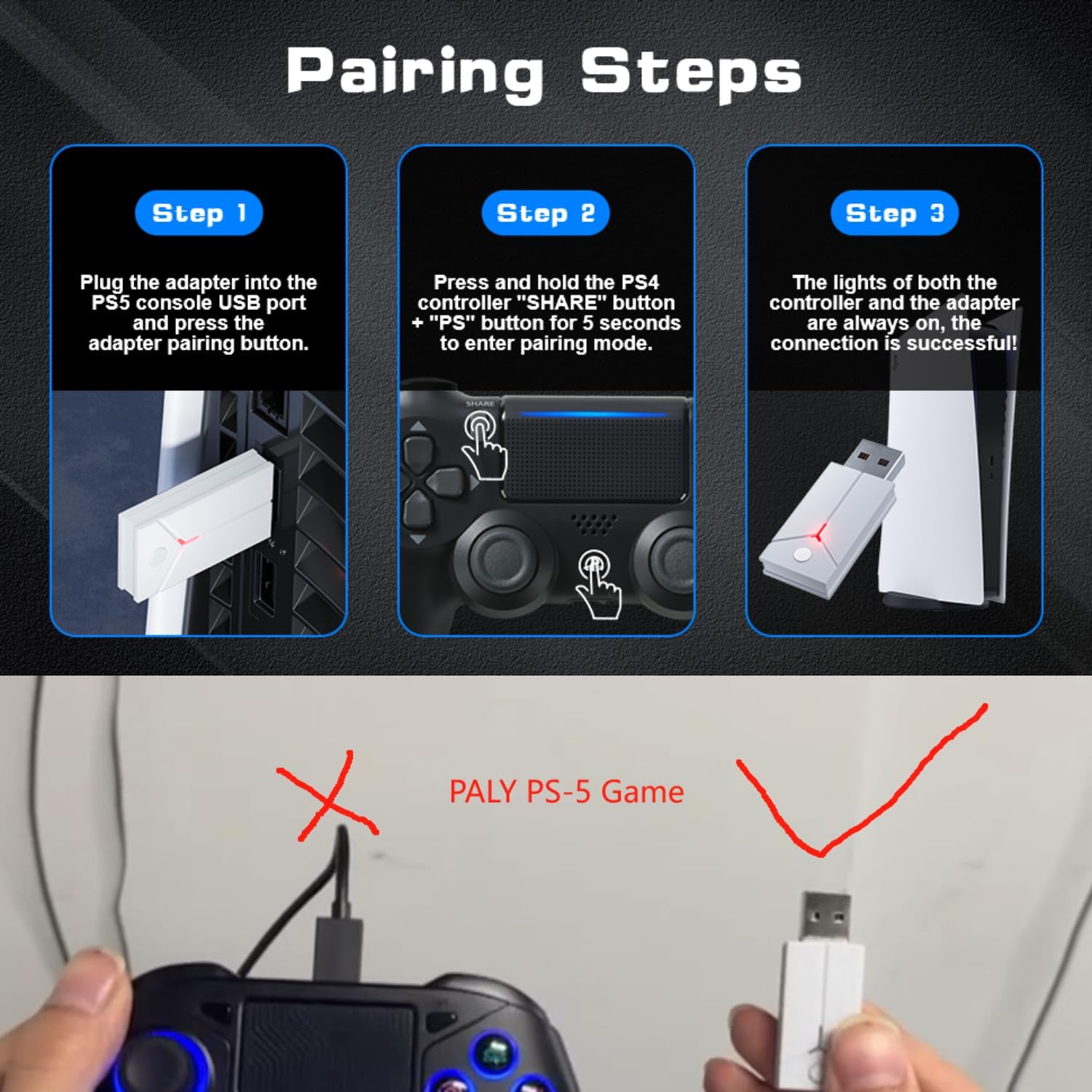
Image: A three-step visual guide demonstrating how to pair the controller with a PS5 console using the USB adapter.
3. Connecting to PC (Wired)
Connect the controller to your PC directly using the Type-C data cable.
4. Connecting to PC (Bluetooth)
- Pas 1: Ensure your PC's Bluetooth function is enabled.
- Pas 2: On the Bonacell Wireless Controller, press and hold the COMPARTIR botó i el P button simultaneously for 3 seconds to enter pairing mode.
- Pas 3: On your PC, search for and select the controller from the list of available Bluetooth devices to complete the pairing.
5. Connecting to Android and iOS (Bluetooth)
Supports iOS 13+ devices.
- Pas 1: Activate the Bluetooth function on your mobile phone or tablet.
- Pas 2: On the Bonacell Wireless Controller, press and hold the COMPARTIR botó i el P button simultaneously for 3 seconds to enter pairing mode.
- Pas 3: On your mobile device, search for and select the controller from the list of available Bluetooth devices to complete the pairing.

Image: An illustration showing the Bonacell Wireless Controller's compatibility with various platforms such as PS5, PS4, PC, Android, and iOS.
Instruccions de funcionament
1. RGB Multi-color Button Customization
- To change the light color: Press and hold the L3 botó i el R3 button simultaneously for 3 seconds. The controller will vibrate for 1 second, indicating that the light color can now be changed.
- To switch light effect modes: Press and hold the SET botó i el R3 button simultaneously. Cycle through modes: Colorful → Monochrome → Colorful Transformation → Monochrome Breathing.
2. Funció Turbo
The Turbo function allows for continuous rapid input of a button press. This can be useful in games requiring fast, repeated actions.
Specific instructions for activating and deactivating the Turbo function are typically found in the game's control settings or may involve a combination of the Turbo button (if present) and another action button. Refer to the controller's quick start guide or product packaging for exact button combinations if not detailed here.

Image: An illustration highlighting the dual vibration motors and the Turbo function capability of the controller.
Manteniment
- Neteja: Feu servir un drap suau i sec per netejar el controlador. Eviteu utilitzar productes químics agressius o materials abrasius.
- Emmagatzematge: Guardeu el controlador en un lloc fresc i sec, allunyat de la llum solar directa i de temperatures extremes.
- Cura de la bateria: Per allargar la durada de la bateria, eviteu descarregar completament el controlador amb freqüència. Carregueu-lo regularment, fins i tot si no l'utilitzeu durant períodes prolongats.
Resolució de problemes
- El controlador no es connecta:
- Assegureu-vos que el controlador estigui carregat.
- Verify the correct pairing procedure for your device (PS5, PC, Android/iOS).
- For PS5, ensure you are using the wireless receiver.
- For Bluetooth connections, ensure Bluetooth is enabled on your host device and the controller is in pairing mode.
- Prova de reiniciar tant el controlador com el dispositiu amfitrió.
- Els botons o joysticks no responen:
- Assegureu-vos que el controlador estigui connectat correctament.
- Check for any physical obstructions or debris around the buttons/joysticks.
- If connected via PC, ensure drivers are up to date.
- La vibració no funciona:
- Assegura't que el joc admeti la resposta per vibració.
- Revisa la configuració del joc per assegurar-te que la vibració estigui activada.
Especificacions
| Característica | Detall |
|---|---|
| Nom del producte | Controlador sense fil |
| Número de model | B0DT8G5RST |
| Dimensions | 165 x 105 x 45 mm |
| Pes | 0.26 kg (Item Package Weight: 300 g) |
| Capacitat de la bateria | Ió de liti de 1000 mAh |
| Temps d'ús | Fins a 16 hores |
| Temps de càrrega | Aproximadament 2.5 hores |
| Mètode de càrrega | Base or Type-C charging |
| Connectivitat | 2.4GHz USB Receiver, Bluetooth, USB-C (wired) |
| Compatibilitat | PS4, PS5, PC (Windows), Android (iOS 13+) |
| Característiques clau | Dual Shock Motor, Six-Axis Gyroscope, Touchpad, 3.5mm Audio Jack, Turbo Function, RGB Buttons |
| Material | ABS |
Garantia i Suport
For warranty information or technical support, please refer to the product packaging or contact Bonacell customer service through the retailer's platform where the product was purchased.
