Introducció
La barra de llums ALOGIC Illuminate USB-C amb enfocament automàtic 4K WebLa càmera està dissenyada per millorar el vostre espai de treball proporcionant il·luminació ajustable i una alta qualitat webcam. This device offers warm or neutral lighting without screen glare, intuitive touch controls, and a magnetic remote dial for precise adjustments. The integrated 12MP (4K) autofocusing webcam is compatible with Mac and Windows, suitable for video calls, streaming, and recording. A magnetic privacy cover is included for the webcam, and a bright status LED indicates when the camera is active. The light bar is compatible with monitors 8-30mm thick and connects via a single USB-C cable.

Image: The ALOGIC Illuminate USB-C Light Bar with 4K Autofocus Webcàmera, espectacleasing its sleek design and integrated weblleva.
Contingut del paquet
Si us plau, comproveu el paquet per veure si hi ha els elements següents:
- Barra de llum ALOGIC Illuminate USB-C amb enfocament automàtic 4K Weblleva
- Cable USB-C
- Dial de comandament a distància magnètic
- Coberta de privadesa magnètica
Configuració
- Connecteu la barra de llum: Gently place the Illuminate light bar on top of your monitor. The adjustable clamp mechanism is designed to securely fit monitors between 8-30mm thick. Ensure the light bar is centered for optimal lighting and webcam positioning.
- Connecteu l'alimentació i les dades: Connect the provided USB-C cable to the USB-C port on the light bar and then to an available USB-C port on your computer or monitor. This single cable provides both power and data for the light and weblleva.
- Position the Remote Dial: Place the magnetic remote control dial on your desk within easy reach. It will automatically connect to the light bar.
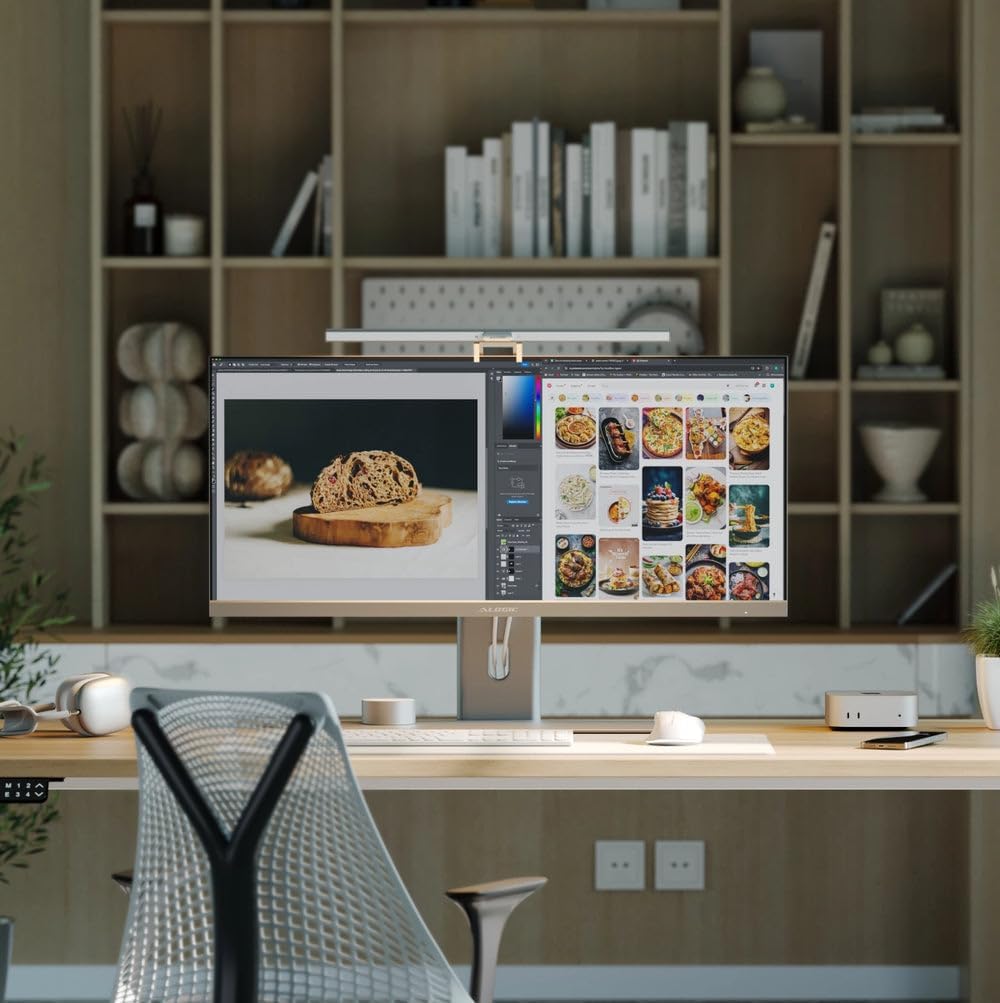
Image: The Illuminate light bar securely mounted on top of a monitor, integrated into a modern workspace.

Image: Diagram illustrating the USB-C connection for power and data, simplifying setup.
Instruccions de funcionament
Control de la llum
The Illuminate light bar offers flexible lighting options to suit your environment.
- Controls tàctils: The light bar features intuitive touch controls located on its surface. Use these to quickly adjust brightness and color temperature.
- Remote Dial: For fine-tuned adjustments, use the magnetic remote control dial. Swipe your finger along the adjustment bar on the dial to change brightness or color temperature. Press the power button to turn the light on/off, and the mode switch button to cycle through color temperature presets.
- Temperatura de color: Adjust the light from warm to neutral tones to match your preference or environment.

Image: A diagram highlighting the touch-sensitive buttons on the light bar for adjusting power, brightness, and color temperature.

Image: The magnetic remote control dial, detailing its power button, mode switch button, and adjustment bar for light settings.

Image: Visual representation of the light bar providing various color temperatures, from warm to cool, on a monitor.
WebÚs de la càmera
The integrated 4K autofocus webcam is ready for use once connected to your computer.
- Compatibilitat: El webcam is fully compatible with Mac and Windows operating systems. It functions as a standard USB weblleva.
- LED d'estat: A bright status LED on the light bar indicates when the webLa càmera està activa i compartint vídeo.
- Cobertura de privadesa: For privacy, attach the magnetic privacy cover over the weblent de càmera quan no estigui en ús.

Imatge: Un primer pla view demonstrating the magnetic privacy cover snapping onto the webcam for enhanced privacy.
Vídeo oficial del producte
Video: An official product video from ALOGIC USA demonstrating the features and functionality of the Illuminate USB-C Light Bar with 4K Autofocus Weblleva.
Manteniment
To ensure the longevity and optimal performance of your ALOGIC Illuminate device, follow these simple maintenance guidelines:
- Neteja: Use a soft, dry, lint-free cloth to clean the surface of the light bar and webcam lens. Avoid using abrasive cleaners, solvents, or aerosol sprays, as these can damage the finish or optical components.
- Emmagatzematge: Quan no l'utilitzeu durant períodes prolongats, guardeu el dispositiu en un lloc fresc i sec, allunyat de la llum solar directa i de temperatures extremes.
- Cura del cable: Eviteu doblegar o engargar excessivament el cable USB-C per evitar danys interns.
Resolució de problemes
If you encounter issues with your ALOGIC Illuminate, refer to the following common solutions:
- Light or Webcam Not Functioning:
- Ensure the USB-C cable is securely connected to both the light bar and your computer/monitor.
- Try connecting to a different USB-C port on your computer or monitor.
- Verify that your computer's operating system recognizes the webcam (check Device Manager on Windows or System Information on Mac).
- Reinicieu l'ordinador.
- Webcam Image Quality Issues:
- Assegureu-vos el webcam lens is clean and free from dust or smudges.
- Check your video conferencing software settings to ensure the ALOGIC webcam is selected and configured for 4K resolution if supported.
- Assegureu-vos que hi hagi una il·luminació adequada al vostre entorn.
- Remote Dial Not Responding:
- Ensure the remote dial is within close proximity to the light bar.
- Check if the light bar itself is powered on.
Especificacions
Detailed specifications for the ALOGIC Illuminate USB-C Light Bar with 4K Autofocus Weblleva:
| Característica | Especificació |
|---|---|
| Marca | ALOGIC |
| Pes de l'article | 2.2 lliures |
| Nombre de bateries | 1 bateria no estàndard (inclosa) |
| Estil | Modern |
| Nombre de fonts de llum | 1 |
| Angle del feix | 120 graus |
| Connectivitat | USB-C |
| Sistemes operatius | Windows®, macOS®, Android, Linux |
| Material | ABS / Alumini |
| Dimensions del paquet | 21.81 x 6.34 x 2.28 polzades |
| ASIN | B0DT9PS68Y |
| Data de primera disponibilitat | 17 de gener de 2025 |
Garantia i Suport
Per obtenir informació sobre la garantia i assistència tècnica, consulteu el representant oficial d'ALOGIC. weblloc web o contacteu directament amb el servei d'atenció al client. Conserveu el rebut de compra per a reclamacions de garantia.


