Introducció
The GMKtec G9 Mini PC is a versatile and compact computing solution designed for various applications, including daily tasks, office work, home entertainment, and network-attached storage (NAS) functionalities. It features an Intel N150 processor, multiple M.2 NVMe slots for extensive storage, and dual-boot capabilities with Windows 11 Pro and Linux. This manual provides essential information for setting up, operating, maintaining, and troubleshooting your GMKtec G9 Mini PC.
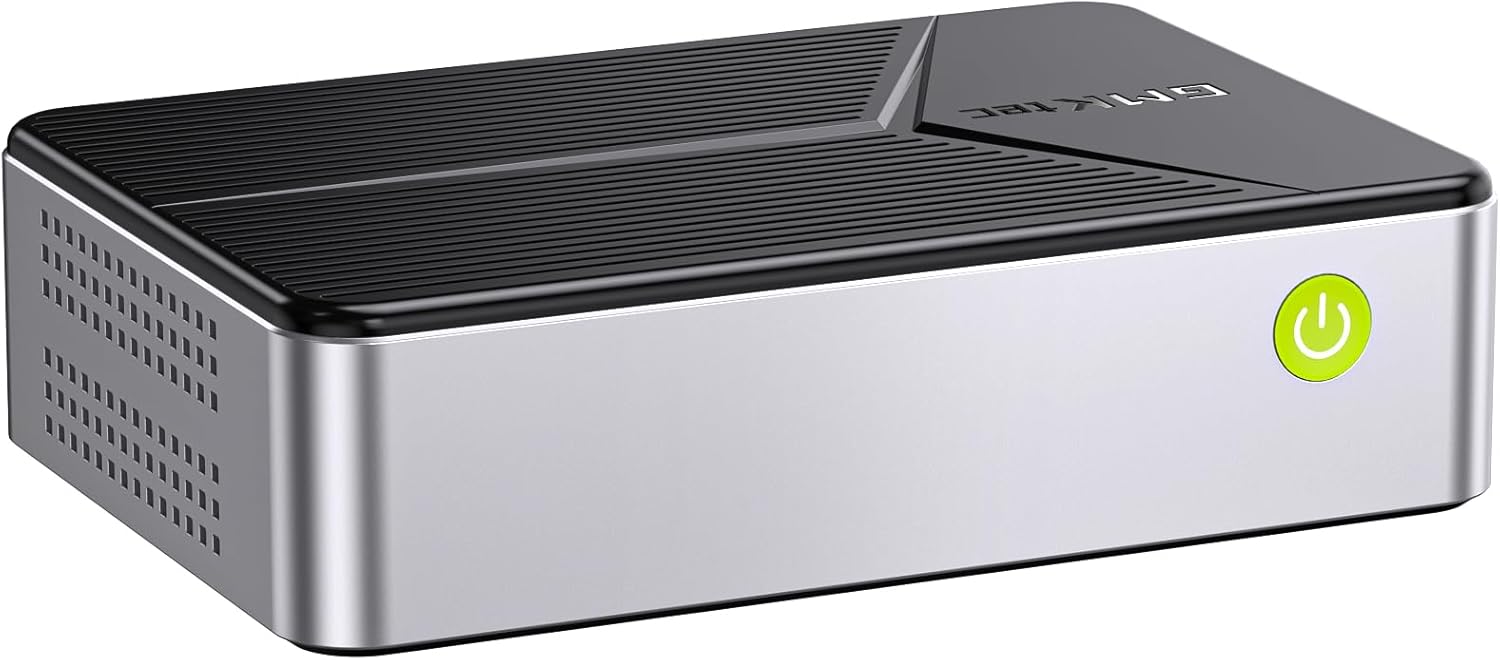
Image: The GMKtec G9 Mini PC, a compact computing device.
Configuració
1. Desembalatge i inspecció inicial
Carefully remove the Mini PC and all accessories from the packaging. Inspect for any visible damage. Ensure all components listed in the packing list are present.
2. Connexió de perifèrics
- Adaptador d'alimentació: Connect the power adapter to the DC-in port on the Mini PC and then to a power outlet.
- Visualització: Connect your monitor(s) to the HDMI ports or the Type-C port (with DP support) using appropriate cables. The device supports triple 4K @ 60 Hz display output.
- Teclat i ratolí: Connect your USB keyboard and mouse to the available USB 3.2 ports.
- Xarxa: For wired network access, connect an Ethernet cable to one of the 2.5GbE RJ45 ports. For wireless connectivity, ensure your Wi-Fi network is available.
- Àudio: Connect speakers or headphones to the 3.5mm audio port if needed.

Imatge: Un cop mésview of the GMKtec G9 Mini PC's features, including processor, graphics, storage, RAM, and connectivity options.
3. Encès
Press the power button located on the front of the Mini PC. The system will boot up. The first boot may take longer as it configures the operating system.
4. Dual Boot System
The G9 Mini PC comes pre-installed with a dual-boot system, featuring Windows 11 Pro on the SSD and Linux (version 24.10 or higher recommended) on the 64GB eMMC memory. The default boot is typically to Windows 11 Pro. You can switch between operating systems during startup via the boot menu (consult your system's BIOS/UEFI settings for specific key presses, often F7 or F11).

Image: Visual representation of the dual-boot capability, showing Windows and Linux operating systems side-by-side on monitors.
Instruccions de funcionament
1. Ús general
Once booted, operate the Mini PC as you would any standard desktop computer. Use your connected keyboard and mouse to navigate the operating system interface. For optimal performance, ensure all drivers are up to date.
2. Funcionalitat d'emmagatzematge connectat a la xarxa (NAS)
The G9 Mini PC is designed with 4 PCIe M.2 2280 slots, allowing it to function as a powerful NAS. While GMKtec does not provide NAS software, you can install third-party NAS software (e.g., TrueNAS, OpenMediaVault) to create a centralized storage network for file backup, sharing, and media streaming. The dual 2.5GbE Ethernet ports provide high-speed network connectivity for efficient data transfer.

Image: Illustration highlighting the dual 2.5Gbps high-speed Ethernet ports for fast network connectivity.
3. Media Streaming Server Hub
Utilize the G9 Mini PC as a media streaming server. With sufficient storage and appropriate software, you can stream movies, music, and other media content to various devices within your home network, including phones, tablets, laptops, and smart TVs.

Image: A visual depicting the Mini PC connected to a monitor, keyboard, and mouse, functioning as a media streaming server hub.
4. Budget Homelab Applications
The G9 Mini PC is suitable for homelab setups, allowing you to host servers, run virtual machines, or manage surveillance systems. Its compact size and multiple storage options make it an ideal solution for personal or small-scale network environments.

Image: The Mini PC integrated into a homelab setup, displaying multiple monitors showing surveillance feeds.
5. Triple Display Output
The Mini PC supports connecting up to three 4K displays simultaneously via its two HDMI 2.0 ports and one full-function Type-C port. This capability enhances productivity for office tasks, film viewing, and design work.

Image: A setup showing the Mini PC connected to three monitors, demonstrating its triple display output capability for multitasking.
Manteniment
1. Actualitzacions d'emmagatzematge i RAM
The G9 Mini PC features a disassembled design for easy upgrades. It supports four M.2 2280 PCIe slots, with a maximum capacity of 4TB per slot, totaling up to 16TB. The system also includes 12GB LPDDR5 RAM and 64GB eMMC storage. To upgrade, carefully open the chassis and install compatible SSDs or RAM modules. Refer to the detailed instructions provided in the separate hardware upgrade guide (if applicable) or consult professional assistance.

Imatge: Una explosió view of the Mini PC showing the internal layout and the four M.2 SSD slots for easy installation and upgrades.
2. Sistema de refrigeració
The G9 Mini PC is equipped with a triple cooling system, including two fans for the SSD/DDR compartments and a large fan for the CPU. This design helps maintain optimal operating temperatures while producing minimal fan noise (33-36 dB). Ensure proper ventilation around the device to prevent overheating. Regularly clean dust from the vents using compressed air.
Resolució de problemes
Problemes comuns i solucions:
- Sense sortida de pantalla:
- Check all display cable connections (HDMI, Type-C).
- Assegureu-vos que el monitor estigui encès i configurat a la font d'entrada correcta.
- Prova un altre cable de pantalla o monitor.
- El sistema no s'encén:
- Verify the power adapter is securely connected to both the Mini PC and the power outlet.
- Proveu la presa de corrent amb un altre dispositiu.
- If the device was recently updated or experienced a power issue, a BIOS reset might be necessary (e.g., by temporarily removing the CMOS battery, consult professional guidance if unsure).
- High Operating Temperatures:
- Ensure the Mini PC is placed in a well-ventilated area, away from direct sunlight or heat sources.
- No obstruïu els forats de ventilació.
- Consider adding heatsinks to M.2 SSDs, especially if running intensive applications.
- Update BIOS/UEFI firmware if available, as it may contain thermal management improvements.
- Operating System Issues (e.g., Linux/Windows not booting):
- Access the BIOS/UEFI settings (usually by pressing F7 or F11 during startup) to check boot order.
- Ensure the correct boot drive (SSD or eMMC) is selected.
- If an OS is corrupted, a reinstallation may be required.
- Problemes de connectivitat de xarxa:
- For wired connections, check Ethernet cable integrity and router status.
- For Wi-Fi, ensure the Wi-Fi adapter is enabled and connected to the correct network.
- Actualitza els controladors de xarxa.
For persistent issues, refer to the official GMKtec support resources or contact customer service.
Especificacions
| Característica | Especificació |
|---|---|
| Marca | GMKtec |
| Número de model | GMKtec NUCBOX G9 |
| Processador | Intel N150 (4 Cores, 4 Threads, up to 3.6 GHz) |
| Gràfics | Intel UHD Graphics (max. 1000 MHz) |
| RAM | 12 GB LPDDR5 |
| Storage (Primary) | 1TB M.2 SSD |
| Storage (Secondary) | eMMC de 64 GB |
| Ampliació d'emmagatzematge | 4 x M.2 2280 PCIe slots (Max 16TB total) |
| Sistema operatiu | Dual Boot: Windows 11 Pro, Linux |
| Sortida de vídeo | 2 x HDMI (4K @ 60 Hz), 1 x Type-C (DP/Data/PD) - Triple Display Support |
| Ports USB | 3 x USB 3.2 (10 Gbps) |
| Xarxa | Dual RJ45 2.5GbE Ethernet, WiFi 6, Bluetooth 5.2 |
| Àudio | 3.5mm Àudio Jack |
| Dimensions (L x A x A) | 12 x 10 x 12 cm |
| Pes | 1.13 kg |
Garantia i Suport
GMKtec provides comprehensive support for its products. The G9 Mini PC typically comes with a 2-year warranty.
Suport d'Amazon:
For general inquiries or issues related to your purchase, you can contact Amazon Support. Log in to your Amazon account, go to "Your Orders," and select "Ask Product Question" for assistance.
Suport postvenda:
For technical assistance, troubleshooting, or warranty claims, you can reach out to the GMKtec After-Sales Team directly.
Correu electrònic: support@gmktec.com
24/7 Customer Support is available via email.
Image: Information regarding warranty and support channels, including Amazon and direct email support.


