1. Introducció
This manual provides comprehensive instructions for the installation, operation, and maintenance of your Sapphire Nitro+ AMD Radeon RX 9070 Gaming OC Graphics Card. Please read this manual thoroughly before installation and retain it for future reference. Proper installation and usage ensure optimal performance and longevity of your product.

Figure 1: Sapphire Nitro+ AMD Radeon RX 9070 Gaming OC Graphics Card and Packaging
2. Informació de seguretat
Observe the following safety precautions to prevent damage to the graphics card or personal injury:
- Desconnecteu sempre l'alimentació de l'ordinador abans d'instal·lar o treure qualsevol component.
- Wear an anti-static wrist strap or frequently touch a grounded metal object to discharge static electricity before handling the graphics card.
- Manegeu la targeta gràfica per les vores per evitar tocar els components sensibles.
- Assegureu-vos de ventilar adequadament la carcassa de l'ordinador per evitar que s'escalfi massa.
- Keep the graphics card away from moisture and extreme temperatures.
3. Contingut del paquet
Verifiqueu que tots els elements siguin presents al paquet del producte:
- Sapphire Nitro+ AMD Radeon RX 9070 Gaming OC Graphics Card
- Manual d'instruccions (aquest document)
- Additional accessories may vary by region or retailer.
4. Requisits del sistema
Abans d'instal·lar la targeta gràfica, assegureu-vos que el sistema compleixi els requisits mínims següents:
- Placa base compatible amb PCI Express amb una ranura per a gràfics x16.
- Minimum 750W power supply with appropriate PCIe power connectors (e.g., 8-pin + 8-pin).
- Memòria de sistema (RAM) mínima de 16 GB.
- Sistema operatiu: Windows 10/11 de 64 bits o Linux de 64 bits.
- Internet connection for driver installation.
- Sufficient space within the PC case for a card with dimensions of approximately 13.02 x 5.06 x 0.04 inches.
5. Configuració i instal·lació
Follow these steps to install your graphics card:
- Prepareu el vostre sistema: Turn off your computer and disconnect the power cable. Open your computer case.
- Localitza la ranura PCIe: Identifica una ranura PCI Express x16 disponible a la placa base. Treu les cobertes de les ranures d'expansió que l'obstrueixen.
- Instal·leu la targeta gràfica: Carefully align the graphics card with the PCIe x16 slot. Press down firmly and evenly until the card is securely seated. A click may be heard.
- Assegureu la targeta: Use the screw or latch mechanism on your case to secure the graphics card to the chassis.
- Connecteu els cables d'alimentació: Connect the required PCIe power cables from your power supply to the graphics card. This model typically requires two 8-pin PCIe power connectors. Ensure connections are firm.
- Tanqueu la carcassa i connecteu els perifèrics: Close your computer case, reconnect the power cable, and connect your display cable (HDMI or DisplayPort) to the graphics card.
- Engegar i instal·lar els controladors: Turn on your computer. Once the operating system loads, download and install the latest AMD Radeon drivers from the official AMD weblloc (www.amd.com/en/support).

Figure 2: Graphics Card Seated in PCIe Slot

Figure 3: STEALTH Hidden Power Cable Routing
6. Instruccions de funcionament
After successful installation and driver setup, your graphics card is ready for use. The AMD Radeon software provides various settings for optimizing performance, display, and other features.
- Actualitzacions de controladors: Regularly check for and install the latest graphics drivers from AMD to ensure optimal performance and compatibility with new games and applications.
- Configuració de la pantalla: Use the AMD Radeon software or your operating system's display settings to configure resolution (up to 3840x2160), refresh rate, and multiple monitors.
- Performance Tuning: The AMD Radeon software allows for performance tuning, including fan speed control and power limit adjustments. Exercise caution when modifying these settings.
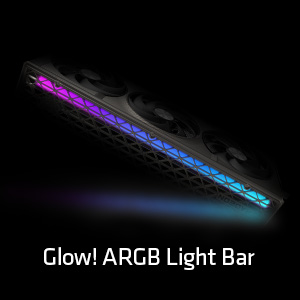
Figure 4: Customizable ARGB Light Bar
7. Manteniment
Proper maintenance helps extend the lifespan and maintain the performance of your graphics card.
- Eliminació de pols: Periodically clean dust from the heatsink fins and fan blades using compressed air. Ensure the fans are held stationary during cleaning to prevent damage.
- Cura del ventilador: The Sapphire Nitro+ series features Quick Connect Fans, allowing for easy removal and cleaning. Refer to the manufacturer's guidelines for specific fan removal instructions.
- Pasta tèrmica: Replacing thermal paste is generally not recommended for end-users and should only be performed by qualified technicians if necessary.

Figure 5: Graphics Card Cooling Fans
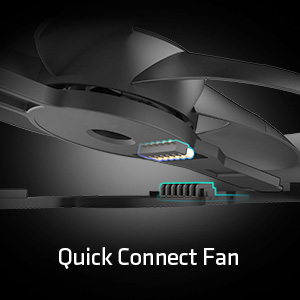
Figure 6: Quick Connect Fan Feature
8. Solució De Problemes
Si teniu problemes amb la targeta gràfica, tingueu en compte les solucions habituals següents:
- Sense sortida de pantalla:
- Assegureu-vos que el cable de la pantalla estigui connectat correctament tant a la targeta gràfica com al monitor.
- Verifiqueu que els cables d'alimentació PCIe estiguin connectats correctament a la targeta gràfica.
- Comproveu si la targeta gràfica està completament col·locada a la ranura PCIe.
- Si és possible, prova amb un cable de pantalla o monitor diferent.
- Inestabilitat/Avaries del sistema:
- Assegureu-vos que els controladors gràfics estiguin actualitzats.
- Check your power supply unit (PSU) to ensure it meets the recommended wattage.
- Monitor GPU temperatures using software like AMD Radeon software. Excessive heat can cause instability.
- Rendiment deficient en jocs/aplicacions:
- Assegureu-vos que els controladors gràfics estiguin actualitzats.
- Revisa la configuració del joc; redueix la resolució o la qualitat dels gràfics si cal.
- Verify that your system meets the recommended specifications for the application.
9. Especificacions
| Característica | Especificació |
|---|---|
| Número de model | 11349-01-20G |
| Coprocessador gràfic | AMD Radeon RX 9070 |
| Xipset Brand | AMD |
| Mida de la RAM de la targeta gràfica | 16 GB GDDR6 |
| Interfície de memòria | 256 bits |
| Velocitat de memòria | 20 GHz |
| Velocitat de rellotge de la GPU | 2700 MHz (augment) |
| Resolució de pantalla màxima | 3840 x 2160 |
| Interfície de sortida de vídeo | 2 x HDMI, 2 x DisplayPort |
| Dimensions del producte (LxWxH) | 13.02 x 5.06 x 0.04 polzades |
| Pes de l'article | 5.99 lliures |
10. Garantia i Suport
For warranty information and technical support, please refer to the documentation included with your product or visit the official Sapphire weblloc web. Els termes i condicions de la garantia poden variar segons la regió i el distribuïdor.
Recursos en línia:
- Sapphire Official Weblloc: www.sapphiretech.com
- Suport d'AMD: www.amd.com/en/support


