1. Producte acabatview
The AINAVI 15-inch Touchscreen Car Stereo Radio is an advanced multimedia system designed specifically for Toyota FJ Cruiser models from 2007 to 2021. It integrates modern features such as Wireless CarPlay, Android Auto, GPS Navigation, and a high-resolution QLED display to enhance your driving experience.

Figura 1.1: AINAVI 15-inch Touchscreen Car Stereo Radio with rearview camera and smartphone displaying CarPlay/Android Auto.
Característiques principals:
- Super Connection Speed: Stable CarPlay & Android Auto signal flow, 1080P video playback without lag. Wired/wireless mirroring (Airplay+Android) with 1920x1080 HD resolution.
- Powerful Navigation Service: Supports most satellite services, 5G WiFi for accurate navigation. Includes Google Maps with 2D/3D perspectives, various routes, obstacle broadcasts, and voice function.
- 5G WiFi & 8-Core Processor: Faster 2.4GHz & 5GHz WiFi for smooth APP network environment. 8-Core CPU and Dual-Core GPU for smooth operation and 3D environment rendering. Upgraded ultra HD QLED screen for high-resolution graphics.
- 6GB RAM + 128GB ROM & Split Screen: 6GB RAM for simultaneous software operation. 128GB ROM for app downloads and data storage.
- 1080P posterior View & Knob/Button Control: Provides HD reversing scenes with astern ruler line. Two large knobs for AC temperature and wind speed adjustment, and a small knob for volume.
- 48-EQ (Voice Point Touch Control) + Professional DSP: Adjust voice point position based on seating. Features 7 sound modes (Normal, Jazz, Pop, Classical, Heavy Metal, Vocal, Soft), 6 surround sound patterns, Bass Boost, and individual speaker volume control.
- USB to RCA Output Function: Allows independent video playback on multiple screens for backseat entertainment.
- Controls físics: Two large knobs for AC temperature/wind speed, one voice control knob, and four physical buttons for AC functions.
2. Contingut del paquet
Si us plau, verifiqueu que tots els elements que s'enumeren a continuació estiguin inclosos al vostre paquet:
- Car Head Unit with Frame for Toyota FJ Cruiser *1
- AHD 1080P posterior View Càmera *1
- GPS Antenna *1
- USB 4Pin Cable *1
- USB 6Pin Cable *1
- Micròfon *1
- Blue Frame Removal Tool *1
- Manual d'usuari *1
- Cable d'alimentació *1

Figura 2.1: Illustration of all components included in the package.
3. Configuració i instal·lació
Installation of the AINAVI car stereo involves replacing the existing head unit in your Toyota FJ Cruiser. While the unit is designed for a precise fit, professional installation is recommended. Ensure the vehicle's power is disconnected before beginning installation.
Passos d'instal·lació (Guia general):
- Preparació: Desconnecta el terminal negatiu de la bateria del teu cotxe.
- Eliminar la unitat antiga: Carefully remove the existing car stereo and dashboard trim using appropriate tools, such as the included blue frame removal tool.
- Connecteu el cablejat: Connect the provided power cable, RCA cables, GPS antenna, USB cables, and microphone to the new head unit and the corresponding vehicle harnesses. Ensure all connections are secure.
- posterior View Instal·lació de la càmera: Install the AHD 1080P Rear View Camera at the rear of your vehicle and route its cable to the head unit. Connect it to the designated input.
- Prova de connexions: Before fully reassembling the dashboard, reconnect the car battery and power on the unit to test all functions (audio, navigation, camera, CarPlay/Android Auto, AC controls).
- Unitat segura: Once all functions are verified, securely mount the new head unit and reassemble the dashboard trim.
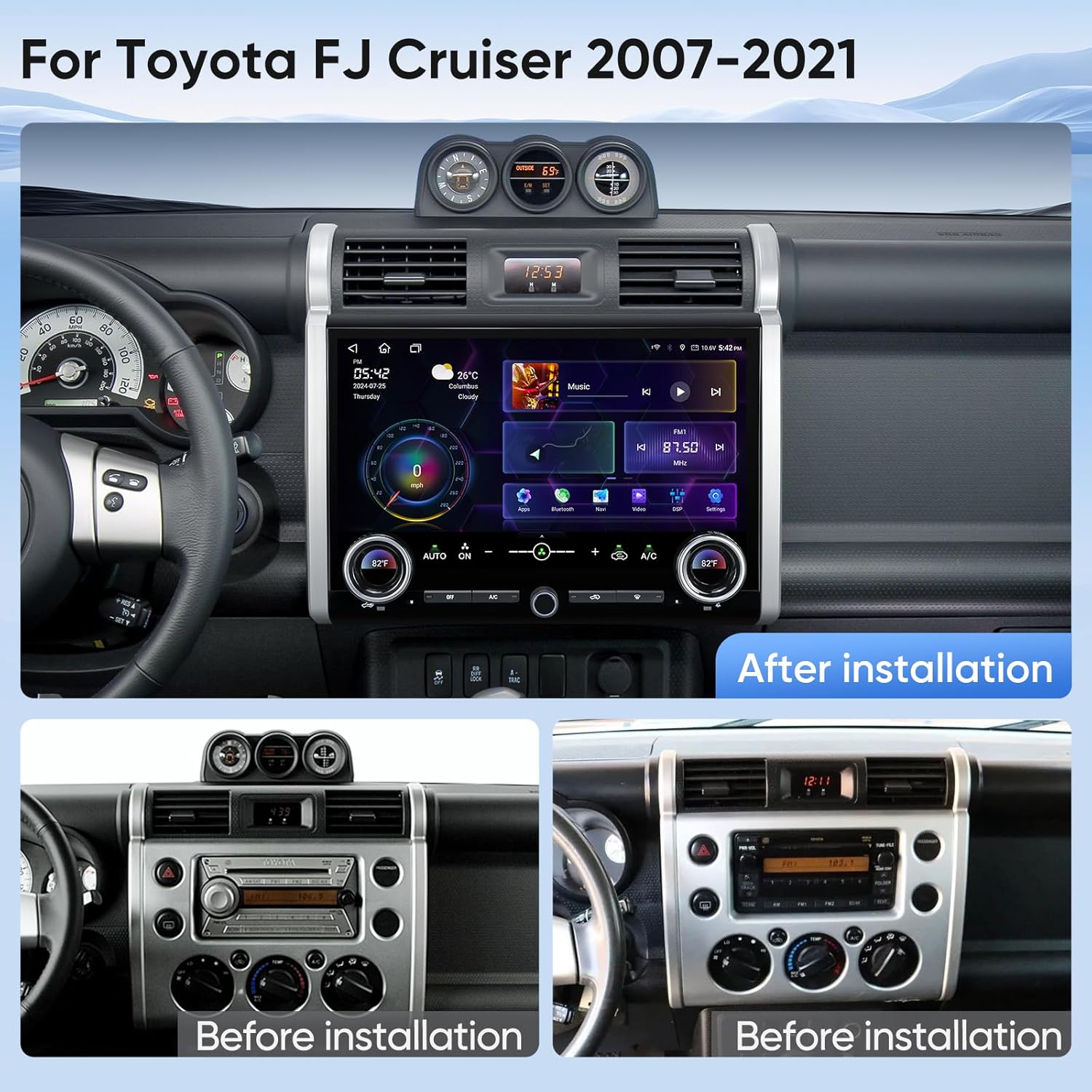
Figura 3.1: Visual comparison of the dashboard before and after installing the AINAVI car stereo.
For detailed wiring diagrams or specific vehicle considerations, please refer to the included wiring instructions or contact AINAVI customer support.
4. Instruccions de funcionament
4.1 Engegada/Apagada i Interfície Bàsica
The unit powers on automatically with the vehicle's ignition. The main interface provides quick access to common functions like music, navigation, phone, and settings. Use the touchscreen for interaction.
4.2 CarPlay sense fil i Android Auto
Connect your iPhone or Android smartphone wirelessly to access CarPlay or Android Auto. This allows for seamless integration of navigation, music, calls, and messages directly on the stereo's display.

Figura 4.1: Funcionalitat CarPlay sense fil i Android Auto.
4.3 Navegació GPS
Utilize the built-in GPS module and 5G WiFi for accurate navigation. The system supports various map applications available on the Google Play Store. Enter your destination via the touchscreen or voice command for turn-by-turn directions.

Figura 4.2: GPS Navigation in action.
4.4 Funcionalitat de pantalla dividida
The split-screen mode allows you to run two applications simultaneously, such as navigation and music playback, for enhanced multitasking.

Figura 4.3: Split Screen and Mirroring capabilities.
4.5 Darrera View Funcionament de la càmera
When the vehicle is shifted into reverse, the 1080P rear view camera automatically displays a clear image on the screen, assisting with parking and maneuvering. The display includes an astern ruler line for guidance.

Figura 4.4: 1080P posteriorview Càmera view.
4.6 Audio Control and DSP
Adjust audio settings using the 48-band equalizer and Professional DSP (Digital Signal Processor). This allows for fine-tuning of sound profiles, including various sound modes (Jazz, Pop, Classical, etc.), surround sound patterns, bass boost, and individual speaker volume control.

Figura 4.5: Built-in DSP for advanced audio customization.
4.7 Physical Knobs and Buttons
The unit features two large physical knobs for adjusting AC temperature and wind speed. Pressing these knobs allows switching between functions. A central knob controls the volume. Dedicated physical buttons are also present for various AC functions.
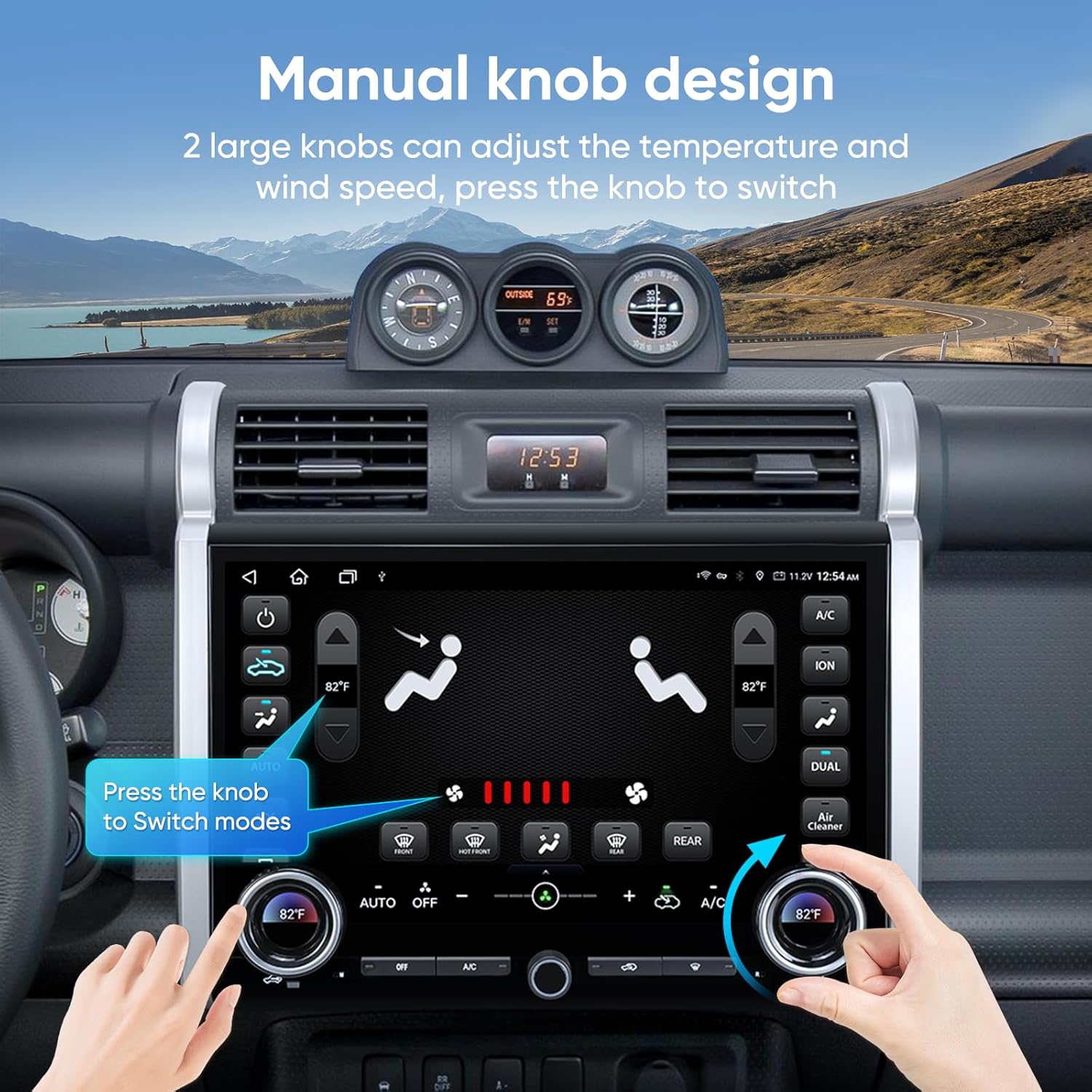
Figura 4.6: Manual knob design for climate control.
5. Manteniment
To ensure the longevity and optimal performance of your AINAVI car stereo, follow these maintenance guidelines:
- Neteja de pantalla: Use a soft, lint-free cloth specifically designed for electronics to clean the touchscreen. Avoid abrasive materials or harsh chemical cleaners, which can damage the screen.
- Neteja general: Wipe down the unit's frame and buttons with a slightly damp cloth. Ensure no liquid enters the unit.
- Actualitzacions de programari: Periodically check for software updates from AINAVI to ensure the system runs efficiently and has the latest features and bug fixes.
- Eviteu temperatures extremes: While designed for automotive use, prolonged exposure to extreme hot or cold temperatures can affect performance.
- Inspecció del cable: Occasionally inspect all connected cables for any signs of wear or damage.
6. Solució De Problemes
Aquesta secció tracta problemes comuns que podeu trobar. Si el problema persisteix, poseu-vos en contacte amb l'atenció al client.
| Problema | Causa possible | Solució |
|---|---|---|
| La unitat no s'encén. | Connexió d'alimentació fluixa, fusible fundit, problema amb la bateria del vehicle. | Comproveu les connexions del cable d'alimentació. Inspeccioneu els fusibles del vehicle. Assegureu-vos que la bateria del cotxe estigui carregada. |
| No hi ha so dels altaveus. | Volume too low, mute activated, incorrect wiring, speaker issues. | Increase volume. Check mute setting. Verify speaker wiring. Test with different audio source. |
| El CarPlay/Android Auto no es connecta. | Bluetooth/WiFi off on phone, incorrect pairing, software glitch. | Ensure phone's Bluetooth/WiFi is on. Forget and re-pair device. Restart both phone and head unit. |
| posterior view la càmera no mostra el vídeo. | Camera cable loose/damaged, incorrect wiring, camera malfunction. | Check camera cable connection. Verify reverse gear signal wire. Contact support if issue persists. |
| Slow response or freezing. | Too many apps running, low memory, software issue. | Close unnecessary applications. Restart the unit. Check for software updates. |
| AC controls not responding. | Wiring issue with AC module, software conflict. | Verify AC control wiring. Contact AINAVI technical support for specific guidance. |
7. Especificacions
| Característica | Detall |
|---|---|
| Marca | AINAVI |
| Model | For Toyota FJ Cruiser 2007-2021 |
| Mida de la pantalla | 15 polzades |
| Resolució de visualització | 1920 x 1080 (HD QLED) |
| Sistema operatiu | Android |
| Processador | 8-Core CPU, Dual-Core GPU |
| RAM | 6 GB |
| ROM | 128 GB |
| Connectivitat | Bluetooth, USB, Wi-Fi (2.4GHz & 5GHz), Wired, Wireless |
| Mode de sortida d'àudio | Surround Stereo with 48-EQ and DSP |
| posterior View Càmera | AHD 1080P (Included) |
| Pes de l'article | 6.6 lliures |
| Dimensions del paquet | 15.51 x 12.99 x 5.59 polzades |
8. Garantia i Suport
Informació de la garantia:
The AINAVI 15-inch Touchscreen Car Stereo Radio comes with a 12 Months Manufacturer GuaranteeSi us plau, conserveu el comprovant de compra per a reclamacions de garantia.
Atenció al client:
Our professional technical support team is available to assist with installation, troubleshooting, and any other inquiries you may have. If you encounter an air conditioner issue or any other problem, please contact us freely.
- Telèfon d'atenció al client: +1 (833) 858-5016
- Horari de treball: 3:00 PM to 12:00 PM PST
- Correu electrònic: info@ainavi.com

Figura 8.1: AINAVI Customer Support contact details.
You can also seek help via your order center on the platform where you purchased the product.


