1. Introducció
This manual provides detailed instructions for the safe and efficient operation of your Memorex MX-TT700 7-in-1 Nostalgic Wooden Music Center. Please read this manual thoroughly before using the device and retain it for future reference.
1.1 Producte acabatview
The Memorex MX-TT700 is a versatile audio system combining vintage aesthetics with modern functionality. It features a 3-speed turntable, CD/MP3 player, USB playback, Bluetooth streaming, AM/FM radio, and an AUX-in port. It also supports recording audio from various sources directly to a USB drive.
1.2 Què hi ha a la caixa
- Memorex MX-TT700 Music Center
- Adaptador de CA
- Adaptador de 45 RPM
- Cable d'entrada auxiliar
- Instruction Manual (IM)
2. Informació important de seguretat
Please observe the following safety precautions to prevent electric shock, fire, or damage to the unit.
- Font d'alimentació: Feu servir només l'adaptador de CA especificat. Assegureu-vos que el volumtage coincideix amb la vostra font d'alimentació local.
- Ventilació: No bloquegeu les obertures de ventilació. Deixeu prou espai al voltant de la unitat per a un flux d'aire adequat.
- Aigua i humitat: No exposeu la unitat a la pluja, la humitat ni a líquids que gotegen o esquitxen. Mantingueu els objectes plens de líquids, com ara gerros, allunyats de la unitat.
- Calor: No col·loqueu la unitat a prop de fonts de calor com ara radiadors, registres de calor, estufes o altres aparells (inclosos amplificadors) que produeixen calor.
- Neteja: Desendolleu la unitat de la presa de corrent abans de netejar-la. Feu servir només un drap sec.
- Manteniment: No intenteu atendre aquest producte vosaltres mateixos. Consulteu tots els serveis a personal de servei qualificat.
- Col·locació: Place the unit on a stable, flat surface. Avoid placing it in direct sunlight or areas with excessive dust or vibration.
3. Producte acabatview: Components and Controls
Familiarize yourself with the various parts and controls of your music center.
3.1 Controls del panell frontal

Imatge: Frontal view of the Memorex MX-TT700, highlighting the control panel with LCD display, buttons, and knobs.
- Pantalla LCD: Mostra el mode actual, la informació de la pista, la freqüència de ràdio, etc.
- Botó d'encesa/mode: Turns the unit on/off and selects input mode (Phono, CD, USB, Bluetooth, AM, FM, AUX).
- Pom de volum: Ajusta el nivell de volum principal.
- Port USB: For USB playback and recording.
- Safata de CD: Per inserir CD d'àudio.
- Repeat/Random Button: Controls playback modes for CD/USB.
- Skip/Search Buttons (<< / >>): Navigates tracks/stations.
- Botó Reproduir/Pausa: Controla la reproducció.
- Botó d'aturada: Atura la reproducció.
- Botó Obrir/Tancament: Obre i tanca la safata del CD.
- Botó de gravació: Initiates recording to USB.
- Botó de programa/memòria: Programs CD tracks or saves radio presets.
- FM Antenna (Pigtail): For FM radio reception (located at the back).
- Presa d'entrada AUX: Connecteu dispositius d'àudio externs.
- Auriculars Jack: Per a una escolta privada.
3.2 components de la placa giratòria
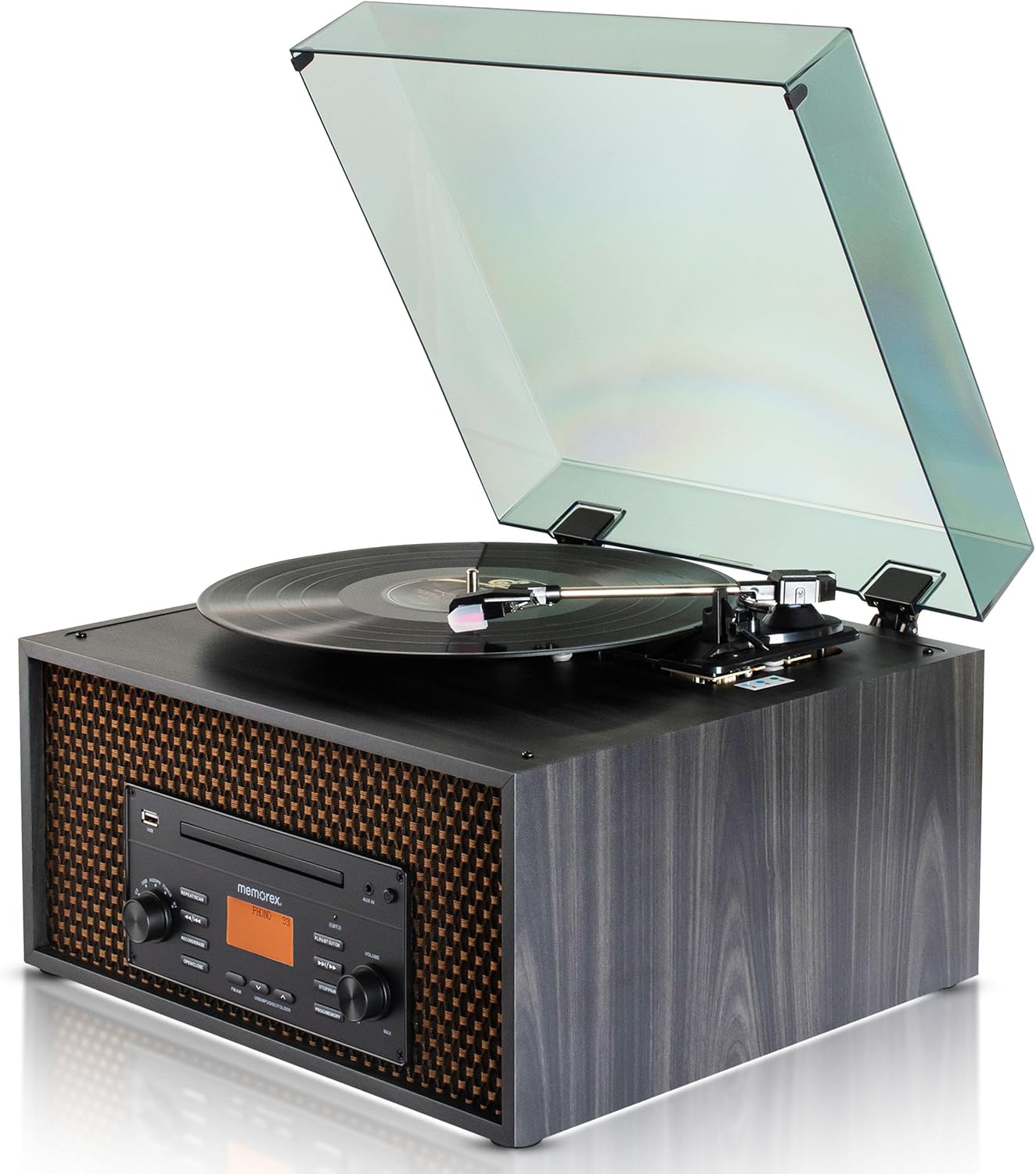
Imatge: Superior view of the Memorex MX-TT700, showing the turntable platter, tonearm, stylus, and open dust cover.
- Plat giratori: On es col·loquen els registres.
- Braç: Sosté el llapis i segueix els solcs del disc.
- Agulla (punta): Reads the record grooves.
- Adaptador de 45 RPM: Used for playing 7-inch records with large center holes.
- Interruptor selector de velocitat: Adjusts turntable speed (33 1/3, 45, 78 RPM).
- Funda antipols: Protegeix el tocadiscos de la pols.
4. Guia de configuració
4.1 Desembalatge i col·locació
- Traieu amb cura la unitat del seu embalatge.
- Place the music center on a flat, stable surface, away from direct sunlight, heat sources, and excessive dust or vibration.
- Assegureu-vos que hi hagi una ventilació adequada al voltant de la unitat.
- Remove any protective materials from the turntable, including the stylus protector.
4.2 Connexió d'alimentació
- Connect the supplied AC adapter to the DC IN jack on the back of the unit.
- Connecteu l'adaptador de CA a una presa de corrent estàndard.
4.3 Antenna Connection (FM)
Extend the FM pigtail antenna located at the back of the unit for optimal FM radio reception. Adjust its position if reception is poor.
5. Funcionament
Turn the Power/Mode knob to switch on the unit. The LCD display will illuminate. Rotate the knob to select your desired audio source.
5.1 Funcionament del tocadiscs

Image: Detail of the turntable area, illustrating the 3-speed selector switch (33 1/3, 45, 78 RPM).
- Turn the Power/Mode knob to select "PHONO" mode.
- Aixequeu la coberta antipols.
- Place a record on the turntable platter. If playing a 7-inch record with a large center hole, place the 45 RPM adapter on the spindle first.
- Set the speed selector switch to the correct speed for your record (33 1/3, 45, or 78 RPM).
- Aixequeu suaument el braç amb la palanca de cueing i col·loqueu el llapis sobre la pista desitjada del disc.
- Baixeu el braç lentament sobre el disc utilitzant la palanca de cueing. El disc començarà a reproduir-se.
- Ajusteu el volum amb el botó de volum.
- To stop playback, lift the tonearm, return it to the tonearm rest, and secure it.
Reproducció de CD/MP3 de 5.2
- Turn the Power/Mode knob to select "CD" mode.
- Press the "OPEN/CLOSE" button to open the CD tray.
- Place a CD (audio CD or MP3 CD) with the label side facing up into the tray.
- Press the "OPEN/CLOSE" button again to close the tray. The unit will read the disc.
- Press the "PLAY/PAUSE" button to start playback.
- Use the "<< / >>" buttons to skip tracks. Press and hold to fast forward/rewind.
- Press the "REPEAT/RANDOM" button to cycle through repeat modes (e.g., repeat one, repeat all, random).
- Press the "STOP" button to stop playback.
Reproducció USB 5.3

Image: The music center with a USB drive inserted, illustrating its capability for USB playback and recording.
- Inseriu una unitat flaix USB al port USB.
- Turn the Power/Mode knob to select "USB" mode. The unit will automatically detect and begin playing compatible audio files (MP3).
- Use the "<< / >>" buttons to skip tracks. Press and hold to fast forward/rewind.
- Press the "REPEAT/RANDOM" button to cycle through repeat modes.
- Press the "STOP" button to stop playback.
5.4 Transmissió per Bluetooth

Image: The music center paired with a smartphone via Bluetooth, demonstrating wireless audio streaming.
- Turn the Power/Mode knob to select "BLUETOOTH" mode. The LCD display will show "BLUETOOTH" and flash, indicating it's in pairing mode.
- Al dispositiu amb Bluetooth (telèfon intel·ligent, tauleta), activeu Bluetooth i cerqueu els dispositius disponibles.
- Select "MX-TT700" from the list of devices. Once paired, the display will stop flashing and show "BLUETOOTH".
- Start playing music on your connected device. The audio will stream through the music center.
- Adjust volume on both the music center and your connected device.
5.5 Funcionament de la ràdio AM/FM

Image: The music center displaying various FM radio frequencies, indicating its radio capabilities.
- Turn the Power/Mode knob to select "AM" or "FM" mode.
- Use the "<< / >>" buttons to manually tune to a station. Press and hold to auto-scan for the next available station.
- Per desar una configuració predefinida: When on a desired station, press the "PROGRAM/MEMORY" button. The preset number will flash. Use "<< / >>" to select a preset number (1-20), then press "PROGRAM/MEMORY" again to confirm.
- Per recuperar un valor predefinit: In AM or FM mode, press the "PROGRAM/MEMORY" button repeatedly to cycle through saved presets.
- Adjust the FM pigtail antenna for best reception.
5.6 Funcionament d'entrada AUX
- Connect an external audio device (e.g., smartphone, MP3 player) to the AUX-in jack on the front panel using the supplied 3.5mm aux-in cable.
- Turn the Power/Mode knob to select "AUX" mode.
- Start playing audio on your connected external device.
- Adjust the volume on both the music center and your external device.
5.7 Enregistrament a USB
The MX-TT700 allows you to record audio from the Turntable, CD, or AUX-in directly to a USB flash drive in MP3 format.
- Insert a USB flash drive into the USB port. Ensure it has sufficient free space.
- Select the desired source you wish to record from (PHONO, CD, or AUX).
- Start playback on the source (e.g., begin playing a record, CD, or audio from an AUX-connected device).
- Press the "RECORD" button. The display will indicate recording is in progress.
- To stop recording, press the "RECORD" button again or the "STOP" button. The recorded file es desarà a la unitat USB.
6. Manteniment
6.1 Neteja de la unitat
- Desconnecteu sempre la unitat abans de netejar-la.
- Feu servir un drap suau i sec per netejar les superfícies exteriors. No utilitzeu productes de neteja abrasius, ceres ni dissolvents.
- For the dust cover, use a soft cloth and a mild detergent solution.
6.2 Turntable and Stylus Care
- Mantingueu la tapa antipols tancada quan no feu servir el plat giratori per evitar l'acumulació de pols.
- Netegeu el llapis periòdicament amb un raspall suau, raspallant suaument de darrere cap endavant.
- Substitueix el llapis quan notis una degradació de la qualitat del so o un desgast visible.
6.3 CD/USB Care
- Manipuleu els CD per les vores. Netegeu-los amb un drap suau i sense borrissol, netejant des del centre cap a fora.
- Ensure USB drives are free of dust and debris before insertion.
7. Solució De Problemes
If you encounter issues with your music center, refer to the following table for common problems and solutions.
| Problema | Causa possible | Solució |
|---|---|---|
| Sense poder | AC adapter not connected properly; Power outlet not working. | Assegureu-vos que l'adaptador de CA estigui ben connectat a la unitat i a una presa de corrent que funcioni. |
| Sense so | Volum massa baix; Mode incorrecte seleccionat; Auriculars connectats. | Increase volume. Select correct input mode. Disconnect headphones. |
| El tocadiscos no gira ni sona | Incorrect speed selected; Stylus protector still on; Tonearm not lowered. | Set correct speed. Remove stylus protector. Lower tonearm onto record. |
| El CD no es reprodueix | CD inserted incorrectly; Disc is dirty or scratched; Incorrect mode. | Insert CD label-side up. Clean or replace CD. Select "CD" mode. |
| S'ha produït un error en l'aparellament de Bluetooth | Device too far; Bluetooth not enabled on external device; Unit not in pairing mode. | Ensure device is within 30 feet. Enable Bluetooth. Select "BLUETOOTH" mode on unit. |
| Mala recepció de ràdio | Antena FM no estesa o posicionada correctament. | Extend and adjust the FM pigtail antenna for better signal. |
| La gravació per USB no funciona | USB drive full or incompatible; Source not playing. | Use a compatible USB drive with sufficient space. Ensure source audio is playing. |
8. Especificacions
| Model | MX-TT700 |
| Font d'alimentació | AC Adapter (Input: 100-240V ~ 50/60Hz) |
| Velocitats de la placa giratòria | 33 1/3, 45 i 78 RPM |
| Versió Bluetooth | (Not specified in JSON, assuming standard) |
| Interval Bluetooth | Fins a 30 peus (10 metres) |
| Freqüències de ràdio | AM / FM PLL Radio (20 preset stations) |
| Sortida de l'altaveu | 2 x 2 W (Total 4 W) |
| Format d'enregistrament USB | MP3 |
| Dimensions del producte (L x A x A) | 18.47" x 12.26" x 16.51" (46.91 cm x 31.14 cm x 41.94 cm) |
| Pes de l'article | 3 lliures (1.36 kg) |
| Material | Fusta |
| Components inclosos | AC Adapter, 45 RPM Adapter, Aux-in Cable, Instruction Manual |
9. Garantia i Suport
Memorex products are designed for reliability and performance. For warranty information or technical support, please refer to the warranty card included with your product or visit the official Memorex weblloc.
Fabricant: Memorex
Weblloc: www.memorex.com (Nota: Això és un marcador de posició URL, consulteu la documentació del producte per obtenir l'assistència oficial weblloc.)


