1. Introducció
This manual provides essential information for the safe and effective use of your Magcubic HY300pro+ Mini Projector. Please read it thoroughly before operating the device and retain it for future reference.
The Magcubic HY300pro+ is a portable mini projector featuring 4K support, Android 11.0 operating system, WiFi6, and Bluetooth 5.4 connectivity. It is designed for versatile use in various environments, offering a flexible 180-degree rotation and an integrated 5W speaker.

Image 1.1: Magcubic HY300pro+ Mini Projector and Remote Control.
2. Què hi ha a la caixa
Verifiqueu que tots els elements següents estiguin inclosos al vostre paquet:
- Magcubic HY300pro+ Mini Projector
- Adaptador d'alimentació
- Control remot
- Manual d'usuari
3. Producte acabatview i Característiques
The HY300pro+ projector is designed for ease of use and portability, offering a range of features for an enhanced viewexperiència.
Característiques principals:
- Enhanced Clarity and Brightness: 8000 lumens and an 8000:1 contrast ratio for clear visuals.
- Àudio integrat: 5W SoundBase speaker for rich audio without external speakers.
- Disseny versàtil i portàtil: Lightweight (0.4 kg) with 180-degree rotation for flexible placement.
- Control intuïtiu: Advanced Air Mouse remote control with voice command support.
- Resolució de visualització: Native 720p resolution with 4K support.
- Sistema operatiu: Android 11.0 (or later, as indicated by Android 14 in some visuals) for direct app access.
- Connectivitat: WiFi6 and Bluetooth 5.4 for seamless wireless connections.

Image 3.1: Key features of the HY300pro+ Projector.

Image 3.2: The compact and portable design of the projector.
4. Configuració
4.1 Col·locació
The projector offers flexible placement options due to its 180-degree rotation capability. It can be used for ceiling mounting, tabletop projection, or tripod installation.
- Ús de taula: Col·loqueu el projector sobre una superfície estable i plana.
- Muntatge de trípode: Secure the projector to a compatible tripod for adjustable height and angle.
- Muntatge al sostre: Install the projector upside down on a ceiling mount (sold separately) for overhead projection.
Per a un òptim viewing experience, a projection distance of 1.6 meters is recommended for an 80-inch screen. Adjust the distance to achieve your desired screen size.

Image 4.1: Projector placement options and recommended distances.

Image 4.2: 180-degree rotation for flexible projection on walls or ceilings.
4.2 Connexió d'alimentació
- Connecteu l'adaptador de corrent al port d'entrada d'alimentació del projector.
- Connecteu l'adaptador d'alimentació a una presa de corrent adequada.
- Premeu el botó d'encesa del projector o del comandament a distància per encendre el dispositiu.
5. Funcionament
5.1 Initial Power On and Android System
Upon first power-on, the projector will boot into its integrated Android operating system (Android 11.0 or later). You can navigate the interface using the provided remote control.

Image 5.1: Android 14 Integrated System Interface.
5.2 Using the Air Mouse Remote Control
The projector comes with an advanced Air Mouse remote control for precise navigation and control.
- Maridatge: Press and hold the two designated buttons on the remote (refer to remote diagram) to enter pairing mode.
- Configuració de Bluetooth: Open the Bluetooth settings on the projector's interface.
- Connectar: Select the remote control icon or the remote's name from the list of available devices to pair.
- Funció Air Mouse: Once paired, move your wrist to control the on-screen cursor.
The remote also supports voice commands for hands-free adjustments and content search.
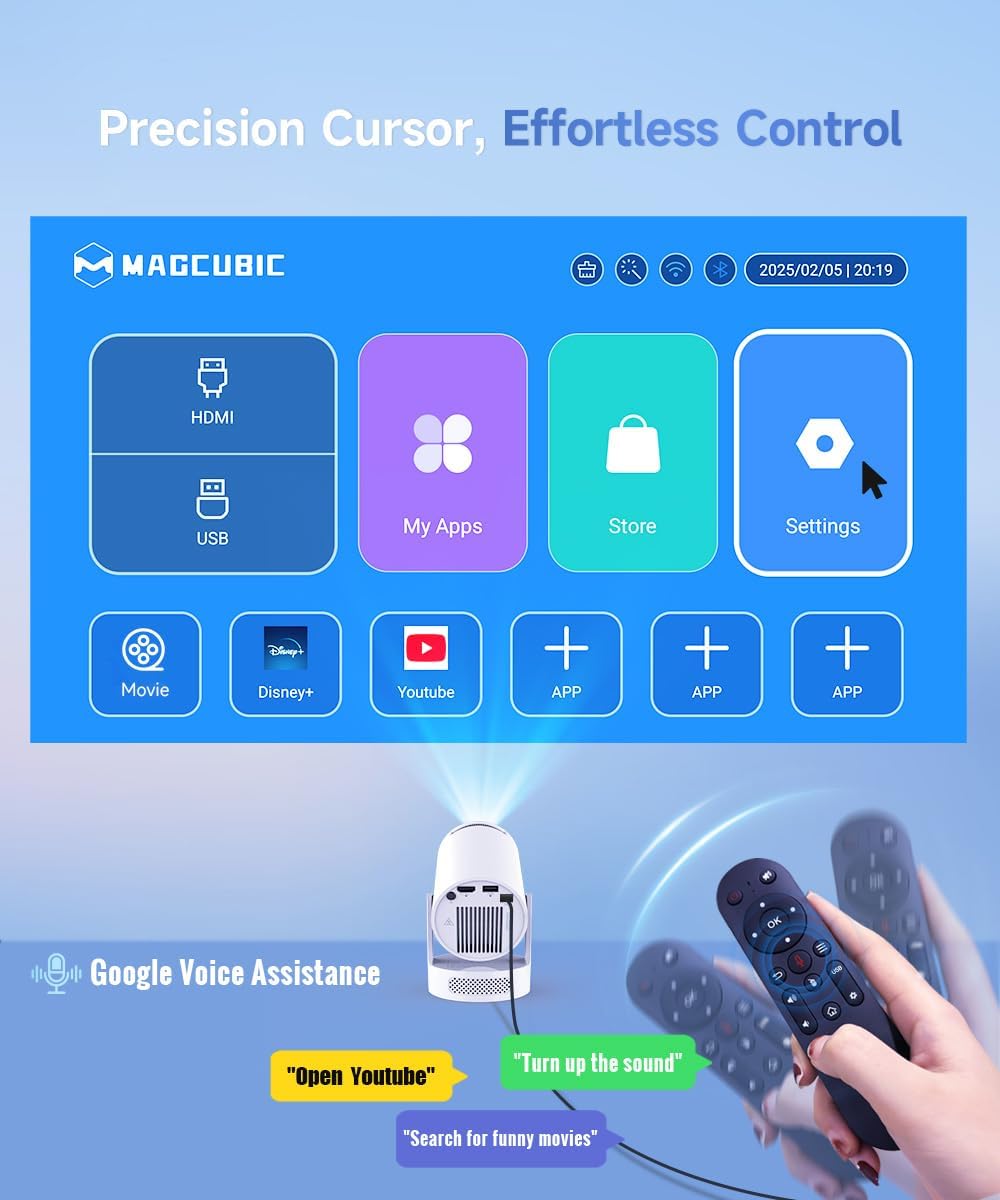
Image 5.2: Precision control with the Air Mouse remote and voice assistance.

Image 5.3: Instructions for using the Air Mouse remote control.
6. Connectivitat
6.1 Wireless Connectivity (WiFi6 & Bluetooth 5.4)
The projector supports both WiFi6 and Bluetooth 5.4 for high-speed and stable wireless connections.
- WiFi 6: Connecta't a la teva xarxa domèstica per accedir a Internet i reproduir en temps real.
- Bluetooth 5.4: Pair with external Bluetooth speakers or headphones for enhanced audio, or connect other Bluetooth devices.

Image 6.1: Wireless casting and WiFi6 performance.

Image 6.2: Wireless casting and wired connection options.
6.2 Connexions per cable
The projector includes ports for wired connections to various devices.
- HDMI: Connect gaming consoles, laptops, TV sticks, or other HDMI-enabled devices.
- USB: Connect USB drives for media playback or other compatible USB accessories.

Image 6.3: Versatile compatibility and easy connection ports.
7. Ajust de la imatge
Achieve a clear and perfectly aligned image using the following adjustment features:
- Enfocament manual: Ajusteu l'anell d'enfocament de la lent del projector fins que la imatge sigui nítida.
- Auto Vertical Correction: The projector automatically corrects vertical keystone distortion.
- Manual 4P Keystone: For more precise adjustments, manually correct the four corners of the image.
- Zoom (80-100%): Adjust the image size without moving the projector.

Image 7.1: Easy tuning and perfect alignment features.

Image 7.2: Simple manual focus for a clear view.
8. Àudio
The Magcubic HY300pro+ features an integrated 5W SoundBase speaker, providing clear and rich audio directly from the projector.

Image 8.1: Crisp, clear, powerful 5W speaker.

Image 8.2: Integrated 5W speaker for immersive sound.
For an enhanced audio experience, you can connect external Bluetooth speakers or a sound system via the Bluetooth 5.4 connection.
9. Manteniment
Un manteniment adequat garanteix la longevitat i el rendiment òptim del vostre projector.
- Neteja de la lent: Feu servir un drap suau i sense borrissol dissenyat específicament per a lents òptiques. No utilitzeu productes de neteja abrasius ni dissolvents.
- Neteja de l'exterior: Netegeu l'exterior del projector amb un drap suau i sec. Per a la brutícia resistent, netegeu lleugeramentamp es pot fer servir un drap, seguit d'un de sec.
- Ventilació: Assegureu-vos que les obertures de ventilació del projector estiguin buides i sense obstruccions per evitar el sobreescalfament.
- Emmagatzematge: Quan no l'utilitzeu durant períodes prolongats, guardeu el projector en un lloc fresc i sec, allunyat de la llum solar directa i de temperatures extremes.
10. Solució De Problemes
Si teniu problemes amb el projector, consulteu els problemes i solucions més comuns següents:
| Problema | Causa possible | Solució |
|---|---|---|
| Sense imatge o imatge borrosa | Incorrect focus, wrong input source, projection distance too far/close. | Adjust manual focus. Verify input source. Adjust projection distance (1.6m for 80-inch screen). |
| Sense so | Volume too low, external speaker not connected, audio output settings. | Increase volume. Check Bluetooth connection to external speakers. Verify audio output settings in Android. |
| El comandament a distància no funciona | Low battery, not paired, obstruction. | Replace batteries. Re-pair the remote control (see Section 5.2). Ensure no obstructions between remote and projector. |
| Problemes de connexió Wi-Fi | Contrasenya incorrecta, fora de rang, problemes amb el router. | Verifiqueu la contrasenya del Wi-Fi. Acosteu el projector a l'encaminador. Reinicieu l'encaminador. |
| Sobreescalfament del projector | Ventilació bloquejada, ús prolongat en ambients calorosos. | Assegureu-vos que els ports de ventilació estiguin lliures. Feu funcionar el projector en una zona ben ventilada. Deixeu que es refredi. |
For optimal performance, ensure your projector's firmware is up to date. Check the settings menu for software updates.
11. Especificacions
| Característica | Detall |
|---|---|
| Marca | Magcúbic |
| Model | HY300Pro+ Android |
| Color | Blanc |
| Tipus de producte | Projector portàtil |
| Tecnologia de visualització | LCD LCD |
| Resolució nativa | 1280 x 720 píxels |
| Resolució màxima de pantalla | 3840 x 2160 Pixels (4K Support) |
| Brillantor | 8000 lúmens |
| Relació de contrast | 8000:1 |
| Tecnologia de connectivitat | Wi-Fi (WiFi6), Bluetooth (BT5.4), HDMI, USB |
| Característiques especials | Integrated Speaker, Lightweight, Portable, Built-in Wi-Fi, 180° Rotation |
| Altaveu integrat | 5W |
| Dispositius compatibles | Smartphone, Game Console, Laptop/Tablet, TV Stick, USB Drive |
| Tipus d'instal·lació | Tripod Mount, Tabletop, Ceiling Mount |
| Dimensions del paquet | 24.4 x 18.2 x 13.2 cm |
| Pes de l'article | 400 grams |
12. Garantia i Suport
Your Magcubic HY300pro+ Mini Projector comes with a manufacturer's warranty of 1 year.
Magcubic is committed to providing comprehensive customer support:
- Servei professional 24/7: Assistència disponible les 24 hores del dia.
- Devolució o canvi en 30 dies: Policy for product satisfaction.
- Suport tècnic de tota la vida: Ongoing support for the lifespan of your product.
For support inquiries, please refer to the contact information provided in your product packaging or visit the official Magcubic weblloc.

Image 12.1: Magcubic Customer Service Commitment.