1. Introducció
Thank you for choosing the THOMSON WS302 Cosy Wooden Home Speaker. This manual provides essential information for the safe and efficient operation of your new speaker. Please read it thoroughly before use and retain it for future reference.

Image 1.1: The THOMSON WS302 speaker in a home setting, showcasing its wooden design.
2. Informació de seguretat
- Font d'alimentació: Only use the provided power cable and connect the speaker to a 230V AC power outlet.
- Aigua i humitat: No exposeu l'altaveu a l'aigua, la pluja o la humitat excessiva. Aquest producte no és impermeable.
- Fonts de calor: Mantingueu l'altaveu allunyat de fonts de calor com ara radiadors, registres de calor, estufes o altres aparells (inclosos amplificadors) que produeixen calor.
- Ventilació: Assegureu-vos que hi hagi una ventilació adequada. No bloquegeu cap obertura de ventilació.
- Neteja: Unplug the speaker from the power outlet before cleaning. Use a dry, soft cloth. Do not use liquid cleaners or aerosol cleaners.
- Manteniment: No intenteu atendre aquest producte vosaltres mateixos. Consulteu tots els serveis a personal de servei qualificat.
3. Contingut del paquet
Carefully unpack your speaker and check that all items are present and in good condition. If any item is missing or damaged, contact your retailer.
- THOMSON WS302 Cosy Wooden Home Speaker
- Cable d'alimentació

Image 3.1: The THOMSON WS302 product packaging.
4. Característiques del producte
The THOMSON WS302 speaker offers a blend of classic design and modern audio technology:
- Bluetooth 5.3: Per a una transmissió d'àudio sense fil estable i eficient.
- 50 Watts Musical Power: Delivers rich and powerful sound.
- Removable Front Grille: Allows for aesthetic customization and easy cleaning of the speaker drivers.
- Separate Treble and Bass Adjustment: Fine-tune your audio experience to your preference.
- Entrada auxiliar de 3.5 mm: Connect non-Bluetooth devices easily.
- Port USB: Per a opcions de connectivitat addicionals.

Image 4.1: Detail of the THOMSON logo on the speaker grille.
5. Configuració
5.1 Col·locació
Place the speaker on a stable, flat surface. For optimal sound quality, avoid placing it in enclosed spaces or directly against a wall, which can affect bass response. Ensure there is adequate space around the speaker for ventilation.
5.2 Connexió d'alimentació
- Connect the provided power cable to the power input port on the back of the speaker.
- Plug the other end of the power cable into a standard 230V AC wall outlet.
- Flip the power switch on the speaker to the 'ON' position.
6. Instruccions de funcionament
6.1 Vinculació Bluetooth
- Ensure the speaker is powered on. The Bluetooth indicator light will begin to flash, indicating it is in pairing mode.
- On your audio device (smartphone, tablet, laptop), enable Bluetooth and search for available devices.
- Select "THOMSON WS302" from the list of devices.
- Un cop connectat, l'indicador lluminós Bluetooth de l'altaveu s'il·luminarà fixament i sentireu un to de confirmació.
- You can now stream audio wirelessly to your speaker.
6.2 Auxiliary (AUX) Input
- Connecteu un extrem d'un cable d'àudio de 3.5 mm (no inclòs) al port d'entrada AUX de l'altaveu.
- Connect the other end of the 3.5mm audio cable to the headphone jack or audio output of your device.
- The speaker will automatically switch to AUX mode, or you may need to select it using a mode button if available.
6.3 Controls d'àudio
The top panel of the speaker features controls for adjusting the audio output:
- Pom de volum: Gireu en sentit horari per augmentar el volum, en sentit antihorari per disminuir-lo.
- Pom de baix: Adjusts the low-frequency audio output. Rotate to increase or decrease bass levels.
- Pom treble: Adjusts the high-frequency audio output. Rotate to increase or decrease treble levels.
- Interruptor d'alimentació: Toggles the speaker on or off.
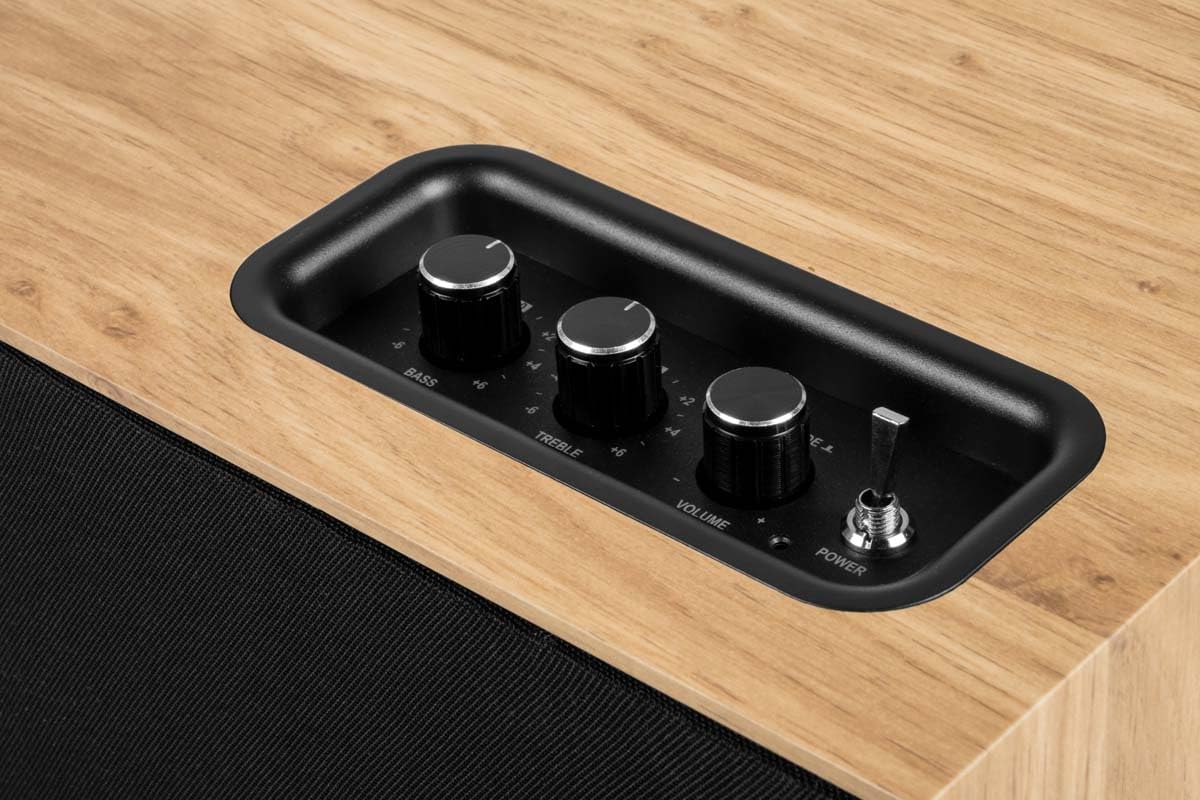
Image 6.1: Top control panel with Bass, Treble, Volume, and Power controls.
7. Manteniment
- Neteja: Always unplug the speaker before cleaning. Use a soft, dry, lint-free cloth to wipe the exterior surfaces. Do not use abrasive cleaners, waxes, or solvents.
- Pols: Regularly dust the speaker, especially the grille, to prevent accumulation that could affect sound quality. The front grille is removable for easier cleaning.
- Emmagatzematge: If storing the speaker for an extended period, unplug it and store it in a cool, dry place, away from direct sunlight and extreme temperatures.
8. Solució De Problemes
| Problema | Causa possible | Solució |
|---|---|---|
| Sense poder | Power cable not connected; Power switch off; Outlet not working. | Ensure power cable is securely connected; Turn power switch ON; Test outlet with another device. |
| Sense so | Volume too low; Incorrect input mode; Device not playing audio; Bluetooth not connected. | Increase volume; Select correct input (Bluetooth/AUX); Ensure audio is playing on source device; Re-pair Bluetooth. |
| Bluetooth no emparellat | Speaker not in pairing mode; Device too far; Interference; Already connected to another device. | Ensure speaker is flashing (pairing mode); Move device closer; Turn off other Bluetooth devices; Disconnect from other devices. |
| So distorsionat | Volume too high (speaker or source); Poor audio source quality; Treble/Bass settings too high. | Reduce volume on speaker and/or source device; Use a higher quality audio source; Adjust Bass/Treble knobs. |
9. Especificacions
| Nom del model | WS302 |
| Marca | THOMSON |
| Tecnologia de connectivitat | Bluetooth 5.3, auxiliar (3.5 mm) |
| Potència de sortida dels altaveus | 50 watts |
| Resposta de freqüència | 40 Hz |
| Mode de sortida d'àudio | estèreo |
| Mètode de control | Tàctil (botons) |
| Material | Fusta |
| Color | marró |
| Dimensions (L x A x A) | 30 cm x 25 cm x 15 cm |
| Pes de l'article | 1150 grams |
| Font d'alimentació | Electric Cable (230 Volts Input) |
| Dispositius compatibles | Smartphone, Tablet, Laptop, MP3 Player, Television |
| Característiques especials | USB Port, Removable Front Grille, Bass/Treble Adjustment |
10. Garantia i Suport
10.1 Informació de la garantia
This THOMSON WS302 speaker comes with a Garantia limitada. Please refer to the warranty card included in your package or contact your retailer for specific terms and conditions. Spare parts availability is guaranteed for 3 anys des de la data de compra.
10.2 Atenció al client
If you encounter any issues not covered in the troubleshooting section or require further assistance, please contact THOMSON customer support or your authorized retailer. Have your product model number (WS302) and purchase details ready when contacting support.


