Introducció
Welcome to the user manual for your AYANEO Pocket S Android Handheld Gaming Device. This manual provides essential information for setting up, operating, maintaining, and troubleshooting your device to ensure optimal performance and longevity. Please read this manual thoroughly before using your device.
Informació de seguretat
To prevent damage to your device or injury to yourself or others, please observe the following precautions:
- No exposeu el dispositiu a temperatures extremes, llum solar directa ni humitat elevada.
- Eviteu deixar caure el dispositiu ni sotmetre'l a impactes forts.
- Feu servir només carregadors i accessoris aprovats.
- No intenteu desmuntar ni reparar el dispositiu vosaltres mateixos. Poseu-vos en contacte amb personal de servei qualificat.
- Mantingueu el dispositiu allunyat de l'aigua i altres líquids.
Components del dispositiu
Familiarize yourself with the various parts of your AYANEO Pocket S.
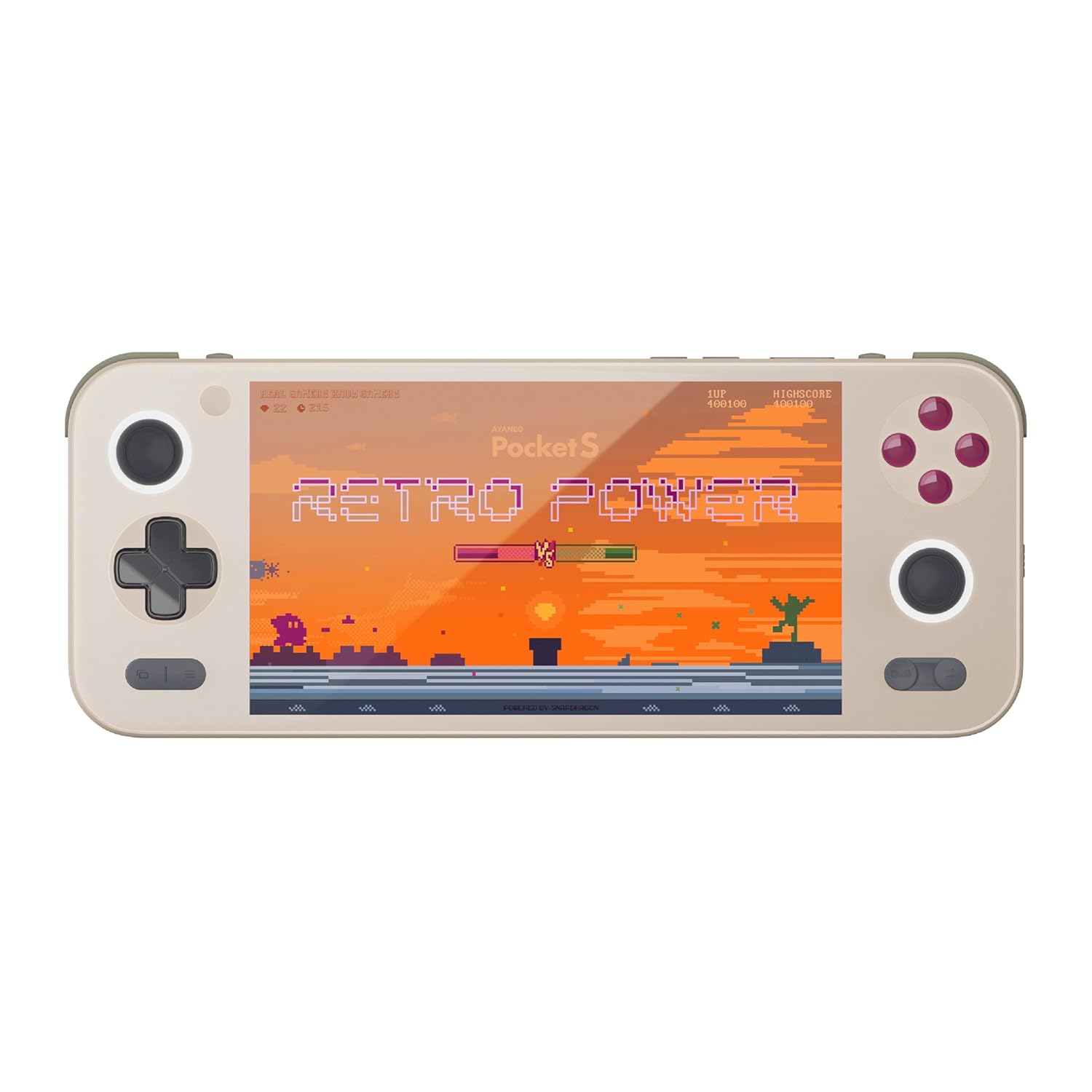
Figura 1: Frontal view of the AYANEO Pocket S, showing the screen, joysticks, D-pad, and action buttons.

Figure 2: Close-up of the Master Controller, highlighting the RGB Hall joysticks, Hall triggers, and crystal-textured keys.

Figure 3: Illustration of the internal VC thermal plate and active cooling system, along with the "Fishbone" biomimetic heat dissipation design on the side.

Figure 4: The AYANEO Pocket S displaying the AYASpace and AYAHOME Launcher interface, showing various game icons.
Característiques principals:
- Visualització: 6-inch 2K Borderless IPS Screen (490 PPI, 120% sRGB, 85% DCI-P3)
- Processador: Snapdragon G3x Gen 2 Gaming Platform
- Memòria i emmagatzematge: Up to 16GB RAM, up to 1TB Storage (This model: 12GB RAM, 128GB Storage)
- Refrigeració: Large VC Heat Sink, Active Cooling System, "Fishbone" Cooling Vents
- Controls: Master Controller with RGB Hall Joysticks, Linear Hall Triggers, X-axis Vibration
- Sistema operatiu: Android 13
Guia de configuració
1. Càrrega inicial
Before first use, fully charge your AYANEO Pocket S. Connect the provided USB-C cable to the device's charging port and the other end to a compatible power adapter. The charging indicator will illuminate.
2. Encès / apagat
- Per encendre: Press and hold the Power button located on the top edge of the device until the AYANEO logo appears on the screen.
- Per apagar: Press and hold the Power button until the power options menu appears. Select "Power Off" and confirm.
- Per reiniciar: Al menú d'opcions d'energia, seleccioneu "Reiniciar".
3. Configuració inicial del sistema
Upon first power-on, you will be guided through the initial Android setup process. This includes:
- Selecció del vostre idioma.
- Connexió a una xarxa Wi-Fi.
- Signing in with your Google account (optional, but recommended for app downloads).
- Setting up screen lock and other security features.
4. Actualitzacions de programari
It is recommended to check for and install any available system updates after initial setup to ensure you have the latest features and security patches. Navigate to Configuració > Sistema > Actualització del sistema.
Funcionament del vostre dispositiu
Navegació i controls
The AYANEO Pocket S features both touchscreen input and physical controller input for navigation and gameplay.
- Pantalla tàctil: Use familiar Android gestures such as tap, swipe, pinch-to-zoom.
- Joysticks: Analog input for movement and camera control in games.
- D-Pad: Digital input for menu navigation and directional controls.
- Botons d'acció (A/B/X/Y): Primary input for in-game actions.
- Shoulder/Trigger Buttons (L1/L2/R1/R2): Additional input for various game functions.
- Botons de funció: Dedicated buttons for system functions, such as Home, Back, and Menu.
Modes de rendiment
The device offers multiple performance modes to optimize for either maximum performance or extended battery life.
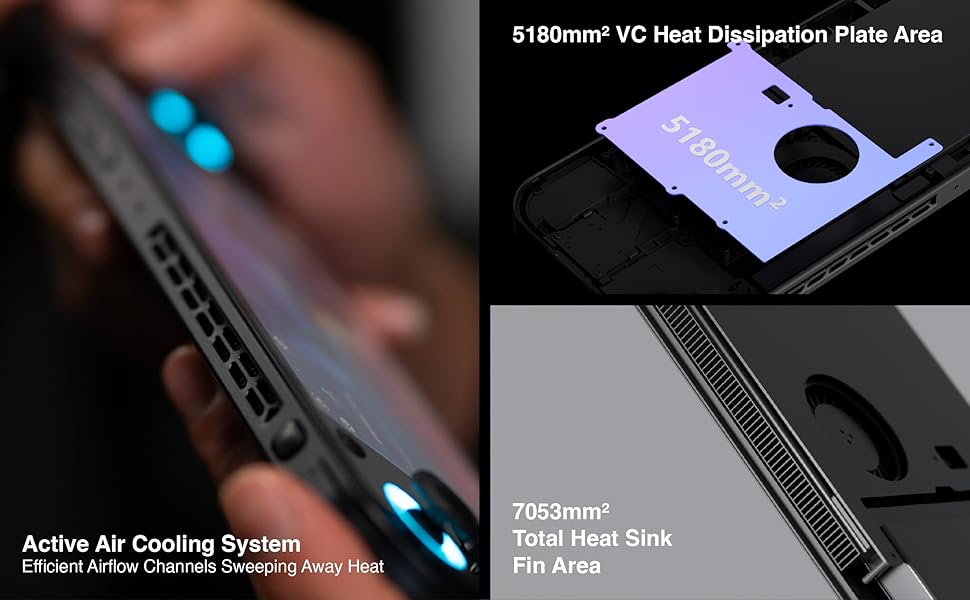
Figure 5: Diagram illustrating the three performance modes: Performance Turbo Mode, Balanced Mode, and Power-Saving Long Battery Life Mode.
- Performance Turbo Mode: Maximizes CPU, GPU, and fan speed for demanding games.
- Mode equilibrat: Provides a good balance between performance and battery life for most games.
- Power-Saving Long Battery Life Mode: Optimizes for extended usage, suitable for less demanding applications or when battery conservation is critical.
You can switch between these modes via the AYASpace application or quick settings menu.
AYASpace and AYAHOME Launcher
The AYASpace application and AYAHOME Launcher provide a customized Android experience for gaming handhelds.
- Gestió de jocs: Organize and launch your games.
- Mapatge de claus: Customize button assignments for mobile games that do not natively support physical controllers.
- Configuració del sistema: Access performance mode settings, controller calibration, and other device-specific configurations.
Manteniment
Neteja del dispositiu
- Use a soft, lint-free cloth to wipe the screen and body of the device.
- Per a taques persistents, lleugerament dampNetegeu el drap amb aigua o un netejador de pantalles.
- No utilitzeu productes químics agressius, netejadors abrasius ni aerosols.
- Ensure all ports are free of dust and debris. Use a soft brush or compressed air if necessary, holding the can upright.
Cura de la bateria
- Eviteu descarregar completament la bateria amb freqüència.
- No deixeu el dispositiu sense carregar durant períodes prolongats.
- Store the device in a cool, dry place if not used for a long time, with the battery charged to around 50%.
Manteniment de programari
- Regularly check for and install system updates.
- Keep your applications updated through the Google Play Store or AYASpace.
- Esborra periòdicament la memòria cau i les innecessàries files per mantenir el rendiment del sistema.
Resolució de problemes
| Problema | Causa possible | Solució |
|---|---|---|
| El dispositiu no s'encén. | Bateria baixa; Fallada del sistema. | Carregueu el dispositiu durant almenys 30 minuts. Feu un reinici forçat mantenint premut el botó d'engegada durant 10-15 segons. |
| La pantalla no respon. | Error de programari; Danys a la pantalla. | Reinicieu el dispositiu. Si el problema persisteix, poseu-vos en contacte amb l'atenció al client. |
| Games are lagging or performing poorly. | Incorrect performance mode; Background apps; Overheating. | Switch to Performance Turbo Mode. Close unnecessary background applications. Ensure cooling vents are not blocked. |
| Problemes de connexió Wi-Fi. | Incorrect password; Router issue; Device Wi-Fi module error. | Verify Wi-Fi password. Restart your router. Toggle Wi-Fi off and on on the device. |
If you encounter issues not listed here or if the suggested solutions do not resolve the problem, please contact AYANEO customer support.
Especificacions
| Característica | Detall |
|---|---|
| Model | butxaca S |
| Processador | Snapdragon G3x Gen 2 Gaming Platform |
| Mostra | 6-inch 2K Borderless IPS Display (2560*1440 resolution, 490 PPI, 120% sRGB, 85% DCI-P3) |
| RAM | 12 GB (segons el model actual) |
| Emmagatzematge | 128 GB (segons el model actual) |
| Sistema operatiu | Android 13 |
| Sistema de refrigeració | Large VC Heat Sink, Active Cooling System, "Fishbone" Vents |
| Bateria | 1 bateria de ions de liti (inclosa) |
| Dimensions | Aproximadament 8.42 x 3.35 x 0.55 polzades |
| Pes | Aproximadament 1.59 lliures (0.72 kg) |
Informació de la garantia
AYANEO products typically come with a limited manufacturer's warranty. Please refer to the warranty card included in your product packaging or visit the official AYANEO weblloc web per obtenir informació detallada sobre els termes i condicions de la garantia. Conserveu el comprovant de compra per a reclamacions de garantia.
Note: Protection plans may be available for purchase separately. These plans are offered by third parties and are not part of the standard manufacturer's warranty.
Atenció al client
For technical assistance, troubleshooting, or warranty inquiries, please contact AYANEO customer support through their official channels:
- Oficial Weblloc: www.ayaneo.com (Check for support section or contact page)
- Suport per correu electrònic: Consulteu l'oficial weblloc web per obtenir l'adreça electrònica d'assistència més actualitzada.
- Online Community/Forums: AYANEO may host online communities where users can find answers and share experiences.
When contacting support, please have your device model (Pocket S) and serial number ready.


