Majority Darwin Bluetooth Alarm Clock with 10W Wireless Charging
Model: Darwin | Brand: Majority
Introducció
This manual provides detailed instructions for the operation and maintenance of your Majority Darwin Bluetooth Alarm Clock. This device integrates an FM radio, dual alarm clock, 10W wireless charging, and ambient lighting to enhance your bedside experience.
Informació de seguretat
- Llegiu atentament totes les instruccions abans d'utilitzar.
- Mantingueu el dispositiu allunyat de l'aigua i la humitat.
- No exposar a temperatures extremes.
- No intenteu desmuntar ni reparar la unitat vosaltres mateixos. Poseu-vos en contacte amb personal de servei qualificat.
- Ensure proper ventilation when using the wireless charging function.
Contingut del paquet
Verifiqueu que tots els elements siguin presents a la caixa:
- Majority Darwin Bedside Clock
- Adaptador de corrent
- Manual d'usuari

Image: Package contents of the Majority Darwin alarm clock, including the clock, power adapter, and user manual.
Producte acabatview
Familiarize yourself with the main components and control buttons of your Darwin alarm clock.
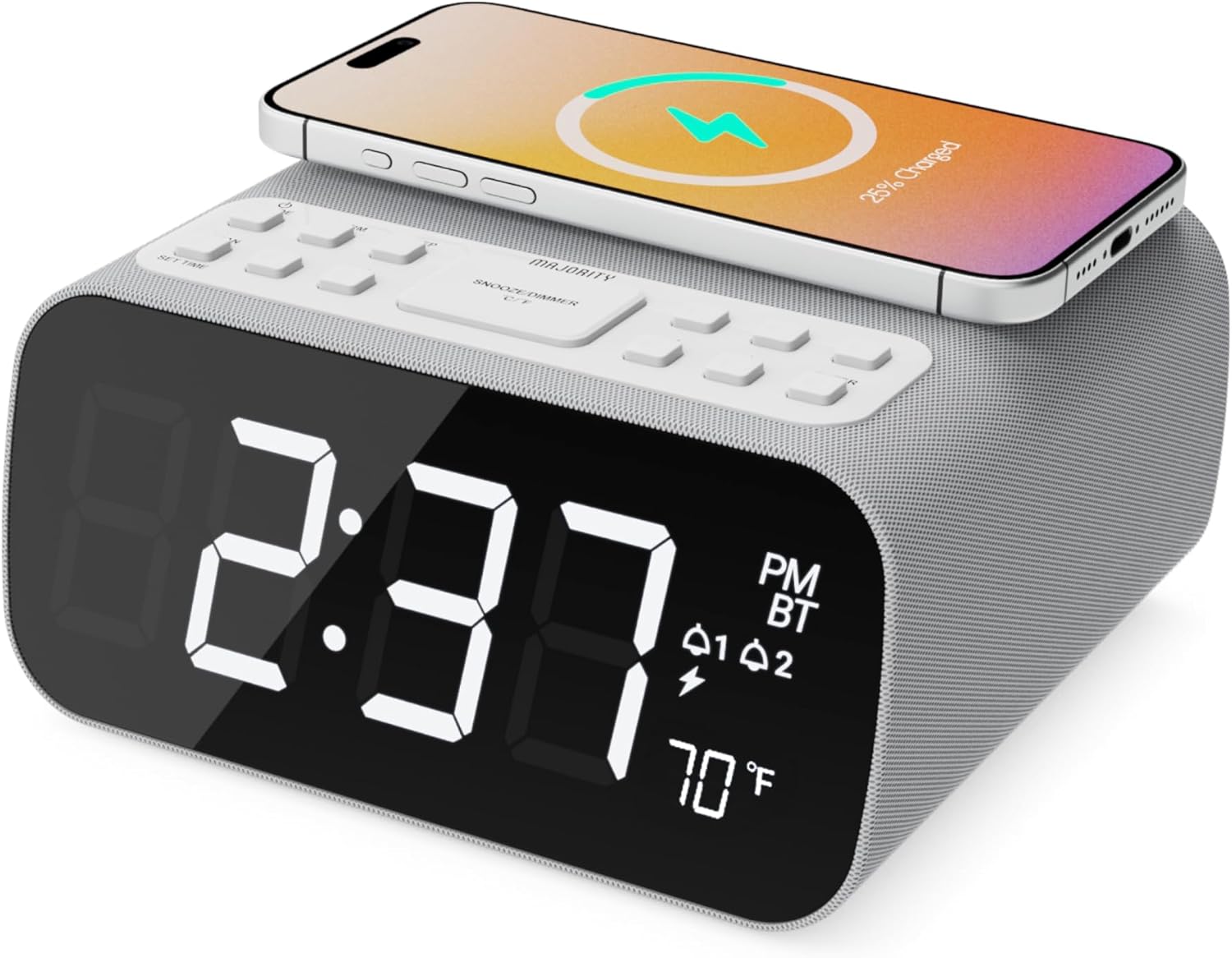
Imatge: Frontal view of the Majority Darwin alarm clock showing the large digital display, wireless charging pad on top, and control buttons.

Imatge: Lateral view of the Majority Darwin alarm clock highlighting the control panel with buttons for time, alarm, volume, and light settings.
Controls del tauler superior
- Coixinet de càrrega sense fil: Place compatible devices here for 10W wireless charging.
- Botó Posposa/Llum: Short press to snooze alarm; long press to adjust display brightness or cycle through ambient light colors.
- Time/Date Set Button: Press to enter time/date setting mode.
- Botons d'alarma 1/2: Press to activate/deactivate Alarm 1 or Alarm 2. Long press to set alarm time.
- Volume/Tune Buttons: Adjust volume or tune FM radio stations.
- Botó de mode: Switch between FM Radio, Bluetooth, and White Noise modes.
Rear Panel Controls & Ports
- Entrada DC 12V: Connect the mains power adapter here.
- Port de càrrega USB: For charging additional devices via USB cable.
- Compartiment de la bateria: For backup batteries (not for primary power).
- Display Dimmer Slider: Manually adjust the brightness of the main time display.
- Night Light Dimmer: Adjust brightness of the ambient light.
Configuració
Connexió d'alimentació
Connect the provided mains power adapter to the DC 12V input port on the rear of the alarm clock and plug it into a wall outlet. The display will light up.
For battery backup, open the battery compartment on the bottom and insert 2 x AAA batteries (not included). This will retain time settings during a power outage but will not power the display or charging functions.
Imatge: Part posterior view of the Majority Darwin alarm clock with the power adapter connected to the DC 12V input.
Configuració de l'hora inicial
- Premeu llargament el botó Hora/Data establerta button on the top panel. The hour digits will start flashing.
- Utilitza el Volume/Tune botons per ajustar l'hora.
- Premeu el botó Hora/Data establerta Premeu el botó de nou per confirmar l'hora i passar a la configuració dels minuts.
- Utilitza el Volume/Tune botons per ajustar els minuts.
- Repeat this process for setting the year, month, and day.
- Premeu el botó Hora/Data establerta button one last time to save all settings.
Instruccions de funcionament
Time Display & Dimmer
The large LED display shows the current time.
Atenuació manual: Utilitza el Display Dimmer Slider on the rear panel to manually adjust the brightness of the time display.
Atenuació automàtica: The device features an auto-dimming function that adjusts display brightness at fixed time intervals (e.g., dimming at night, brightening during the day).

Imatge: Frontal view of the Majority Darwin alarm clock displaying time, AM/PM, and temperature, highlighting the dual alarm icons.
Configuració d'alarma
The Darwin alarm clock supports two independent alarms (Alarm 1 and Alarm 2).
- Long press either the Alarma 1 or Alarma 2 button. The hour digits for that alarm will flash.
- Utilitza el Volume/Tune botons per configurar l'hora d'alarma desitjada.
- Premeu el corresponent Alarma Premeu el botó de nou per confirmar l'hora i passar a la configuració dels minuts.
- Utilitza el Volume/Tune botons per configurar els minuts d'alarma desitjats.
- Premeu el botó Alarma button again to select the alarm source (FM radio or built-in tone). Use Volume/Tune botons per seleccionar.
- Premeu el botó Alarma button again to set the alarm volume.
- Premeu el botó Alarma button one last time to activate the alarm. An alarm icon will appear on the display.
Deactivating an Alarm: Short press the corresponding Alarma 1 or Alarma 2 button to turn it off. The alarm icon will disappear.
Funció de posposar
When an alarm sounds, short press the Posposa/Llum button on the top panel to temporarily silence the alarm for 9 minutes. The alarm will sound again after the snooze period.
Funcionament de la ràdio FM
- Premeu el botó Mode fins que aparegui "FM" a la pantalla.
- Utilitza el Volume/Tune buttons to manually tune to your desired FM station.
- Auto Scan & Store Presets: Premeu llargament el botó Mode per escanejar automàticament i desar les emissores de FM disponibles com a predefinides.
- Premeu breument Mode per anar passant pels preajustos desats.
Bluetooth Pairing & Playback
- Premeu el botó Mode button until "BT" appears on the display and the Bluetooth indicator starts flashing.
- On your smartphone or other Bluetooth device, enable Bluetooth and search for "Majority Darwin".
- Select the device to pair. Once connected, the Bluetooth indicator on the alarm clock will stop flashing.
- You can now play audio from your device through the alarm clock's speaker. Use the Volume/Tune buttons on the alarm clock or your device to adjust volume.

Image: A smartphone displaying music playback, connected via Bluetooth to the Majority Darwin alarm clock.
Càrrega sense fils
The top surface of the alarm clock features a 10W wireless charging pad.
- Place your Qi-compatible smartphone directly onto the wireless charging pad.
- Ensure the phone is centered on the charging symbol for optimal charging.
- A charging indicator (e.g., a lightning bolt icon) may appear on your phone's screen or the alarm clock's display to confirm charging.
Port de càrrega USB: An additional USB port on the rear allows you to charge other devices using a USB cable.
Image: The Majority Darwin alarm clock with a smartphone placed on top, indicating active wireless charging.
Night Light / Ambient Light
The alarm clock features an ambient light ring around its base.
- Premeu llargament el botó Posposa/Llum button to turn the ambient light on/off.
- Premeu breument Posposa/Llum button to cycle through different color modes (e.g., red, green, blue, purple, white, color cycle).
- Utilitza el Atenuador de llum nocturna on the rear panel to adjust the brightness of the ambient light.

Image: The Majority Darwin alarm clock illuminated with a vibrant ambient light from its base.
White Noise Function
The device includes various white noise sounds to aid relaxation and sleep.
- Premeu el botó Mode button until the white noise mode is activated (indicated by a specific icon or text on the display).
- Utilitza el Volume/Tune buttons to adjust the volume of the white noise.
- Premeu breument Mode button again to cycle through different white noise sounds (e.g., nature sounds, fan noise).
Manteniment
- Netegeu el dispositiu amb un drap suau i sec. No utilitzeu productes de neteja abrasius ni dissolvents.
- Mantenir les obertures de ventilació netes.
- If not in use for an extended period, disconnect from power and remove backup batteries.
Resolució de problemes
Sense alimentació / Pantalla apagada
- Assegureu-vos que l'adaptador de corrent estigui connectat correctament tant al dispositiu com a una presa de corrent que funcioni.
- Comproveu si la presa de corrent funciona.
La càrrega sense fils no funciona
- Assegureu-vos que el vostre dispositiu sigui compatible amb Qi.
- Make sure your phone is centered on the charging pad.
- Remove any thick phone cases or metallic objects between the phone and the charging pad.
Problemes d'aparellament de Bluetooth
- Ensure the alarm clock is in Bluetooth pairing mode (BT flashing).
- Make sure your device's Bluetooth is enabled and searching.
- Prova de desvincular i tornar a vincular el dispositiu.
- Ensure no other devices are currently connected to the alarm clock via Bluetooth.
L'alarma no sona
- Verify that the alarm is activated (alarm icon visible on display).
- Comproveu la configuració del volum de l'alarma.
- Ensure the correct alarm time is set.
Especificacions
| Característica | Detall |
|---|---|
| Marca | Majoria |
| Nom del model | Darwin |
| Sortida de càrrega sense fils | 10W |
| Potència de sortida dels altaveus | 12 watts |
| Tecnologia de connectivitat | Bluetooth |
| Font d'alimentació | Mains Power (Battery Backup) |
| Dimensions del producte | 13.07 x 8.22 x 6.09 polzades |
| Pes de l'article | 1.42 lliures (645 grams) |
| Característiques especials | Adjustable Volume, Dual Alarm, Bluetooth, Wireless Charging, FM Radio, Dimmable Display, Ambient Night Light, White Noise |
Garantia i suport
The Majority Darwin Bluetooth Alarm Clock comes with a standard manufacturer's warranty. Please refer to the warranty card included in your package for specific terms and conditions.
For technical support, troubleshooting, or warranty claims, please visit the official Majority weblloc o poseu-vos en contacte amb el seu servei d'atenció al client.
Online resources and FAQs may also be available on the product support page.


