1. Introducció
This manual provides detailed instructions for the installation, operation, maintenance, and troubleshooting of your TP-Link Archer NX600 5G Wireless Router. The Archer NX600 is designed to deliver high-speed 5G connectivity with Wi-Fi 6 AX3600Mbps dual-band performance. It features a 2.5G WAN/LAN port and two Gigabit LAN ports, offering a plug-and-play setup for advanced network sharing. It is compatible with EasyMesh and HomeShield for flexible and secure home networking.
2. Contingut del paquet
Verifiqueu que tots els articles siguin presents al vostre paquet. Si falta algun article o està malmès, poseu-vos en contacte amb el vostre distribuïdor.
- TP-Link Archer NX600 5G Wireless Router
- Adaptador d'alimentació
- Cable Ethernet
- Guia d'instal·lació ràpida
3. Maquinari acabatview
Familiaritzeu-vos amb els components físics del vostre encaminador.
3.1 Tauler frontal

Descripció de la imatge: The front panel of the Archer NX600 router is white with a vertical black strip containing LED indicators. These indicators show the status of signal strength, internet connection, Wi-Fi, and power.
3.2 Panell posterior
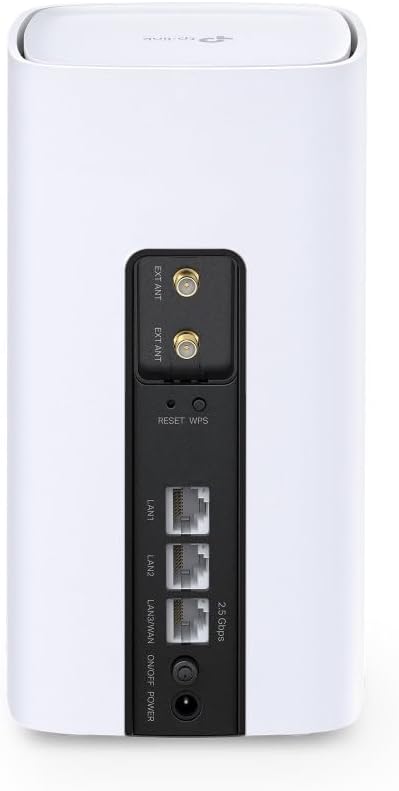
Descripció de la imatge: The rear panel of the Archer NX600 router features various ports and buttons. From top to bottom, it includes two external antenna connectors (EXT ANT), a Reset/WPS button, two Gigabit LAN ports (LAN1, LAN2), a 2.5G WAN/LAN port, an On/Off switch, and a power input port.
3.3 Indicadors LED
- Intensitat del senyal: Indicates the strength of the 5G/LTE cellular signal.
- Internet: Shows the status of the internet connection.
- Wi-Fi: Indica l'activitat de la xarxa Wi-Fi.
- Potència: Mostra l'estat d'alimentació del dispositiu.
3.4 Ports i botons
- Ranura per a targeta SIM: Insert your 5G/4G SIM card here.
- Port WAN/LAN 2.5G: Connect to a modem for wired internet or to a device for high-speed LAN connection.
- Ports LAN Gigabit (x2): Connecteu dispositius amb cable com ara ordinadors o consoles de jocs.
- Botó de restabliment/WPS: Press and hold to reset the router to factory settings. Press briefly to activate WPS.
- Port d'alimentació: Connecteu l'adaptador de corrent proporcionat.
- Interruptor d'encesa/apagada: Power the router on or off.
4. Configuració
Follow these steps for initial setup of your Archer NX600 router.
4.1 Inseriu la targeta SIM
- Assegureu-vos que l'encaminador estigui apagat.
- Locate the SIM card slot, typically on the bottom or side of the device.
- Insert your 5G/4G SIM card into the slot until it clicks into place. Ensure the correct orientation as indicated on the router.
4.2 Encès
- Connect the provided power adapter to the router's power port and then to a power outlet.
- Press the On/Off switch to power on the router.
- Wait for the LED indicators on the front panel to stabilize. The Signal Strength and Internet LEDs should indicate a stable connection.
4.3 Connecteu-vos a Internet
The router is designed for plug-and-play operation with a SIM card. Once the SIM card is inserted and the router is powered on, it should automatically connect to the 5G/4G network.
You can connect your devices to the router via Wi-Fi or Ethernet cable:
- Connexió Wi-Fi: Find the Wi-Fi network name (SSID) and password printed on the label at the bottom of the router. Select this network on your device and enter the password.
- Connexió Ethernet: Connect an Ethernet cable from one of the router's LAN ports to your computer or other wired device.
4.4 Accés Web Interfície de gestió
For advanced settings and configuration, access the router's web interfície de gestió:
- Connect your device to the router (Wi-Fi or Ethernet).
- Obre a web navegador i introduïu l'adreça d'accés predeterminada (per exemple, http://tplinkwifi.net or the IP address printed on the router label) in the address bar.
- Log in using the administrator password you set during the first login, or the default password (if not changed).
5. Instruccions de funcionament
This section covers common operational aspects of your Archer NX600 router.
5.1 Gestió de xarxes Wi-Fi
A través del web interfície de gestió, podeu:
- Canvieu els noms de les xarxes Wi-Fi (SSID) i les contrasenyes.
- Enable or disable guest networks.
- Configura la configuració de seguretat de la Wi-Fi.
5.2 Compatibilitat amb EasyMesh
The Archer NX600 supports EasyMesh, allowing it to work with other EasyMesh-compatible devices to form a unified mesh Wi-Fi network. This provides seamless coverage with a single Wi-Fi name throughout your home.
- Refer to the EasyMesh setup guide within the router's web interface or on the TP-Link support website for detailed instructions on expanding your mesh network.
5.3 HomeShield Features
TP-Link HomeShield provides comprehensive network protection and parental controls. Access these features via the TP-Link Tether app or the web interfície de gestió.
- Protecció de xarxa: Real-time IoT protection, malicious site blocker, intrusion prevention, and home network scanner.
- Controls parentals: Profile management, content filtering, time limits, and insights.
- Qualitat de servei (QoS): Prioritzar els dispositius o les activitats per a un rendiment òptim.
5.4 Using the 2.5G WAN/LAN Port
The versatile 2.5G port can be configured as either a WAN port or a LAN port:
- Mode WAN: Connect an external modem (cable, fiber, or DSL) to this port to use the Archer NX600 as a traditional wireless router, in addition to its 5G capabilities.
- Mode LAN: Use this port to connect a high-speed wired device, such as a network-attached storage (NAS) or a powerful desktop PC, for faster local network transfers.
6. Manteniment
Un manteniment regular ajuda a garantir un rendiment òptim i una llarga vida útil del vostre encaminador.
- Col·locació: Col·loqueu el router en un lloc central, allunyat d'obstacles i fonts d'interferències (per exemple, microones, telèfons sense fil).
- Ventilació: Ensure adequate airflow around the router to prevent overheating. Do not cover ventilation openings.
- Actualitzacions de firmware: Comproveu i instal·leu periòdicament si hi ha actualitzacions de firmware a través del router. web interfície de gestió. Les actualitzacions sovint inclouen millores de rendiment, pegats de seguretat i noves funcions.
- Neteja: Gently clean the router's exterior with a soft, dry cloth. Avoid using liquid cleaners or abrasive materials.
- Reinicieu: If you experience minor performance issues, try rebooting the router by unplugging it from the power outlet for 10 seconds and then plugging it back in.
7. Solució De Problemes
Aquesta secció tracta problemes comuns que podeu trobar.
7.1 Sense connexió a Internet
- Comproveu la targeta SIM: Assegureu-vos que la targeta SIM estigui inserida correctament i que estigui activa amb un pla de dades.
- Indicadors LED: Verify that the Signal Strength and Internet LEDs are solid green. If not, try repositioning the router or checking your SIM card.
- Configuració de l'APN: En el web management interface, check the APN (Access Point Name) settings. These are usually configured automatically, but may need manual adjustment for some carriers.
- Reinicieu: Apagueu i torneu a apagar el router.
7.2 Velocitat d'Internet lenta
- Intensitat del senyal: Check the Signal Strength LED. If it's low, try moving the router to a location with better 5G/4G reception.
- Congestió de la xarxa: High network traffic from multiple devices can reduce speed. Consider using QoS settings to prioritize important devices or applications.
- Interferències de Wi-Fi: Other wireless devices can interfere with your Wi-Fi signal. Try changing Wi-Fi channels in the router settings.
- Carrier Throttling: Your mobile carrier might be throttling your speed after a certain data usage. Check your data plan.
7.3 Cannot Connect to Wi-Fi Printer
Some older Wi-Fi printers may have compatibility issues with newer Wi-Fi standards or dual-band networks. If you are experiencing difficulty connecting a Wi-Fi printer:
- Separate Wi-Fi Bands: En el router web management interface, try separating the 2.4 GHz and 5 GHz Wi-Fi networks by giving them different SSIDs (network names). Then, attempt to connect your printer specifically to the 2.4 GHz network, as many older printers only support this band.
- Firmware de la impressora: Assegureu-vos que el firmware de la impressora estigui actualitzat.
- WPS: Try using the WPS button on the router and your printer (if supported) for an easier connection.
- Connexió Ethernet: If possible, connect the printer to one of the router's LAN ports using an Ethernet cable.
7.4 Router Overheating
If the router feels excessively hot or experiences frequent disconnections, it might be overheating.
- Ventilació: Assegureu-vos que el router estigui col·locat en una zona ben ventilada i que les seves reixetes de ventilació no estiguin bloquejades.
- Temperatura ambient: Avoid placing the router in direct sunlight or in an enclosed space where heat can build up.
8. Especificacions
| Característica | Detall |
|---|---|
| Marca | TP-Link |
| Nom del model | Archer NX600 5G/4G Wi-Fi 6 |
| Número de model de l'article | Archer NX600 |
| Tecnologia de connectivitat | Wi-Fi |
| Comunicació sense fils estàndard | 802.11ax |
| Classe de banda de freqüència | Banda Dual |
| Característica especial | Banda Dual |
| Tipus sense fil | 802.11ax |
| Sistema operatiu | Sistema operatiu TP-Link |
| Color | Blanc |
| Pes de l'article | 600 grams |
| Dimensions del paquet | 22.8 x 22.7 x 11.9 cm |
| Usos recomanats per al producte | Casa |
| Dispositius compatibles | Smartphone, Tablet, PC, Gaming Console, Smart TV, Surveillance Camera, Smart Thermostat, Printer |
| Components inclosos | TP-Link Archer NX600 |
9. Garantia i Suport
Per obtenir informació sobre la garantia i assistència tècnica, consulteu el lloc web oficial de TP-Link. website or the warranty card included with your product. You can typically find:
- Registre del producte.
- Technical support contact information (phone, email, chat).
- Firmware downloads and FAQs.
- Termes i condicions de la garantia.
Visita Suport de TP-Link per a la informació més recent.


