1. Introducció
Thank you for choosing the Shokz Opencomm2 2025 Wireless Earphones. These open-ear bone conduction headphones are designed for clear communication and comfortable listening, particularly in professional and active environments. This manual provides essential information for the proper use, setup, and maintenance of your device.

Image: The Shokz Opencomm2 2025 Wireless Earphones, showcasing their flexible, open-ear design and integrated microphone boom.
2. Producte acabatview
2.1 Què hi ha a la caixa
- Shokz Opencomm2 2025 Wireless Earphones
- Cable de càrrega USB-C
- Maleta de transport
- Guia de l'usuari (aquest document)
- Legal Statement & Warranty Card

Image: Contents of the Shokz Opencomm2 2025 package, including the earphones, charging cable, carrying case, and documentation.
2.2 Components dels auriculars
Familiarize yourself with the key components of your Opencomm2 earphones:
- Transductors de conducció òssia: These rest on your cheekbones, delivering audio without blocking your ear canals.
- Boom del micròfon: Adjustable boom for clear voice pickup.
- Botó multifunció: Per a l'engegada, l'emparellament, la reproducció/pausa i la gestió de trucades.
- Botons de volum: Per ajustar el volum i el control de pista.
- Port de càrrega USB-C: Per carregar el dispositiu.

Imatge: Un primer pla view of the Shokz Opencomm2 earphone's right side, highlighting the multi-function button, volume controls, and the USB-C charging port.
3. Configuració
3.1 Càrrega dels auriculars
- Connect the USB-C charging cable to the charging port on the earphones.
- Connecteu l'altre extrem del cable a un adaptador de corrent USB (no inclòs) o al port USB d'un ordinador.
- The LED indicator will show the charging status. A full charge takes approximately 1.5 hours.
3.2 Vinculació amb un dispositiu
- Assegureu-vos que els auriculars estiguin apagats.
- Press and hold the multi-function button for 5-7 seconds until the LED indicator flashes red and blue alternately, indicating pairing mode.
- On your device (e.g., smartphone, computer), enable Bluetooth and search for available devices.
- Select "Opencomm2" from the list of found devices.
- Once connected, the LED indicator will flash blue once every few seconds, and you will hear a voice prompt "Connected".
4. Instruccions de funcionament
4.1 Com posar-se els auriculars
Place the flexible band behind your head, with the bone conduction transducers resting comfortably on your cheekbones, just in front of your ears. Adjust the microphone boom so it is positioned near your mouth for optimal voice clarity.
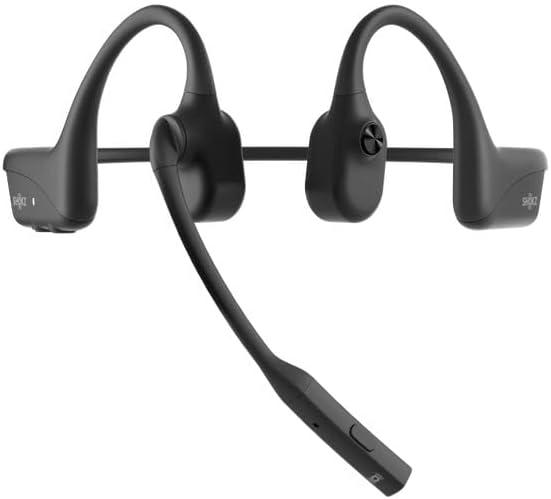
Image: The Shokz Opencomm2 2025 earphones positioned on a head, demonstrating the correct placement of the bone conduction transducers and microphone boom.
4.2 Controls bàsics
- Encès/apagat: Manteniu premut el botó multifunció durant 2 segons.
- Reproduir/pausa: Premeu el botó multifunció una vegada.
- Pujar/baixar el volum: Press the respective volume buttons.
- Pista següent: Press and hold the Volume + button for 2 seconds.
- Pista anterior: Press and hold the Volume - button for 2 seconds.
- Respondre/Finalitzar la trucada: Premeu el botó multifunció una vegada.
- Rebutja la trucada: Manteniu premut el botó multifunció durant 2 segons.
- Silenciar el micròfon: During a call, press the multi-function button twice.
5. Manteniment
5.1 Neteja
Netegeu els auriculars amb un drap suauamp drap. No utilitzeu productes químics agressius ni netejadors abrasius. Assegureu-vos que el port de càrrega estigui sec abans de carregar-lo.
5.2 Emmagatzematge
Store the earphones in their carrying case when not in use to protect them from dust and damage. Avoid storing in extreme temperatures.
5.3 Resistència a l'aigua
The Opencomm2 earphones are water resistant, meaning they can withstand sweat and light splashes. They are not designed for submersion in water. Do not charge if wet.
6. Solució De Problemes
- Sense energia: Ensure the earphones are fully charged. Connect to a power source and check the LED indicator.
- No es pot emparellar: Ensure the earphones are in pairing mode (red and blue flashing LED). Turn off and on your device's Bluetooth, then try pairing again. Move closer to your device.
- Sense so: Comproveu els nivells de volum tant dels auriculars com del dispositiu connectat. Assegureu-vos que els auriculars estiguin connectats correctament mitjançant Bluetooth.
- Qualitat de trucada baixa: Ensure the microphone boom is positioned correctly near your mouth. Check for environmental noise interference.
- Connexió intermitent: Move closer to your connected device. Avoid obstacles between the earphones and the device.
7. Especificacions
| Característica | Especificació |
|---|---|
| Nom del model | Opencomm2 |
| Connectivitat | Sense fil (Bluetooth 5.0) |
| Interval Bluetooth | Fins a 10 metres (33 peus) |
| Tipus de controlador d'àudio | Controlador de conducció òssia |
| Resposta de freqüència | 20 Hz - 20 kHz (Resonant Mode) |
| Sensibilitat | 96 dB |
| Impedància | 32 ohms |
| Temps de càrrega | Aproximadament 1.5 hores |
| Pes de l'article | 35 grams (1.23 unces) |
| Nivell de resistència a l'aigua | Resistent a l'aigua |
| Micròfon | Micròfon Boom |
| Port de càrrega | USB-C |
8. Garantia i Suport
Your Shokz Opencomm2 2025 Wireless Earphones come with a limited warranty. Please refer to the included Warranty Card for detailed terms and conditions. For technical support, product registration, or further assistance, please visit the official SHOKZ weblloc o poseu-vos en contacte amb el seu departament d'atenció al client.
Assistència en línia: Visita la botiga SHOKZ a Amazon


