Informació important de seguretat
Please read all instructions carefully before using this monitor. Keep this manual for future reference.
- No exposeu el monitor a la pluja ni a la humitat per evitar riscos d'incendi o descàrrega elèctrica.
- No obriu el monitor casing. No hi ha peces a l'interior que l'usuari pugui reparar. Demaneu totes les tasques de manteniment a personal qualificat.
- Assegureu-vos que hi hagi una ventilació adequada al voltant del monitor. No bloquegeu les obertures de ventilació.
- Feu servir només l'adaptador de corrent i els cables proporcionats pel fabricant.
- Desconnecteu l'endoll de la presa de corrent si no heu d'utilitzar el monitor durant un període prolongat.
Contingut del paquet
Verifiqueu que tots els elements siguin presents al vostre paquet:
- GIGABYTE MO32U Monitor
- Cable d'alimentació
- Cable HDMI 2.1
- Cable DP (cable DisplayPort)
- USB cable (USB Type-A to Type-B upstream cable)
- Guia d'inici ràpid / Manual d'usuari (aquest document)
Configuració
1. Muntatge de l'estand
Carefully remove the monitor and stand components from the packaging. Attach the stand neck to the monitor panel, ensuring it clicks securely into place. Then, attach the base to the stand neck and tighten the screws if necessary. The stand allows for height adjustment (up to 130mm) and tilt (-5° to +21°).
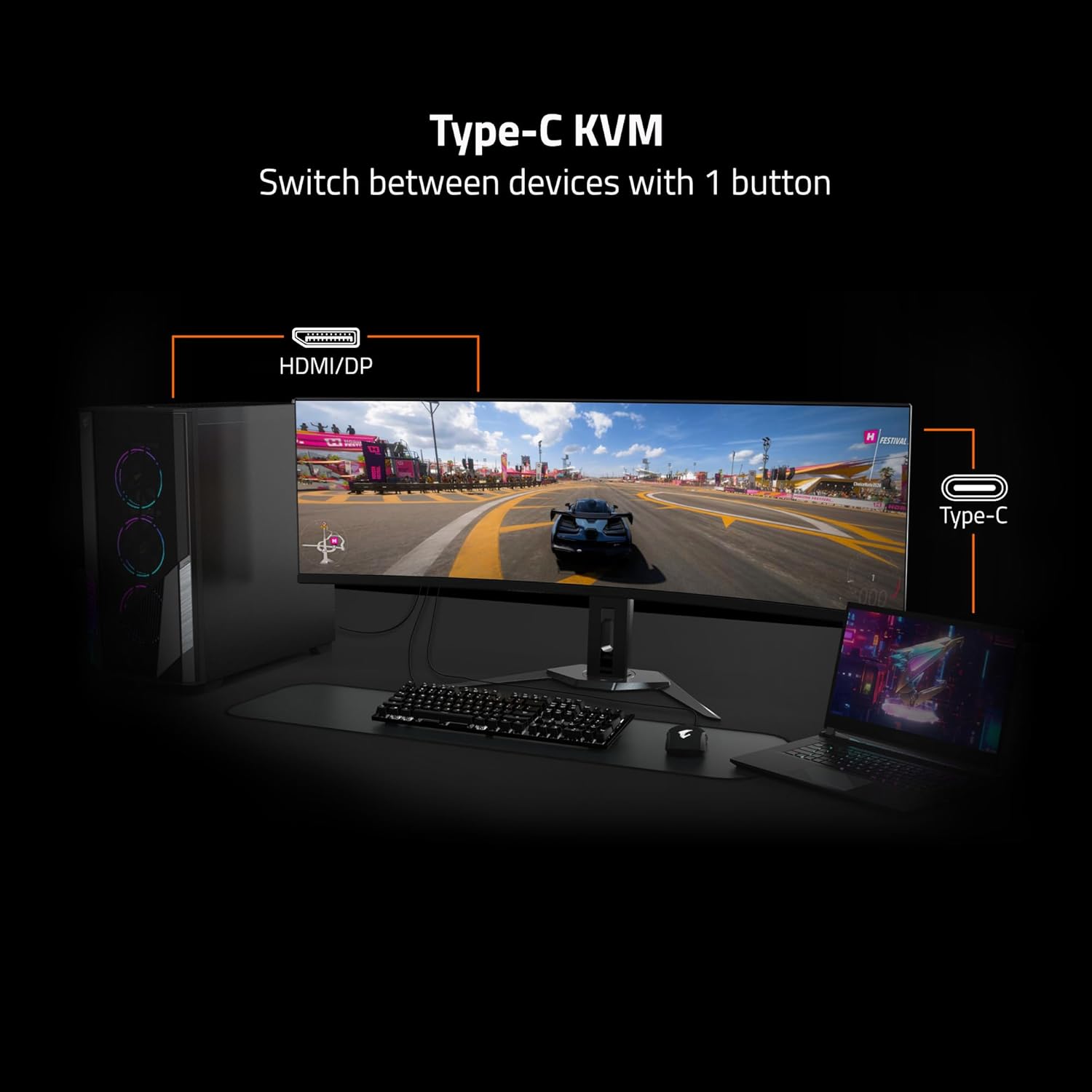
Image: Adjustable Stand and VESA Wall Mount points.
2. Instal·lació del suport de paret VESA
The monitor supports VESA 100x100mm mounting. If using a VESA compatible wall mount or arm, remove the stand from the monitor. Secure the VESA mount to the monitor using appropriate screws (not included) according to the mount manufacturer's instructions. Refer to the image above for VESA mount point location.
3. Connexió del monitor
Connect the necessary cables to the corresponding ports on the back of the monitor and to your computer or other devices. Ensure all connections are secure.
- Potència: Connecteu el cable d'alimentació al monitor i a una presa de corrent.
- Entrada de vídeo: Use the provided HDMI 2.1 or DisplayPort 1.4 cables to connect to your graphics card. The monitor also supports USB Type-C for video input.
- USB Upstream: Connect the USB upstream cable (USB Type-A to Type-B) from your computer to the monitor's USB 3.0 Upstream port to enable the monitor's USB downstream ports and KVM functionality.
- USB descendent: Connect USB devices (keyboard, mouse, USB drives) to the USB 3.0 Downstream ports.
- Presa per a auriculars: Connecteu auriculars o altaveus externs.

Image: I/O Ports diagram on the back of the monitor.
Funcionament del vostre monitor
1. Encendre/apagar
Premeu el botó d'engegada, que normalment es troba a la part posterior o inferior del monitor, per encendre o apagar el monitor. L'indicador lluminós d'engegada s'il·luminarà quan el monitor estigui encès.
3. KVM Functionality
The GIGABYTE MO32U features a built-in KVM (Keyboard, Video, Mouse) switch, allowing you to control multiple devices (e.g., a desktop PC and a laptop) with a single set of keyboard and mouse connected to the monitor. To use KVM, ensure both devices are connected to the monitor via video inputs (HDMI/DP and Type-C) and the USB upstream cable is connected to the primary device. You can switch between devices using a dedicated KVM button or through the OSD menu.

Image: Type-C KVM setup for switching between devices.
4. Configuració i funcions de la pantalla
The MO32U monitor offers advanced display features for an optimized viewExperiència:
- Resolució i freqüència d'actualització: Enjoy a 4K UHD (3840x2160) resolution with a 165Hz refresh rate for smooth visuals.
- Temps de resposta: Experience ultra-fast 0.03ms GTG (Gray-to-Gray) response time, minimizing motion blur.
- AMD FreeSync Premium Pro: Sincronitza la freqüència d'actualització del monitor amb la freqüència d'imatges de la GPU per eliminar el trencament i les entrebancades de la pantalla.
- QD-OLED Panel: Delivers vibrant colors, deep blacks, and high contrast (1.5M:1) with 99% DCI-P3 color gamut and 10-bit color depth.
- VESA DisplayHDR True Black 400: Provides enhanced contrast and color accuracy for HDR content.
- VESA ClearMR 9000: Ensures high motion clarity.
- Característiques de la cura dels ulls: Includes Flicker-Free and Low Blue Light technologies, certified by Eyesafe, to reduce eye strain during prolonged use.

Image: Key display features and certifications.

Image: Visual comparison of 0.03ms/165Hz performance versus 5ms/60Hz.
5. GIGABYTE OLED Care
The monitor incorporates GIGABYTE OLED Care, an AI-based algorithm designed to minimize the risk of OLED burn-in issues. This suite of technologies operates in the background with minimal user interference. OLED Care includes various adjustable settings within the OSD menu to help protect the panel and extend its lifespan.
Manteniment
Un manteniment adequat garanteix la longevitat i el rendiment òptim del monitor.
- Neteja de la pantalla: Netegeu suaument la pantalla amb un drap suau i sense borrissol. Per a marques difícils, netegeu suaument.ampNetegeu el drap amb aigua o un netejador de pantalles no abrasiu. No ruixeu líquid directament sobre la pantalla.
- Neteja de la Casing: Feu servir un drap suau i sec per netejar el monitor casing. Eviteu utilitzar detergents forts o productes de neteja abrasius.
- Cura OLED: Allow the monitor to perform its automatic OLED Care functions. Avoid prolonged display of static images at high brightness settings.
Resolució de problemes
Si teniu problemes amb el monitor, consulteu les solucions habituals següents:
- Sense energia: Assegureu-vos que el cable d'alimentació estigui connectat correctament tant al monitor com a una presa de corrent que funcioni. Comproveu si l'indicador lluminós d'engegada està encès.
- Sense senyal: Verify that the video cables (HDMI, DisplayPort, USB-C) are correctly connected to both the monitor and your source device. Ensure the correct input source is selected in the monitor's OSD menu.
- Imatge parpellejant o distorsionada: Check cable connections. Ensure your graphics card drivers are up to date. Try adjusting the refresh rate in your operating system's display settings.
- Retenció/Burn-in d'imatge: While OLED Care minimizes this risk, prolonged static images can contribute. Utilize OLED Care features and avoid displaying static content for extended periods.
- KVM no commuta: Ensure the USB upstream cable is connected to the active source device and that the KVM function is properly configured in the OSD menu.
If the problem persists after trying these steps, contact GIGABYTE customer support.
Especificacions
| Característica | Detall |
|---|---|
| Marca | GIGABYTE |
| Número de model | MO32U |
| Mida de la pantalla | 32 polzades |
| Tipus de visualització | QD OLED |
| Resolució | 4K UHD (3840 x 2160) |
| Freqüència d'actualització | 165 Hz |
| Temps de resposta | 0.03 Milliseconds GTG |
| Relació d'aspecte | 16:9 |
| Relació de contrast | 1.5M:1 |
| Brillantor | 1000 Candela per Square Meter (Peak) |
| Gamma de colors | 99% DCI-P3 |
| Viewangle ing | 178 graus |
| Connectivitat | 2x HDMI 2.1, 1x DisplayPort 1.4, 1x USB Type-C, 1x USB 3.0 Upstream, 3x USB 3.0 Downstream, 1x Earphone Jack |
| Sincronització adaptativa | AMD FreeSync Premium Pro |
| Suport HDR | VESA DisplayHDR True Black 400 |
| KVM | Yes, Type-C KVM |
| Tipus de muntatge | VESA 100x100mm, Height Adjustable Stand |
| Consum d'energia | 54 watts |
| Color | Negre |
Informació de la garantia
This GIGABYTE MO32U monitor comes with a 3 anys de garantia del fabricant. For detailed terms and conditions, please refer to the warranty card included in your product packaging or visit the official GIGABYTE weblloc.
Suport
For technical assistance, troubleshooting beyond this manual, or warranty claims, please contact GIGABYTE customer support. You can find contact information and additional resources on the official GIGABYTE weblloc.
Recursos en línia: Visit the GIGABYTE support page for drivers, FAQs, and further documentation.


