1. Producte acabatview
The TP-Link TL-MC102 is a media converter designed to facilitate the conversion between 1000BASE-SX fiber and 1000Base-T copper media. It supports Gigabit Ethernet standards (IEEE802.3ab 1000Base-T and IEEE802.3z 1000Base-SX) and is compatible with multi-mode fiber optic cables using SC-Type connectors. This device operates at 850nm wavelength for both transmitting and receiving data, offering full wire-speed forwarding. It can function as a standalone unit or be integrated into TP-Link's MC1400 chassis. Key features include Auto MDI/MDI-X for the TX port and front panel status LEDs for easy monitoring.
The TL-MC102 extends fiber optic distances up to 0.55 kilometers (550 meters) when using 50/125µm multi-mode fiber, or 220 meters with 62.5/125µm multi-mode fiber.
2. Contingut del paquet
Comproveu que el vostre paquet contingui els elements següents:
- 1 x TL-MC102 Gigabit SFP to RJ45 Fiber Media Converter
- 1 x adaptador de corrent
- 1 x Guia d'instal·lació
3. Característiques del producte
- Converteix fibra 1000BASE-SX a medi de coure 1000Base-T i viceversa.
- Supports auto-negotiation for Half-Duplex / Full-Duplex transfer modes.
- Features auto MDI/MDI-X for the TX port.
- Proporciona configuració de commutador per al mode de transferència forçada/automàtica al port FX.
- Extends fiber distance up to 550m (1,800 feet) using 50/125µm Multi-Mode Fiber.
- Extends fiber distance up to 220m (720 feet) using 62.5/125µm Multi-Mode Fiber.
- Equipped with easy-to-view Indicadors LED per monitoritzar l'activitat de la xarxa.
- External power supply for operation.
- Operates at a wavelength of 850nm.
- Maximum power consumption: 1.66W.
- Complies with IEEE 802.3ab and IEEE 802.3z standards.
4. Maquinari acabatview
The TL-MC102 features a compact design with essential ports and LED indicators for status monitoring.
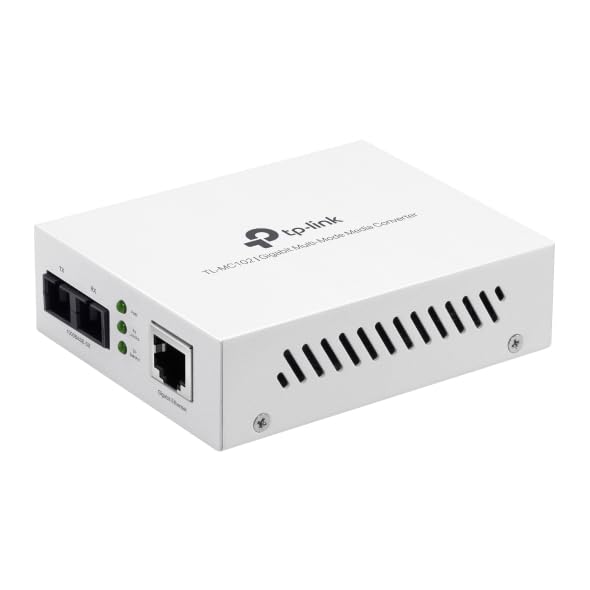
Figura 1: Davant view of the TL-MC102 Gigabit SFP to RJ45 Fiber Media Converter. This image shows the compact white casing of the device, highlighting its ports and LED indicators on the front panel.
Ports i connectors:
- RJ45 Port (TX): Standard Ethernet port for connecting to copper-based network devices (e.g., switch, router, computer) using an Ethernet cable. Supports 10/100/1000Mbps speeds and Auto MDI/MDI-X.
- SFP Port (FX): Slot for an SFP (Small Form-Factor Pluggable) module. This port is used for fiber optic connections. The TL-MC102 is designed for 1000BASE-SX multi-mode SFP modules.
- Entrada d'alimentació: Connector per a l'adaptador d'alimentació extern.
Indicadors LED:
The front panel LEDs provide real-time status information about the converter's operation:
- PWR (potència):
- A: The converter is powered on.
- Apagat: The converter is powered off.
- Enllaç/Acció FX (Enllaç/Activitat de fibra):
- A: A fiber link is established.
- Parpellejant: Les dades es transmeten o es reben a través de l'enllaç de fibra.
- Apagat: No fiber link is established.
- TX Link/Act (Copper Link/Activity):
- A: A copper Ethernet link is established.
- Parpellejant: Data is being transmitted or received over the copper link.
- Apagat: No copper Ethernet link is established.
- TX 1000 (Copper Speed):
- A: The copper port is operating at 1000Mbps.
- Apagat: The copper port is operating at 10/100Mbps.
5. Instruccions de configuració
Follow these steps to set up your TL-MC102 media converter:
- Apagueu els dispositius: Before making any connections, ensure that all devices (e.g., switch, router, computer) to be connected to the media converter are powered off.
- Insert SFP Module: Carefully insert a compatible 1000BASE-SX multi-mode SFP module into the SFP port (FX) of the TL-MC102. Ensure it clicks into place.
- Connect Fiber Cable: Connect one end of a multi-mode fiber optic cable (with SC-Type connectors) to the SFP module in the TL-MC102. Connect the other end of the fiber cable to a compatible fiber optic device (e.g., fiber switch, another media converter).
- Connecteu el cable Ethernet: Connect one end of an Ethernet cable to the RJ45 port (TX) of the TL-MC102. Connect the other end of the Ethernet cable to the Ethernet port of your copper-based network device (e.g., switch, router, PC).
- Connecteu l'adaptador d'alimentació: Plug the provided power adapter into the power input of the TL-MC102, then plug the other end into a standard electrical outlet.
- Dispositius d'encesa: Power on the TL-MC102. The PWR LED should illuminate. Then, power on your connected network devices.
- Verifica les connexions: Check the LED indicators on the TL-MC102. The FX Link/Act and TX Link/Act LEDs should illuminate, indicating successful link establishment. If data is flowing, these LEDs will flash. The TX 1000 LED should be on if the copper connection is at Gigabit speed.
Nota: Ensure that the fiber optic cable type (multi-mode) and connector type (SC) match the requirements of the SFP module and the connected fiber device.
6. Instruccions de funcionament
Once properly set up, the TL-MC102 operates automatically to convert signals between fiber and copper media. No further configuration is typically required for basic operation.
Estat de seguiment:
Regularly observe the LED indicators on the front panel to monitor the status of your network connections:
- Un sòlid PWR LED indicates the device is receiving power.
- Sòlid Enllaç FX/Act i Enllaç TX/Act LEDs confirm active network links on both fiber and copper sides.
- Parpellejant Enllaç FX/Act i Enllaç TX/Act LEDs indicate active data transmission.
- Un sòlid TX 1000 LED confirms a Gigabit Ethernet connection on the copper side.
If any Link/Act LED is off when it should be on, refer to the Troubleshooting section.
7. Manteniment
To ensure optimal performance and longevity of your TL-MC102, consider the following maintenance guidelines:
- Mantenir net: Regularly clean the exterior of the device with a soft, dry cloth. Avoid using liquid or aerosol cleaners.
- Ventilació: Assegureu-vos que el dispositiu estigui col·locat en una zona ben ventilada per evitar el sobreescalfament. No bloquegeu cap obertura de ventilació.
- Gestió de cables: Keep fiber and Ethernet cables neatly organized and free from kinks or excessive bends, especially fiber optic cables which are sensitive to bending.
- Font d'alimentació: Use only the power adapter provided with the device. If a replacement is needed, ensure it meets the exact specifications.
- Medi ambient: Operate the device within its specified environmental conditions (temperature, humidity) to prevent damage.
- Actualitzacions de firmware: While media converters typically do not require frequent firmware updates, check the TP-Link support website periodically for any recommended updates for your model.
8. Solució De Problemes
If you encounter issues with your TL-MC102, refer to the following common problems and solutions:
- Sense alimentació (LED PWR apagat):
- Ensure the power adapter is securely connected to the converter and a working electrical outlet.
- Verifiqueu que la presa de corrent funciona connectant-hi un altre dispositiu.
- Comproveu si l'adaptador de corrent està danyat.
- Sense enllaç de fibra (LED FX Link/Act apagat):
- Verify that the SFP module is correctly inserted into the SFP port.
- Check the fiber optic cable for damage or kinks.
- Ensure the fiber cable connectors are clean and properly seated at both ends.
- Confirm that the connected fiber device is powered on and functioning correctly.
- Ensure the SFP module and the connected fiber device are compatible (e.g., multi-mode to multi-mode, correct wavelength).
- No Copper Link (TX Link/Act LED Off):
- Check the Ethernet cable for damage and ensure it is securely connected to both the TL-MC102 and the network device.
- Verifiqueu que el dispositiu de xarxa connectat (per exemple, commutador, encaminador, PC) estigui encès i que el seu port Ethernet estigui actiu.
- Prova un cable Ethernet diferent.
- Ensure the network device's Ethernet port is configured correctly (e.g., not disabled).
- Velocitat de xarxa lenta:
- Check the TX 1000 LED. If it's off, the copper connection is not at Gigabit speed. This could be due to the connected device or cable.
- Ensure all connected devices (including the SFP module) support Gigabit Ethernet.
- Inspect Ethernet and fiber cables for damage or poor connections.
- Connectivitat intermitent:
- Check all cable connections (power, Ethernet, fiber) for looseness.
- Assegureu-vos que el dispositiu no s'escalfa excessivament.
- Verify that the power supply is stable.
- Consider testing with different cables or SFP modules if available.
9. Especificacions
| Característica | Descripció |
|---|---|
| Marca | TP-Link |
| Número de model | TL-MC102 |
| Interfície del maquinari | Ethernet, SFP |
| Dispositius compatibles | NICs, Network Switch, Router |
| Protocol d'enllaç de dades | Ethernet |
| Velocitat de transferència de dades | 1 gigabits per segon |
| Tipus de fibra | Fibra multimode (1000BASE-SX) |
| Longitud d'ona | 850 nm |
| Distància màxima de fibra | 550m (50/125µm MMF), 220m (62.5/125µm MMF) |
| Consum d'energia | Màxim 1.66W |
| Normes | IEEE 802.3ab, IEEE 802.3z |
| Pes de l'article | 0.46 lliures |
| UPC | 810142823715 |
10. Garantia i Suport
Informació de la garantia:
The TP-Link TL-MC102 comes with a 2 any de garantia del fabricant. Please retain your proof of purchase for warranty claims. For detailed warranty terms and conditions, refer to the official TP-Link weblloc web o la targeta de garantia inclosa amb el producte.
Suport tècnic:
For technical support, product updates, and additional resources, please visit the official TP-Link support weblloc. Normalment hi podeu trobar preguntes freqüents, guies de resolució de problemes i informació de contacte del servei d'atenció al client.
Oficial de TP-Link Weblloc: www.tp-link.com