1. Producte acabatview
The Nokia G310 5G Smartphone (Model TA-1573) offers lightning-fast 5G connectivity and modern mobile technology. It features a vibrant display for various tasks, a powerful processor for smooth performance, and an advanced camera system for detailed photos. Designed for daily use, it provides a comfortable grip and durable build quality. Enjoy extensive network compatibility, ample storage, a long-lasting battery with quick charging, and a user-friendly interface with regular software updates.
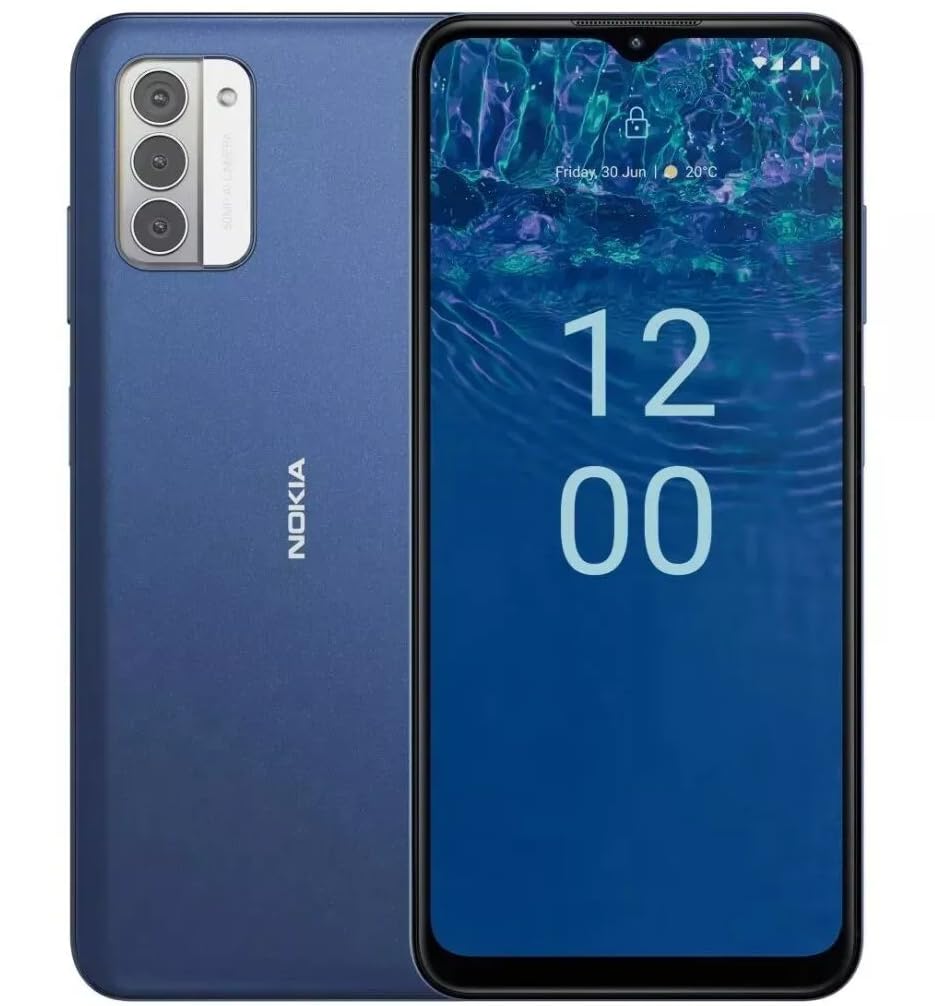
Imatge: Part posterior view of the Nokia G310 5G Smartphone, showcasing the triple camera module and Nokia branding.
Característiques clau
- Connectivitat 5G: Experience ultra-fast mobile data speeds and low latency.
- Pantalla vibrant: Large touchscreen display delivers vibrant colors and sharp visuals.
- Rendiment eficient: Processor handles everyday tasks smoothly, from browsing to gaming.
- Disseny durador: Sleek and modern smartphone design with durable construction.
2. Primers passos
Què hi ha a la caixa
- Telèfon intel·ligent Nokia G310 5G
- Carregador
SIM and MicroSD Card Installation
Locate the SIM/MicroSD card tray on the side of your device. Use the provided SIM ejector tool to open the tray. Insert your Nano-SIM card(s) and/or MicroSD card into the designated slots. Ensure the cards are correctly oriented. Gently push the tray back into the device until it clicks into place.
Encès/Apagat
To power on your Nokia G310, press and hold the Power/Fingerprint Sensor button located on the right side of the device until the Nokia logo appears. To power off, press and hold the Power/Fingerprint Sensor button, then select 'Power off' from the options that appear on the screen.
3. Disseny del dispositiu
Physical Buttons and Ports
- Botons de volum: Located on the right side, above the Power/Fingerprint Sensor button, for adjusting media and call volume.
- Power/Fingerprint Sensor Button: Located on the right side, used for powering the device on/off, locking/unlocking the screen, and fingerprint authentication.
- Port USB-C: Situat a la part inferior, s'utilitza per a la càrrega i la transferència de dades.
- Presa d'àudio de 3.5 mm: Situat a la part inferior, per connectar auriculars amb cable.
- Ponent: Situat a la part inferior per a la sortida d'àudio.
- Micròfon: Integrat per a trucades i ordres de veu.
Mòdul de càmera
The rear of the device features a multi-lens camera module, including a main camera, along with a flash for low-light photography. The front-facing camera is discreetly placed within a notch at the top of the display.
4. Instruccions de funcionament
Navegació bàsica
The Nokia G310 operates on the Android operating system, offering an intuitive touchscreen interface. Swipe up from the bottom of the screen to access the app drawer, swipe down from the top for notifications and quick settings, and use gestures or navigation buttons (configurable in settings) to move between apps and screens.
Connectivitat
- 5G Cellular Data: The device supports 5G connectivity for ultra-fast mobile data speeds. Ensure your SIM card and plan support 5G.
- Wi-Fi: Connecteu-vos a xarxes sense fil per accedir a Internet. Aneu a Configuració > Xarxa i Internet > Wi-Fi per gestionar les connexions.
- Bluetooth: Pair with other Bluetooth-enabled devices like headphones or speakers. Go to Settings > Connected devices > Bluetooth.
- GPS: Utilize built-in GPS for location services and navigation.
5. Ús de la càmera
The Nokia G310 features an advanced camera system designed to capture memorable moments. Access the camera app from your home screen or app drawer.
Fer Fotos
Open the Camera app, frame your shot, and tap the shutter button on the screen to take a picture. The advanced AI camera assists in optimizing settings for various scenes.
Gravació de vídeos
In the Camera app, switch to video mode, then tap the record button to start and stop recording. The phone supports various video resolutions.
Modes de càmera
Explore different camera modes available in the camera app, such as Portrait, Panorama, and Night mode, to enhance your photography experience.
6. Gestió de la bateria
Carregant el teu dispositiu
The Nokia G310 is equipped with a 5000 Milliamp Hours (5000.0 Battery Power Rating) battery. Connect the provided USB-C charger to the port at the bottom of the device. The phone supports quick charging for reduced downtime.
Optimització de la durada de la bateria
- Ajusteu la brillantor de la pantalla a un nivell còmode.
- Activa el mode d'estalvi de bateria quan la bateria estigui baixa.
- Tanca les aplicacions no utilitzades que s'executen en segon pla.
- Desactiveu el Wi-Fi, el Bluetooth o el GPS quan no els feu servir.
7. Especificacions tècniques
| Número de model | TA-1573 |
| Sistema operatiu | Android |
| Model de CPU | MediaTek Helio P60T |
| Tecnologia cel·lular | 5G |
| Operador sense fil | Desbloquejat |
| Capacitat d'emmagatzematge de memòria | 4 GB |
| Resolució | 1080 x 2340 |
| Entrada de la interfície humana | Pantalla tàctil |
| Capacitat de la bateria | 5000 milionsamp Hores |
| Jack d'àudio | 3.5 mm |
| Color | Blau |
| Fabricant | Nokia |
| Data de primera disponibilitat | 31 de gener de 2025 |
8. Solució De Problemes
If you encounter issues with your Nokia G310, try the following common troubleshooting steps:
- El dispositiu no respon: Premeu i manteniu premut el botó d'engegada durant uns 10-15 segons per forçar un reinici.
- Problemes de connectivitat: Toggle Wi-Fi or Bluetooth off and on. Restart your device. Check network settings.
- L'aplicació no funciona: Esborra la memòria cau i les dades de l'aplicació a Configuració > Aplicacions. Si el problema persisteix, desinstal·la i torna a instal·lar l'aplicació.
- La bateria s'esgota ràpidament: Review battery usage in Settings > Battery to identify power-hungry apps. Adjust screen brightness and enable Battery Saver.
- Emmagatzematge ple: Elimineu-les innecessàries files, photos, or apps. Transfer media to a computer or cloud storage. Consider using a MicroSD card for additional storage.
9. Manteniment i cura
- Neteja: Feu servir un drap suau i sense borrissol per netejar el dispositiu. Eviteu productes químics agressius o materials abrasius.
- Actualitzacions de programari: Regularly check for and install software updates to ensure your device runs optimally and has the latest security features. Go to Settings > System > System update.
- Gestió d'emmagatzematge: Periòdicament review your device's storage to free up space and maintain performance.
- Condicions ambientals: Avoid exposing your device to extreme temperatures, direct sunlight, or excessive moisture.
10. Garantia i Suport
For warranty information, please refer to the warranty card included in your product packaging or visit the official Nokia support website. For further assistance, contact Nokia customer support.


