1. Introducció
Welcome to your new iFFALCON 4K LCD 43-inch Google TV, Model 43U65. This television combines advanced display technology with the smart features of Google TV to provide an immersive entertainment experience. This manual will guide you through the setup, operation, and maintenance of your TV.

Imatge: Frontal view of the iFFALCON 43U65 4K Google TV, showcasing its slim bezels and vibrant display.
2. Configuració
2.1 Desembalatge i inspecció
Carefully remove the TV from its packaging. Ensure all accessories are present:
- Manual d'usuari
- Control remot
- Targeta de garantia
- Cable d'alimentació
2.2 Instal·lació de l'estand
Per instal·lar el suport de TV:
- Col·loqueu la pantalla del televisor amb la pantalla cap avall sobre una superfície suau i plana per evitar que es faci malbé.
- Alineeu les bases del suport amb les ranures corresponents de la part inferior del televisor.
- Fixeu els suports amb els cargols proporcionats. Precaució: When tightening screws, do so manually for the final turns to avoid stripping the threads, especially with wooden screws.
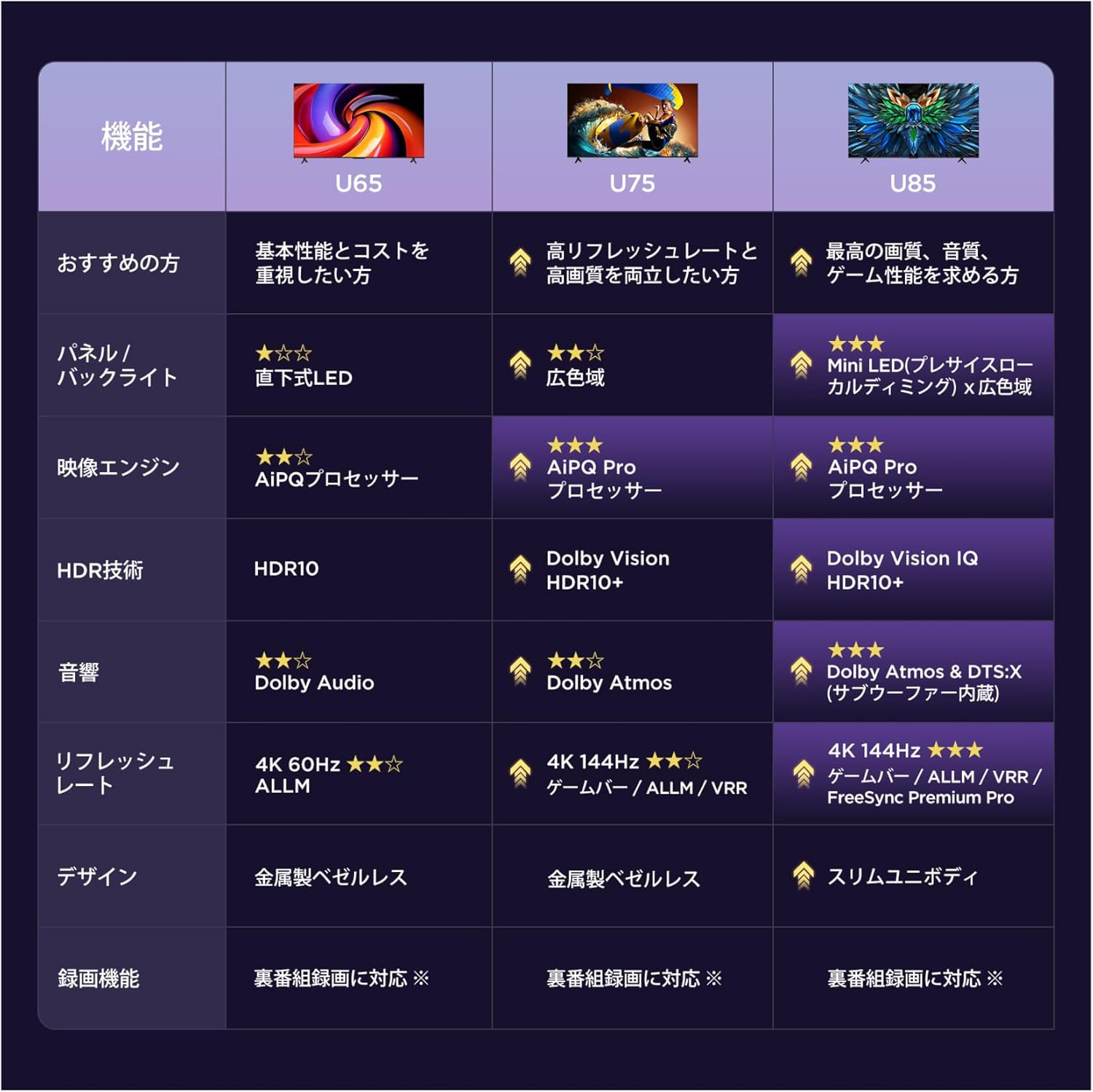
Image: A diagram illustrating the dimensions of the 43-inch TV (95.8cm width, 60.3cm height, 18.5cm depth with stand) and the recommended viewing distance of approximately 0.8 meters.
2.3 Engegada inicial i configuració bàsica
After connecting the power cable and any necessary external devices (e.g., antenna, HDMI devices):
- Premeu el botó d'engegada del comandament a distància o del televisor.
- Follow the on-screen prompts to complete the initial setup, including language selection, network connection (Wi-Fi or Ethernet), and Google account login.
- The TV will guide you through channel scanning and basic picture/sound settings.
3. Funcionament del televisor
3.1 Interfície de Google TV
Your iFFALCON TV features Google TV, which organizes your favorite content from various streaming services into one personalized home screen. Access apps like YouTube, Amazon Prime Video, Netflix, Hulu, Disney+, Apple TV+, and more directly from the interface.

Image: The Google TV home screen displaying recommended movies, TV shows, and various streaming application icons.
3.2 Voice Control with 'Hey Google'
Use the built-in 'Hey Google' voice assistant for hands-free control. Press the dedicated button on your remote and speak commands to search for content, control smart home devices, check weather, and more.

Image: A child using the 'Hey Google' voice command to interact with the television, demonstrating the voice search feature.
3.3 Chromecast and AirPlay 2
The TV supports Chromecast built-in and AirPlay 2, allowing you to cast content (videos, photos, music) from your smartphone or tablet (Apple or Android) directly to the large TV screen.

Image: A visual representation of AirPlay 2 and Chromecast built-in, showing content being shared from Apple and Android devices to the TV.
4. Característiques clau
4.1 AiPQ Processor
The AiPQ Processor integrates multiple image quality adjustment algorithms. It features AI Clarity, AI Color, AI Contrast, and AI HDR, enabling pixel-level optimization of picture quality for a superior viewexperiència.

Image: A stylized diagram of the AiPQ Processor chip, highlighting its advanced image processing capabilities.
4.2 4K Ultra HD and HDR10
Experience stunning clarity with 4K Ultra HD resolution, featuring over 8 million pixels. HDR10 technology enhances brightness, shadow detail, and color reproduction, delivering a more realistic and immersive visual experience.

Image: A split-screen comparison demonstrating the enhanced detail and clarity of 4K Ultra HD content compared to lower resolution.

Image: A split-screen comparison illustrating the difference between an image without HDR and one with HDR, showing improved contrast and color vibrancy.
4.3 MEMC (Motion Estimation, Motion Compensation)
MEMC technology reduces motion blur and eliminates image tearing, providing a smoother and more fluid viewing experience, especially for fast-paced content.

Image: A split-screen comparison showing a snowboarder, with one side demonstrating reduced motion blur and tearing with MEMC enabled, and the other side without MEMC.
4.4 Dolby Audio
Enjoy rich, clear, and powerful sound with Dolby Audio. This technology delivers an immersive, three-dimensional sound experience that fills your room, making every scene more engaging.

Image: A visual representation of sound waves emanating from the TV, illustrating the immersive sound field created by Dolby Audio.
4.5 Game Master (Game Mode/ALLM)
The Game Master feature, including Game Mode and Auto Low Latency Mode (ALLM), optimizes the TV for gaming. ALLM automatically detects when a game console is connected and switches to a low-latency mode, reducing input lag and providing a smoother gaming experience by eliminating blur and stutter.

Image: A television screen displaying an intense space combat game, illustrating the enhanced gaming experience with Game Master.

Image: A split-screen comparison showing a car in a game, with one side demonstrating reduced blur and stutter with ALLM enabled, and the other side without ALLM.
4.6 Bezel-less Design
The TV features a sleek, bezel-less design that allows the screen to blend seamlessly into your living space, providing a more expansive viewzona d'ing.

Imatge: Un primer pla view of the TV's thin bezel, emphasizing its modern, frameless design.
4.7 Multi-Eye Care
The TV incorporates multi-eye care technology, including low blue light emission, natural light correction, and flicker-free display, to reduce eye strain and provide a comfortable viewing experience for movies and games.

Image: A collage of images illustrating different aspects of eye care technology, such as natural light correction and reduced blue light.
5. Manteniment
To ensure the longevity and optimal performance of your iFFALCON TV, follow these maintenance guidelines:
- Neteja de pantalla: Netegeu suaument la pantalla amb un drap suau i sense borrissol. Per a marques difícils, netegeu lleugerament.ampNetegeu el drap amb aigua o un netejador de pantalles especialitzat. Eviteu productes químics agressius o materials abrasius.
- Neteja d'armaris: Feu servir un drap suau i sec per netejar el moble del televisor.
- Ventilació: Assegureu-vos que les obertures de ventilació del televisor no estiguin bloquejades per evitar el sobreescalfament.
- Apagar: Disconnect the power cord from the outlet during lightning storms or when the TV will be left unattended for extended periods.
6. Solució De Problemes
Si teniu problemes amb el televisor, consulteu els problemes i solucions més comuns següents:
| Problema | Possible causa/solució |
|---|---|
| No hi ha alimentació / el televisor no s'encén | Check if the power cable is securely connected to the TV and the power outlet. Ensure the power outlet is functional. Try pressing the power button on the TV itself. |
| Sense imatge / Mala qualitat d'imatge | Check input source (HDMI, Antenna). Ensure cables are connected correctly. Adjust picture settings (brightness, contrast, color) in the TV menu. If using an antenna, check signal strength. |
| Sense so / Mala qualitat de so | Check volume level and mute status. Ensure audio cables are connected correctly. Check sound settings in the TV menu. If using external audio, ensure it is powered on and correctly configured. |
| El comandament a distància no funciona | Replace batteries. Ensure there are no obstructions between the remote and the TV's IR sensor. Re-pair the remote if it's a Bluetooth remote. |
| Problemes de connexió de xarxa | Check Wi-Fi password. Restart your router. Ensure the TV is within range of your Wi-Fi network. Try a wired Ethernet connection if available. |
| Slow response / Laggy interface | Close unused applications. Restart the TV. Ensure sufficient internet speed for streaming. |
Si el problema persisteix després de provar aquestes solucions, poseu-vos en contacte amb l'atenció al client.
7. Especificacions
| Característica | Detall |
|---|---|
| Mida de la pantalla | 43 polzades |
| Tipus de visualització | VA LCD |
| Resolució | 4K (3840 x 2160) |
| Freqüència d'actualització | 60 Hz |
| Sistema operatiu | Google TV |
| Tecnologia d'àudio | Dolby Audio |
| Suport HDR | HDR10 |
| Connectivitat | Bluetooth, Wi-Fi, 3 x HDMI ports, 2 x USB ports |
| Característiques especials | AiPQ Processor, AirPlay2, Chromecast, Game Mode/ALLM |
| Dimensions del producte (W x H x D) | 95.7 cm x 60.3 cm x 18.5 cm (amb suport) |
| Pes del producte | 5.7 kg |
| Consum anual d'energia | 85 kWh/any |
8. Garantia i Suport
8.1 Informació de la garantia
Your iFFALCON 43U65 TV comes with a standard manufacturer's warranty. An optional 5-year long-term warranty may be available for purchase. Please refer to the included warranty card for detailed terms and conditions.
8.2 Atenció al client
For technical assistance, troubleshooting, or service inquiries, please contact iFFALCON customer support:
- Telèfon: 0120-955-517
- Horari de funcionament: 09:00 - 18:00
- Weblloc: https://www.tcl.com/jp/ja/support

Image: Information regarding TCL's customer support system, including phone number, operating hours, and website for repair support across Japan.


