1. Introducció
Thank you for choosing the Angrox Voice Remote Control. This remote is specifically designed as a replacement for Philips Google Smart TVs, offering enhanced functionality including voice control and dedicated shortcut buttons for popular streaming services. Please read this manual carefully to ensure proper setup and operation.

Imatge: Frontal i lateral view of the Angrox Voice Remote Control, showcasinel seu disseny ergonòmic i la disposició dels botons.
2. Configuració
2.1 Instal·lació de la bateria
The remote requires two (2) AAA batteries (not included). Ensure correct polarity when inserting the batteries.
- Traieu la tapa de les piles de la part posterior del comandament a distància fent-la lliscar cap avall.
- Insert two AAA batteries, matching the positive (+) and negative (-) terminals as indicated inside the battery compartment.
- Torneu a col·locar la tapa de la bateria fent-la lliscar fins que faci clic de manera segura.

Image: A three-step diagram illustrating how to remove the battery cover, insert two AAA batteries, and replace the cover.
2.2 Emparellament amb el televisor
Before using the remote, it must be paired with your Philips Google Smart TV. This remote supports both infrared and Bluetooth technology for optimal performance.
- Ensure your Philips Google Smart TV is powered on.
- Hold down the "VOL-" button and the "Mic" (Google Assistant) button simultaneously for 5 seconds.
- The remote will initiate the pairing process. All pairing transactions occur in the background, and no further setup is typically required once the pairing is successful.

Image: A hand holding the remote, with an arrow pointing from the 'VOL-' and 'Mic' buttons to a TV screen, illustrating the pairing process.

Image: A visual guide showing the remote and a TV screen with on-screen instructions for pairing, emphasizing holding the VOL- and Mic buttons.
2.3 Models de televisors compatibles
This voice replacement remote is compatible with the following Philips Google Smart TV series:
- Sèrie 7000: 75PUL7552/F7, 65PUL7552/F7, 55PUL7552/F7, 50PUL7552/F7, 43PUL7652/F7
- Sèrie 7600: 65PUL7672/F7, 55PUL7672/F7, 50PUL7672/F7, 43PUL7672/F7

Image: The remote control centered between two Philips Google Smart TVs, with lists of compatible 7000 and 7600 series models.
3. Instruccions de funcionament
3.1 Funcions dels botons anteriorsview
Familiarize yourself with the various buttons and their functions on your Angrox remote control:
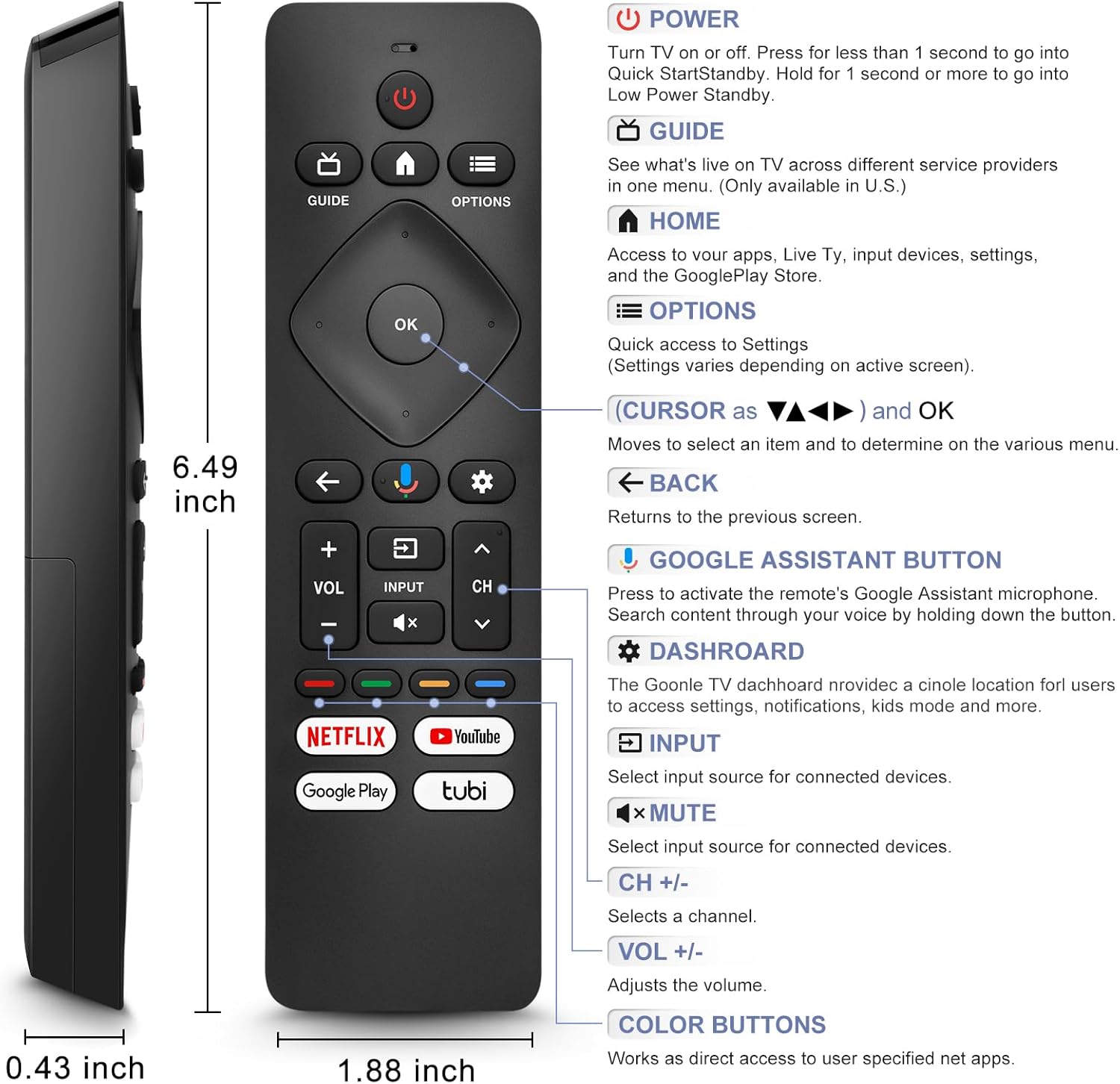
Image: A detailed diagram of the remote control with labels and descriptions for each button, including Power, Guide, Home, Options, Cursor/OK, Back, Google Assistant, Dashboard, Input, Mute, Volume, Channel, and Color Buttons.
- Potència: Press to turn TV on or off. Hold for 1 second for Quick Start Standby, or longer for Low Power Standby.
- Guia: Access live TV service providers (availability may vary by region).
- Inici: Access apps, Live TV, input devices, settings, and the Google Play Store.
- Opcions: Quick access to settings (settings vary based on active screen).
- Cursor (Up/Down/Left/Right) & OK: Navegar pels menús i confirmar les seleccions.
- Enrere: Torna a la pantalla anterior.
- Botó de l'Assistent de Google: Press and hold to activate the remote's microphone for voice search.
- Tauler de control: Access the Google TV dashboard for settings, notifications, and kids mode.
- Entrada: Seleccioneu la font d'entrada per als dispositius connectats.
- Silenciar: Mute or unmute the TV audio.
- VOL +/-: Ajusteu el nivell de volum.
- CH +/-: Select the next or previous channel.
- Botons de color: Provide direct access to user-specified net apps.
3.2 Voice Search Function
The integrated voice function allows for easier and more intuitive interaction with your smart TV. Simply press and hold the Google Assistant button and speak your command or query.
- Manteniu premut el botó Botó de l'Assistent de Google (icona de micròfon).
- Speak clearly into the remote's microphone.
- Deixeu anar el botó quan acabeu de parlar.
Examples of voice commands include: "What's the weather today?", "Turn down the volume", "Open YouTube", or searching for specific content.
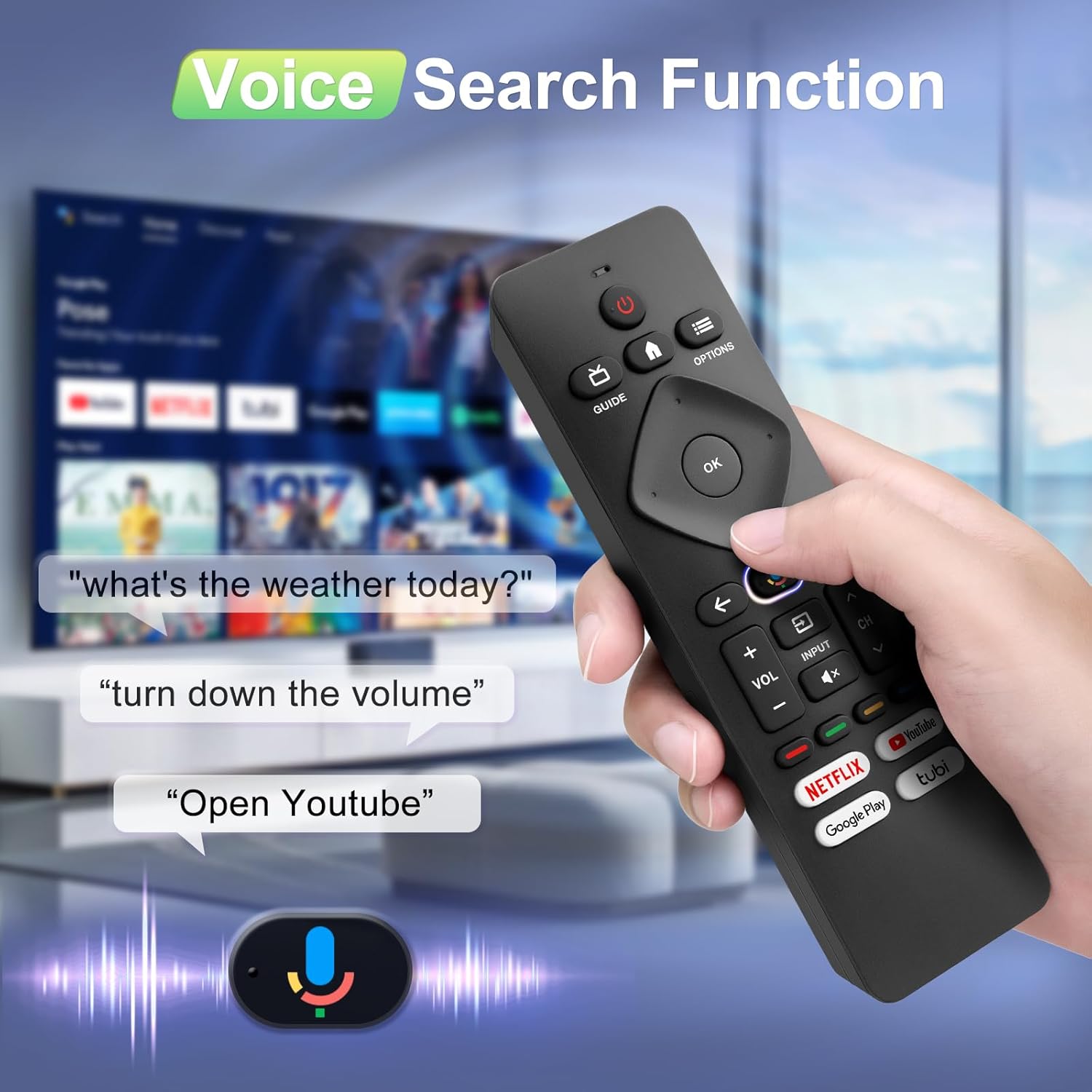
Image: A hand holding the remote, with speech bubbles showing example voice commands like "what's the weather today?" and "Open Youtube", demonstrating the voice search capability.
3.3 botons de drecera
The remote features four dedicated shortcut buttons for quick access to popular streaming channels:
- Netflix
- YouTube
- Google Play
- Tubi
Pressing these buttons will directly launch the respective application on your TV, provided they are installed and configured.

Image: The remote control highlighting the four dedicated shortcut buttons for Netflix, YouTube, Google Play, and Tubi, with their respective logos.
4. Manteniment
Per garantir la longevitat i el rendiment òptim del comandament a distància, seguiu aquestes pautes de manteniment:
- Neteja: Netegeu el comandament a distància amb un drap suau i sec. No utilitzeu netejadors líquids ni materials abrasius.
- Substitució de la bateria: Replace batteries when the remote's response becomes sluggish or it stops functioning. Always replace both batteries at the same time with new ones.
- Emmagatzematge: Guardeu el comandament a distància en un lloc fresc i sec, allunyat de la llum solar directa i de temperatures extremes.
- Eviteu les gotes: Protegiu el comandament a distància d'impactes físics, ja que les caigudes poden danyar els components interns.
5. Solució De Problemes
If you encounter issues with your remote control, please refer to the following common solutions:
- El comandament a distància no respon:
- Comproveu si les piles estan inserides correctament amb la polaritat correcta.
- Substitueix les piles velles per piles AAA noves.
- Assegureu-vos que no hi hagi obstacles entre el comandament a distància i el receptor d'infrarojos del televisor.
- La funció de veu no funciona:
- Ensure the remote is properly paired with your TV via Bluetooth. Refer to Section 2.2.
- Make sure you are pressing and holding the Google Assistant button while speaking.
- Revisa la configuració del televisor per assegurar-te que el control per veu estigui activat.
- Buttons Unresponsive or Sticky:
- Clean the remote surface, especially around the buttons, to remove any dirt or debris.
- If buttons remain unresponsive after cleaning and battery replacement, the remote may require replacement.
- Short Remote Distance:
- The remote supports infrared and Bluetooth. Ensure no physical obstructions are blocking the signal.
- The remote is designed for optimal performance within 10 meters (approximately 33 feet) and is available up to 12 meters (approximately 39 feet).
6. Especificacions
| Marca | Angrox |
| Número de model | URMT26CND002 |
| Dispositius compatibles | Philips Google Smart TVs (7000 & 7600 Series) |
| Tecnologia de connectivitat | Infrared, Bluetooth |
| Característiques especials | Ergonomic, Voice Search, Shortcut Buttons |
| Font d'alimentació | 2 piles AAA (no incloses) |
| Pes de l'article | 2.39 unces (aproximadament 67.7 grams) |
| Dimensions del paquet | 6.73 x 1.93 x 1.02 polzades |
| Durabilitat del botó | Tested for 5,000-8,000 clicks per button |
7. Garantia i Suport
Angrox is committed to providing excellent after-sale service. We focus on the compatibility and quality of our replacement remotes. If you have any questions or concerns regarding your order or the product, please do not hesitate to contact us directly. Our professional after-sale service team is available to assist you.
For support, please refer to the contact information provided with your purchase or visit the Angrox store on Amazon.
