Introducció
This manual provides essential information for the setup, operation, and maintenance of your Roku Smart TV 2025 – 55-Inch Plus Series. This television features Mini-LED backlighting, QLED screen technology, and Dolby Vision for a premium viewing experience. It integrates the Roku operating system for streamlined access to streaming content and includes an Enhanced Voice Remote for convenient control.

Què hi ha a la caixa
Verifiqueu que tots els components siguin presents abans de continuar amb la configuració.
- Roku Plus Series 55" 4K QLED Mini-LED TV
- Stands and screws for TV base
- Roku Enhanced Voice Remote with 2 AAA batteries
- Guia d'inici ràpid

Configuració
1. Instal·lació física
Carefully remove the TV from its packaging. You can either attach the included stands for tabletop placement or use a VESA-compatible wall mount (sold separately).
Fixació dels suports:
- Col·loqueu el televisor cara avall sobre una superfície suau i neta per evitar que es facin malbé la pantalla.
- Alineeu cada suport amb els forats de cargol corresponents a la part inferior del televisor.
- Fixeu els suports amb els cargols proporcionats. No els estrenyeu massa.
2. Dispositius de connexió
Connect your external devices such as cable boxes, gaming consoles, or sound systems to the appropriate ports on the back or side of the TV.
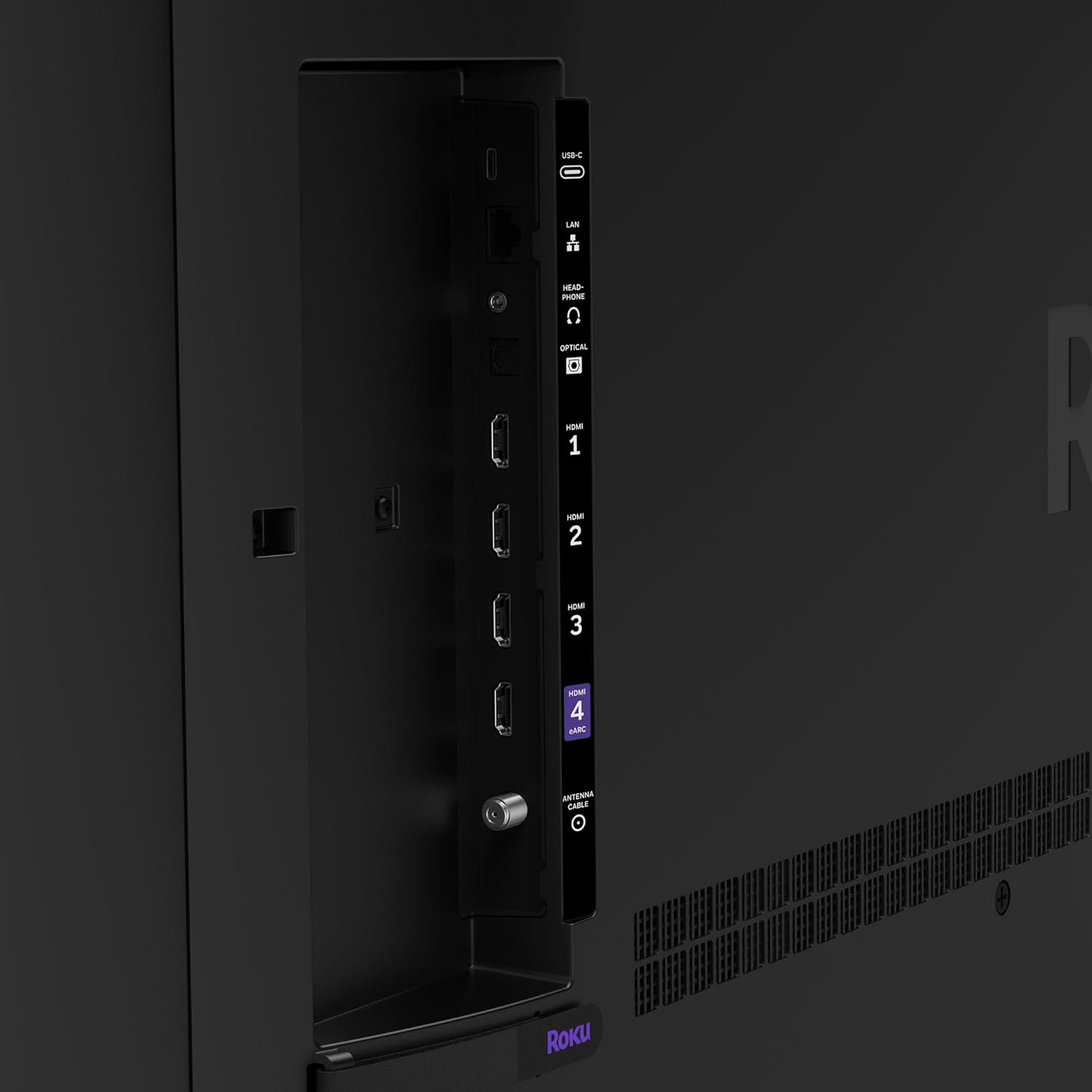
- HDMI: For high-definition video and audio from devices like Blu-ray players, game consoles, and set-top boxes. HDMI 4 supports ARC (Audio Return Channel) for simplified audio connections to soundbars or AV receivers.
- USB-C: For connecting compatible USB devices.
- LAN (Ethernet): Per a una connexió a Internet per cable.
- Auriculars: Per connectar auriculars amb cable.
- Àudio òptic: Per a la sortida d'àudio digital a sistemes de so.
- Antena/cable: Per connectar una antena o una connexió de televisió per cable.
3. Engegada i configuració inicial
- Connecteu el cable d'alimentació al televisor i després a una presa de corrent.
- Insert the included AAA batteries into the Roku Enhanced Voice Remote.
- Premeu el botó d'engegada del comandament a distància per encendre el televisor.
- Follow the on-screen instructions to select your language, connect to your Wi-Fi network (or use Ethernet), and activate your Roku account. An internet connection is required for full functionality.
En funcionament
1. Navegació per la interfície de Roku
The Roku home screen provides easy access to streaming channels, live TV, and settings. Use the directional pad on your remote to navigate through menus and select options.

2. Enhanced Voice Remote
Your Roku Enhanced Voice Remote offers convenient features for searching and controlling your TV.

- Botó de veu: Press and hold to use voice commands for searching content, launching apps, or controlling playback.
- Dreceres personalitzables: Assign your favorite apps or functions to the quick launch buttons.
- Lost Remote Finder: Press the remote finder button on the TV (if available) or use the Roku Mobile app to locate a misplaced remote.
3. Picture Settings (Roku Smart Picture Max)
The Roku Smart Picture Max feature, powered by AI, automatically optimizes picture quality for various content types. You can access picture modes through the TV settings.

4. Sound Settings (Dolby Atmos & Bluetooth Headphone Mode)
Your TV supports Dolby Atmos for immersive audio and includes a built-in subwoofer for enhanced bass. For private listening, activate Bluetooth Headphone Mode.
- Dolby Atmos: Provides multi-dimensional sound. Ensure your content and connected audio system support Dolby Atmos for the full experience.
- Bluetooth Headphone Mode: Pair your Bluetooth headphones via the TV's settings menu to listen without disturbing others.
- Auto Speech Clarity & Night Mode: Adjust these settings in the audio menu for clearer dialogue and reduced loud sounds during late-night viewing.
5. Contingut en streaming
Access thousands of streaming channels, including free content and subscription services, directly from your home screen.

6. Integració de la llar intel·ligent
The Roku TV integrates with various smart home ecosystems, allowing voice control via Roku Voice, Siri, Alexa, or Google Assistant. You can also use Apple AirPlay to share content from Apple devices.

Manteniment
Neteja de la pantalla del televisor:
- Apagueu el televisor i desconnecteu-lo de la presa de corrent.
- Feu servir un drap de microfibra suau i sec per netejar suaument la pantalla.
- Per a taques difícils, fregueu lleugeramentampRenta el drap amb aigua o una solució de neteja de pantalles dissenyada específicament per a electrònica. No ruixis líquid directament sobre la pantalla.
- Avoid using harsh chemicals, abrasive cleaners, or paper towels, as these can damage the screen.
Cleaning the TV Body and Remote:
- Use a soft, dry cloth to wipe dust from the TV's frame and the remote control.
- For the remote, ensure no liquid enters the battery compartment.
Actualitzacions de programari:
Your Roku TV receives automatic software updates to ensure you have the latest features and security enhancements. Ensure your TV is connected to the internet for these updates.
Resolució de problemes
Sense energia:
- Assegureu-vos que el cable d'alimentació estigui ben connectat tant al televisor com a una presa de corrent que funcioni.
- Prova la presa de corrent amb un altre dispositiu per confirmar que tingui corrent.
Sense imatge/so:
- Verify that the correct input source is selected on the TV.
- Check all cable connections (HDMI, antenna, etc.) to ensure they are secure.
- For sound issues, check the TV's volume and mute settings. If using external audio, ensure it is powered on and correctly connected.
El comandament a distància no respon:
- Substituïu les piles del comandament a distància.
- Assegureu-vos que no hi hagi obstacles entre el comandament a distància i el televisor.
- If the remote is paired via Bluetooth, try re-pairing it through the TV's settings.
Problemes de connexió de xarxa:
- Reinicieu el router i el mòdem.
- Ves a la configuració de xarxa del televisor i intenta tornar a connectar-te a la xarxa Wi-Fi.
- Si feu servir una connexió amb cable, assegureu-vos que el cable Ethernet estigui connectat correctament.
Especificacions
| Característica | Especificació |
|---|---|
| Marca | Roku |
| Número de model | 55R6C7 |
| Mida de la pantalla | 55 polzades (140 cm diagonal visible) |
| Tecnologia de visualització | 4K UHD, LED, Mini-LED, QLED |
| Resolució | 4K (3840 x 2160) |
| Freqüència d'actualització | 60 Hz |
| Dimensions del producte (P x A x A) | 11.7 x 48.3 x 30.5 polzades |
| Pes de l'article | 27.4 lliures |
| Relació d'aspecte | 16:9 |
| Color | Negre |
| Voltage | 120 volts (CA) |
| Wattage | 200 watts |
| Tecnologia de connectivitat | Bluetooth, Ethernet, USB-C, Wi-Fi |
| Característiques especials | Bluetooth Headphone Mode, Dolby Vision, Game Mode, Art Mode, Voice Remote, Variable Refresh Rate (VRR), Flat |
| Piles necessàries | 2 piles AAA (incloses per al comandament a distància) |
Garantia i Suport
Informació de la garantia:
For detailed warranty information, please refer to the warranty card included with your product or visit the official Roku support weblloc. Els termes de garantia estàndard solen cobrir els defectes de fabricació durant un període especificat a partir de la data de compra.
Atenció al client:
If you encounter issues not covered in this manual or require further assistance, please contact Roku customer support. Support contact details can usually be found on the Roku weblloc web o a la documentació del producte.
Online resources, including FAQs and troubleshooting guides, are also available on the Roku support portal.


